
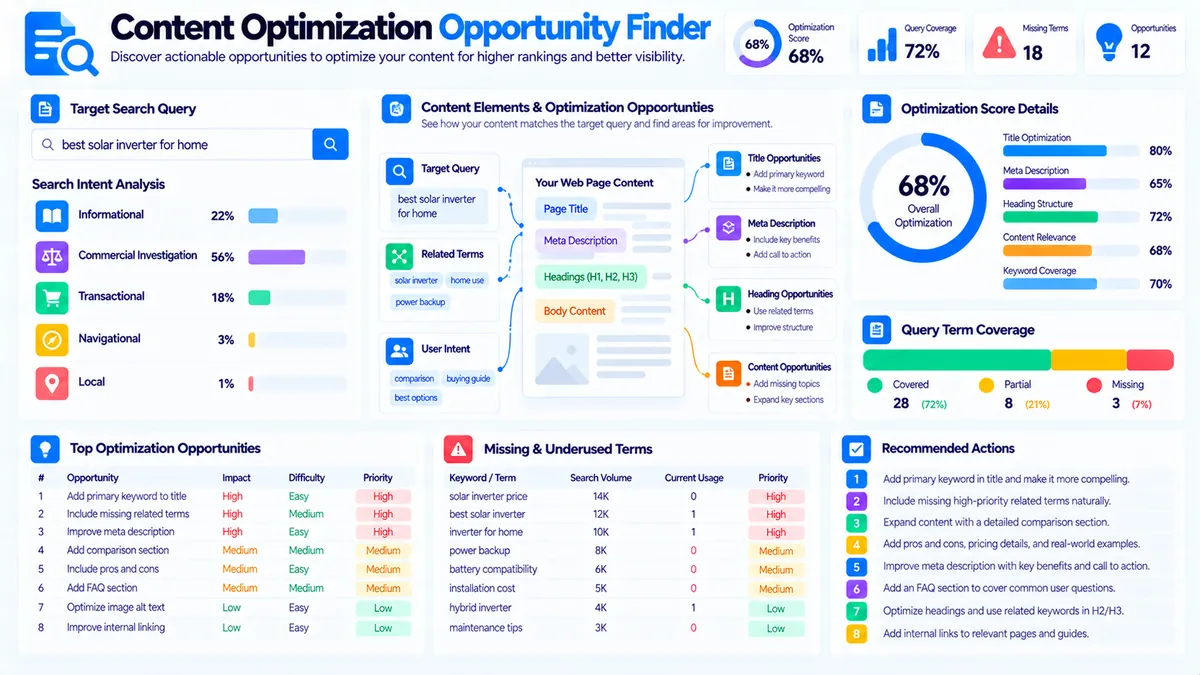
The Content Optimization Opportunity Finder helps you identify practical on-page improvements by comparing a target query with your page title, meta description, headings, body content, related terms, and other content signals.
Enter your primary query, optionally add the current page title and meta description, provide related terms or concepts, and paste the page content or HTML. The tool analyzes the supplied signals and produces a prioritized list of optimization opportunities, missing query terms, related-term gaps, intent signals, page-structure observations, and recommended next actions.
The analysis runs in your browser. It does not crawl the live URL, inspect Google rankings, or use a third-party SEO database.
Content Optimization Opportunity Finder
Find practical on-page content improvements by comparing your target query, title, meta description, headings, body content, and key page signals.
Search term to optimize for
Content to optimize
Optimization Opportunity Report
Prioritized content opportunities are inferred from the supplied query, page signals, related terms, and content.
View JSON report
How to Use the Content Optimization Opportunity Finder in Simple Steps
- Enter one Target Query that represents the primary search term or keyword you want the page to serve.
- Add the current Page Title and Meta Description if you want them reviewed for relevance, length, and query visibility.
- Optionally enter Related Terms or Concepts, then paste the page body, article, landing-page copy, or HTML into the Page Content field.
- Click Find Optimization Opportunities and review the optimization score, top priorities, individual opportunities, query coverage, page signals, and recommended next actions.
The target query supports up to 300 characters, related terms support up to 5,000 characters, and content supports up to 100,000 characters.
Use Load Example to test the tool with a sample technical SEO page or Clear to reset the analysis.
What the Content Optimization Opportunity Finder Checks
The tool looks at several page-level signals together rather than treating one metric as the complete optimization picture.
It reviews:
- Target query coverage
- Page title relevance and length
- Meta description relevance and length
- Related-term coverage
- Content length
- Heading structure
- Average sentence length
- Search-intent signals
- Query-term repetition
- HTML links
- Potential internal-link opportunities
- Missing query terms
- Missing related terms
- Prioritized optimization opportunities
The resulting report separates opportunities into High, Medium, and Low priority so you can review the most important issues first.
Understanding the Optimization Score
The tool produces an Optimization Score from 0 to 100.
The score starts from a full baseline and subtracts points for detected opportunities according to their priority.
High-priority opportunities receive a larger deduction than medium- or low-priority opportunities.
The report classifies the result as:
- Strong opportunity coverage
- Moderate opportunity coverage
- High-priority optimization needed
This score is a local diagnostic based on the signals supplied to the tool. It is not a Google ranking score, a SERP score, or a prediction of future search performance.
A page with a lower score is not automatically a poor page. It simply has more locally detected opportunities according to the analyzer’s rules.
Target Query Coverage
The analyzer extracts meaningful terms from the target query and checks whether those terms appear in the page content.
For example, if the target query is:
technical SEO audit
the tool can check for meaningful terms such as:
- technical
- SEO
- audit
It then reports the percentage of meaningful query terms represented in the content.
If fewer than half of the meaningful query terms are found, the analyzer can create a high-priority query-coverage opportunity.
If some terms are missing but coverage is otherwise stronger, it can create a medium-priority review opportunity.
The goal is not to force every query word into the page. Missing terms should be added only when they accurately describe the subject and improve clarity.
Missing Query Terms
The Missing Query Terms section shows meaningful terms from the target query that were not detected in the supplied content.
For example, a page targeting:
technical SEO audit checklist
might contain:
technical SEO
but never discuss:
audit
or:
checklist
The tool can surface those missing terms for review.
A missing term is an editorial signal, not an instruction to insert the word repeatedly.
Page Title Analysis
The optional Page Title field allows the analyzer to check:
- Whether a title was supplied
- Title length
- Target-query visibility
- Potential title-shortness opportunity
- Potential title-length opportunity
If no title is provided, the analyzer creates a high-priority opportunity because title relevance cannot be reviewed.
If the supplied title is shorter than 35 characters, the tool may suggest strengthening it where additional wording would communicate the subject more clearly.
If it exceeds 65 characters, the tool may suggest reviewing unnecessary wording because long titles can be truncated in some search interfaces.
These thresholds are practical local checks, not universal search-engine requirements.
Target Query in the Page Title
The analyzer also checks whether the target query is visible in the supplied title.
If the full query is absent and meaningful query-term coverage is not present, it can create a high-priority opportunity to bring the target query closer to the title.
The recommended action is not to force an exact match.
A better title should accurately describe the page and naturally reflect the primary topic.
For example:
Technical SEO Audit: Complete Checklist and Guide
can communicate the subject clearly without requiring awkward repetition.
Meta Description Analysis
The optional Meta Description field is checked for:
- Presence
- Length
- Query visibility
- Descriptive value
If no meta description is supplied, the analyzer creates a medium-priority opportunity to add one.
If the description is shorter than 90 characters, the tool may suggest strengthening it so the page’s value is communicated more clearly.
If it exceeds 170 characters, the tool may suggest tightening unnecessary wording and placing the most important value proposition earlier.
These are editorial review thresholds rather than guarantees about how search engines will display a description.
Related Terms and Concepts
The Related Terms or Concepts field lets you provide an explicit benchmark for important supporting terminology.
For example:
- crawlability
- indexing
- XML sitemap
- robots.txt
- canonical tags
- redirects
- internal links
- structured data
- page speed
The analyzer checks whether each supplied term appears in the title, meta description, or content.
This is useful when you already have:
- A content brief
- An editorial checklist
- A keyword list
- Important entities
- Supporting concepts
- Required subtopics
Related-Term Coverage
The report separates supplied related terms into covered and missing groups.
A term is considered represented when it is detected in the supplied title, meta description, or page content.
If important related terms are missing, the tool can create a high-priority optimization opportunity.
If all supplied related terms are already represented, the tool does not recommend simply adding more repetitions. Instead, it suggests reviewing their context and depth.
This helps keep the workflow focused on useful content rather than terminology volume.
Search Intent Analysis
The analyzer compares the intent signals in the target query with the signals detected in the page content.
It identifies a likely query intent and reports a confidence value, then compares that with the strongest content-intent signal.
This can reveal cases where the query and page appear to serve different purposes.
For example:
best project management software
contains commercial-investigation signals.
If the supplied content mainly explains:
what project management software is
the content may produce stronger informational signals.
The analyzer can flag that difference as a high-priority search-intent opportunity.
Content Intent
The report displays both:
- Query intent
- Content intent
This distinction is useful because the page can contain the target query while still being structured around a different search purpose.
The analyzer uses local heuristic signals to classify common intent patterns. It does not use live SERPs or external search-engine data.
For a dedicated intent review, you can also use the Search Intent Analyzer and Content Search Intent Alignment Checker.
Heading Structure
The analyzer checks headings detected in supplied HTML content.
If no headings are detected, it can create a medium-priority opportunity to improve section structure.
If the content contains more than 900 words but fewer than three detected headings, it can also suggest stronger long-form section organization.
For example, a long technical guide may be easier to scan when it is divided into descriptive sections such as:
- Crawlability
- Indexing
- XML Sitemaps
- Canonical URLs
- Redirects
- Structured Data
- Technical Validation
The tool is not judging whether a particular heading hierarchy is required by Google. It is identifying a practical content-structure opportunity.
Content Depth
The analyzer checks the approximate word count of the supplied content.
If the content contains fewer than 250 words, it can create a high-priority opportunity to review content depth against the page’s intended purpose.
A short page is not automatically thin or poor.
A short page may be appropriate for:
- A focused definition
- A simple landing page
- A contact page
- A concise product description
- A specific answer
The recommendation is therefore to confirm whether the page actually satisfies its intended query before adding more content.
Sentence Length and Readability
The analyzer calculates average sentence length from the supplied content.
If the average exceeds 28 words, it can create a medium-priority readability opportunity.
Long sentences are not automatically incorrect. The useful question is whether complex sentences make the page harder to understand or scan.
Consider splitting dense sentences when a clearer structure would help the reader.
Query Repetition
The tool also checks whether several meaningful query terms occur repeatedly in the content.
When enough primary-query terms appear three or more times, the analyzer can create a medium-priority opportunity to review repetition.
The recommended action is to check whether the wording feels natural and whether repeated phrases actually add meaning.
Do not remove useful terminology simply to reduce a number.
Likewise, do not add exact-match phrases simply to increase query coverage.
Internal-Link Opportunity
When the supplied content contains more than 700 words and no HTML links are detected, the analyzer can create a low-priority internal-link opportunity.
The recommendation is to consider linking to useful supporting pages, definitions, related resources, or deeper guides where those links genuinely help the reader.
This check only counts links present in supplied HTML. It does not crawl your website or discover available internal URLs automatically.
For broader internal-link analysis, use the SEO Website Tools collection and your existing internal-link workflows.
Top Priorities
The report creates a Top Priorities section containing up to five of the highest-priority opportunities.
Each priority includes:
- Opportunity title
- Priority level
- Recommended action
This lets you start with the most important detected issues instead of reviewing every signal equally.
For example, a page might receive priorities such as:
- Review search-intent alignment
- Improve primary-query term coverage
- Address important related-term gaps
- Strengthen the page title
- Improve long-form section structure
The actual priorities depend on the supplied page.
Optimization Opportunities
The complete Optimization Opportunities section provides more detail for every detected issue.
Each opportunity contains:
- Title
- Priority
- Reason
- Action
The Reason explains why the analyzer flagged the issue.
The Action provides a practical next step.
This distinction makes the report more useful than a simple pass/fail checklist.
Practical Example: Technical SEO Audit
Suppose the target query is:
technical SEO audit
and the page contains:
Technical SEO is important for websites. Check your website regularly to improve SEO performance.
The content includes some topic language but provides limited evidence of an actual audit.
The analyzer may identify opportunities around:
- Query coverage
- Content depth
- Heading structure
- Related concepts
- Search-intent alignment
If you then expand the page to explain crawling, indexing, redirects, canonical URLs, XML sitemaps, structured data, internal links, and validation steps, the page provides stronger evidence that it actually addresses the subject.
The analyzer can then be run again to review the updated signals.
Practical Example: Commercial Query
Consider:
best email marketing software for small business
A page that only defines email marketing may contain some of the query vocabulary but serve a different purpose.
A page targeting this query may need useful evaluation content such as:
- Features
- Pricing
- Integrations
- Ease of use
- Automation
- Deliverability
- Pros and cons
- Selection criteria
The analyzer can identify a potential intent mismatch if the query produces commercial signals while the content is primarily informational.
Practical Example: Missing Related Terms
Suppose your target query is:
technical SEO audit
and your related-term benchmark includes:
crawlability, indexing, XML sitemap, canonical tags, redirects
If the content discusses only crawlability and indexing, the report can surface the other supplied terms as missing.
That does not mean every missing term must be added.
Review each term and decide whether it belongs naturally within the page’s intended scope.
How to Use the Report for Content Updates
Start with high-priority opportunities.
Then review medium-priority issues for meaningful improvements.
Finally, consider low-priority opportunities after the core page purpose is clear.
A practical sequence is:
- Confirm that the target query accurately describes the page.
- Resolve major search-intent mismatches.
- Make sure the page clearly covers the primary topic.
- Review missing query terms.
- Review important related concepts.
- Improve the title and meta description where useful.
- Improve heading structure for substantial content.
- Review readability and repetitive wording.
- Add relevant internal links where they help the reader.
- Run the analyzer again after meaningful changes.
This approach keeps optimization focused on usefulness rather than score chasing.
Technical Breakdown: How the Analyzer Works
The Content Optimization Opportunity Finder processes the supplied inputs locally in the browser.
It normalizes the target query, title, meta description, related terms, and page content, then extracts meaningful query terms and checks their presence across the supplied signals.
When HTML is provided, common non-content elements such as:
- script
- style
- noscript
- template
- SVG
- head
are removed before the body text is analyzed.
The analyzer then evaluates:
- Query-term coverage
- Title coverage
- Meta-description coverage
- Related-term coverage
- Word count
- Character count
- Heading count
- Average sentence length
- HTML link count
- Query-intent signals
- Content-intent signals
- Query-term repetition
- Potential optimization opportunities
Each detected opportunity receives a priority level and contributes a defined deduction to the local optimization score.
Browser-Side Processing
The tool does not crawl a live URL.
It works only from the information supplied in the browser:
- Target query
- Page title
- Meta description
- Related terms
- Page content
It does not query:
- Google Search
- Live SERPs
- Search rankings
- Search Console
- Third-party SEO databases
This makes the tool useful for fast editorial analysis without configuring an external API.
What the Tool Does Not Predict
The Optimization Score is not:
- A Google ranking score
- A ranking probability
- A SERP similarity score
- A search-volume metric
- A competition score
- A guarantee of better rankings
- A substitute for reviewing actual search results
The recommendations are practical editorial signals derived from the supplied inputs.
Search engines use much more complex systems than these local heuristics, and actual search performance depends on many factors outside the scope of this tool.
Common Optimization Problems the Tool Can Expose
Missing page title
Without a supplied title, the analyzer cannot review title relevance or query visibility.
Add the actual page title and run the analysis again.
Very short title
A short title may leave insufficient room to communicate the page’s subject clearly.
Expand it only when the additional wording improves clarity.
Very long title
A long title may contain unnecessary wording and can be truncated in some interfaces.
Review the wording and move the most important subject language toward the beginning.
Missing meta description
If no meta description is supplied, add the current description so it can be reviewed.
Weak query coverage
If important terms from the target query are absent, confirm that the page actually discusses the subject represented by those terms.
Missing related concepts
Review the missing related terms and add only the concepts that genuinely belong to the page.
Long page with few headings
Break substantial content into descriptive sections that help readers scan and navigate the subject.
Short content
Check whether the page actually answers its intended query before deciding whether additional content is necessary.
Query and content intent differ
Review whether the target query is correct for the page or whether the page needs additional sections that address the query’s purpose.
Repetitive query wording
Remove unnecessary repetition when it makes the content sound unnatural without adding useful information.
No internal links in long HTML content
Consider adding relevant internal links to supporting resources where they provide additional value.
Combining This Tool with Other PKCapra Tools
The Content Optimization Opportunity Finder works well as a final editorial review after other content analyses.
Use the Content Semantic Coverage Analyzer to review semantic breadth, depth, and concept coverage.
Use the Content Entity Analyzer to inspect likely people, organizations, places, products, technologies, and concepts.
Use the Content Search Intent Alignment Checker to examine query-versus-content intent more deeply.
Use the Content-to-Keyword Mapper to connect page content with keyword themes.
Use the Content Gap Analyzer to investigate missing topic coverage.
For organizing related terms, use Keyword Clustering and Keyword Grouping.
For page metadata, use the Title Tag Analyzer and Meta Description Analyzer.
Developer Snippets (Automate This Tool Offline)
The following examples demonstrate simple offline checks for target-query coverage and title length. They are smaller than the complete PKCapra analyzer and do not reproduce its full opportunity scoring, intent detection, related-term analysis, or report generation.
Python
import re

query = "technical SEO audit"
title = "Technical SEO Audit: Complete Checklist and Guide"

def normalize(value):
    value = value.lower()
    value = re.sub(r"[^a-z0-9\s-]", " ", value)
    return re.sub(r"\s+", " ", value).strip()

query_terms = [
    term for term in normalize(query).split()
    if len(term) > 2
]

normalized_title = normalize(title)

covered = [
    term for term in query_terms
    if re.search(r"\b" + re.escape(term) + r"\b", normalized_title)
]

coverage = round(
    len(covered) / len(query_terms) * 100
) if query_terms else 0

print("Title length:", len(title))
print("Query coverage:", coverage, "%")
print("Missing terms:", [
    term for term in query_terms
    if term not in covered
])
PowerShell
$query = "technical SEO audit"
$title = "Technical SEO Audit: Complete Checklist and Guide"

function Normalize-Text($value) {
    $value = $value.ToLower()
    $value = $value -replace '[^a-z0-9\s-]', ' '
    return ($value -replace '\s+', ' ').Trim()
}

$queryTerms = (Normalize-Text $query).Split(' ') |
    Where-Object { $_.Length -gt 2 }

$normalizedTitle = Normalize-Text $title

$covered = @()

foreach ($term in $queryTerms) {
    if ($normalizedTitle -match "\b$([regex]::Escape($term))\b") {
        $covered += $term
    }
}

$coverage = if ($queryTerms.Count) {
    [math]::Round(($covered.Count / $queryTerms.Count) * 100)
} else {
    0
}

Write-Output "Title length: $($title.Length)"
Write-Output "Query coverage: $coverage%"
Write-Output "Missing terms: $(
    $queryTerms | Where-Object { $_ -notin $covered }
)"
Node.js
const query = "technical SEO audit";
const title = "Technical SEO Audit: Complete Checklist and Guide";

function normalize(value) {
  return value
    .toLowerCase()
    .replace(/[^a-z0-9\s-]/g, " ")
    .replace(/\s+/g, " ")
    .trim();
}

const queryTerms = normalize(query)
  .split(/\s+/)
  .filter(term => term.length > 2);

const normalizedTitle = normalize(title);

const covered = queryTerms.filter(term => {
  const escaped = term.replace(/[.*+?^${}()|[\]\\]/g, "\\$&");
  return new RegExp(`\\b${escaped}\\b`).test(normalizedTitle);
});

const coverage = queryTerms.length
  ? Math.round((covered.length / queryTerms.length) * 100)
  : 0;

const missing = queryTerms.filter(
  term => !covered.includes(term)
);

console.log("Title length:", title.length);
console.log("Query coverage:", `${coverage}%`);
console.log("Missing terms:", missing);
These snippets demonstrate basic query coverage only. A complete optimization workflow should also evaluate content intent, related concepts, headings, content depth, sentence length, repetition, links, and page-level opportunities.
Native Software Workflow: Review Optimization Opportunities in Excel with Power Query
Excel can help you manage optimization opportunities across a larger content inventory.
Create columns such as:
- URL
- Target Query
- Page Title
- Meta Description
- Related Terms
- Content
- Optimization Score
- Query Coverage
- High-Priority Opportunities
- Missing Query Terms
- Missing Related Terms
- Recommended Action
- Status
A practical workflow is:
- Import your content inventory into Excel.
- Keep one page per row.
- Store the target query separately from the title, meta description, and content.
- Use Power Query to normalize whitespace and clean unnecessary formatting.
- Keep important related terms in a separate field.
- Copy the target query and page signals into the analyzer.
- Review the prioritized opportunities.
- Record the important actions back in your Excel inventory.
- Group similar issues across pages.
- Re-run the analysis after substantive content changes.
This approach is useful when managing optimization work across multiple articles, landing pages, category pages, or documentation resources.
Reporting and Export
After the analysis is complete, the tool provides several reporting options.
Copy Report copies the human-readable optimization report.
Copy JSON copies the complete structured analysis data.
Download JSON creates a local JSON file containing the analysis.
Download PDF creates a direct PDF report containing the main optimization findings, priorities, coverage gaps, page signals, and recommendations.
The report can therefore be used for editorial handoffs, content audits, documentation, or offline analysis.
Frequently Asked Questions
What is a content optimization opportunity finder?
A content optimization opportunity finder reviews a page’s query, title, meta description, content, related terms, and structural signals to identify practical improvements that may make the page clearer and better aligned with its intended subject.
What does this tool analyze?
It analyzes target-query coverage, title and meta signals, related-term coverage, content length, headings, sentence length, intent signals, query repetition, HTML links, and other locally detectable content opportunities.
Does the tool analyze a live URL?
No. You paste the page content or HTML into the tool. It does not crawl the live URL.
Does it use Google Search results?
No. The analyzer does not query Google Search, live SERPs, rankings, or third-party SEO databases.
What is the optimization score?
The optimization score is a local 0–100 diagnostic based on the opportunities detected in the supplied inputs. Higher-priority opportunities produce larger score deductions.
Does a high score mean the page will rank?
No. The score does not predict rankings or guarantee search performance.
What are related terms?
Related terms are important supporting keywords, concepts, entities, or subtopics that you want the analyzer to check against the supplied page.
Should I add every missing query term?
No. Add a missing term only when it accurately represents the subject and improves the page for the reader.
Why does the tool flag a short page?
The analyzer flags content below 250 words for a depth review. This is a prompt to check the page’s purpose, not a claim that every short page needs more words.
Why does the tool flag a long title?
Titles longer than 65 characters are flagged for review because some search interfaces may truncate long titles. The tool does not claim that 65 characters is a universal search-engine limit.
Why does it flag long sentences?
An average sentence length above 28 words can indicate that some content may be harder to scan. The recommendation is to review clarity rather than mechanically shorten every sentence.
Can I use HTML as input?
Yes. The analyzer accepts plain text or HTML and removes common non-content elements before analyzing the text.
Does the tool check internal links?
It can count HTML links in the supplied content and can flag a potential internal-link opportunity when long content contains no detected links. It does not crawl your website to discover which internal links should be added.
Continue Your Content Optimization Workflow
Start with the Content Optimization Opportunity Finder when you have an existing page and want a prioritized list of practical improvements.
Use the Content Semantic Coverage Analyzer for broader topic and concept coverage, the Content Entity Analyzer for entity-focused analysis, and the Content Search Intent Alignment Checker for detailed query-versus-content intent review.
For keyword relationships, explore Keyword Clustering and Keyword Grouping.
For missing subject coverage, use the Content Gap Analyzer, and for keyword-to-page relationships use the Content-to-Keyword Mapper.
For additional on-page checks, visit the SEO Website Tools collection.