
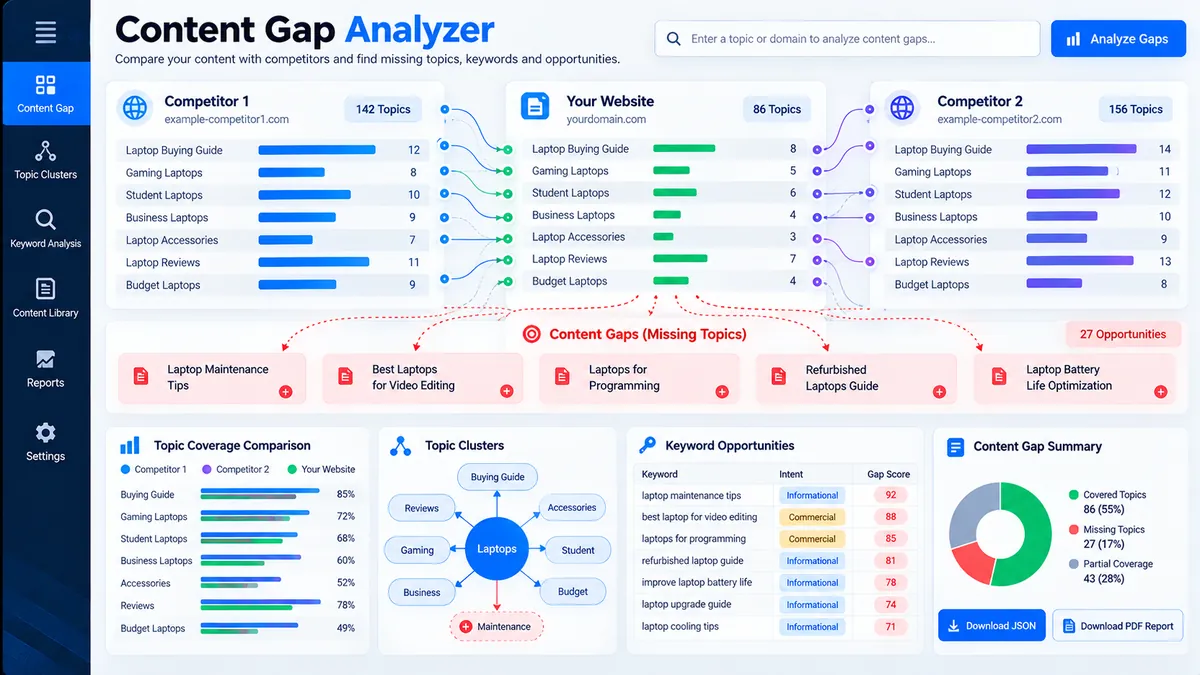
The Content Gap Analyzer compares your existing topics against competitor or reference topic sets to identify missing coverage, repeated themes, partial matches, and priority opportunities. Add your current content topics, enter reference sets, optionally define priority topics, and run the analysis to turn topic-level differences into a focused content plan.
Content Gap Analyzer
Compare your existing topic coverage with competitor or reference topics to find content gaps, recurring opportunities, and a practical priority plan.
Your Topics / Existing Content
Topics or keywords you already cover.
Competitor / Reference Set 1
Topics from competitor or reference source 1.
Competitor / Reference Set 2
Topics from competitor or reference source 2.
Competitor / Reference Set 3
Topics from competitor or reference source 3.
Priority Topics (Optional)
Topics you want to prioritize in the analysis.
Analysis Results
Overview of content coverage, gaps, and opportunities based on your input.
View JSON report
Privacy & methodology: Analysis is deterministic and runs in your browser. The tool compares the topic lists you provide; it does not fetch competitor pages, live Google/Bing results, search volume, rankings, or third-party keyword databases.
Content Gap Analyzer: Find Missing Topics in Your Existing Content
The Content Gap Analyzer compares your existing topics against competitor or reference topic sets to identify missing coverage, repeated themes, partial matches, and priority opportunities. Add your current content topics, enter reference sets, optionally define priority topics, and run the analysis to turn topic-level differences into a focused content plan. For broader website checks, combine topic coverage analysis with the SEO Content Readability Analyzer and SEO Heading Analyzer to review how the resulting content is structured and presented.
How to Use the Content Gap Analyzer in Simple Steps
- Enter your existing topics. Add the topics already covered across your website or content plan, using one topic per line, comma-separated topics, or semicolon-separated topics.
- Add reference topic sets. Enter topics from competitors, SERP research, editorial research, or another reference set into the available comparison fields.
- Add priority topics. Enter specific subjects you want the analysis to pay particular attention to, such as commercially important topics or topics planned for upcoming content.
- Run and export the analysis. Select Analyze Content Gaps to compare the datasets, then use the report, JSON, or PDF export options to preserve the results for your content workflow.
The analyzer is useful before expanding an existing content cluster because it separates topics you already cover from subjects appearing in the supplied reference sets. After identifying missing subjects, you can use the Keyword Density Checker during content review to inspect keyword usage without treating keyword frequency as a substitute for topic coverage.
Technical Breakdown: Browser-Based Topic Comparison
The Content Gap Analyzer performs deterministic topic comparison in the browser using the datasets supplied through its interface. It does not automatically crawl competitor websites, query Google or Bing, retrieve search-volume data, calculate keyword difficulty, or fetch live SERP results.
Existing Coverage
Existing coverage represents topics found in your own topic dataset. These subjects establish the baseline against which the supplied reference sets are compared.
Potential Content Gaps
Potential gaps are topics found in the reference data but not present in the existing-topic dataset. They indicate subjects that may deserve editorial review rather than automatically proving that a new page is required.
Partial Topic Matches
Partial matches identify closely related wording where two topic entries are not identical. This helps distinguish genuine missing coverage from differences in how the same subject has been phrased.
Repeated Reference Topics
Repeated topics are subjects appearing across multiple reference sets. Repetition can provide a useful signal for prioritizing further research because the same subject occurs independently within the supplied comparison data.
Priority Opportunities
Priority topics combine your explicit priorities with the comparison results. A priority subject that appears repeatedly in reference data but is absent from your existing topics becomes a clear candidate for manual editorial review.
For technical SEO work beyond content coverage, the Internal Links & Crawl Path Analyzer can be used separately to inspect internal-link relationships and crawl paths, while the Indexability & Crawlability Analyzer addresses a different layer of website accessibility and indexing signals.
Developer Snippets (Automate This Tool Offline)
The same basic comparison model can be reproduced offline when topic lists are already available as CSV files. The following Python script uses Pandas to normalize topic text, compare an existing dataset with multiple reference datasets, and export the resulting gap and repetition reports.
import pandas as pd

def normalize_topic(value):
    return " ".join(str(value).strip().lower().split())

def load_topics(path, column="topic"):
    df = pd.read_csv(path)
    if column not in df.columns:
        raise ValueError(f"Missing required column: {column}")
    topics = df[column].dropna().map(normalize_topic)
    return set(topic for topic in topics if topic)

existing = load_topics("existing-topics.csv")

reference_files = [
    "reference-set-1.csv",
    "reference-set-2.csv",
    "reference-set-3.csv"
]

reference_sets = [load_topics(path) for path in reference_files]

all_reference_topics = set().union(*reference_sets)
potential_gaps = sorted(all_reference_topics - existing)

topic_frequency = {}

for reference_set in reference_sets:
    for topic in reference_set:
        topic_frequency[topic] = topic_frequency.get(topic, 0) + 1

repeated_topics = sorted(
    topic for topic, count in topic_frequency.items()
    if count > 1
)

gap_report = pd.DataFrame({
    "topic": potential_gaps
})

repeated_report = pd.DataFrame({
    "topic": repeated_topics,
    "reference_set_count": [
        topic_frequency[topic] for topic in repeated_topics
    ]
})

gap_report.to_csv("content-gaps.csv", index=False)
repeated_report.to_csv("repeated-reference-topics.csv", index=False)

print(f"Existing topics: {len(existing)}")
print(f"Reference topics: {len(all_reference_topics)}")
print(f"Potential gaps: {len(potential_gaps)}")
print(f"Repeated reference topics: {len(repeated_topics)}")
This offline workflow is intentionally limited to the data supplied in the CSV files. It does not claim live competitor coverage or search-engine visibility. That separation keeps the automated result reproducible and makes the source datasets explicit.
Microsoft Excel Power Query Workflow
Excel Power Query can reproduce the normalization stage when topic research is maintained in spreadsheets. This is useful when content teams need to review, merge, and manually validate large topic lists before sending them into the analyzer.
- Open Microsoft Excel and place each topic dataset in a structured table with a Topic column.
- Select the table and choose Data > From Table/Range.
- In Power Query, select the Topic column and use Transform > Format > Trim.
- Apply Transform > Format > Clean to remove non-printing characters.
- Use Transform > Format > Lowercase to normalize capitalization.
- Load the cleaned table back into Excel with Home > Close & Load.
- Repeat the process for each reference dataset.
- Merge the normalized datasets and remove duplicates before manually reviewing missing and repeated topics.
A simple Power Query transformation can normalize a topic column with M code:
let
    Source = Excel.CurrentWorkbook(){[Name="Topics"]}[Content],
    CleanTopic = Table.TransformColumns(
        Source,
        {
            {
                "Topic",
                each Text.Lower(Text.Trim(Text.Clean(Text.From(_)))),
                type text
            }
        }
    ),
    RemoveBlankTopics = Table.SelectRows(
        CleanTopic,
        each [Topic] <> null and [Topic] <> ""
    )
in
    RemoveBlankTopics
Power Query is particularly useful when the research process begins with spreadsheets rather than manually entered browser fields. The final editorial decision should still account for topic relevance, search intent, existing URLs, content quality, and site architecture rather than treating every difference between datasets as a mandatory new page.
Frequently Asked Questions
What is a content gap?
A content gap is a topic present in a reference dataset but absent from the existing topic dataset being analyzed.
What does the Content Gap Analyzer compare?
The Content Gap Analyzer compares your existing topics with the reference topic sets you provide through the tool interface.
Does the analyzer crawl competitor websites?
The Content Gap Analyzer does not crawl competitor websites or automatically retrieve competitor page data.
Does the tool provide Google search volume?
The Content Gap Analyzer does not provide live Google search volume, keyword difficulty, traffic estimates, or ranking data.
What are repeated reference topics?
Repeated reference topics are subjects that occur in more than one of the supplied reference sets.
What are partial topic matches?
Partial topic matches are closely related topic entries that use different wording rather than being exact text matches.
Can I analyze competitor topics manually?
Manual competitor topic analysis is supported when you collect the relevant topics yourself and enter them into the reference-set fields.
Can I export the Content Gap Analyzer results?
Result export is available through the tool’s report, JSON, and PDF actions.
Should every identified content gap become a new page?
A detected content gap is a research signal, not an automatic publishing requirement.
What should I check after finding content gaps?
Content gaps should be reviewed against search intent, topical relevance, existing pages, internal linking, and the site’s broader SEO structure before creating new content.
For additional website-level SEO checks, the SEO & Website Tools category provides access to related technical and content analysis utilities.