
Content Structure
Readability Guidance
Most Repeated Words
| Word | Count | Share |
|---|
Readability scores are estimates. Use them as editing signals rather than as a guaranteed SEO or ranking score.
SEO Content Readability Analyzer
Make Your Content Easier to Read and Understand
Good content should not make readers work harder than necessary.
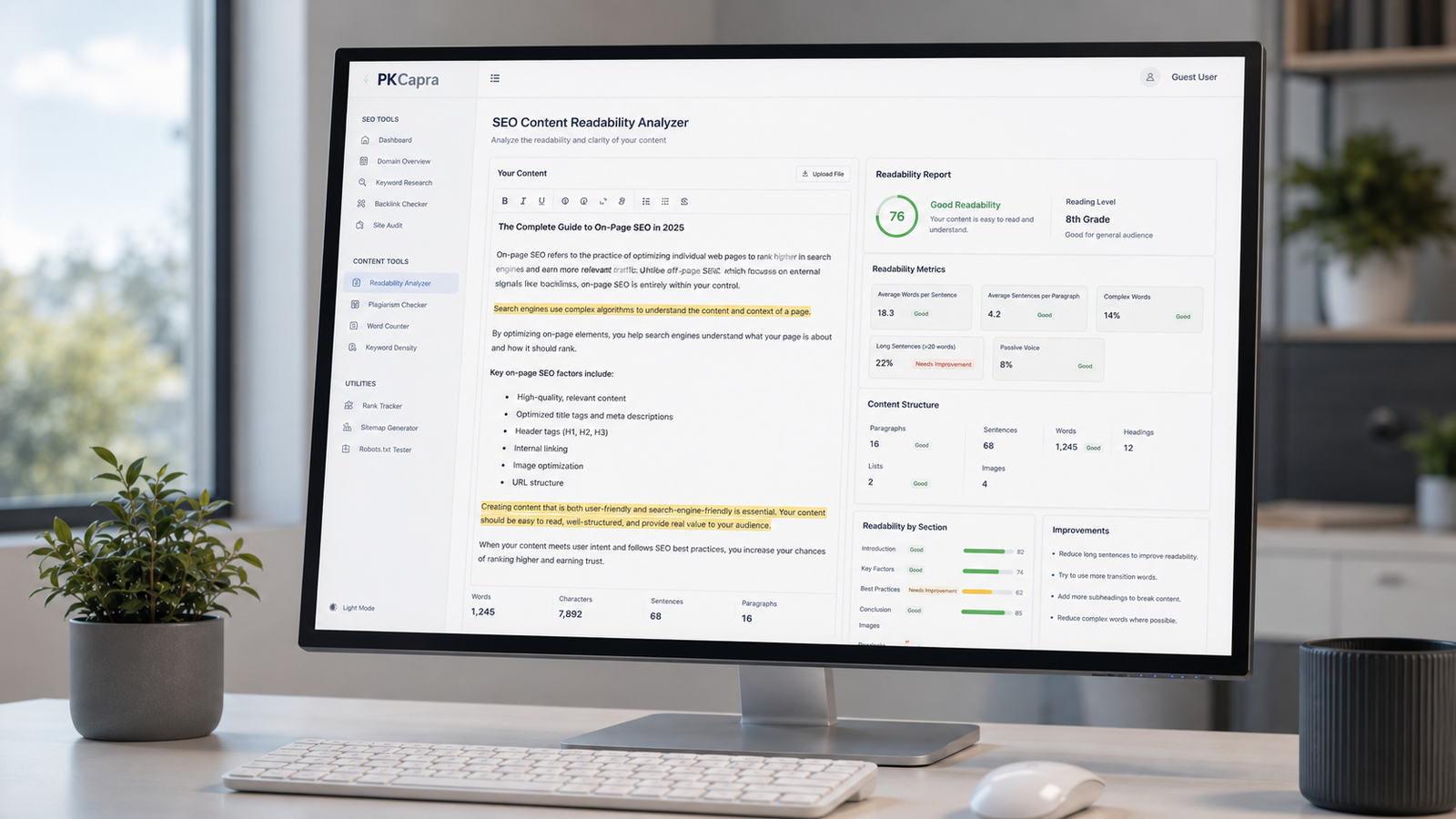
The PKCapra SEO Content Readability Analyzer helps you review the structure and readability of your writing before you publish it. Paste your content into the tool to see useful measurements such as word count, sentence length, paragraph structure, readability score, reading level, long sentences, complex-word usage, and frequently repeated words.
The analysis happens directly in your browser, so you can use the tool to review articles, blog posts, product descriptions, service pages, landing pages, and other website content without sending the text to a separate analysis service.
Paste your content above and select Analyze Content to get started.
What Is Content Readability?
Readability is about how easily a person can understand written information.
A page may contain accurate and valuable information but still be difficult to use if sentences are unnecessarily complicated, paragraphs are too dense, or important information is buried inside large blocks of text.
Readability analysis gives you measurable signals that can help identify these issues.
It does not replace human judgment. A score cannot understand your audience, your subject, your brand voice, or the importance of a particular technical term.
Instead, the results give you a starting point for reviewing the writing.
Why Does Readability Matter?
People rarely read most web pages word for word from beginning to end.
They scan headings, paragraphs, lists, sentences, and important phrases looking for the information they need.
Clear structure and straightforward writing can make that process easier.
For example, a long sentence containing several separate ideas may be technically correct but difficult to follow. Breaking it into two sentences may make the same information much clearer.
Likewise, a large paragraph may contain useful information but become easier to scan when it is divided into smaller sections.
The objective is not to make every sentence short or every page extremely simple. The objective is to communicate the subject clearly to the intended reader.
How to Use the Readability Analyzer
1. Paste your content
Copy the text you want to review and paste it into the analysis box.
You can use an article, blog post, product description, landing page, service page, or another type of written content.
2. Analyze the content
Click Analyze Content.
The tool processes the text and generates a readability and content-structure report.
3. Review the results
Look at the overall readability score first, then examine the supporting measurements.
Pay particular attention to long sentences, paragraph density, complex-word usage, and repeated words.
4. Edit where it helps
Do not change your content simply because a number looks high or low.
Open the actual sentences and paragraphs behind the result. If an edit makes the writing clearer without removing necessary information, make the change.
What Does the Tool Measure?
Readability Score
The analyzer provides an estimated readability score based on the text you enter.
The score is intended as an editing signal. It should not be treated as a Google ranking score or a guarantee that content will perform better in search.
Different audiences and subjects naturally require different levels of language.
A specialist medical, legal, technical, or financial page may legitimately use terminology that would not appear in a general-interest article.
Reading Level
The tool provides an approximate reading-level estimate based on the analyzed text.
This can help you understand how complex the writing may be for a general reader.
Use the result as a guide rather than a strict requirement.
If a technical term is necessary, replacing it with an inaccurate simpler word would make the content worse—not better.
Estimated Reading Time
The analyzer provides an approximate reading time based on the amount of text.
Reading time is useful when reviewing the overall length of a page and considering how much information a visitor is being asked to consume.
Word Count
Word count shows the amount of written content being analyzed.
There is no universal word count that makes a page good for SEO. The appropriate length depends on the subject, search intent, and information the reader actually needs.
Sentence Count
Sentence count helps provide context for the other readability measurements.
Combined with word count, it allows the tool to estimate average sentence length.
Average Words Per Sentence
This measurement shows approximately how many words are contained in each sentence.
A high average can indicate that some sentences deserve another look, particularly when several ideas have been combined together.
However, sentence variety is normal in good writing. Short sentences should not be forced everywhere.
Long Sentences
The analyzer identifies sentences containing more than 25 words and shows their approximate share of the content.
A long sentence is not automatically a bad sentence.
Some long sentences are clear and necessary. Others become difficult because they contain too many clauses, ideas, or unnecessary words.
Use this result to find sentences worth reviewing—not sentences that must automatically be rewritten.
Complex Words
The tool estimates the proportion of words containing multiple syllables.
This can provide another signal when reviewing language complexity.
Complex words are not inherently bad. Many subjects require precise terminology, and replacing accurate terminology simply to lower a score can reduce the quality of the content.
Paragraph Structure
The analyzer looks at paragraph count and average sentences per paragraph.
Large blocks of text can be harder to scan on screens, especially on mobile devices.
Breaking a dense paragraph into logical sections can often improve usability without changing the underlying information.
Most Repeated Words
The tool identifies frequently repeated content words while excluding common stop words.
This can help reveal vocabulary that appears repeatedly throughout the text.
Repeated terminology may be completely appropriate when it accurately describes the subject. The result simply gives you another signal to review.
How Should You Interpret the Readability Score?
Do not treat the readability score as a pass-or-fail test.
Instead, ask why the score looks the way it does.
If the score is lower than expected, examine the supporting measurements.
Are sentences unusually long?
Are several complex terms being used?
Are paragraphs carrying too many ideas?
Is the subject itself technical?
Once you understand the reason, you can decide whether an edit would actually improve the page.
A lower score is not automatically a problem, just as a higher score does not automatically mean the content is excellent.
Is a Higher Readability Score Always Better?
No.
Writing for a professional audience sometimes requires terminology that increases language complexity.
For example, a technical guide may need precise industry terms. Removing those terms merely to produce a simpler score could make the information less accurate.
The right level of readability depends on the people who will use the page.
A children’s educational article, an enterprise software manual, and a specialist research page should not necessarily sound the same.
Optimize for the reader, not for the number.
Readability and SEO
Readability is relevant to the quality of a page’s user experience, but it should not be confused with a direct ranking formula.
Google’s guidance encourages website owners to create helpful, reliable, people-first content rather than content created primarily to manipulate search rankings.
That principle is important when using any SEO writing tool.
Do not rewrite a useful paragraph simply because an analyzer prefers shorter sentences.
Do not remove important terminology simply because a readability score becomes lower.
Do not add unnecessary text to increase word count.
Instead, use analysis to identify genuine opportunities to make the content clearer, more useful, and easier to navigate.
Readability vs. SEO Content Optimization
These are related, but they are not the same task.
Readability analysis looks at characteristics of the writing, such as sentence length, word complexity, and paragraph structure.
SEO content optimization considers a much broader set of questions, including search intent, topical relevance, page structure, internal linking, titles, metadata, and the usefulness of the information provided.
A page can be highly readable but fail to answer the visitor’s question.
Another page can contain valuable information but present it in a difficult-to-follow structure.
The best content combines useful information with clear communication.
For a broader on-page review, use the PKCapra Meta Tags Analyzer.
To investigate whether important pages can be accessed and indexed, use the PKCapra Indexability & Crawlability Analyzer.
For internal linking and crawl-path analysis, use the PKCapra Internal Links & Crawl Path Analyzer.
How to Improve Readability Without Making Content Generic
Improving readability does not mean removing personality or turning every page into short, basic sentences.
A better approach is to improve clarity while preserving the writer’s meaning and voice.
Break up overloaded sentences
If one sentence contains several independent ideas, consider separating them.
Remove unnecessary words
Look for phrases that add length without adding meaning.
Use descriptive headings
Headings help readers understand what each section contains before they read it.
Keep paragraphs focused
A paragraph should generally develop one connected idea rather than combining several unrelated points.
Explain unfamiliar terminology
If your audience may not know a technical term, briefly explain it instead of assuming everyone understands it.
Use lists when they improve scanning
Lists are useful when presenting multiple related items, steps, requirements, or examples.
Preserve necessary complexity
Do not simplify a sentence if doing so removes important meaning or technical accuracy.
What Is a Good Sentence Length?
There is no single sentence length that every page should use.
Short sentences can be easy to scan.
Longer sentences can be useful when they express a relationship between ideas clearly.
The problem is usually not length by itself. It is unnecessary complexity.
For example, a 30-word sentence that communicates one clear idea may be easier to understand than a 15-word sentence filled with vague wording.
Use the analyzer’s long-sentence measurement to locate potential problem areas, then judge each sentence in context.
What Is a Good Paragraph Length?
There is no universal paragraph size for SEO.
Paragraphs should be long enough to develop an idea but short enough to remain comfortable to read on the device being used.
On the web, especially on mobile screens, breaking very dense blocks into logical sections can make information easier to scan.
The analyzer’s paragraph measurements can help you identify unusually dense sections that deserve a closer look.
Should You Simplify Every Complex Word?
No.
A complex word is not necessarily a difficult word for your audience.
Industry-specific terminology can make content more precise.
For example, replacing a precise technical term with a vague everyday word might technically make a sentence simpler while making the information less useful.
Use simpler language where it improves understanding, but keep terminology that is necessary for accuracy.
Should You Aim for a Perfect Readability Score?
No.
There is no universal readability score that guarantees good SEO performance.
A tool can measure characteristics of your writing, but it cannot determine whether the information is accurate, original, useful, or appropriate for your audience.
Instead of chasing a perfect score, look for obvious opportunities to improve clarity.
Who Can Use This Tool?
The analyzer can be useful for:
- SEO professionals reviewing website content
- Bloggers editing articles before publication
- Copywriters checking drafts
- Website owners improving existing pages
- Ecommerce teams reviewing product descriptions
- Agencies performing content audits
- Editors reviewing sentence and paragraph structure
- Students and professionals checking general readability
What Types of Content Can You Analyze?
You can use the tool for many types of text, including:
- Blog posts
- SEO articles
- Product descriptions
- Service pages
- Landing pages
- Website copy
- Guides and tutorials
- Marketing content
- Informational articles
- Existing content being updated
The analysis works on the text you paste into the tool.
Does Readability Affect Google Rankings?
There is no single readability score that Google requires website owners to achieve.
Search performance depends on many factors, and readability should be approached as part of creating a useful page rather than as a number to manipulate.
A clear page can help people understand information more easily, but improving readability does not guarantee a higher position in search results.
Is This an SEO Score?
No.
The score shown by this tool is a readability measurement.
It should not be interpreted as a prediction of Google rankings, a content-quality grade from Google, or a replacement for a complete SEO audit.
Use it alongside other content and technical checks.
Does the Tool Store My Content?
The analyzer is designed to perform its calculations directly in your browser.
Your pasted text does not need to be sent to a remote readability-analysis service for the calculations performed by this tool.
As with any browser-based tool, you should still follow your organization’s privacy and security policies when working with confidential material.
Can I Analyze an Existing Article?
Yes.
Copy the article text into the tool and analyze it.
This can be particularly useful when updating older content that has grown over time and may now contain long paragraphs, repetitive wording, or unnecessarily complicated sentences.
Can Readability Analysis Replace Human Editing?
No.
Automated measurements can identify patterns, but they cannot understand every editorial decision.
A human editor can determine whether a sentence is appropriate for the audience, whether terminology is necessary, whether an explanation is accurate, and whether the overall page actually answers the reader’s needs.
The strongest workflow is to use the tool as an assistant and make the final decisions yourself.
A Practical Content Review Workflow
For a useful content review, try this process:
Write → Analyze → Investigate → Edit → Read → Publish
First, write the content naturally.
Then run it through the analyzer.
Look for unusual sentence lengths, dense paragraphs, complex wording, and repeated terms.
Open the relevant sections and decide whether an edit would genuinely improve them.
Finally, read the complete page as a visitor rather than as an SEO report.
If the content is clear, accurate, useful, and appropriate for its audience, you have achieved something more valuable than a perfect automated score.
Use Readability Data as a Guide
Numbers are useful when they reveal something worth investigating.
They become less useful when they become the objective.
The PKCapra SEO Content Readability Analyzer is designed to help you see patterns in your writing so you can make informed editorial decisions.
Use the score to investigate.
Use sentence measurements to find potential problem areas.
Use paragraph data to check structure.
Use repeated-word data to spot patterns.
Then use your own judgment to decide what should change.
The goal is not to make content sound like a machine wrote it. The goal is to make useful information easier for real people to understand.