
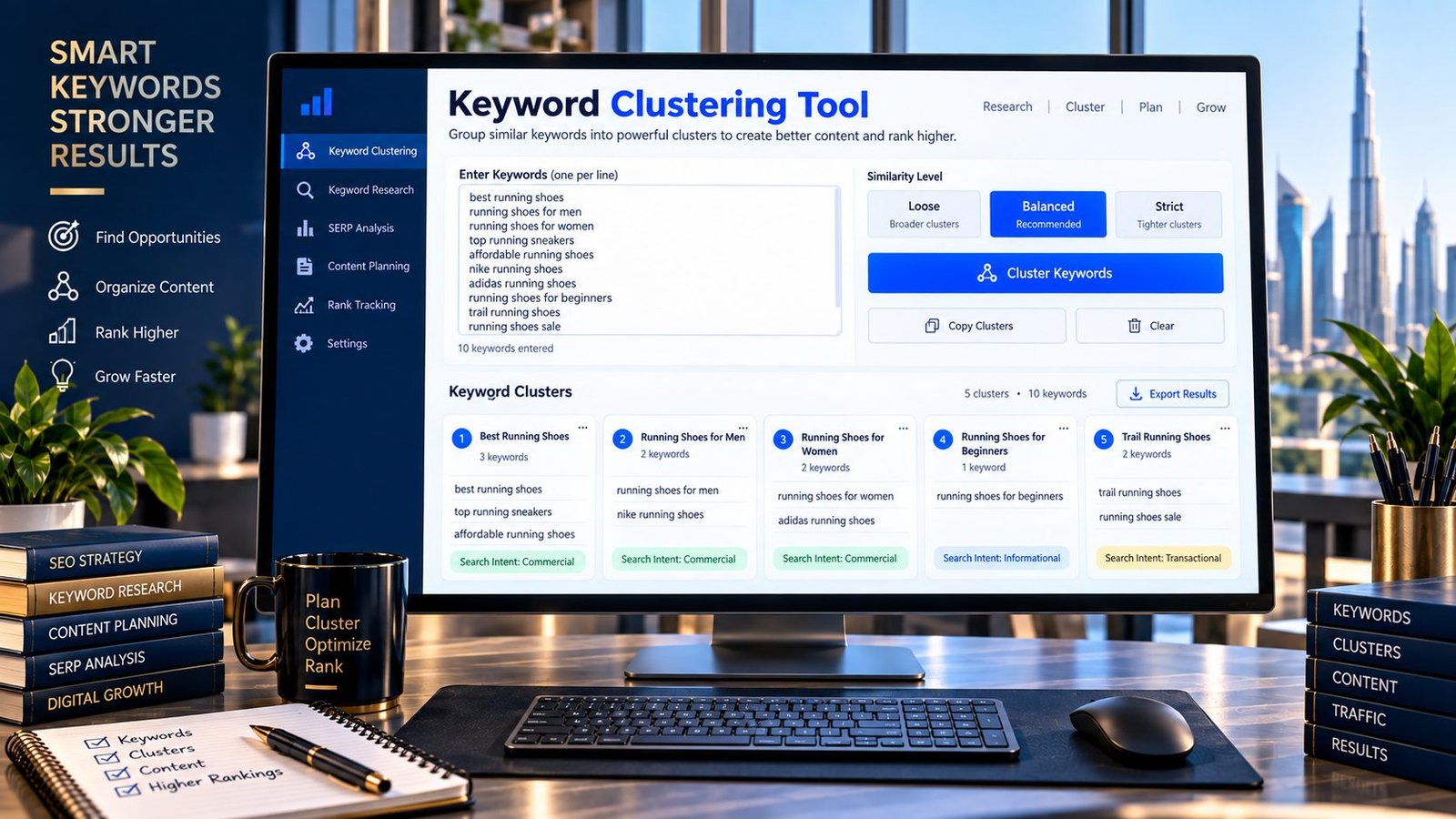
Turn a long list of keywords into organized topic groups with PKCapra’s Keyword Clustering Tool.
Paste your keywords, choose a similarity level, and let the tool organize related terms into clusters. Each cluster can help you identify groups of keywords that may belong to the same content topic or SEO planning workflow.
The tool works directly in your browser, making it useful for organizing keyword research without uploading your keyword list to a third-party processing service.
Important: Keyword clustering is an automated similarity-based process. A cluster is a research signal, not proof that every keyword should target exactly the same page. Search intent and actual search results should still be reviewed before making content or URL decisions.
Keyword Clustering
Group related keywords by shared words and search intent signals to turn a large keyword list into practical content clusters.
- Use closely related keyword variations rather than unrelated terms from the same broad topic.
- Review each automated cluster manually before assigning a page or content brief.
- Shared words do not always mean identical search intent, so SERP research remains important.
- One strong topic can often support several related queries without creating unnecessary near-duplicate pages.
Clustering is performed in your browser. This tool uses lexical similarity and does not access Google Search, live SERPs, search-volume databases or your analytics account.
What Is Keyword Clustering?
Keyword clustering is the process of organizing related search terms into groups based on shared characteristics.
For example, a keyword research list might contain:
keyword clusteringkeyword clustering toolSEO keyword clusteringkeyword groupinggroup keywords for SEO
Instead of treating every phrase as a completely separate topic, you can analyze their relationship and organize them into a cluster.
This can make a large keyword list easier to understand and use during content planning.
Why Is Keyword Clustering Useful?
Keyword research can quickly produce hundreds or thousands of phrases.
Managing every keyword individually can make content planning unnecessarily complicated.
Clustering can help you:
- organize large keyword lists
- identify related terms
- discover broader topic groups
- reduce duplicate research
- plan content more efficiently
- identify potential content themes
- create a more structured keyword map
- prioritize manual SERP analysis
The important distinction is that clustering organizes your research. It does not automatically determine your final content architecture.
How Keyword Clustering Works
PKCapra’s Keyword Clustering Tool analyzes the keywords you provide and groups them according to lexical similarity.
The tool can identify relationships between words and phrases and place similar keywords into the same group.
You can adjust the similarity setting depending on how closely you want terms to match.
Loose
A looser setting can create broader groups and connect keywords with less strict similarity.
This can be useful during early-stage keyword research when you want to discover broader relationships.
Balanced
The balanced setting provides a middle ground between broad and highly restrictive grouping.
Strict
A strict setting requires closer similarity between keywords, producing more narrowly defined clusters.
Example Keyword Clustering
Suppose your research contains:
keyword clustering
keyword clustering tool
SEO keyword clustering
keyword grouping
keyword grouping tool
keyword research
SEO keyword research
keyword research tool
A clustering tool may organize related terms into groups such as:
Cluster: Keyword Clustering
- keyword clustering
- keyword clustering tool
- SEO keyword clustering
Cluster: Keyword Grouping
- keyword grouping
- keyword grouping tool
Cluster: Keyword Research
- keyword research
- SEO keyword research
- keyword research tool
The exact output depends on the keywords and similarity setting.
These clusters should then be reviewed against actual search intent before deciding whether they belong on one page or multiple pages.
How to Use the Keyword Clustering Tool
Step 1: Collect Your Keywords
Prepare a list of keywords from your research.
Put one keyword per line.
For example:
seo tools
seo tools for small business
best seo tools
free seo tools
technical seo tools
seo audit tools
seo analysis tools
Step 2: Paste Your Keywords
Enter your keyword list into the PKCapra Keyword Clustering Tool.
Step 3: Choose Similarity
Select the clustering level that matches your research objective.
Use broader clustering when exploring topics and stricter clustering when you need more closely related groups.
Step 4: Generate Clusters
Run the tool to organize your keyword list.
Step 5: Review the Results
Examine each cluster and determine whether the keywords actually share the same search intent.
Step 6: Use the Clusters for Planning
The resulting groups can become inputs for:
- content briefs
- keyword maps
- topic research
- editorial calendars
- landing-page planning
- SEO audits
Keyword Clustering Does Not Equal Search Intent
This is one of the most important concepts when using an automated keyword clustering tool.
Two keywords can contain similar words while representing different user needs.
For example:
“SEO audit tool”
and
“SEO audit services”
share vocabulary, but the first may represent a user looking for software while the second can represent someone looking for a service provider.
A similarity algorithm may identify a relationship between the phrases.
That does not mean they should automatically share one landing page.
Always examine the intent behind the keywords.
Keyword Similarity vs Search Intent
There are two different questions:
Keyword Similarity
“Do these keywords look linguistically related?”
Search Intent
“Are people searching for these keywords trying to accomplish the same thing?”
Keyword clustering primarily helps with the first question.
SEO strategy requires answering both.
This is why PKCapra presents clustering as a research and organization tool, rather than an automatic content-architecture decision maker.
How to Validate Keyword Clusters
After generating your clusters, manually review the most important groups.
1. Examine the Main Topic
What is the central subject shared by the keywords?
2. Identify the Search Intent
Ask whether users are looking for:
- information
- a product
- a service
- a tool
- instructions
- comparisons
- definitions
- troubleshooting
3. Compare Search Results
Search the important keywords and compare the types of pages appearing in the results.
4. Look for SERP Overlap
If substantially similar pages appear for several keywords, that can be useful evidence that the terms have related intent.
5. Check the Actual Content
Make sure the page you plan to create can genuinely satisfy the needs represented by the entire cluster.
Keyword Clustering for Content Planning
Once you have validated a cluster, you can use it to build a content plan.
For example:
Primary topic:image alt text
Related keywords:
- image alt text
- alt text for images
- image alt attribute
- image alt text SEO
- missing image alt text
A validated cluster can help you build one comprehensive resource instead of automatically creating a separate thin page for every variation.
This can also make your editorial workflow easier to manage.
Keyword Clustering for SEO Content
Clusters can help you identify related terminology that may be relevant to a page.
However, related keywords should be included naturally.
Do not force every keyword into:
- the title
- headings
- paragraphs
- image alt text
- links
The content should remain useful and readable.
The objective is to cover a topic comprehensively rather than repeat keyword variations mechanically.
Keyword Clustering for Large Keyword Lists
Clustering becomes particularly useful when keyword research produces a large dataset.
For example, an SEO project might contain:
- hundreds of keywords
- thousands of keyword variations
- product-related queries
- informational questions
- location modifiers
- long-tail searches
Instead of reviewing every phrase independently, clustering can provide an initial organizational layer.
You can then prioritize the most important clusters for deeper research.
Keyword Clustering vs Keyword Grouping
The terms keyword clustering and keyword grouping are often used interchangeably.
In practical SEO workflows, both refer to organizing related keywords into groups.
The difference usually comes from the methodology being used.
Some systems group keywords based on:
- words
- phrases
- semantic relationships
- SERP overlap
- search intent
- manually defined rules
PKCapra’s current Keyword Clustering Tool uses keyword similarity, so its results should be interpreted as automated similarity groups rather than SERP-based intent clusters.
What the PKCapra Tool Does
The current PKCapra implementation provides:
- Multi-keyword input
- One-keyword-per-line workflow
- Duplicate removal
- Keyword normalization
- Similarity-based clustering
- Loose similarity mode
- Balanced similarity mode
- Strict similarity mode
- Cluster counts
- Unclustered keyword reporting
- Suggested cluster topics
- Complete cluster copying
- Example keyword set
- Clear/reset controls
- Browser-side processing
- Responsive mobile interface
Browser-Based Keyword Clustering
PKCapra processes the keyword list directly in the browser.
This means the tool does not require a Google account, SEO platform account or external keyword API connection to perform its basic clustering process.
This makes it useful for quickly organizing keyword research locally in the browser.
Privacy Reminder
Do not paste confidential information, customer data, passwords, API keys or other sensitive material into any online tool.
Keyword lists can sometimes contain commercially sensitive research, so use appropriate care when working with proprietary data.
Common Keyword Clustering Mistakes
Creating a Page for Every Keyword
Not every keyword variation needs its own URL.
Creating separate pages for extremely similar searches can create unnecessary duplication and a difficult site structure.
Assuming Similar Words Mean Similar Intent
Words alone do not establish search intent.
Always validate important clusters.
Using One Cluster as an Automatic Content Brief
A cluster is a starting point.
You still need to determine:
- audience
- intent
- topic depth
- content format
- unique information needed
- appropriate page type
Over-Optimizing Content
Do not insert every clustered keyword simply because the tool grouped them together.
Write naturally.
Ignoring Unclustered Keywords
Some keywords may not have enough similarity to join another group.
That does not mean they are useless.
They may represent:
- a separate topic
- a different intent
- a unique long-tail query
- an opportunity requiring individual research
Keyword Clustering Workflow for SEO Professionals
A practical workflow is:
Keyword Research → Clean Keywords → Cluster → Validate Intent → Review SERPs → Map Keywords → Create Content → Monitor Performance
Keyword Research
Collect relevant keywords.
Clean Keywords
Remove duplicates and obvious irrelevant terms.
Cluster
Use PKCapra to identify similarity-based groups.
Validate Intent
Determine what users actually want from each group.
Review SERPs
Compare search-result pages for important terms.
Map Keywords
Assign validated clusters to existing or planned URLs.
Create Content
Build useful pages around genuine user needs.
Monitor
Review actual search performance and refine the content strategy when appropriate.
When Should You Use Keyword Clustering?
Keyword clustering can be particularly useful when:
- you have a large keyword list
- you’re planning a new website
- you’re creating content silos
- you’re organizing keyword research
- you’re preparing content briefs
- you’re reviewing keyword exports
- you’re consolidating related topics
- you’re building an editorial calendar
It may be unnecessary for a very small keyword list where the relationships are already obvious.
Keyword Clustering Limitations
Automated clustering has limitations.
PKCapra’s current tool uses lexical/similarity-based analysis rather than live Google SERP comparison.
Therefore, it cannot independently determine:
- actual Google ranking overlap
- exact search intent
- current SERP composition
- keyword search volume
- keyword difficulty
- conversion value
- whether Google considers two queries interchangeable
Use the output as a research aid and validate important decisions with additional SEO research.
Does Keyword Clustering Improve Rankings?
Keyword clustering itself does not guarantee higher search rankings.
Its purpose is to organize keyword research and help you think about related topics and content structure.
Ranking depends on many factors, including the usefulness and relevance of the content, technical implementation, competition, search context and other signals.
Avoid treating a cluster count or similarity score as a ranking prediction.
Does Every Keyword Need a Separate Page?
No.
Whether keywords should have separate pages depends on their search intent and the content needed to satisfy users.
If several keywords represent substantially the same need, one comprehensive page may be appropriate.
If they represent substantially different needs, separate pages may make more sense.
Keyword clustering can help identify relationships, but the final decision requires human review.
Frequently Asked Questions
What is keyword clustering?
Keyword clustering is the process of organizing related keywords into groups based on similarities between the search terms.
What is a keyword clustering tool?
A keyword clustering tool automatically analyzes a keyword list and groups related terms according to a defined clustering method.
Is PKCapra’s Keyword Clustering Tool free?
Yes. The PKCapra tool is designed as a free online keyword clustering utility.
How does PKCapra cluster keywords?
The current tool uses lexical similarity and normalization to identify related keywords and organize them into groups.
Does PKCapra use Google search results for clustering?
No. The current implementation does not use live Google SERP data. It performs similarity-based clustering in the browser.
Does keyword clustering tell me which keywords should share a page?
Not automatically. The tool provides similarity-based groups. Search intent and SERP analysis should be used before deciding your final page structure.
What is the difference between keyword clustering and keyword grouping?
The terms are often used similarly. Both generally refer to organizing related keywords into groups, although individual tools may use different methodologies.
How many keywords can I cluster?
The practical amount depends on your browser and the size of the keyword list. For very large datasets, processing the list in manageable batches can make the workflow easier.
Can I use keyword clustering for content planning?
Yes. Validated clusters can help organize topics, content briefs, keyword maps and editorial plans.
Can keyword clustering replace keyword research?
No. Clustering organizes existing keyword research. It does not replace research into search demand, intent, competition or actual SERPs.
What should I do after clustering keywords?
Review the clusters, validate search intent, compare relevant search results and then map validated groups to appropriate pages or content topics.
Related PKCapra Tools
After organizing your keyword research, you can use the Keyword Density Checker to review keyword usage within content.
For on-page analysis, the SEO Content Readability Analyzer can help evaluate content readability, while the SEO Heading Analyzer can help review heading structure.
When planning URLs for your validated topics, the URL Slug Generator can help create clean, readable slugs.
Final Takeaway
Keyword clustering is most useful when it turns a messy keyword list into a structure that you can actually work with.
PKCapra’s Keyword Clustering Tool provides an automated similarity-based starting point, helping you identify related terms without manually sorting every keyword.
But clustering should not be the final SEO decision.
Cluster first, validate search intent second, review the SERPs third, and then decide how your content and URLs should be structured.
That combination gives you a more reliable workflow than treating automated keyword similarity as a substitute for SEO judgment.