
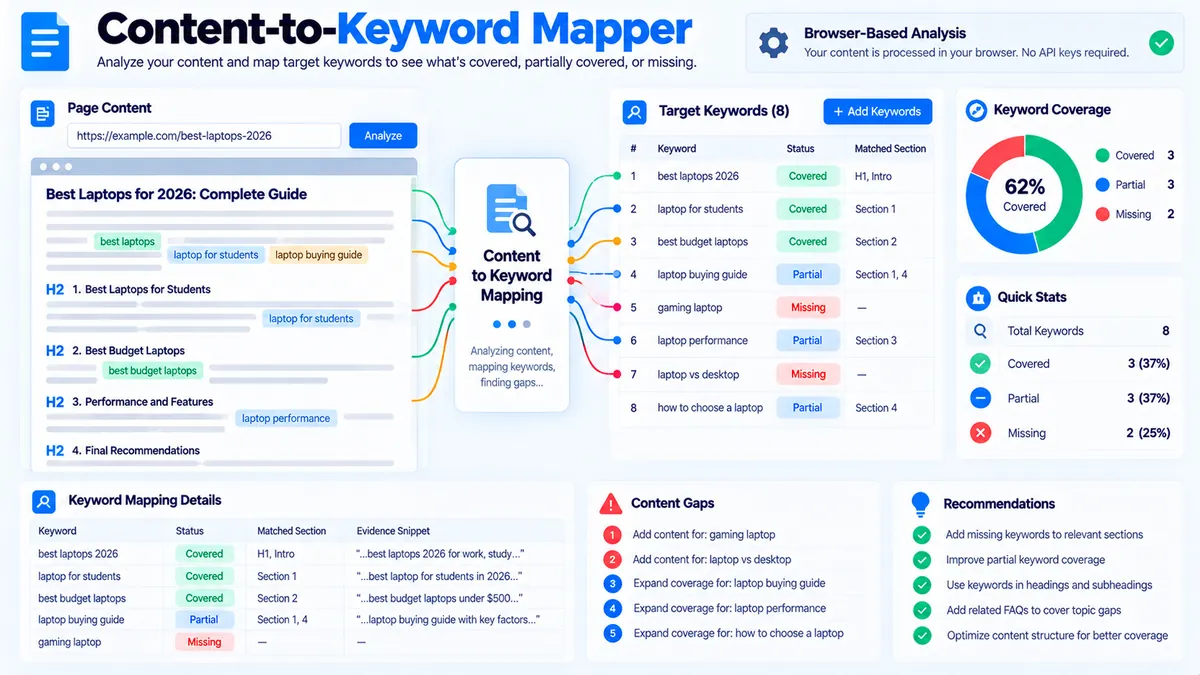
Content-to-Keyword Mapper maps target keywords to the content you provide and shows where each keyword is covered, partially covered, or missing. It uses the supplied page title, target keyword list, and page content to identify lexical matches, relevant sections, evidence excerpts, and editorial actions without requiring a search-engine API or keyword database.
Content-to-Keyword Mapper
Map supplied keywords to the most relevant sections of your content, identify uncovered terms, and find where topical coverage is strongest or weakest.
Content-to-Keyword Mapping Report
Generated from the content and keywords you supplied.
View JSON report
How to Use the Content-to-Keyword Mapper in Simple Steps
- Enter the page title if you want the mapper to consider the title when evaluating keyword coverage. The title provides additional context for the page-level mapping.
- Enter your target keywords or phrases. You can provide multiple keywords so the tool can evaluate the coverage of the complete target set rather than checking only one phrase at a time.
- Paste the full page content into the content field and click Map Keywords to Content. The tool processes the supplied text in the browser and compares the target keywords with the available content and sections.
- Review the mapping results and export them when needed. The tool identifies Covered, Partial, and Missing keywords, shows matching evidence and recommended editorial actions, and provides Copy Report, Copy JSON, Download JSON, and Download PDF options.
What the Content-to-Keyword Mapper Checks
The Content-to-Keyword Mapper performs a deterministic content-to-keyword comparison using the text supplied by the user.
For each target keyword, the tool can identify:
- Coverage status
- Match percentage
- Best matching content section
- Word or term matches
- Exact phrase matches
- Evidence excerpt
- Recommended editorial action
The mapper also evaluates section-level keyword coverage so you can see whether important terms are concentrated in one section or distributed across the page.
The result is an editorial mapping report, not a live search-engine ranking report.
Covered, Partial, and Missing Keywords
The three primary states describe how strongly a target keyword is represented in the supplied content.
Covered
A Covered keyword has sufficient lexical evidence in the supplied content according to the mapper’s matching logic.
This indicates that the concept or phrase is represented strongly enough for the tool’s deterministic coverage rules. It does not mean that Google has assigned the page a ranking position for that keyword.
Partial
A Partial keyword has some relevant lexical evidence but does not meet the tool’s stronger coverage threshold.
Partial coverage can occur when related terms or components of a phrase appear without enough direct evidence to classify the keyword as fully covered.
This is an editorial signal for reviewing the relevant section rather than a search-engine ranking prediction.
Missing
A Missing keyword has insufficient matching evidence in the supplied content.
A missing result tells you that the target keyword is not adequately represented according to the mapper’s text-matching rules. The recommended action can therefore be used to identify content that may need a relevant addition or clearer topical treatment.
How Keyword-to-Section Mapping Works
The mapper does more than count whether a word exists somewhere on the page.
It examines the supplied content in sections and attempts to associate each target keyword with the section containing the strongest relevant evidence.
This can help answer questions such as:
- Which section currently covers this keyword?
- Is the keyword supported by a meaningful passage?
- Is the phrase present only as an isolated mention?
- Which content section should be reviewed?
- Which target keywords have no useful textual coverage?
The section mapping is based on the content supplied to the tool. It does not fetch the published page from the web.
Exact Phrase Matches vs Related Term Matches
An exact phrase match is stronger lexical evidence than a collection of unrelated words that happen to appear separately.
For example, if the target keyword is:
content optimization
a direct occurrence of that phrase provides exact phrase evidence.
If the content contains content and optimization separately in relevant text, the mapper can use the available term evidence according to its matching logic, but that does not make the separate words equivalent to an exact phrase occurrence.
This distinction helps prevent a simple word-count check from being mistaken for complete phrase coverage.
Why Content-to-Keyword Mapping Matters
A keyword list and a content draft are two different assets.
The keyword list defines the terms you intend to address. The content defines what the page actually communicates.
Mapping the two makes the relationship visible before publication or during a content refresh.
A useful workflow is:
- Start with the target keyword set.
- Map the keywords against the current draft.
- Review Missing and Partial results.
- Open the section identified by the mapper.
- Add or improve content only where the keyword is genuinely relevant.
- Run the mapping again.
- Export the final report if you need a record of the editorial review.
This avoids relying on memory when reviewing a large article.
The Mapper Does Not Measure Google Rankings
The Content-to-Keyword Mapper does not connect to Google Search Console, Google Search, Bing, a keyword database, or a live SERP provider.
It therefore does not provide:
- Google ranking positions
- Search volume
- Keyword difficulty
- Cost per click
- Click-through rate
- Impressions
- Search-engine traffic
- Live SERP features
- Competitor keyword rankings
Its coverage result answers a narrower question:
“How strongly does the supplied content represent these supplied target keywords?”
That distinction keeps the report tied to data the tool actually has.
Browser-Side Processing
The mapper processes the supplied title, keyword list, and content in the browser.
This architecture is useful because the core mapping operation does not require a remote keyword database or a server-side analysis request.
The workflow is:
- Read the text entered into the tool.
- Parse the target keyword list.
- Process the supplied content into analyzable sections.
- Compare target terms and phrases against the content.
- Calculate the deterministic coverage signals.
- Identify the strongest matching section and evidence.
- Generate the report directly in the browser.
There is no requirement for a Google API, Bing API, SEO data subscription, or keyword database for the mapping itself.
How to Interpret the Match Percentage
The match percentage is a coverage signal generated from the supplied content and the mapper’s deterministic matching logic.
It should be used for editorial comparison rather than treated as a Google relevance score.
For example, if a keyword moves from Partial to Covered after you add genuinely relevant supporting content, the report provides evidence that the supplied draft now contains stronger lexical coverage for that target.
It does not prove that the page will gain a particular search position.
Avoid Adding Keywords Just to Change the Score
A keyword coverage tool should support useful writing, not encourage mechanical repetition.
If a keyword is genuinely relevant to a section, add clear information that answers the reader’s need. If a keyword is unrelated to the section, adding it merely to increase a coverage signal can reduce content quality.
Use the mapper to find missing topical coverage and weak evidence, not as a target for repeating exact phrases unnecessarily.
Content Sections and Editorial Decisions
Section-level mapping is particularly useful for long pages.
A large guide can contain dozens of headings and thousands of words. A keyword may technically appear somewhere in the document while still receiving little meaningful explanation.
When reviewing a Partial or Missing result, inspect the identified section and ask:
- Does this section actually answer the keyword’s underlying question?
- Is the term used in the correct context?
- Is important supporting information missing?
- Would a dedicated subsection improve clarity?
- Would adding the keyword create unnecessary repetition?
The mapper supplies the evidence; the editorial decision remains with the writer.
Developer Snippets (Automate This Tool Offline)
The browser tool is useful for interactive review, while a local script can help automate repeated lexical checks across content files.
The following Python script reads a CSV containing target keywords and a text file containing page content, then reports exact phrase matches and basic term coverage.
import csv
import re
from pathlib import Path

keywords_file = Path("keywords.csv")
content_file = Path("content.txt")
output_file = Path("keyword-content-map.csv")

if not keywords_file.exists():
    raise FileNotFoundError(f"Keyword file not found: {keywords_file}")

if not content_file.exists():
    raise FileNotFoundError(f"Content file not found: {content_file}")

content = content_file.read_text(encoding="utf-8")
normalized_content = re.sub(r"\s+", " ", content).strip().lower()

results = []

with keywords_file.open("r", encoding="utf-8-sig", newline="") as file:
    reader = csv.DictReader(file)

    if "keyword" not in (reader.fieldnames or []):
        raise ValueError("keywords.csv must contain a 'keyword' column.")

    for row in reader:
        keyword = row["keyword"].strip()

        if not keyword:
            continue

        normalized_keyword = re.sub(r"\s+", " ", keyword).strip().lower()

        exact_match = normalized_keyword in normalized_content

        keyword_terms = [
            term
            for term in re.findall(r"\b[\w'-]+\b", normalized_keyword)
            if len(term) > 2
        ]

        matched_terms = [
            term
            for term in keyword_terms
            if re.search(r"\b" + re.escape(term) + r"\b", normalized_content)
        ]

        term_ratio = (
            len(matched_terms) / len(keyword_terms)
            if keyword_terms
            else 0
        )

        if exact_match:
            status = "Covered"
        elif term_ratio >= 0.5:
            status = "Partial"
        else:
            status = "Missing"

        results.append({
            "keyword": keyword,
            "status": status,
            "exact_phrase_match": exact_match,
            "matched_terms": ", ".join(matched_terms),
            "term_match_ratio": round(term_ratio, 3)
        })

with output_file.open("w", encoding="utf-8-sig", newline="") as file:
    fieldnames = [
        "keyword",
        "status",
        "exact_phrase_match",
        "matched_terms",
        "term_match_ratio"
    ]

    writer = csv.DictWriter(file, fieldnames=fieldnames)
    writer.writeheader()
    writer.writerows(results)

print(f"Created: {output_file}")
This script is intentionally local. It does not call Google, Bing, an SEO API, or a keyword database. It provides a basic offline mapping workflow that can be extended for internal content-audit pipelines.
Native Software Workaround: Excel Power Query
Excel Power Query can provide a practical spreadsheet workflow when your keyword list and content inventory already live in CSV or Excel files.
A simple workflow is:
- Create a spreadsheet containing your target keywords in a
keywordcolumn. - Save the keyword list as CSV if you want to use the Python workflow above.
- Keep the page content in a text file or another structured source.
- Open Excel and select Data → Get Data → From File.
- Import the keyword or content inventory.
- Use Power Query transformations to normalize whitespace and text casing.
- Create a review table containing the keyword, coverage status, and editorial action.
- Load the transformed table into Excel with Home → Close & Load.
- Filter the results by Missing or Partial status to create a focused editorial queue.
Power Query is useful for managing the data around a content audit, while the PKCapra mapper provides the interactive browser-based mapping workflow.
Related PKCapra Workflows
Keyword mapping is useful alongside other content and SEO analysis workflows.
Use Keyword Clustering when a large keyword list needs to be organized into topical groups before mapping those keywords to pages.
Use Keyword Grouping when you need to organize related terms into practical keyword groups.
Use SERP Snippet Preview when reviewing how a page’s title and description can appear in search results after the content mapping stage.
Use Title Tag Analyzer to review the page title separately from the content coverage analysis.
Use SEO & Website Tools to access the broader collection of PKCapra SEO and webmaster utilities.
Frequently Asked Questions
What is a Content-to-Keyword Mapper?
A Content-to-Keyword Mapper compares supplied target keywords with supplied page content and reports how strongly each keyword is represented.
Does the mapper check Google rankings?
No. The mapper does not retrieve Google rankings or live SERP data. It analyzes the text provided by the user.
Does it provide keyword search volume?
No. Search volume is not part of the mapper’s browser-side content analysis.
What does a Covered keyword mean?
A Covered keyword has sufficient matching evidence in the supplied content according to the tool’s deterministic coverage rules.
What does a Partial keyword mean?
A Partial keyword has some relevant matching evidence but does not meet the stronger coverage condition used for a Covered result.
What does a Missing keyword mean?
A Missing keyword has insufficient matching evidence in the supplied content according to the mapper’s matching logic.
Does the tool use an SEO API?
No. The core Content-to-Keyword Mapper does not require a Google, Bing, or commercial SEO API.
Can I analyze HTML content?
Yes. The mapper supports supplied page content and can process HTML/plain-text content according to the tool’s content parsing workflow.
Does a Covered result guarantee a ranking?
No. A Covered result only describes lexical content coverage within the supplied text. Search rankings depend on many factors outside this tool’s analysis.
Can I export the mapping report?
Yes. The tool provides Copy Report, Copy JSON, Download JSON, and Download PDF actions.