
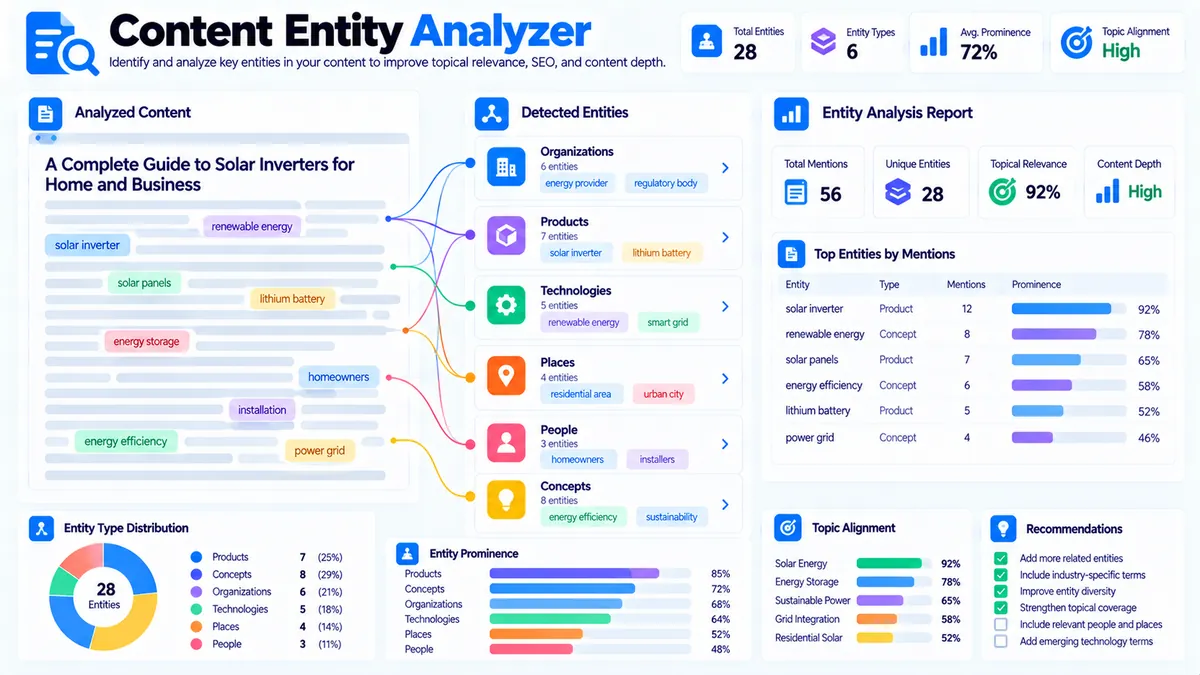
The Content Entity Analyzer helps you identify important entities mentioned in your content and understand how those entities relate to your focus topic. It detects likely people, organizations, places, products or technologies, and concepts using transparent browser-side heuristics, then reports mention frequency, prominence, entity types, topic alignment, and possible naming inconsistencies.
Enter your article or page content, optionally add a Focus Topic, choose the detection sensitivity and maximum number of entities, then run the analysis. The tool processes the supplied content directly in your browser and produces a structured report that you can copy, export as JSON, or download as a PDF.
Content Entity Analyzer
Extract likely entities from your content, inspect entity types and prominence, review topic alignment, and find weak or one-off entity signals that may need clearer coverage.
Content to analyze
Entity Analysis
Candidate entities are ranked from the text you supplied using transparent local heuristics.
View JSON report
How to Use the Content Entity Analyzer in Simple Steps
- Paste your article, landing-page copy, product description, documentation, or other content into the Content box. The tool accepts plain text as well as HTML content.
- Enter an optional Focus Topic if you want to measure how closely detected entities align with the subject of the page.
- Choose Detection Sensitivity and Maximum Entities. Use Focused for stricter detection, Balanced for general analysis, or Broad when you want a wider candidate set.
- Click Analyze Entities and review the entity list, types, mention frequency, prominence, topic alignment, naming consistency, content statistics, and recommendations.
The analyzer supports content up to 100,000 characters. You can also use Load Example to test the interface immediately or Clear to remove the current analysis.
What the Content Entity Analyzer Measures
The tool looks for repeated or potentially meaningful names and phrases within the supplied content and groups them into practical entity categories.
Person / Name
These are likely people or named individuals detected from capitalization, phrase patterns, and other local signals.
Organization
This category covers likely companies, institutions, publications, platforms, and other organizations.
Place
The analyzer can identify likely locations such as cities, countries, regions, and other place names when the surrounding text provides useful signals.
Product / Technology
This category is useful for software products, platforms, technologies, tools, brands, and similar named objects.
Concept / Topic
Concepts and topic-oriented phrases help reveal recurring subjects that may contribute to the topical structure of the content.
The classification is heuristic rather than a connection to a live knowledge graph. That distinction matters when interpreting unusual names, highly technical terminology, short names, or ambiguous phrases.
How Entity Prominence Works
Entity frequency alone does not tell you whether an entity is important to a page.
The analyzer therefore considers multiple local signals when calculating prominence, including how often an entity appears, how substantial its phrase is, and how early it appears in the content.
An entity that appears repeatedly and prominently near the beginning of an article can receive stronger prominence than a phrase that appears once near the end.
For example, an article about technical SEO might repeatedly mention:
- Technical SEO
- XML sitemap
- Crawl budget
- Search engines
- Google Search Console
The report can help you distinguish frequently used entities from less prominent mentions and identify which named concepts dominate the supplied text.
Focus Topic and Entity Alignment
The optional Focus Topic gives the analyzer a reference point for topical alignment.
For example, if your focus topic is:
technical SEO
the analyzer can compare detected entities and terminology against that topic and identify stronger, moderate, or weaker lexical alignment signals.
This does not claim that a page is authoritative for a topic. It provides a practical content-level signal that can help you inspect whether important entities appearing in the copy are connected to the subject you intended to cover.
Use the result alongside other content-analysis workflows such as the Content Gap Analyzer and Topic Cluster Generator when planning or improving a broader content structure.
Entity Type Distribution
The report summarizes the detected entity mix so you can see whether the content contains a balanced range of named entities or is dominated by one category.
For example, a software guide might contain:
- Organizations representing vendors and platforms
- Products representing software tools
- Technologies representing technical systems
- Concepts representing the main subject
- Places where geographic context is relevant
This distribution is useful for content auditing because two articles can have similar word counts while having very different entity structures.
Similar Entity Names and Naming Consistency
The analyzer also checks for potentially similar entity names.
This can highlight situations such as:
- Different spellings of the same organization
- Abbreviations mixed with full names
- Slightly different product naming
- Singular and plural variations
- Similar phrases that may represent the same concept
For example, content might contain both:
Google Search Console
and:
GSC
The analyzer can surface the relationship as a possible naming-consistency signal.
These matches are suggestions for review rather than definitive identity resolution. Similar text does not always mean two phrases represent the same real-world entity.
Content Statistics
The result includes useful basic statistics for the analyzed content, helping you understand the size and structure of the input alongside the entity findings.
You can use the analyzer together with the Content-to-Keyword Mapper when auditing whether important concepts and search terms are represented consistently throughout a page.
For a broader on-page review, you can also use the Title Tag Analyzer, Meta Description Analyzer, and Image Alt Text Checker.
How to Interpret Strong, Moderate, and Weak Signals
A Strong signal indicates that the local evidence connecting an entity to the supplied focus topic is relatively clear.
A Moderate signal indicates a meaningful relationship exists, but the evidence is less direct.
A Weak signal indicates that the entity was detected but the lexical or contextual relationship with the focus topic is limited.
These labels are content-analysis signals, not external measurements of search-engine understanding, ranking potential, or factual entity importance.
Practical Workflow for Existing Content
Suppose you have a 2,500-word article targeting:
technical SEO audit
Start by pasting the complete article into the analyzer and entering the same phrase as the Focus Topic.
Review the detected entities first.
Then check:
- Which entities appear most frequently?
- Which entities have strong prominence?
- Which entity categories dominate the page?
- Are important technologies or organizations named consistently?
- Are similar entity names being used interchangeably?
- Do the strongest entities actually support the intended topic?
- Are there obvious concepts in the article that are not being represented clearly?
Use those observations to decide whether the copy needs clearer terminology, better topical organization, more consistent naming, or additional supporting information.
For broader content planning, compare the findings with your Content Gap Analyzer and Keyword Clustering workflows.
Technical Breakdown: Why This Analyzer Is Useful
The Content Entity Analyzer runs its analysis locally in the browser rather than requiring a third-party NLP or knowledge-graph API.
Its detection process uses local heuristics to identify candidate names and phrases from the supplied content. The analyzer then normalizes candidates, counts mentions, classifies likely entity types, evaluates prominence, compares terminology with an optional focus topic, and checks for similar entity names.
This architecture makes the tool useful for fast editorial audits because you can analyze the content without configuring an external entity-recognition service.
The trade-off is important: heuristic detection cannot provide the same level of certainty as a dedicated named-entity-recognition system or a maintained knowledge graph. Unusual capitalization, ambiguous names, abbreviations, sentence-initial words, and specialized terminology can produce false positives or missed entities.
The result should therefore be treated as an analytical starting point for editorial review rather than an authoritative database of real-world entities.
Browser-Side Processing and Privacy
The entity analysis is performed in the browser using the content supplied to the tool.
The tool does not require an external NLP API, Google Search connection, knowledge graph API, or third-party SEO database to produce its core analysis.
Because the analyzer works from the text you provide, its findings are based on that content rather than live search-engine results or an external database of known entities.
Common Content Problems the Analyzer Can Expose
Important entity mentioned only once
A central organization, technology, product, or concept may appear only once even though it is important to the page.
Review the surrounding content and determine whether the entity needs additional explanation or contextual references.
Too many weakly related entities
A page can mention many brands, tools, locations, or concepts without developing them meaningfully.
A large entity count does not automatically indicate better topical coverage.
Inconsistent naming
Using several names for the same product or organization can make editorial terminology less consistent.
Review similar-entity suggestions and choose a consistent naming convention where appropriate.
Generic capitalized words detected as entities
Capitalization alone can sometimes make ordinary words look like named entities, especially at the beginning of sentences.
This is one reason the analyzer presents its results as heuristic signals rather than authoritative entity recognition.
Highly technical terminology
Technical documentation can contain product names, commands, libraries, frameworks, abbreviations, and concepts that are difficult to classify reliably from text alone.
Use the results as a review aid and manually validate important findings.
Developer Snippets (Automate This Tool Offline)
The following examples reproduce the core idea of extracting repeated candidate entities from content without calling an external NLP API. They are useful for offline editorial pipelines and local preprocessing.
Python
import re
from collections import Counter

text = """
Technical SEO audits often use Google Search Console, XML sitemaps,
crawl analysis, and structured data to identify website issues.
Google Search Console can also help identify indexing problems.
"""

# Detect simple capitalized phrases as candidate named entities.
pattern = r'\b(?:[A-Z][a-zA-Z0-9&.-]*)(?:\s+[A-Z][a-zA-Z0-9&.-]*){0,3}\b'

candidates = re.findall(pattern, text)

counts = Counter(
    candidate.strip()
    for candidate in candidates
    if len(candidate.strip()) > 2
)

for entity, frequency in counts.most_common():
    print(f"{entity}: {frequency}")
PowerShell
$text = @"
Technical SEO audits often use Google Search Console, XML sitemaps,
crawl analysis, and structured data. Google Search Console can also
help identify indexing problems.
"@

# Extract simple capitalized phrase candidates.
$pattern = '\b(?:[A-Z][a-zA-Z0-9&.-]*)(?:\s+[A-Z][a-zA-Z0-9&.-]*){0,3}\b'

$matches = [regex]::Matches($text, $pattern)

$counts = @{}

foreach ($match in $matches) {
    $entity = $match.Value.Trim()

    if ($entity.Length -gt 2) {
        if ($counts.ContainsKey($entity)) {
            $counts[$entity]++
        } else {
            $counts[$entity] = 1
        }
    }
}

$counts.GetEnumerator() |
    Sort-Object Value -Descending |
    ForEach-Object {
        "$($_.Key): $($_.Value)"
    }
Node.js
const text = `
Technical SEO audits often use Google Search Console, XML sitemaps,
crawl analysis, and structured data. Google Search Console can also
help identify indexing problems.
`;

// Detect simple capitalized phrase candidates.
const pattern = /\b(?:[A-Z][a-zA-Z0-9&.-]*)(?:\s+[A-Z][a-zA-Z0-9&.-]*){0,3}\b/g;

const matches = text.match(pattern) || [];
const counts = new Map();

for (const match of matches) {
  const entity = match.trim();

  if (entity.length > 2) {
    counts.set(entity, (counts.get(entity) || 0) + 1);
  }
}

[...counts.entries()]
  .sort((a, b) => b[1] - a[1])
  .forEach(([entity, frequency]) => {
    console.log(`${entity}: ${frequency}`);
  });
These snippets are intentionally lightweight. They demonstrate offline candidate extraction rather than attempting to recreate the complete browser analyzer, its classification logic, prominence scoring, topic alignment, or naming-consistency checks.
Native Software Workflow: Analyze Content from Excel with Power Query
You can prepare content inventories in Excel before running individual pages through the analyzer.
A practical workflow is:
- Create an Excel table with columns such as URL, Page Title, Focus Topic, and Content.
- Keep one page per row so the content remains associated with its URL and topic.
- Use Power Query to clean obvious formatting problems, remove unnecessary HTML where appropriate, and normalize whitespace.
- Filter the table to the pages you want to inspect.
- Copy the content for each selected page into the Content Entity Analyzer.
- Compare the entity patterns across related pages.
- Record important entities, naming variations, and editorial actions in additional Excel columns.
For larger content inventories, this workflow can be combined with the Content Gap Analyzer and Keyword Grouping to organize pages around related subjects and terminology.
The analyzer itself is designed for content-level inspection. It does not automatically crawl an entire website or build a live site-wide entity database.
When to Use the Content Entity Analyzer
Use it when you need to:
- Audit named entities in an existing article
- Review terminology before publishing
- Check whether important products, organizations, technologies, or concepts are consistently named
- Compare entity patterns across related content
- Inspect how a focus topic aligns with detected terminology
- Find possible duplicate or variant entity names
- Create a quick entity-focused content audit without an external NLP API
- Support a broader topical-content review
It is especially useful after drafting substantial content, when you want another structured view of what the page actually talks about.
Export and Reporting
After analysis, you can use the available report actions to:
- Copy the formatted report
- Copy the structured JSON
- Download the JSON result
- Download a PDF report
The JSON output is useful when you want to move the analysis into another local workflow or retain structured results for later comparison.
The PDF is useful when the analysis needs to be shared as a standalone report.
Frequently Asked Questions
What is a content entity analyzer?
A content entity analyzer identifies likely named entities and important recurring phrases in supplied content and organizes them into categories such as people, organizations, places, products or technologies, and concepts or topics.
Does this tool use Google Search?
No. The core Content Entity Analyzer does not require Google Search or live search results. It analyzes the content supplied to the tool using browser-side heuristics.
Does it use an external NLP API?
No. The tool does not require a third-party NLP API or external knowledge graph for its core entity analysis.
Is entity detection guaranteed to be accurate?
No. Entity detection is heuristic. Ambiguous names, sentence-initial capitalization, abbreviations, unusual terminology, and specialized language can cause false positives or missed entities.
What does the Focus Topic do?
The Focus Topic provides a reference phrase that the analyzer uses to evaluate lexical alignment between detected entities and the subject you entered.
What does entity prominence mean?
Entity prominence is a local content signal based on factors such as mention frequency, phrase characteristics, and where the entity appears in the content. It is not a search-engine ranking metric.
Can the tool detect companies and products?
Yes. The analyzer includes Organization and Product / Technology categories and uses local text signals to identify likely examples.
Can I analyze HTML?
Yes. The Content field can accept plain text or HTML content. The analyzer works from the supplied page text rather than crawling the live URL.
Can I analyze a complete article?
Yes. The tool supports content up to 100,000 characters, making it suitable for substantial articles and long-form pages.
Does a high entity count mean better SEO?
No. Entity quantity by itself does not establish content quality, topical authority, or search performance. The useful question is whether the detected entities are relevant, clearly explained, consistently named, and appropriate for the page’s intended subject.
Continue Your Content Audit
After reviewing entities, use the findings as part of a broader content workflow. The Content-to-Keyword Mapper can help connect page content with keyword themes, while the Content Gap Analyzer can help identify missing topic coverage.
For larger topic structures, explore the Topic Cluster Generator and Pillar Page Analyzer.
For basic page-level checks, the SEO Website Tools collection provides additional tools for titles, metadata, links, speed, structured page signals, and related SEO tasks.