
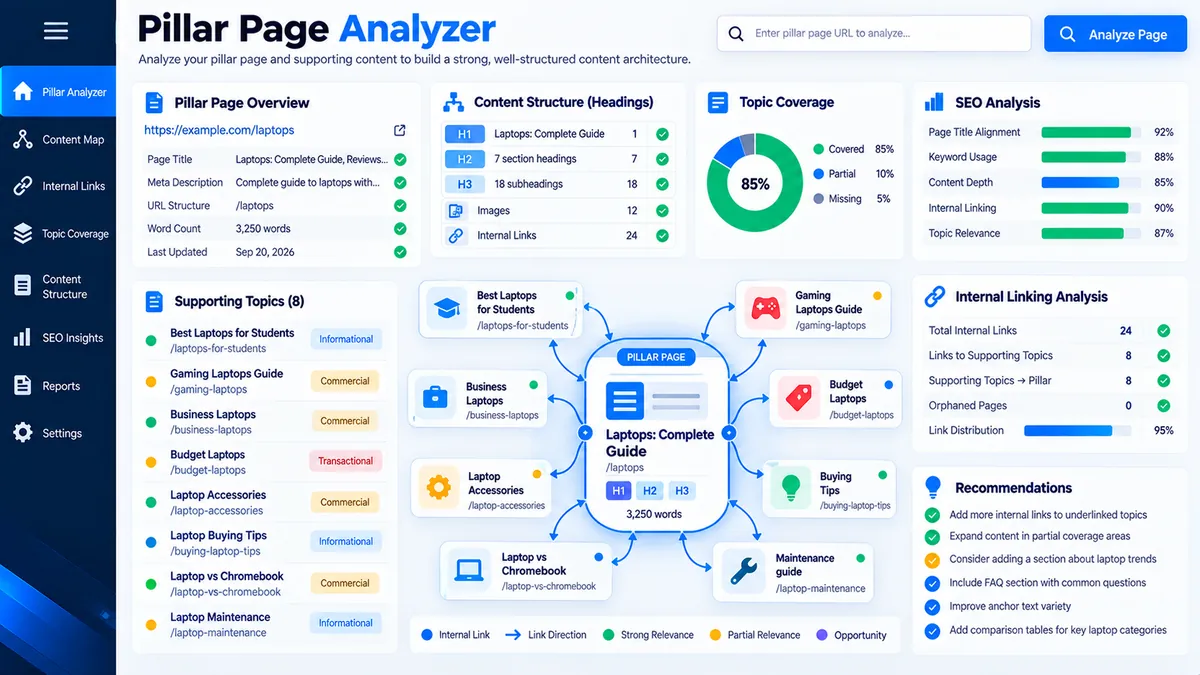
The Pillar Page Analyzer checks whether a long-form pillar page has clear topical focus, supporting-topic coverage, heading structure, internal-link signals, and alignment between the core topic, title, URL, and page content. Enter the page details and content to identify structural gaps before publishing or updating the pillar page.
Pillar Page Analyzer
Audit a pillar page for topic coverage, content depth, heading structure, internal-link signals, and supporting-topic alignment.
Pillar Page Analysis
Generated from the page data and content you supplied.
View JSON report
How to Use the Pillar Page Analyzer in Simple Steps
- Enter the core topic. Add the main subject the pillar page is intended to cover. This becomes the reference topic for the page-level alignment checks.
- Add the page details. Enter the page title and, when available, the page URL so the analyzer can compare them with the core topic.
- Add supporting topics. Enter the subtopics that the pillar page should cover. These provide the reference set for supporting-topic coverage analysis.
- Paste the page content and analyze. Add the pillar page content as HTML or plain text, then run the analysis to review headings, topic mentions, links, supporting-topic coverage, and structural signals.
Use the Keyword Clustering Tool when you first need to organize related keywords into similarity-based groups, or use the Keyword Grouping Tool when the research requires practical topic and search-intent organization before defining the pillar page.
Technical Breakdown: Pillar Page Structure Analysis
The Pillar Page Analyzer evaluates the content supplied through its interface using deterministic page-content checks. It examines the relationship between the core topic and page elements, heading structure, supporting-topic mentions, and internal and external link signals. The analysis is based on the content you provide and does not automatically crawl the published page or query live search-engine data.
Core Topic Alignment
Core-topic alignment compares the supplied pillar subject with the page title, URL, headings, and body content. The result helps identify whether the page consistently communicates the intended central subject.
Heading Structure
Heading analysis checks the supplied H1, H2, and H3 structure and identifies heading-order or structural signals that may require editorial review. A technically valid heading hierarchy does not by itself establish topical completeness.
Supporting-Topic Coverage
Supporting-topic coverage checks whether the topics supplied as expected subtopics are represented in the analyzed content. Missing mentions are content-planning signals and should be reviewed for relevance rather than added mechanically.
Internal-Link Signals
Internal-link analysis separates internal and external links found in the supplied content and provides a structural signal for how the pillar page connects to other resources. Link presence does not automatically validate destination relevance or anchor-text quality.
Title and URL Alignment
Title and URL alignment checks whether the supplied page metadata reflects the core topic. The URL should describe the page clearly, while the title should communicate the page’s primary subject without forcing unnecessary keyword repetition.
For pages where title and description presentation also needs review, the SERP Snippet Preview can be used to inspect desktop and mobile search-result presentation before finalizing the page metadata.
Developer Snippets (Automate This Tool Offline)
The same basic pillar-page checks can be reproduced offline when page content is available as HTML. The following Python script extracts headings, counts words, checks supporting-topic mentions, and summarizes internal and external links without sending the content to an external API.
import re
from urllib.parse import urlparse

import pandas as pd
from bs4 import BeautifulSoup

CORE_TOPIC = "technical seo"

SUPPORTING_TOPICS = [
    "technical seo audit",
    "website crawlability",
    "indexability",
    "canonical tags",
    "robots.txt",
    "xml sitemap",
    "internal linking"
]

PAGE_URL = "https://pkcapra.com"
HTML_FILE = "pillar-page.html"

with open(HTML_FILE, "r", encoding="utf-8") as file:
    html = file.read()

soup = BeautifulSoup(html, "html.parser")

text = " ".join(soup.stripped_strings).lower()

headings = {
    "h1": [tag.get_text(" ", strip=True) for tag in soup.find_all("h1")],
    "h2": [tag.get_text(" ", strip=True) for tag in soup.find_all("h2")],
    "h3": [tag.get_text(" ", strip=True) for tag in soup.find_all("h3")]
}

word_count = len(re.findall(r"\b[\w'-]+\b", text))

topic_rows = []

for topic in SUPPORTING_TOPICS:
    normalized_topic = topic.lower().strip()
    topic_rows.append({
        "topic": topic,
        "present": normalized_topic in text
    })

topic_report = pd.DataFrame(topic_rows)

internal_links = []
external_links = []

page_domain = urlparse(PAGE_URL).netloc

for link in soup.find_all("a", href=True):
    href = link["href"].strip()
    parsed = urlparse(href)

    if parsed.scheme in {"http", "https"}:
        if parsed.netloc == page_domain:
            internal_links.append(href)
        else:
            external_links.append(href)

core_topic_present = CORE_TOPIC in text

print("Core topic present:", core_topic_present)
print("Word count:", word_count)
print("H1 count:", len(headings["h1"]))
print("H2 count:", len(headings["h2"]))
print("H3 count:", len(headings["h3"]))
print("Internal links:", len(internal_links))
print("External links:", len(external_links))

print("\nSupporting topic coverage:")
print(topic_report.to_string(index=False))

topic_report.to_csv(
    "pillar-topic-coverage.csv",
    index=False
)
This script evaluates the supplied HTML locally and produces a topic-coverage CSV for editorial review. It does not determine rankings, search volume, competitor performance, or whether a page will satisfy a particular search result.
Microsoft Excel Power Query Workflow
Excel Power Query can organize pillar-page audit data when content teams maintain topic coverage and page-review records in spreadsheets. Use it to normalize supporting topics and prepare a repeatable coverage table before reviewing the page itself.
- Create an Excel table with columns for Topic, Page URL, Content Status, and Notes.
- Select the table and choose Data > From Table/Range.
- Select the Topic column and choose Transform > Format > Trim.
- Apply Transform > Format > Clean to remove non-printing characters.
- Use Transform > Format > Lowercase to normalize topic wording.
- Filter out blank topics and remove exact duplicates.
- Use Home > Close & Load to return the cleaned table to Excel.
- Compare the normalized supporting-topic list with the analyzer’s coverage results and manually review topics marked as missing.
A simple Power Query transformation for topic normalization is:
let
    Source = Excel.CurrentWorkbook(){[Name="PillarTopics"]}[Content],
    CleanTopics = Table.TransformColumns(
        Source,
        {
            {
                "Topic",
                each Text.Lower(Text.Trim(Text.Clean(Text.From(_)))),
                type text
            }
        }
    ),
    RemoveBlankTopics = Table.SelectRows(
        CleanTopics,
        each [Topic] <> null and [Topic] <> ""
    ),
    RemoveDuplicates = Table.Distinct(
        RemoveBlankTopics,
        {"Topic"}
    )
in
    RemoveDuplicates</code></pre>
</article>
Power Query is useful for repeatable spreadsheet preparation, but the final pillar-page decision requires editorial review of topic relevance, search intent, existing URLs, page purpose, and site architecture.
Frequently Asked Questions
What is a pillar page?
A pillar page is a comprehensive central resource covering a broad subject while connecting to more focused supporting content.
What does the Pillar Page Analyzer check?
The Pillar Page Analyzer checks topic alignment, headings, supporting-topic coverage, word count, and internal and external link signals from the content supplied to it.
Does the analyzer crawl my published page?
The Pillar Page Analyzer does not automatically crawl the published URL; it analyzes the page information and content supplied through its interface.
Can I paste HTML into the analyzer?
HTML content can be supplied for analysis, allowing the tool to inspect headings, links, and text structure from the provided markup.
Does the tool check search rankings?
The Pillar Page Analyzer does not provide live rankings, search volume, keyword difficulty, or competitor ranking data.
What does supporting-topic coverage mean?
Supporting-topic coverage measures whether the supplied supporting subjects are represented in the analyzed pillar-page content.
Does more content automatically make a better pillar page?
More content does not automatically make a better pillar page because relevance, organization, completeness, and search intent also affect content quality.
Why does the analyzer check internal links?
Internal-link analysis identifies links within the supplied page content that can support navigation between the pillar page and related resources.
Should every missing supporting topic be added?
A missing supporting topic is an editorial review signal rather than an automatic requirement to add another section.
What should I analyze before publishing a pillar page?
A pillar page should be reviewed for topical coverage, search intent, heading structure, internal linking, page purpose, and alignment with the site’s existing content architecture.
For broader topic planning, use the Keyword Clustering Tool to organize related keyword groups before building the pillar structure, then use the Keyword Grouping Tool to organize keywords by practical topic and search-intent signals.