
Check Image Alt Text Before It Becomes an SEO or Accessibility Problem
Missing or poorly written image alt text is easy to overlook, especially on image-heavy websites. A page can look completely normal to a sighted visitor while its HTML contains images with missing, empty, generic or repetitive alternative text.
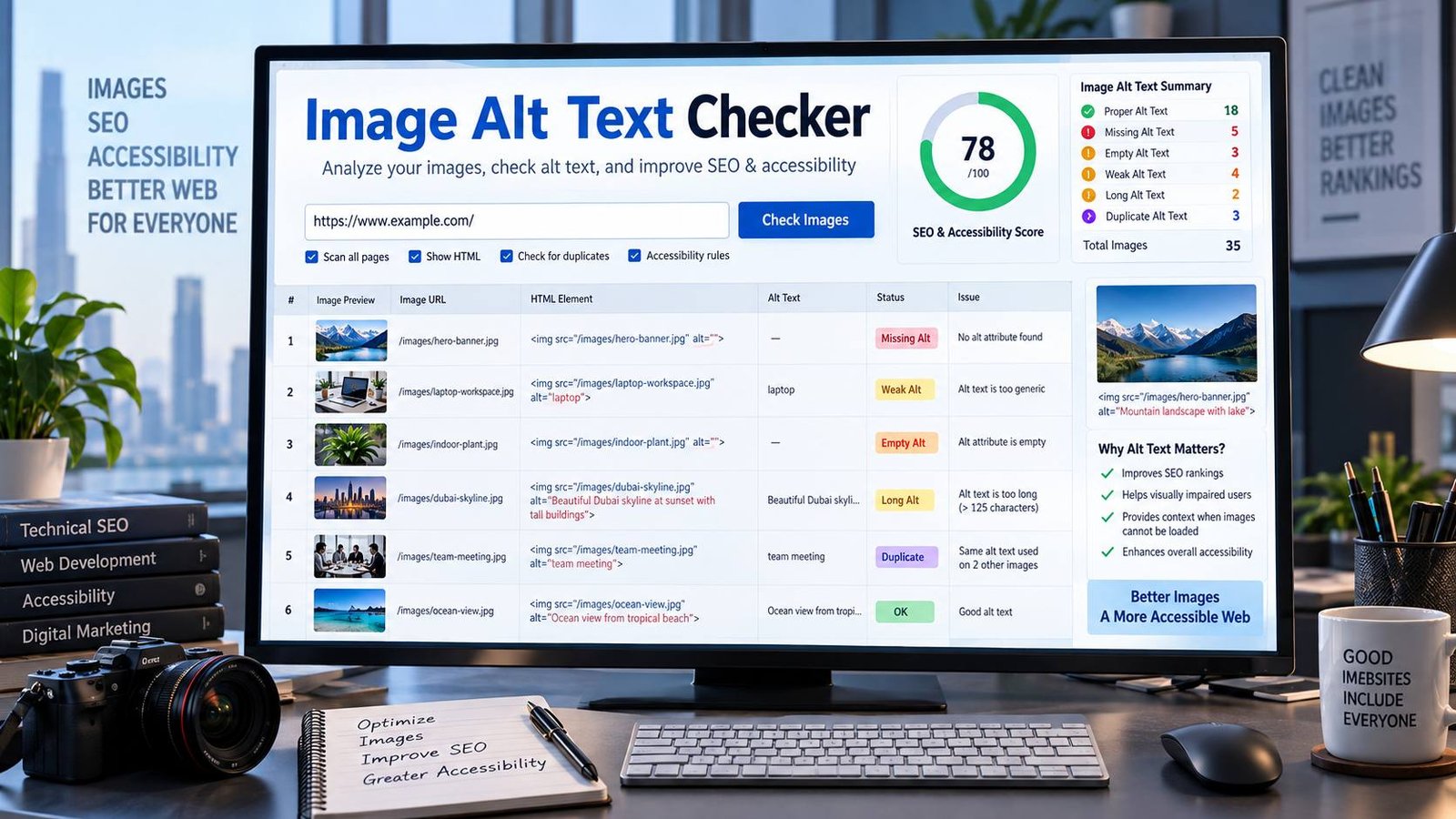
PKCapra Image Alt Text Checker scans a public webpage and shows you what its returned HTML contains for each <img> element. It identifies missing alt attributes, empty alt values, potentially weak descriptions, overly long alt text and duplicate alt text, then gives you an overall alt-text health score.
Use the checker to audit blog posts, landing pages, product pages, documentation, tool pages and other public webpages before or after content changes.
Image Alt Text Checker
Scan a public webpage for image alt text problems and quickly see which images are missing, empty, overly long, or potentially weak.
| Image | Alt text | Finding |
|---|
This checker analyzes the HTML returned for the public URL. An empty alt="" can be intentional for decorative images, so it is reported for review rather than automatically treated as an error.
Analysis uses the public URL you provide. Do not submit private, authenticated, or sensitive URLs.
What Is Image Alt Text?
Alt text is the text value provided through the alt attribute of an HTML image.
For example:
<img src="seo-dashboard.jpg" alt="SEO dashboard showing website performance metrics">The purpose is not simply to tell a search engine what a picture looks like. Good alternative text communicates the information or function that the image provides in its context.
This matters particularly for people who use screen readers or otherwise cannot see the image. W3C’s current image guidance explains that informative images need meaningful text alternatives, while decorative images can use an empty alt="" value.
Google also uses alt text, together with page content and computer vision, to understand images and their subject matter. Google recommends useful, information-rich alt text and specifically advises against keyword stuffing.
Why Does Alt Text Matter for SEO?
Alt text is only one part of image SEO, but it gives search engines useful textual context about an image.
Google says it uses alt text along with the page’s content and other systems to understand what an image is about. Google also recommends placing images near relevant text and using descriptive filenames and alt text.
That means image optimization should not be treated as:
“Put the target keyword into every alt attribute.”
A better approach is:
Describe the meaningful information or function of the image naturally and accurately.
For example, if an article explains how to analyze a website’s HTTP response and the screenshot shows an HTTP status dashboard, an appropriate alt text could be:
“HTTP status checker showing a 200 OK response”
A poor alternative would be:
“HTTP status checker SEO HTTP status checker tool SEO tool HTTP checker”
The second version is not useful to a person using a screen reader and risks becoming keyword stuffing. Google explicitly recommends avoiding keyword stuffing in alt attributes.
What Does PKCapra Image Alt Text Checker Check?
The checker reads the HTML returned for the public URL you provide and analyzes the <img> elements it finds.
Missing Alt Attributes
The tool identifies images where the alt attribute is not present.
For example:
<img src="website-audit.jpg">This is different from:
<img src="website-audit.jpg" alt="">The first has no alt attribute. The second explicitly provides an empty alternative.
Missing alt attributes deserve attention because the browser markup does not communicate an intentional text alternative for the image.
Empty Alt Text
The checker separately reports:
alt=""as Empty alt for review.
This is important because an empty alt attribute is not automatically an error.
W3C recommends an empty alternative for genuinely decorative images that do not add information to the page. This allows assistive technologies to skip them rather than announcing unnecessary content.
So if the checker reports an empty alt value, ask:
Is this image decorative, or does it communicate something important?
If it is decorative, alt="" may be exactly right.
If it conveys meaningful information, review the alternative text.
Weak Alt Text
The checker can flag very generic values such as:
imagephotopicturegraphicimg
These values do not tell the reader much about the image’s purpose or meaningful content.
Instead of:
alt="image"consider something like:
alt="Website performance report showing page speed metrics"The exact wording should depend on what the image actually communicates.
W3C recommends concise alternatives that communicate the information or function represented by the image rather than simply describing an image as an “image” or “picture.”
Long Alt Text
PKCapra flags alt text longer than 125 characters for review.
This is a PKCapra quality heuristic, not a universal HTML or WCAG rule.
There is no single magic character count that makes every alt text correct. The right length depends on the image’s purpose and context.
W3C recommends keeping alternative text as concise as possible while still communicating the image’s purpose. If substantially more detail is needed, that information may belong in the surrounding content or another long-description approach instead.
So a long-alt finding should prompt a question:
Can this image’s useful information be communicated more clearly and concisely?
Duplicate Alt Text
The checker identifies repeated non-empty alt text across multiple images on the same page.
This is useful for content QA, but duplicates are not automatically wrong.
For example, two identical decorative or repeated images may legitimately have the same treatment. On the other hand, giving several different product images exactly the same description may make the alternatives less useful.
Treat duplicate findings as a review signal, not an automatic accessibility failure.
Missing Alt vs Empty Alt: What Is the Difference?
This is one of the most important things to understand when using an alt text checker.
| Situation | Example | Typical action |
|---|---|---|
| Missing attribute | <img src="photo.jpg"> | Review and usually add an appropriate alternative |
| Empty alt | <img src="photo.jpg" alt=""> | Correct for genuinely decorative images |
| Useful descriptive alt | alt="Red running shoes on a white background" | Usually appropriate when the image conveys that information |
| Generic alt | alt="image" | Review and make it meaningful |
| Functional image | alt="Download PDF" | Describe the action/function |
| Complex image | alt="Quarterly sales chart" | Provide additional explanation in surrounding content when necessary |
W3C’s guidance makes the underlying principle clear: the alternative should communicate the information or function of the image.
How to Write Better Alt Text
Good alt text starts with the question:
“What would someone who cannot see this image need to know?”
Then write the shortest natural answer.
Example 1: Informative Photograph
Weak:
alt="photo"Better:
alt="Marketing team reviewing website analytics on a laptop"Example 2: Product Image
Weak:
alt="product image"Better:
alt="Black leather backpack with padded shoulder straps"Only include characteristics that actually matter in the context.
Example 3: Functional Image
If an image is used as a button or link, describe its function, not merely its appearance.
For example:
<img src="download-icon.svg" alt="Download report">W3C specifically recommends describing the destination or action for functional images.
Example 4: Decorative Image
If an image exists only for visual decoration:
<img src="decorative-divider.svg" alt="">Do not force an unnecessary description into the attribute.
W3C recommends null alt text for decorative images so assistive technologies can ignore them.
Do You Need to Put Keywords in Alt Text?
No.
Use a relevant keyword when it naturally describes the image, but do not add keywords merely because you want another place to repeat them.
Google recommends useful, information-rich alt text that is appropriate in context and warns against keyword stuffing.
For example, if the image genuinely shows a “meta description analyzer,” this can be useful:
alt="Meta description analyzer showing a 155-character description"But this is not useful:
alt="meta description analyzer SEO tool meta description checker best meta description analyzer"The second example prioritizes keyword repetition over the user’s experience.
How to Use the PKCapra Image Alt Text Checker
1. Enter a Public Webpage URL
Paste the full URL of the webpage you want to inspect.
For example:
https://example.com/blog/example-page/2. Start the Check
Click Check Image Alt Text.
PKCapra requests the public webpage and examines the HTML response.
3. Review the Health Score
The results include an overall Alt text health score and grade.
You will also see counts for:
- Images found
- Missing alt
- Empty alt
- Needs review
- Long alt text
- Duplicate alt text
4. Review Individual Images
The findings table shows the image, current alt text and detected issue.
This lets you move from a general score to the individual images that require attention.
5. Fix the Source Content
Update the relevant image markup or CMS media field, then scan the page again.
The goal is not simply to achieve a perfect numerical score. The goal is to make the page’s meaningful images understandable to people who cannot see them while keeping decorative images appropriately non-announced.
What Does the Alt Text Health Score Mean?
PKCapra’s score is a practical diagnostic indicator, not a WCAG certification and not a Google ranking score.
The checker gives greater weight to missing alt attributes and also considers review findings such as long or potentially weak alt text.
Use the score to prioritize work:
Excellent
Few or no detected issues.
Still review important images manually because automated HTML checks cannot determine whether an existing description accurately represents the image.
Good
The page has generally healthy alt-text coverage, but some images may deserve attention.
Needs Work
There are enough detected issues to justify a focused image-alt review.
Poor
Significant missing or problematic alt-text coverage should be addressed.
Do not treat the score as a substitute for human accessibility review.
W3C notes that automated checks can identify missing alt attributes, but determining whether an alternative is appropriate requires considering the image and its context.
Why an Automated Checker Cannot Fully Judge Alt Text
This is an important limitation.
A tool can inspect HTML:
<img src="team.jpg" alt="Team members in an office">But the tool may not know whether the photograph actually shows a team in an office.
Likewise:
<img src="chart.png" alt="Sales chart">may technically contain alt text while still failing to communicate the important information contained in the chart.
W3C’s guidance distinguishes simple informative images from complex images such as charts and diagrams. For complex visual information, additional text equivalent information may be needed elsewhere on the page.
So PKCapra should be used as a first-pass QA tool, followed by human review of important images.
Image Alt Text and Accessibility
Alt text is fundamentally an accessibility feature.
People who use screen readers may receive the alternative text instead of the visual image. W3C explains that text alternatives allow people who cannot see images to access their information or function.
This applies to:
- Blog images
- Product photographs
- Infographics
- Screenshots
- Charts
- Diagrams
- Icons
- Image links
- Image buttons
- Logos
- Instructional graphics
But the correct treatment depends on the image’s role.
A decorative background does not need a descriptive paragraph.
A product photograph needs useful product information.
A search icon used as a button needs to communicate the search action.
A chart may need both a concise alternative and supporting text containing the important data.
Alt Text Is Only One Part of Image SEO
Fixing alt attributes does not automatically optimize an image completely.
Google’s image SEO guidance also recommends considering:
- Relevant surrounding page content
- Descriptive image filenames
- Relevant captions where appropriate
- Image placement near related content
- Useful alt text
- Overall page relevance
Google says it combines alt text with the page’s content and computer vision when understanding images.
So an effective image SEO workflow is broader than simply checking whether alt exists.
For example:
Good image SEO workflow
- Use a meaningful image.
- Give the image a sensible filename.
- Place it near relevant content.
- Add useful alt text when the image is informative.
- Use
alt=""when it is genuinely decorative. - Add a caption when a caption helps the reader.
- Avoid keyword stuffing.
- Review important images manually.
Common Alt Text Mistakes
1. Leaving the Alt Attribute Out Completely
<img src="seo.jpg">If the image is meaningful, review it and provide an appropriate alternative.
2. Using “Image” or “Photo” as the Description
alt="image"This communicates almost nothing.
3. Repeating Keywords
Alt text should not become a hidden keyword list.
Google explicitly warns against keyword stuffing in alt attributes.
4. Describing Decorative Images
If an image adds no useful information, forcing a description into the alt attribute can create unnecessary screen-reader noise.
Use:
alt=""when the image is genuinely decorative.
5. Making Every Alt Text Extremely Long
More words do not automatically mean better accessibility.
The goal is useful information, not maximum character count.
6. Treating an Empty Alt as Automatically Broken
An empty alt attribute can be exactly correct for a decorative image.
Always consider the image’s purpose.
7. Assuming a Perfect Automated Score Means Perfect Accessibility
Automated tools can find markup patterns. They cannot fully understand visual meaning and page context.
Human review still matters.
When Should You Run an Image Alt Text Audit?
An alt-text audit is especially useful after:
- Publishing a new content-heavy page
- Adding many new images
- Migrating a website
- Changing WordPress themes
- Replacing page templates
- Moving to a new CMS
- Importing products
- Publishing a large blog update
- Redesigning a website
- Launching a new landing-page section
It is also useful as part of a regular technical SEO and accessibility QA process.
Combine Image Alt Checks With Other SEO Checks
Image accessibility and image SEO do not exist in isolation.
After checking image alt text, review the page’s broader metadata and technical structure.
For example, you can use the Meta Tags Analyzer to inspect important HTML metadata.
Use the Title Tag Analyzer to review the page title and the Meta Description Analyzer to evaluate the meta description.
For social sharing metadata, check the page with the Open Graph Analyzer and X Card Analyzer.
For URL consistency, the Canonical URL Checker can help verify the canonical signal.
And if you’re reviewing the page as part of a broader on-page optimization process, the SEO Heading Analyzer and SEO Content Readability Analyzer can cover other parts of the page.
You can browse the wider PKCapra tool collection when you need another specialized check.
A Practical Image SEO QA Workflow
For an important webpage, use this order:
Step 1 — Check the Page
Start with the Image Alt Text Checker.
Identify missing and review-level findings.
Step 2 — Fix Meaningful Images
Write concise alternatives based on the actual purpose of each image.
Step 3 — Review Decorative Images
Confirm that genuinely decorative images use an appropriate empty alt value.
Step 4 — Review Functional Images
For linked or clickable images, make sure the alternative communicates the destination or action.
Step 5 — Review Complex Images
For charts, diagrams and other information-rich graphics, make sure the important information is also available as text.
Step 6 — Check Wider On-Page SEO
Review title, meta description, headings, canonical and social metadata with the appropriate PKCapra tools.
Step 7 — Recheck
After making significant changes, run the alt-text check again and manually review the important images.
Privacy and Processing
PKCapra Image Alt Text Checker analyzes the public URL you provide.
The current implementation retrieves the webpage server-side and analyzes the HTML returned for that URL. It does not ask you to upload your website’s private files.
For privacy and security, do not submit:
- Private URLs
- Authenticated pages
- Pages containing sensitive information
- Internal staging URLs that expose confidential content
The current checker is designed for publicly accessible HTTP or HTTPS webpages.
It also has a response-size limit and request timeout, so extremely large or unusual pages may not be fully represented in the returned HTML.
Important Limitation: HTML-Based Analysis
The checker analyzes the HTML returned for the public URL.
That means the result may differ from what you see after a browser executes JavaScript.
For example, if images are inserted dynamically by JavaScript after the initial HTML response, they may not appear in the scan.
Likewise, the tool does not use computer vision to decide whether an alt description accurately matches what an image visually contains.
This distinction matters:
The checker can identify markup problems automatically.
It cannot replace human judgment about visual meaning.
That is why the best workflow combines automated detection with manual review.
Frequently Asked Questions
What is an image alt text checker?
An image alt text checker scans webpage HTML for image elements and evaluates their alt attributes. It can identify missing attributes and other patterns that deserve review.
Is alt text important for SEO?
Yes, alt text helps search engines understand image content and context. Google recommends descriptive alt text and says it uses alt text along with page content and computer vision to understand images.
However, alt text is only one part of image SEO and does not guarantee rankings.
Should every image have alt text?
Every image should have an intentional alternative treatment, but that does not mean every image needs a descriptive sentence. Informative images generally need meaningful alternatives, while genuinely decorative images can use alt="".
Is empty alt text bad?
Not necessarily. alt="" is appropriate for decorative images and can prevent unnecessary screen-reader announcements. The important question is whether the image is actually decorative.
What is the difference between missing alt and empty alt?
Missing alt means the alt attribute is absent. Empty alt means the attribute exists but contains no text:
alt=""Those two cases have different meanings and should not automatically be treated as the same problem.
How long should alt text be?
There is no universal character limit that makes alt text correct. It should be concise while communicating the important information or function of the image. PKCapra flags alt text over 125 characters as a practical review heuristic, not as a WCAG requirement.
Should I put my target keyword in every image alt attribute?
No. Use relevant terminology when it genuinely describes the image, but avoid repeating keywords unnaturally. Google specifically advises against keyword stuffing in alt text.
Can an alt text checker tell whether my alt text is accurate?
Not completely. Automated tools can inspect the HTML and identify patterns, but determining whether the text accurately represents the image requires visual and contextual judgment. W3C also notes that automated checks cannot determine whether an alternative is appropriate in context.
Does PKCapra analyze private webpages?
No. The current tool is designed for publicly accessible HTTP/HTTPS webpages. Do not submit private or authenticated URLs.
Can the checker see images loaded by JavaScript?
The current implementation analyzes the HTML returned by the public URL. Images that only appear after client-side JavaScript execution may not be present in the scan.
Does a good alt-text score guarantee good accessibility?
No. The score is a diagnostic aid. Accessibility depends on context, image purpose, functional behavior and whether the alternative actually communicates the information users need.
Final Takeaway
Good alt text is not about filling every image field with keywords.
It is about making meaningful visual information available to people who cannot see it while giving search engines useful context about the image.
Use the PKCapra Image Alt Text Checker to find missing and potentially problematic alt attributes quickly. Then use human judgment to decide what each image actually needs.
The strongest workflow is simple:
Scan → Identify → Understand the image’s purpose → Fix meaningful images → Confirm decorative images → Review complex visuals → Recheck.