
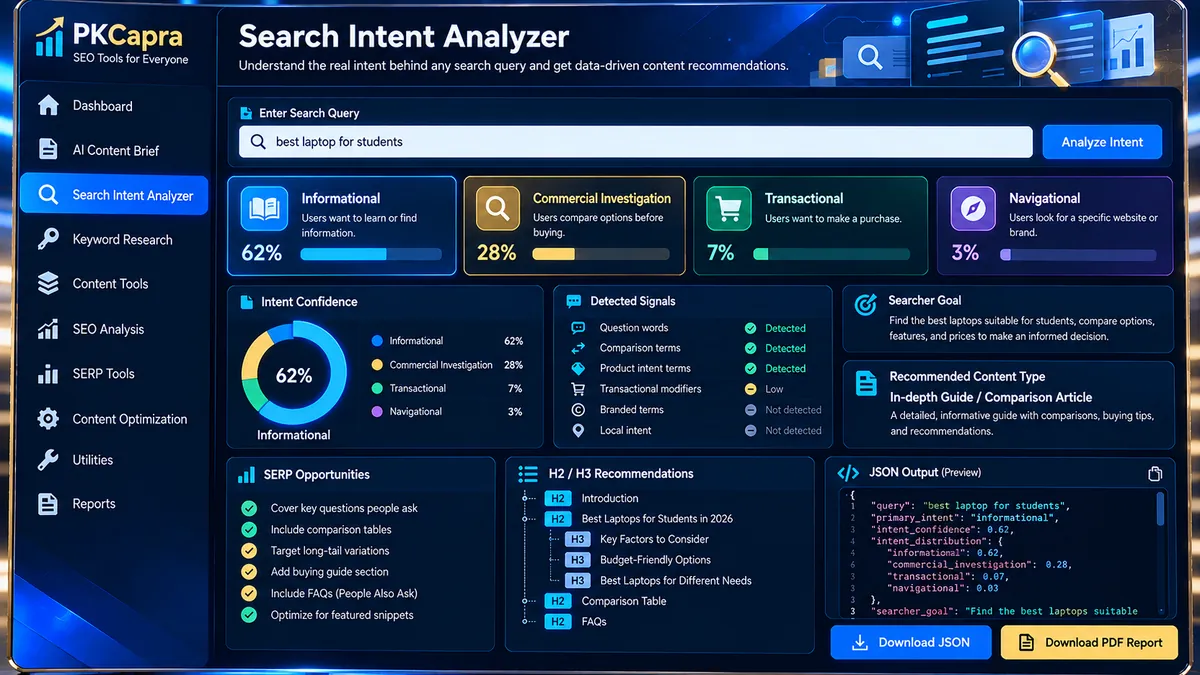
Use the PKCapra Search Intent Analyzer to understand what a searcher is likely trying to accomplish with a keyword or search query. Enter a primary query, add an optional secondary keyword and audience context, then select the business objective that best matches the search. The analyzer evaluates the query using a browser-based heuristic and identifies the likely search intent, intent signals, searcher goal, suitable content type, content angle, SERP feature opportunities, and recommended heading ideas. It is designed to help you plan SEO content around the purpose behind a search rather than relying on the keyword alone.
Search Intent Analyzer
Analyze a search query and turn its wording into a practical intent profile, content direction, SERP opportunity map, and recommended heading structure.
JSON report
Intent classification is heuristic and deterministic. It does not fetch live Google/Bing results, search volume, rankings, click-through data, or competitor pages.
How to Use the Search Intent Analyzer in Simple Steps
- Enter the primary search query. Type the keyword or search phrase you want to analyze into the Primary Search Query field.
- Add optional context. Enter a secondary keyword when useful, then provide the audience or market context to make the analysis more specific.
- Select the business objective. Choose whether the searcher is primarily trying to understand something, compare or evaluate options, take action, or reach a known destination.
- Run and export the analysis. Select Analyze Search Intent to generate the intent classification, confidence, intent signals, searcher goal, recommended content type, content angle, SERP feature opportunities, and heading recommendations. You can then copy the report or JSON output, download the JSON, or download the PDF report.
How the Search Intent Analyzer Works
The Search Intent Analyzer is a browser-based search-intent analysis utility that evaluates a search query using deterministic language and context signals. It classifies the dominant intent into four practical categories: informational, commercial investigation, transactional, or navigational.
The analysis is designed to turn a keyword into a usable content decision. Instead of stopping at an intent label, the tool also provides a heuristic confidence level, the signals that influenced the classification, the likely searcher goal, an appropriate content type and angle, potential SERP feature opportunities, recommended H2/H3 topics, and secondary intent or contextual considerations.
The processing is performed in the browser rather than requiring a live Google or Bing results lookup. The current implementation does not fetch live SERPs, search-volume databases, ranking data, click-through-rate data, or competitor pages. Its classification should therefore be treated as a structured research signal rather than a substitute for live SERP validation.
Search Intent Categories
- Informational: The query primarily indicates a need to learn, understand, define, explain, or research something.
- Commercial Investigation: The query indicates that the searcher is comparing, evaluating, or researching options before making a decision.
- Transactional: The query indicates an intention to take an action such as buying, signing up, downloading, booking, or otherwise completing a task.
- Navigational: The query indicates that the searcher is trying to reach a known website, brand, service, destination, or specific resource.
What the Analysis Report Provides
- Dominant search intent classification
- Heuristic confidence level
- Intent signals detected in the query
- Likely searcher goal
- Recommended content type
- Recommended content angle
- SERP feature opportunities
- Recommended H2 and H3 topics
- Secondary intent and contextual considerations
- Methodology notes describing the limits of the analysis
- Structured JSON output for reuse in SEO workflows
- PDF report export for documentation and sharing
Developer Snippets (Automate This Tool Offline)
The following Python example provides a lightweight offline keyword-intent classifier using transparent lexical rules. It is useful for batch research and automation, but it is a separate implementation and should not be treated as an exact reproduction of every internal rule used by the PKCapra interface.
from dataclasses import dataclass
import re
from typing import List


@dataclass
class IntentResult:
    query: str
    intent: str
    confidence: float
    signals: List[str]


INTENT_RULES = {
    "informational": [
        r"\bwhat is\b",
        r"\bwhat are\b",
        r"\bhow to\b",
        r"\bhow does\b",
        r"\bwhy\b",
        r"\bguide\b",
        r"\btutorial\b",
        r"\bmeaning\b",
        r"\bdefinition\b",
    ],
    "transactional": [
        r"\bbuy\b",
        r"\border\b",
        r"\bdownload\b",
        r"\bsubscribe\b",
        r"\bsign up\b",
        r"\bbook\b",
        r"\bpricing\b",
        r"\bprice\b",
        r"\bdeal\b",
    ],
    "commercial investigation": [
        r"\bbest\b",
        r"\btop\b",
        r"\bvs\b",
        r"\bversus\b",
        r"\bcomparison\b",
        r"\breview\b",
        r"\balternative\b",
        r"\balternatives\b",
    ],
    "navigational": [
        r"\blogin\b",
        r"\blog in\b",
        r"\bofficial site\b",
        r"\bofficial website\b",
        r"\bhomepage\b",
        r"\bcontact\b",
    ],
}


def classify_intent(query: str) -> IntentResult:
    normalized = re.sub(r"\s+", " ", query.strip().lower())

    scores = {
        intent: 0
        for intent in INTENT_RULES
    }

    matched_signals = {
        intent: []
        for intent in INTENT_RULES
    }

    for intent, patterns in INTENT_RULES.items():
        for pattern in patterns:
            if re.search(pattern, normalized):
                scores[intent] += 1
                matched_signals[intent].append(pattern)

    if max(scores.values()) == 0:
        return IntentResult(
            query=query,
            intent="informational",
            confidence=0.35,
            signals=["No strong lexical modifier detected"],
        )

    ordered = sorted(
        scores.items(),
        key=lambda item: item[1],
        reverse=True,
    )

    winning_intent, winning_score = ordered[0]
    total_score = sum(scores.values())

    confidence = min(
        0.95,
        0.50 + (winning_score / max(total_score, 1)) * 0.45,
    )

    return IntentResult(
        query=query,
        intent=winning_intent,
        confidence=round(confidence, 2),
        signals=matched_signals[winning_intent],
    )


if __name__ == "__main__":
    queries = [
        "what is technical SEO",
        "best keyword research tools",
        "buy SEO software",
        "ahrefs login",
    ]

    for query in queries:
        result = classify_intent(query)
        print(result)
For larger keyword sets, the same classification logic can be extended to CSV input and CSV output. Keep the result as a research layer: important keywords should still be checked against the actual search results before making page-architecture decisions.
Search Intent Analysis with Microsoft Excel Power Query
Excel Power Query can be used to create a repeatable manual workflow for organizing keyword research before or after running an intent analysis.
- Open Excel and place your keyword list in a structured table with a clear Keyword column.
- Select Data → From Table/Range to open the table in Power Query.
- Remove blank rows and duplicate keywords so the analysis is not distorted by repeated entries.
- Select the keyword column and use Transform → Format → Trim to remove unnecessary leading and trailing spaces.
- Use Transform → Format → Lowercase when you want a normalized working copy for rule-based analysis.
- Add an Intent column containing the classification produced by your research workflow.
- Add optional columns such as Audience, Business Objective, Content Type, Secondary Intent, and Notes.
- Use Home → Close & Load to return the cleaned keyword-intent dataset to Excel.
This workflow is useful when a keyword list needs to become an editorial planning table. The Search Intent Analyzer can provide a structured first-pass classification, while Power Query provides repeatable data cleaning and organization.
Frequently Asked Questions
What is a Search Intent Analyzer?
A Search Intent Analyzer is a tool that classifies a search query according to the likely task behind the query, such as learning, comparing, taking action, or reaching a known destination.
What search intent categories does the PKCapra Search Intent Analyzer use?
The PKCapra Search Intent Analyzer uses informational, commercial investigation, transactional, and navigational intent categories.
Does the Search Intent Analyzer use live Google search results?
The current PKCapra implementation does not fetch live Google or Bing search results. It uses a browser-based deterministic heuristic analysis of the supplied query and context.
Does it provide search volume or keyword difficulty?
The Search Intent Analyzer does not provide search volume, keyword difficulty, ranking positions, or CTR data. Its purpose is intent classification and content-direction analysis.
Can I analyze a secondary keyword?
Yes. The tool provides an optional secondary keyword field that can add context to the primary query analysis.
What does the business objective field do?
The business objective field adds contextual information about the desired searcher task, including understanding information, comparing options, taking action, or reaching a known destination.
Can I download the search-intent analysis?
Yes. The current interface provides Copy Report, Copy JSON, Download JSON, and Download PDF Report actions.
Can the analyzer replace SERP research?
No. The analyzer provides a heuristic classification and content-direction signal, while live SERP research is still needed when the final decision depends on current ranking-page patterns.
Can I use the results for content briefs?
Yes. The generated searcher goal, content type, content angle, SERP opportunities, and recommended H2/H3 topics can be used as inputs for a content-planning workflow.
Is the analysis a guaranteed prediction of Google rankings?
No. Search-intent classification is not a ranking prediction. The output should be used as a structured research signal and combined with current SERP evidence when making SEO decisions.