
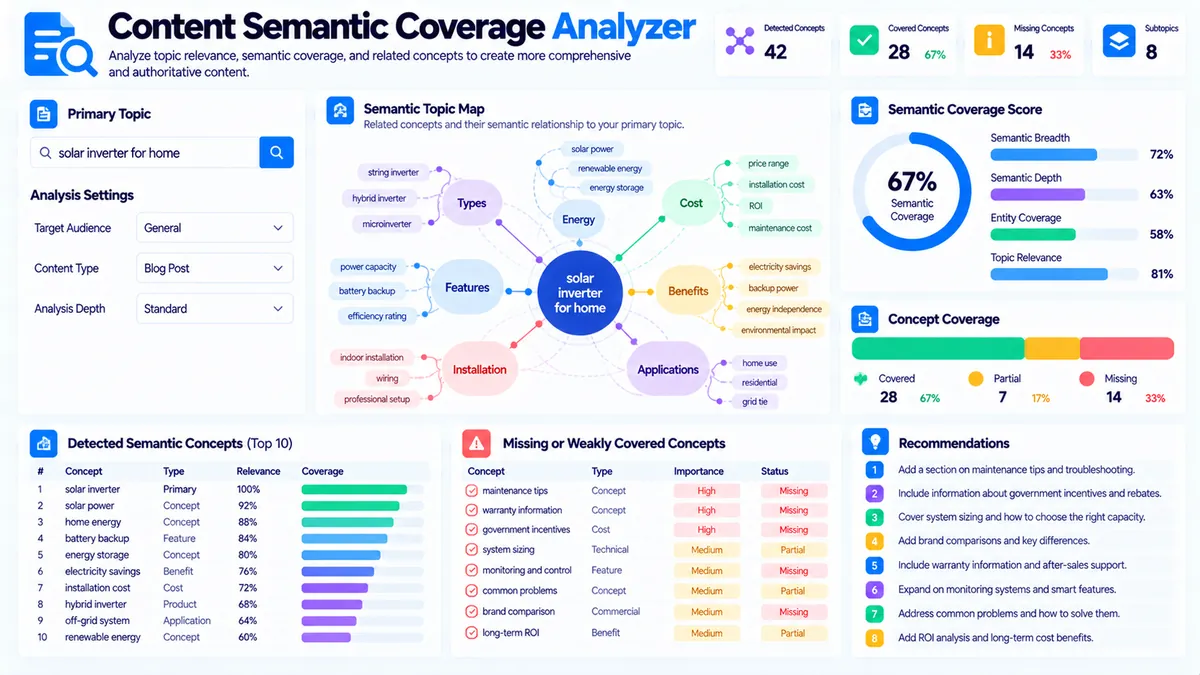
The Content Semantic Coverage Analyzer helps you check whether a page covers the important concepts and terminology associated with its primary topic. Instead of looking only at exact keyword matches, it examines topic-related vocabulary, reference concepts, semantic breadth, semantic depth, and potential coverage gaps.
Enter a Primary Topic, optionally provide Reference Concepts / Terms, paste your content, choose the analysis depth and maximum number of concepts, then run the analysis. The tool produces a structured view of detected concepts, topic coverage, semantic breadth and depth, missing concepts, content statistics, and practical recommendations.
The analyzer works in your browser and does not require an external NLP API, knowledge graph, or third-party SEO database.
Content Semantic Coverage Analyzer
Measure how broadly and deeply your content covers the concepts, related terms, and topic signals connected to a primary subject.
Topic to analyze
Content to analyze
Semantic Coverage Report
Coverage, breadth, depth, concept candidates, and gaps are inferred from the topic, optional reference concepts, and supplied content.
View JSON report
How to Use the Content Semantic Coverage Analyzer in Simple Steps
- Enter the main subject of the page in Primary Topic. Use the topic the content is actually intended to cover.
- Optionally enter Reference Concepts / Terms as a benchmark. Add important concepts, entities, subtopics, or terminology that you expect the content to address.
- Paste your article, landing-page copy, guide, documentation, or HTML into the Content box. Then choose Analysis Depth and the Maximum Concepts limit.
- Click Analyze Semantic Coverage and review the semantic coverage scores, detected concepts, reference coverage, missing concepts, content statistics, and recommendations.
Use Load Example to test the analyzer with sample content or Clear to reset the form.
The tool supports content up to 100,000 characters.
What Is Semantic Coverage?
Semantic coverage describes how thoroughly a page addresses the concepts associated with its main subject.
A page can mention a primary keyword many times while still providing limited topical coverage.
For example, a page about technical SEO might repeatedly use the phrase:
technical SEO
but provide little information about:
- Crawling
- Indexing
- XML sitemaps
- Canonical URLs
- Redirects
- Robots directives
- Structured data
- Internal linking
- Page performance
The exact importance of each concept depends on the page’s purpose. The analyzer helps you inspect the broader vocabulary and concepts actually represented in the supplied content.
Primary Topic Analysis
The Primary Topic provides the central subject against which the content is evaluated.
For example:
technical SEO
or:
email marketing automation
or:
project management software
The analyzer uses the topic to identify relevant terminology and evaluate how strongly the supplied content covers the subject.
A specific topic generally produces more useful analysis than a very broad phrase.
For example:
technical SEO audit
provides a more focused benchmark than simply:
SEO
when the page is specifically about technical SEO auditing.
Reference Concepts / Terms
The optional Reference Concepts / Terms field gives you direct control over the concepts you want to evaluate.
You can provide terms such as:
- Crawlability
- Indexing
- XML sitemap
- Canonical tags
- Robots.txt
- Redirects
- Structured data
This is useful when you already have a content brief, editorial outline, subject-matter checklist, or known topic vocabulary.
The analyzer can then compare the supplied content against those reference concepts and show which concepts are covered and which may be missing.
If the field is left blank, the analyzer uses its local topic-vocabulary and content signals to estimate semantic coverage.
Analysis Depth
The analyzer provides three analysis-depth options.
Focused
Focused analysis keeps the concept set narrower and concentrates on stronger topic-related signals.
Use it when you want to review the core concepts of a page.
Balanced
Balanced analysis provides a broader mix of core and supporting concepts.
It is useful for general content audits where you want meaningful coverage without producing an overly wide concept set.
Broad
Broad analysis allows a wider concept set and can surface more supporting terminology.
Use it when reviewing comprehensive guides, long-form resources, or pages where the subject naturally contains many related concepts.
Maximum Concepts
You can control the maximum number of concepts included in the analysis.
Available limits include:
- 25
- 50
- 75
- 100
A smaller limit keeps the report focused on the strongest candidates.
A larger limit can help when analyzing long-form content with a wide subject vocabulary.
The maximum number does not mean that every listed concept is equally important. It controls how many candidate concepts the report can include.
Semantic Breadth
Semantic breadth looks at how many distinct relevant concepts and topic areas are represented within the content.
A page with strong breadth may cover multiple meaningful dimensions of its subject.
For example, an article about website migrations might address:
- URL changes
- Redirects
- Canonicalization
- Sitemaps
- Internal links
- Analytics
- Search visibility
- Testing
- Monitoring
A page focused on only one narrow aspect may have lower breadth even if that one aspect is discussed in considerable detail.
Breadth is therefore about the range of relevant concepts covered.
Semantic Depth
Semantic depth considers how substantially the content develops the concepts it mentions.
Mentioning ten concepts once does not necessarily provide strong semantic depth.
For example, an article might mention:
canonical tags
once without explaining what they do, when to use them, common implementation errors, or how to validate them.
Another article might dedicate a complete section to canonicalization and explain practical implementation considerations.
The second page provides stronger evidence of depth for that concept.
The analyzer uses local content signals to estimate this difference.
Breadth vs. Depth
Breadth and depth answer different questions.
Semantic breadth:
“How many relevant areas of the topic does this content cover?”
Semantic depth:
“How substantially does the content develop the concepts it covers?”
A page can therefore have:
- High breadth and low depth
- Low breadth and high depth
- High breadth and high depth
- Low breadth and low depth
The appropriate balance depends on the page’s purpose.
A short definition page may intentionally have limited breadth. A comprehensive guide may require much wider coverage.
Detected Semantic Concepts
The report lists concepts detected from the supplied content and evaluates their relationship to the primary topic.
Concepts can be surfaced from:
- Repeated terminology
- Multi-word phrases
- Topic vocabulary
- Reference concepts
- Known topic-related terms
- Related content signals
The analyzer focuses on practical editorial signals rather than claiming to identify every concept contained in the text.
Reference Concept Coverage
When you provide reference concepts, the analyzer checks which of those concepts appear to be represented in the content.
For example, suppose your reference list contains:
- Crawl budget
- XML sitemap
- Canonical URL
- Robots.txt
- Internal linking
If the content clearly discusses four of these concepts but does not meaningfully mention one, the report can identify that potential coverage gap.
This makes the feature particularly useful for working from a predefined content brief.
Missing Concept and Coverage Gaps
The analyzer can identify concepts that appear relevant to the selected topic but have limited or missing representation in the supplied content.
A coverage gap is not automatically a recommendation to add more text.
Before adding a missing concept, ask:
- Is the concept genuinely relevant to this page?
- Does the searcher need this information?
- Does it fit the page’s intended scope?
- Can it be explained accurately?
- Would adding it improve the user’s ability to understand or act on the topic?
This prevents semantic optimization from turning into unnecessary keyword or topic expansion.
Relevant Concepts vs. General Concepts
Not every repeated phrase is meaningful to the topic.
The analyzer therefore distinguishes topic-related concepts from more general vocabulary where its local signals allow that distinction.
For example, common words such as:
website
information
or:
process
may occur frequently in many types of content without providing much evidence of topical specificity.
More specific phrases such as:
canonical URL
crawl budget
or:
XML sitemap
can provide stronger subject-level signals when the primary topic is technical SEO.
Topic Vocabulary
The analyzer can use local topic vocabulary to identify terminology that is associated with the supplied primary topic.
This helps the tool move beyond exact-match keyword checking.
For example, content about email marketing may contain concepts such as:
- Campaigns
- Subscribers
- Segmentation
- Automation
- Open rates
- Click-through rates
- Deliverability
- Personalization
The presence of related terminology can provide useful evidence that the content covers multiple dimensions of the topic.
The vocabulary signals are heuristic and should not be interpreted as an authoritative taxonomy.
Practical Example: Technical SEO
Suppose the primary topic is:
technical SEO
and the page discusses only:
- Website speed
- Mobile performance
- Core Web Vitals
The page may be useful as a focused performance guide, but its semantic coverage of the broader topic “technical SEO” is narrower.
A broader technical SEO resource might also address:
- Crawling
- Indexing
- Robots.txt
- XML sitemaps
- Canonical URLs
- Redirects
- Structured data
- Internal linking
- JavaScript rendering
The analyzer helps you identify that difference.
The goal is not to force every concept into every page. It is to make the scope visible so you can decide whether the page needs expansion or whether the primary topic should be narrower.
Practical Example: Email Marketing
Consider a page targeting:
email marketing automation
A page that only defines email automation may have limited semantic depth.
A more developed page might explain:
- Automated campaigns
- Trigger-based workflows
- Subscriber segmentation
- Personalization
- Welcome sequences
- Abandoned-cart emails
- Lead nurturing
- Deliverability
- Performance measurement
The analyzer can help reveal whether the content contains a meaningful range of related concepts rather than relying primarily on repeated uses of the target phrase.
Practical Example: Project Management Software
Suppose the primary topic is:
project management software
Potential supporting concepts might include:
- Task management
- Team collaboration
- Project planning
- Gantt charts
- Time tracking
- Reporting
- Integrations
- Permissions
- Automation
- Pricing
If the content discusses only task management, it may provide useful depth on one feature while offering limited semantic breadth for the broader software category.
The report can help you identify that distinction.
How to Use Reference Concepts from a Content Brief
If you already have an editorial brief, turn the important subject requirements into reference concepts.
For example:
Primary Topic:technical SEO audit
Reference Concepts:crawlability, indexing, redirects, canonical tags, XML sitemap, robots.txt, structured data, internal links, page speed
Then paste the draft content into the analyzer.
The report can show which planned concepts are represented and which may need attention.
This creates a practical workflow between content planning and final-page auditing.
Semantic Coverage Is Not Keyword Density
Semantic coverage is different from keyword density.
Keyword density asks how frequently a particular word or phrase appears.
Semantic coverage asks whether the content addresses meaningful concepts associated with the subject.
Repeating:
technical SEO
twenty times does not necessarily demonstrate coverage of technical SEO concepts.
Likewise, adding a long list of related words without explaining them does not automatically create useful semantic depth.
The analyzer is intended to support meaningful topical review rather than repetitive keyword insertion.
How to Interpret the Coverage Results
A strong coverage result generally means that the supplied content contains a broad and relevant set of concepts associated with the selected topic or reference benchmark.
A moderate result indicates that meaningful concepts are present but some areas may be limited or uneven.
A weaker result suggests that the content may be covering only a narrow portion of the selected subject or missing important benchmark concepts.
Always interpret the result against the intended scope of the page.
A focused landing page and a 5,000-word educational guide should not necessarily have the same semantic coverage profile.
Recommendations from the Analyzer
The tool generates recommendations based on its detected coverage patterns.
Possible recommendations can include:
- Expand coverage of important missing concepts
- Strengthen depth around major concepts
- Review reference concepts with weak coverage
- Reduce unnecessary repetition
- Narrow the primary topic if the content intentionally covers a smaller subject
- Add supporting explanations where concepts are mentioned without sufficient development
- Review whether the current content scope matches the intended topic
Recommendations are generated from the supplied content and local heuristic signals.
Technical Breakdown: How the Analyzer Works
The Content Semantic Coverage Analyzer processes the supplied content in the browser.
It normalizes the input, removes non-content HTML elements where applicable, extracts candidate concepts and terminology, compares them with the primary topic and optional reference concepts, and evaluates coverage patterns.
The analyzer considers local signals such as:
- Topic vocabulary
- Repeated phrases
- Multi-word terminology
- Reference concept matches
- Concept frequency
- Position and contextual signals
- Topic-related lexical relationships
It then combines those signals into semantic breadth, semantic depth, coverage, and recommendation outputs.
The tool does not connect to a live search engine, external knowledge graph, or third-party semantic database.
Browser-Side Processing and Privacy
The core analysis runs in the browser using the content supplied to the tool.
No external NLP API is required.
The analyzer does not need:
- Google Search access
- Live SERP data
- Search Console data
- A third-party knowledge graph
- An external SEO database
The results are therefore based on the text and settings supplied to the analyzer.
What the Semantic Coverage Score Does Not Mean
The semantic coverage result is not:
- A Google ranking score
- A ranking prediction
- A search-volume metric
- A keyword-density recommendation
- A direct measurement of topical authority
- A guarantee that a page covers every concept a search engine may associate with a topic
Search engines use much more complex systems than a local browser-side heuristic analyzer.
The tool is best used as an editorial diagnostic that helps you inspect the scope and terminology of your content.
Improving a Page After the Analysis
If the report identifies coverage gaps, work through them selectively.
Start with the concepts most closely connected to the page’s actual purpose.
Then ask:
- Does the concept answer an important user question?
- Does it explain something necessary to understand the topic?
- Does it belong on this page rather than another page?
- Can the concept be developed with useful information?
- Does adding it improve clarity or only increase terminology?
For concepts that belong on another page, consider linking to a dedicated resource instead of expanding the current page unnecessarily.
For larger content structures, the Topic Cluster Generator can help organize related subjects into connected content groups.
Combining Semantic Coverage with Other Content Tools
Semantic coverage works best as part of a broader content-audit process.
Use the Content Entity Analyzer to inspect likely people, organizations, places, products, technologies, and concepts within the content.
Use the Content-to-Keyword Mapper to connect page content with keyword themes.
Use the Content Gap Analyzer when you need to investigate missing topic coverage across content.
Use the Search Intent Analyzer and Content Search Intent Alignment Checker to review whether the page’s subject and structure match the purpose behind the target query.
For organizing related subjects, use Keyword Clustering or Keyword Grouping.
Developer Snippets (Automate This Tool Offline)
The following examples demonstrate a lightweight offline approach to finding repeated multi-word concepts. They are not a complete recreation of the PKCapra analyzer and do not reproduce its topic vocabulary, breadth, depth, reference matching, or recommendation logic.
Python
import re
from collections import Counter

text = """
Technical SEO audits examine crawling, indexing, XML sitemaps,
canonical URLs, redirects, robots.txt, structured data,
internal links, and page performance.
"""

# Normalize whitespace.
normalized = re.sub(r"\s+", " ", text).strip()

# Extract simple two-to-four-word phrases.
pattern = r"\b[A-Za-z][A-Za-z0-9-]*(?:\s+[A-Za-z][A-Za-z0-9-]*){1,3}\b"

phrases = re.findall(pattern, normalized.lower())

counts = Counter(
    phrase.strip()
    for phrase in phrases
    if len(phrase.strip()) > 5
)

for phrase, frequency in counts.most_common(20):
    print(f"{phrase}: {frequency}")
PowerShell
$text = @"
Technical SEO audits examine crawling, indexing, XML sitemaps,
canonical URLs, redirects, robots.txt, structured data,
internal links, and page performance.
"@

$normalized = $text -replace '\s+', ' '

# Extract simple two-to-four-word phrase candidates.
$pattern = '\b[A-Za-z][A-Za-z0-9-]*(?:\s+[A-Za-z][A-Za-z0-9-]*){1,3}\b'

$matches = [regex]::Matches($normalized.ToLower(), $pattern)

$counts = @{}

foreach ($match in $matches) {
    $phrase = $match.Value.Trim()

    if ($phrase.Length -gt 5) {
        if ($counts.ContainsKey($phrase)) {
            $counts[$phrase]++
        } else {
            $counts[$phrase] = 1
        }
    }
}

$counts.GetEnumerator() |
    Sort-Object Value -Descending |
    Select-Object -First 20 |
    ForEach-Object {
        "$($_.Key): $($_.Value)"
    }
Node.js
const text = `
Technical SEO audits examine crawling, indexing, XML sitemaps,
canonical URLs, redirects, robots.txt, structured data,
internal links, and page performance.
`;

const normalized = text.replace(/\s+/g, " ").trim().toLowerCase();

// Extract simple two-to-four-word phrase candidates.
const pattern = /\b[A-Za-z][A-Za-z0-9-]*(?:\s+[A-Za-z][A-Za-z0-9-]*){1,3}\b/g;

const phrases = normalized.match(pattern) || [];
const counts = new Map();

for (const phrase of phrases) {
  const value = phrase.trim();

  if (value.length > 5) {
    counts.set(value, (counts.get(value) || 0) + 1);
  }
}

[...counts.entries()]
  .sort((a, b) => b[1] - a[1])
  .slice(0, 20)
  .forEach(([phrase, frequency]) => {
    console.log(`${phrase}: ${frequency}`);
  });
These examples demonstrate phrase extraction only. A production semantic-coverage workflow should add topic-specific reference concepts, normalization, synonym handling, concept classification, and contextual validation before treating extracted phrases as meaningful semantic concepts.
Native Software Workflow: Review Semantic Coverage in Excel with Power Query
Excel can help you organize content briefs and reference concepts before running pages through the analyzer.
Create columns such as:
- URL
- Primary Topic
- Reference Concepts
- Page Title
- Content
- Semantic Breadth
- Semantic Depth
- Coverage Notes
- Missing Concepts
- Editorial Action
Then use Power Query to clean and organize the inventory.
A practical workflow is:
- Import your content inventory into Excel.
- Keep one page per row.
- Store the primary topic separately from the reference concepts.
- Use Power Query to normalize whitespace and clean unnecessary formatting.
- Review the reference concepts for duplicates and obvious variations.
- Paste the selected page content into the analyzer.
- Run the analysis at the depth appropriate for the page.
- Record important coverage gaps and recommendations in your inventory.
- Compare related pages to determine whether a missing concept belongs on the current page or another resource.
- Update the content selectively and recheck the page.
This approach is useful for content teams maintaining large inventories of guides, landing pages, product documentation, and supporting articles.
Common Semantic Coverage Problems
Repeating the primary keyword without covering related concepts
A page can mention the primary topic repeatedly while providing little supporting information.
Review whether important subtopics and concepts are actually explained.
Listing concepts without developing them
A page may contain many related terms but offer little explanation.
This can produce breadth without meaningful depth.
Over-expanding a focused page
A missing concept is not always a problem.
If the page intentionally addresses a narrow question, adding every related concept may reduce clarity.
Reference concepts are too broad
A reference list containing dozens of loosely related terms can make the benchmark less useful.
Keep reference concepts connected to the actual purpose of the page.
Different concepts belong on different pages
A content gap may indicate an opportunity for a separate supporting article rather than another section on the current page.
Use topic clustering and internal-link planning when the subject naturally spans multiple pages.
General vocabulary is mistaken for topical coverage
Common words can appear frequently without providing meaningful evidence of subject coverage.
Always review whether a detected concept contributes useful topical information.
Reporting and Export
After analysis, the report provides several output options.
Copy Report copies the human-readable semantic coverage report.
Copy JSON copies the structured analysis data.
Download JSON creates a local JSON file for offline storage or further processing.
Download PDF creates a direct PDF report containing the semantic coverage findings.
These outputs make it easier to preserve content-audit results and share them with editors, writers, or SEO teams.
Frequently Asked Questions
What is semantic coverage in SEO content?
Semantic coverage is the extent to which content addresses relevant concepts and terminology associated with its main subject rather than relying only on an exact target keyword.
What does the Content Semantic Coverage Analyzer measure?
It evaluates topic-related concepts, reference concept coverage, semantic breadth, semantic depth, content statistics, and potential coverage gaps.
Do I need to provide reference concepts?
No. Reference concepts are optional. You can provide them when you already have a content brief or benchmark, or leave the field blank and let the analyzer use its local topic-vocabulary signals.
What is semantic breadth?
Semantic breadth measures the range of relevant concepts represented in the content.
What is semantic depth?
Semantic depth measures how substantially the content develops the concepts it covers rather than merely mentioning them.
Is semantic coverage the same as keyword density?
No. Keyword density focuses on the frequency of particular words or phrases. Semantic coverage focuses on the range and development of relevant concepts.
Does the analyzer use Google or live search results?
No. The analyzer does not require live Google Search or SERP data. Its core analysis is based on the content and settings supplied by the user.
Does it use an external NLP API?
No. The tool performs its core analysis in the browser without requiring a third-party NLP API.
Should I add every missing concept reported by the tool?
No. A missing concept is a review signal, not an automatic content requirement. Add a concept only when it is relevant to the page’s purpose and useful to the reader.
Can a short page have good semantic coverage?
Yes. Semantic coverage depends on the intended scope of the page. A focused page can cover its subject appropriately without trying to address every related concept.
Does a high semantic coverage score guarantee better rankings?
No. The analyzer provides an editorial diagnostic, not a ranking prediction or search-engine score.
Continue Your Content Audit
Use the Content Semantic Coverage Analyzer to understand what your page actually covers, then combine those findings with other content signals.
The Content Entity Analyzer can help inspect named entities and recurring concepts. The Content Search Intent Alignment Checker can help determine whether the page matches the purpose behind its target query.
For missing subject coverage, use the Content Gap Analyzer. For keyword organization, use Keyword Clustering and Keyword Grouping.
For broader content architecture, explore the Topic Cluster Generator and Pillar Page Analyzer.
For additional page-level checks, visit the SEO Website Tools collection.