
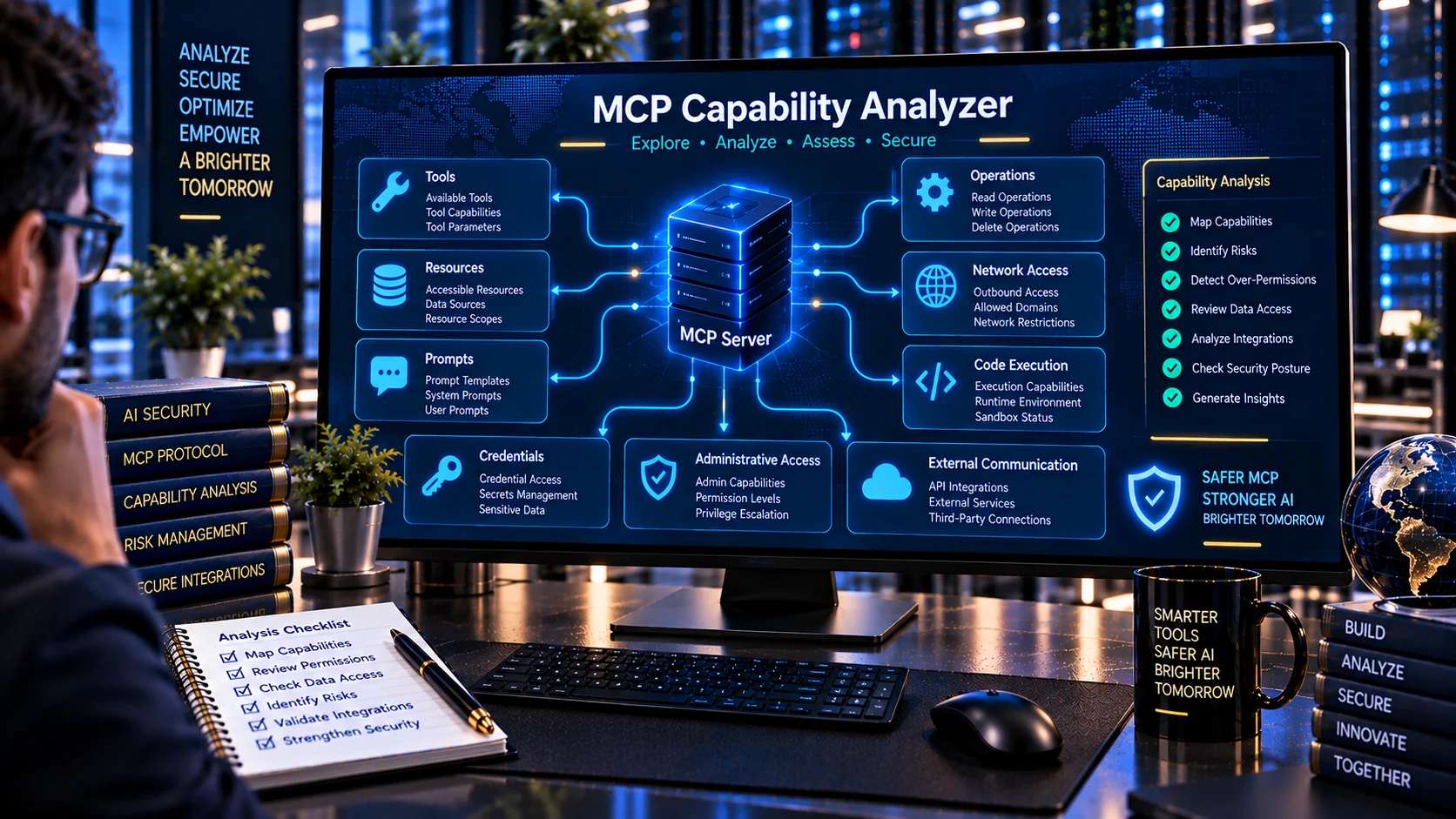
MCP Capability Analyzer helps developers and security teams inspect Model Context Protocol (MCP) server definitions and understand the capabilities exposed to AI applications. Analyze tools, resources, prompts, declared capabilities, access patterns, high-impact operations, network access, credential handling, administrative actions, and other capability signals before connecting an MCP server to an AI system.
MCP Capability Analyzer
Analyze an MCP server definition to summarize exposed tools, resources, prompts, capability declarations, tool permissions, and potentially high-impact actions before connecting the server to an AI application.
Capability Summary
Capability Categories
Findings
What Is an MCP Capability Analyzer?
An MCP Capability Analyzer is a utility for identifying and organizing the capabilities exposed by an MCP server.
An MCP server can expose multiple types of functionality, including tools, resources, and prompts. Understanding this capability surface is important when reviewing an MCP integration because the declared functionality can determine what an AI application or agent is able to discover and potentially use.
PKCapra analyzes an MCP definition and turns its declared capabilities into a structured, human-readable security and capability overview.
Why Analyze MCP Server Capabilities?
An MCP server may expose many capabilities through a single configuration.
A basic configuration review may confirm that the server starts correctly, but that does not necessarily provide a clear overview of everything the server can potentially expose.
Capability analysis can help identify:
- Available tools
- Available resources
- Available prompts
- Read operations
- Write operations
- Delete operations
- Code or command execution
- Network access
- Credential access
- Administrative capabilities
- Financial operations
- External communication
- High-impact capabilities
- Broad capability surfaces
Understanding the capability surface makes it easier to perform additional security and permission reviews.
What Does the MCP Capability Analyzer Check?
PKCapra analyzes MCP server definitions and organizes detected functionality into capability categories.
The analyzer can identify different types of MCP functionality and highlight capabilities that may deserve additional review.
MCP Tools
Tools represent callable operations exposed by an MCP server.
The analyzer reviews declared tools and identifies capability signals associated with their intended actions.
Examples include:
- Reading information
- Creating information
- Updating information
- Deleting information
- Executing commands
- Accessing files
- Accessing networks
- Handling credentials
- Performing administrative operations
A large number of tools can create a broader capability surface and may require more detailed permission review.
MCP Resources
MCP resources provide information or contextual data that can be exposed through an MCP server.
The analyzer identifies declared resources so developers can understand the information surface of the server.
Resource review can be particularly important when resources may contain:
- Internal documents
- Application data
- User information
- Configuration information
- Sensitive business data
- System information
Capability analysis does not determine whether a resource is authorized for every user or agent. That requires an additional authorization review.
MCP Prompts
MCP servers can also expose prompts.
The analyzer identifies prompt-related capabilities so developers can see the broader MCP surface rather than focusing only on callable tools.
Prompts should be reviewed alongside tool descriptions and other MCP metadata because model-facing content can influence how an AI application interprets available functionality.
Read Capabilities
Read capabilities generally allow an AI application or agent to retrieve information without intentionally modifying the underlying system.
Examples include:
- Reading files
- Searching databases
- Retrieving records
- Reading application data
- Fetching resources
- Querying APIs
Read access can still expose sensitive information, so a read-only classification does not automatically mean that a capability is low risk.
Write Capabilities
Write capabilities allow an MCP tool or operation to create or modify data.
Examples include:
- Creating records
- Updating records
- Writing files
- Uploading content
- Modifying configuration
- Changing application data
Write capabilities should be reviewed against the actual authorization model and intended agent workflow.
Delete Capabilities
Delete operations can have significant impact because they may remove information or system resources.
The analyzer identifies deletion-related capability signals so developers can distinguish destructive functionality from ordinary read or retrieval operations.
Examples include:
- Delete files
- Delete records
- Remove resources
- Purge data
- Destroy objects
Deletion capabilities should receive appropriate authorization and approval controls.
Code and Command Execution
Execution capabilities can allow an AI agent or MCP tool to perform code, shell, command, or other runtime operations.
These capabilities can substantially expand what an AI system may be able to do through an MCP server.
The analyzer identifies execution-related signals such as:
- Shell commands
- Code execution
- Script execution
- Runtime execution
- System commands
- Administrative execution
Execution capability should be reviewed together with sandboxing, authorization, isolation, and human approval controls.
For detailed tool-level security analysis, use the AI Tool Security Checker.
Network Access
Network capabilities allow an MCP server or tool to interact with external systems.
The analyzer identifies network-related capability signals such as:
- HTTP requests
- External APIs
- Remote services
- Internet access
- Network connections
- External endpoints
Network access can increase the external reach of an AI-enabled system and should therefore be reviewed against intended destinations and authorization boundaries.
Credential and Secret Access
Some MCP tools may interact with credentials, tokens, passwords, API keys, or other sensitive authentication material.
The analyzer identifies capability signals associated with credential access.
Examples include:
- API keys
- Access tokens
- Passwords
- Authentication credentials
- Secret stores
- Environment secrets
- Private keys
Capability analysis identifies the presence of these signals; it does not determine whether a credential is correctly protected.
For sensitive-data and secret scanning, use the AI PII & Secret Scanner.
Administrative Capabilities
Administrative capabilities can provide elevated control over applications, systems, infrastructure, or organizational resources.
The analyzer looks for signals associated with:
- Admin operations
- Privileged access
- Root-level operations
- User management
- Permission management
- System configuration
- Security configuration
Administrative capabilities should be reviewed carefully against the principle of least privilege.
Financial Capabilities
Some MCP tools may interact with financial systems or perform actions involving money, payments, transactions, or billing.
The analyzer can identify financial capability signals so developers can distinguish these operations from ordinary informational tools.
Examples include:
- Payments
- Transfers
- Purchases
- Refunds
- Billing changes
- Financial transactions
The presence of a financial capability does not establish whether the operation is authorized or safe. It identifies an area requiring additional review.
External Communication
MCP tools may be capable of sending information or communicating with external parties.
Examples include:
- Sending email
- Sending messages
- Posting content
- Calling external services
- Publishing information
- Communicating with third-party systems
External communication capabilities can create data-exposure or unintended-action risks and should be reviewed together with user approval and authorization controls.
High-Impact MCP Capabilities
Some capabilities have a greater potential impact than ordinary read operations.
PKCapra highlights capability signals associated with areas such as:
- Delete operations
- Code execution
- Shell execution
- Network access
- Credential access
- Administrative access
- Financial actions
- External communication
- Broad write access
These findings can help developers prioritize deeper security review.
MCP Capability Surface
The capability surface represents the functionality that an MCP server makes available to an AI application or agent.
A server with many tools and multiple high-impact capability categories may require more detailed review than a narrowly scoped server.
Capability analysis can help answer questions such as:
- What can this MCP server do?
- Which tools can modify data?
- Does it expose execution capabilities?
- Does it access external networks?
- Can it access credentials?
- Does it expose administrative functions?
- Does it contain financial capabilities?
- Does it communicate externally?
MCP Capability Analysis and Least Privilege
Capability analysis can support least-privilege reviews by showing what functionality an MCP server exposes.
The principle of least privilege means that systems should receive only the access required for their intended operation.
For MCP deployments, this can involve reviewing:
- Which tools are exposed
- Which resources are available
- Which operations can modify data
- Which capabilities require elevated access
- Which external systems can be reached
- Which credentials can be accessed
- Which capabilities are actually required
The analyzer does not determine the correct permission model for your organization. That decision requires knowledge of the application, users, data, and operational requirements.
MCP Capabilities and Agent Permissions
An MCP server capability is not necessarily the same thing as an agent’s effective permission.
An agent may have access to only a subset of the available tools, or additional authorization controls may exist outside the MCP definition.
For agent-level permission analysis, use the AI Agent Permission Analyzer.
When comparing configurations over time, the AI Agent Permission Diff Checker can help identify permission changes and capability expansion.
MCP Capabilities and Tool Security
Capability analysis provides an overview of what a server exposes, but it does not replace tool-level security review.
A tool can appear to provide a legitimate capability while still having:
- Excessive permissions
- Unsafe implementation
- Weak authorization
- Dangerous parameters
- Hidden instructions
- Insecure credential handling
- Unsafe network access
Use the AI Tool Security Checker for deeper tool-definition security analysis.
MCP Capabilities and Tool Poisoning
MCP tool metadata can contain instructions or content that attempts to influence AI behavior.
Capability analysis identifies the declared capability surface, while a dedicated poisoning scan can look for suspicious instructions and manipulation signals.
Use the AI Tool Poisoning Scanner to examine MCP tool definitions for hidden instructions, prompt injection signals, privilege escalation requests, data-exfiltration patterns, and other suspicious directives.
MCP Capability Analysis and Configuration Security
Capability analysis should also be considered alongside server configuration security.
Configuration settings can affect how exposed capabilities are protected, including:
- Authentication
- Authorization
- Network binding
- TLS
- Filesystem access
- Sandbox settings
- Debug configuration
- Credential handling
- Execution controls
The MCP Server Configuration Validator can be used for configuration-focused review.
MCP Capability Analysis Workflow
A practical workflow can be:
- Prepare the MCP server definition.
- Run it through the MCP Capability Analyzer.
- Review tools, resources, and prompts.
- Identify read, write, and delete capabilities.
- Check for execution capabilities.
- Review network access.
- Review credential and secret access.
- Identify administrative and financial capabilities.
- Review external communication capabilities.
- Compare the exposed capabilities with the intended use case.
- Perform tool-level security and permission analysis.
- Re-run the analysis after configuration changes.
This creates a structured capability inventory before an MCP server is connected to an AI application.
MCP Capability Analysis in Development
Capability analysis can be useful during development when MCP tools are being added or changed.
Run the analyzer when:
- Adding a new MCP tool
- Adding a new resource
- Adding a new prompt
- Expanding permissions
- Adding network access
- Adding execution functionality
- Introducing credential access
- Moving from development to production
Early review can make unexpected capability expansion easier to identify.
MCP Capability Analysis in Production
Production MCP deployments should be reviewed periodically because capability surfaces can change as tools and integrations evolve.
Changes may introduce:
- New tools
- New resources
- New external APIs
- New write operations
- New administrative actions
- New credentials
- New execution capabilities
A capability review can therefore form part of an MCP change-management or security-review workflow.
Browser-Based MCP Capability Analysis
PKCapra’s MCP Capability Analyzer performs its analysis in the browser using heuristic checks.
This allows developers to inspect MCP definitions without requiring an external AI API for the analysis.
Browser-side processing can be useful when reviewing development configurations or sensitive MCP metadata.
However, developers should still avoid unnecessarily exposing actual credentials, passwords, API keys, or other secrets in configuration files.
Capability Score and Results
The analyzer provides a Capability Score out of 100 together with categorized findings.
Results can include:
- Capability Score
- Detected tools
- Detected resources
- Detected prompts
- Capability categories
- High-impact capabilities
- Security-related signals
- Capability inventory
- Structured JSON report
The score is a heuristic indicator of the analyzed capability surface. It is not a certification that an MCP server is secure or appropriately authorized.
JSON Reports
The MCP Capability Analyzer can generate a structured JSON report.
Reports can be useful for:
- Security reviews
- Documentation
- Development workflows
- Configuration audits
- Change management
- Internal assessments
- Automated processing
The report can be copied or downloaded for further analysis.
Important Limitations
The MCP Capability Analyzer uses heuristic analysis of the supplied MCP definition.
It cannot determine with certainty:
- Whether a capability is actually implemented securely
- Whether a user is authorized to use a capability
- Whether an external endpoint is trustworthy
- Whether credentials are properly protected
- Whether an implementation contains vulnerabilities
- Whether runtime behavior matches the declared capability
- Whether a capability is appropriate for a particular organization
A clean analysis does not guarantee that an MCP server is secure.
Capability analysis should be combined with implementation review, authorization testing, configuration review, monitoring, and appropriate security controls.
Frequently Asked Questions
What is an MCP Capability Analyzer?
An MCP Capability Analyzer reviews an MCP server definition and identifies exposed tools, resources, prompts, capability categories, and higher-impact functionality.
What capabilities can it identify?
It can identify signals associated with read, write, delete, execution, network, credential, administrative, financial, and external communication capabilities.
Does it analyze MCP tools?
Yes. MCP tools are analyzed for declared functionality and capability-related signals.
Does it analyze MCP resources?
Yes. Declared resources are included in the capability inventory.
Does it analyze MCP prompts?
Yes. The analyzer identifies prompt-related capabilities as part of the broader MCP server capability surface.
Does a high Capability Score mean my MCP server is secure?
No. The score is a heuristic representation of the analyzed capability surface. Security also depends on implementation, authorization, configuration, infrastructure, and runtime behavior.
Does capability analysis replace permission analysis?
No. Capability analysis shows what functionality is exposed. Permission analysis examines who or what is allowed to use that functionality.
Can I use this before deploying an MCP server?
Yes. Capability analysis can be performed during development and before connecting an MCP server to an AI application.
Does PKCapra send my MCP definition to an AI API?
The analyzer is designed for browser-side heuristic analysis and does not require an external AI API for its analysis.
What should I do after finding a high-impact capability?
Review whether the capability is actually required, verify its authorization boundaries, inspect its implementation and permissions, and apply appropriate approval and security controls.
Related PKCapra Tools
For MCP configuration review, use the MCP Server Configuration Validator.
For MCP schema validation, use the MCP Tool Schema Validator.
For MCP tool-description review, use the MCP Tool Description Checker.
For tool-level security analysis, use the AI Tool Security Checker and AI Tool Poisoning Scanner.
For agent access analysis, use the AI Agent Permission Analyzer, AI Agent Permission Diff Checker, and AI Agent Configuration Security Checker.