
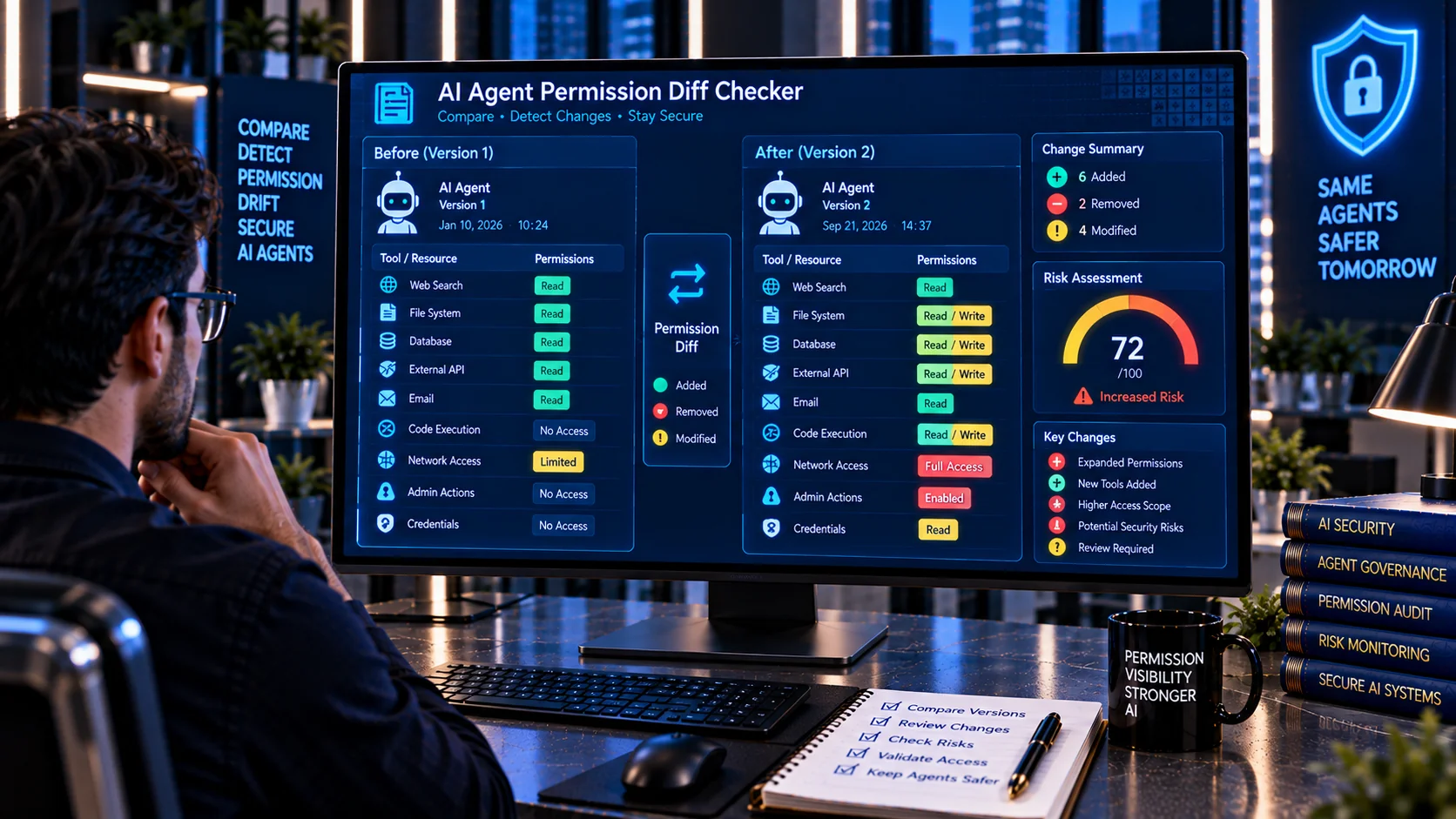
AI Agent Permission Diff Checker helps developers and security teams compare two AI agent or tool permission configurations and identify what has changed between them. It can highlight added permissions, removed permissions, changed capabilities, expanded access, and other security-relevant differences so permission changes can be reviewed before an updated agent configuration is deployed.
AI agents can accumulate permissions as new tools, integrations, roles, data sources, and workflows are added. Microsoft recommends reviewing aggregate and effective permissions and re-reviewing access when workflows, tools, data scope, or deployment environments materially change.
AI Agent Permission Diff Checker
Compare two AI agent or tool permission configurations and identify added, removed, and changed access, capabilities, scopes, and security-sensitive permissions.
Permission Diff
Security-Relevant Changes
Capability Summary
What Is an AI Agent Permission Diff Checker?
An AI Agent Permission Diff Checker compares two versions of an AI agent’s permission or tool configuration.
The two configurations might represent:
- Previous vs. new agent configuration
- Development vs. production
- Before vs. after a security change
- Current vs. proposed permissions
- Two agent versions
- Two tool manifests
- Two role configurations
- Two deployment environments
Instead of reviewing long configuration files manually, a permission diff makes security-relevant changes easier to identify.
Why Compare AI Agent Permissions?
A permission change can alter what an AI agent is capable of doing.
For example, an agent that previously had:
Read customer records
may later receive:
Read + Modify + Delete customer records
The configuration change may be small in a file, but the resulting authority can be significantly different.
OWASP recommends applying least privilege to agent tools and permissions and specifically warns against unrestricted tool access and wildcard permissions.
A permission diff provides a practical way to detect these changes before they become part of a production deployment.
What Does the AI Agent Permission Diff Checker Compare?
The PKCapra AI Agent Permission Diff Checker can analyze two configuration inputs and identify security-related differences such as:
- Added permissions
- Removed permissions
- Changed permissions
- New tools
- Removed tools
- Expanded access
- Reduced access
- Read access
- Write access
- Delete access
- Code execution
- Shell or command execution
- Network access
- Credential access
- Secret access
- Administrative capabilities
- Financial capabilities
- External communication
- Data export
- Permission management
- Broad or wildcard access
- Cross-system access
- Potentially high-impact capabilities
The results are intended to make changes easier to review before approval or deployment.
Added Permissions
Added permissions deserve particular attention because they expand the agent’s potential authority.
Examples include:
- A new database permission
- A new API
- A new tool
- Write access added to a previously read-only tool
- Delete capability added to an agent
- New network destinations
- New credential access
- New administrative functions
A newly added capability does not automatically mean that the configuration is unsafe. It means the change should be understood and verified against the agent’s intended task.
Removed Permissions
Permission removal is also important because it can affect functionality or indicate a deliberate security reduction.
Examples include:
- Removing an unused tool
- Removing write access
- Removing database access
- Removing a network integration
- Removing administrative permissions
- Removing access to sensitive data
A diff makes these reductions visible alongside additions and changes.
Changed Permissions
Some security changes do not appear as completely new or removed permissions.
For example:
Read → Read + Write
or:
Specific Resource → All Resources
or:
Approved API → Any API
These are permission expansions even though the underlying tool or permission name may remain the same.
The AI Agent Permission Diff Checker is designed to surface these types of capability changes for further review.
Permission Expansion and Security Risk
Permission expansion can increase an agent’s potential impact.
Examples include:
- Read becoming write
- Write becoming delete
- Specific resource becoming wildcard access
- Internal-only access becoming external access
- Single-system access becoming cross-system access
- Limited API access becoming unrestricted API access
Microsoft describes over-broad tool access and excessive aggregate privileges as important AI-agent security concerns because agents can chain actions across multiple systems.
AI Agent Permission Drift
Permission drift occurs when an agent’s effective access gradually changes from its original intended scope.
This can happen when teams:
- Add new tools
- Connect new services
- Grant temporary access
- Add roles to solve deployment problems
- Expand data access
- Enable additional APIs
- Keep permissions after a project changes
Microsoft specifically identifies permission creep and excessive aggregate privileges as a challenge for agent deployments and recommends reviewing effective permissions as the agent evolves.
Comparing permission configurations over time can help make this drift visible.
Least Privilege and Permission Diffs
Least privilege means an AI agent should receive only the access required for its intended task.
A permission diff supports this principle by helping teams ask:
- Why was this permission added?
- Is this tool still required?
- Does the agent actually need write access?
- Does the new integration require the requested scope?
- Can a broad permission be narrowed?
- Was temporary access removed after use?
OWASP recommends minimum required tools and per-tool permission scoping, including distinctions such as read-only versus write access.
Read, Write, and Delete Changes
Changes between read, write, and delete permissions are particularly useful to review.
Read Access
Read access allows an agent to retrieve information.
Examples:
- Read documents
- Query databases
- Read customer records
- Retrieve reports
Write Access
Write access allows an agent to modify or create information.
Examples:
- Update records
- Create documents
- Change configuration
- Publish content
Delete Access
Delete access can create irreversible consequences.
Examples:
- Delete files
- Remove database records
- Delete cloud resources
- Remove accounts
OWASP recommends additional controls for destructive and high-impact actions, including independent validation and appropriate human oversight.
Detecting New Tool Access
A permission diff can reveal when an agent gains access to a new tool.
For example:
Before:
Search + Read Documents
After:
Search + Read Documents + Execute Code
The addition of code execution changes the agent’s security profile and should receive appropriate review.
The same principle applies to tools providing:
- Database access
- Network access
- File access
- Payments
- Administration
- Credential retrieval
- External communication
Detecting New Network Access
A configuration may become more externally capable when network permissions are added.
Examples include:
- New HTTP client
- New external API
- Browser access
- Webhook access
- Remote database
- External service integration
Network access can create additional paths for data movement and external actions, so new network capabilities should be reviewed against the agent’s intended task.
Detecting New Credential Access
A permission diff can also highlight changes involving credential or secret access.
Potentially sensitive additions include:
- API keys
- Access tokens
- Passwords
- Cloud credentials
- Database credentials
- Private keys
- Session credentials
Microsoft recommends protecting identities and secrets and keeping agent permissions scoped to the minimum required access.
A new secret-access permission should therefore have a clear business and technical justification.
Detecting Administrative Permission Changes
Administrative permissions can significantly increase an agent’s authority.
Examples include:
- User management
- Role management
- Permission changes
- Security configuration
- Infrastructure configuration
- Production deployment
- Account recovery
OWASP identifies configuration and permission changes beyond intended authorization as a potential agentic AI security problem, particularly when agents have overly broad write authority or lack appropriate approval boundaries.
Detecting Financial Permission Changes
Some agents can interact with financial systems or transaction APIs.
A configuration change that adds capabilities such as:
- Payment initiation
- Refunds
- Transfers
- Purchases
- Billing changes
can materially change the risk profile of an agent.
OWASP recommends additional controls for high-impact and financial actions, including independent validation and appropriate approval mechanisms.
Comparing Development and Production Permissions
One practical use for a permission diff is comparing development and production configurations.
For example:
Development Agent
- Test database
- Test APIs
- Limited file access
Production Agent
- Production database
- Customer data
- External APIs
- Production write access
A diff can help identify whether the production configuration contains broader permissions than intended.
This is particularly useful when deployment processes automatically inherit roles or integrations.
Reviewing Permission Changes Before Deployment
A permission diff can be included in a deployment workflow:
Modify → Compare → Review → Approve → Deploy → Monitor
Before deploying a new agent configuration:
- Compare the old and new configurations.
- Review all added permissions.
- Review permission expansions.
- Investigate new high-impact tools.
- Confirm that removed permissions are intentional.
- Verify least-privilege scope.
- Obtain required approval.
- Deploy the reviewed configuration.
- Monitor the resulting agent activity.
Microsoft recommends deliberate change control and re-review when agent workflows, tools, data scope, or deployment environments materially change.
Permission Changes and Prompt Injection
Permission changes become particularly important when an AI agent can act on untrusted input.
A prompt injection may attempt to manipulate an agent into using tools that it is already authorized to access.
Reducing unnecessary permissions limits the potential impact of such an event.
OWASP recommends least-privilege tool access and explicitly authorized tool operations as part of AI-agent security.
You can also use the AI Prompt Injection Scanner to inspect suspicious input and the AI Agent Permission Analyzer to review the broader permission picture.
Cross-System Permission Changes
An agent may interact with multiple systems, such as:
- CRM
- Database
- File storage
- Cloud infrastructure
- Internal APIs
- External APIs
A permission change that connects an additional system can create a new trust boundary.
Microsoft recommends reviewing aggregate and effective permissions across tools and downstream systems rather than looking at permissions in isolation.
Cross-Tenant and External Access
Cross-tenant or external access changes deserve explicit review.
Examples include:
- New tenant access
- Guest access
- External API access
- Cross-organization resources
- External storage
- Third-party SaaS integrations
Microsoft recommends denying unreviewed cross-tenant or guest paths by default and explicitly reviewing these access relationships.
Permission Changes and Audit Trails
Permission changes should be traceable.
Useful information can include:
- Agent identity
- Configuration version
- Previous permission state
- New permission state
- Changed tool
- Changed resource
- Approver
- Deployment time
- Change reason
- Correlation ID
Microsoft recommends logging agent identity, role, effective scope, actions, resources, and correlation information to support traceability and investigation.
Temporary Permissions and Permission Cleanup
Temporary access can become permanent if it is not removed after the original task is completed.
Examples include:
- Temporary database access
- Temporary production access
- Temporary administrator role
- Temporary API permission
- Temporary external integration
Comparing configurations over time can help identify permissions that were added during an earlier workflow but remain active later.
Microsoft recommends testing revocation paths and removing stale permissions as part of agent lifecycle management.
Browser-Based Permission Diff Analysis
The PKCapra AI Agent Permission Diff Checker is designed for browser-side heuristic analysis.
You can compare supported configuration text without relying on an external AI analysis API.
This makes it useful for preliminary reviews of:
- Agent configurations
- Tool manifests
- Permission files
- Role definitions
- API access configurations
- Deployment configuration
- Security policy files
- AI workflow definitions
Always follow your organization’s data-handling requirements when reviewing confidential configurations.
What the Permission Diff Checker Does Not Guarantee
A permission diff is a review aid, not a complete authorization audit.
The tool analyzes the configuration information provided to it. Actual effective permissions may also depend on identity providers, downstream services, inherited roles, environment policies, API gateways, or other access-control layers.
Therefore:
- A clean diff does not prove an agent is secure.
- An added permission is not automatically unsafe.
- A removed permission is not automatically beneficial.
- Configuration text may not represent effective runtime permissions.
- Inherited permissions may exist outside the compared files.
- High-impact changes require appropriate authorization.
- Runtime access should still be monitored and audited.
Microsoft recommends reviewing effective aggregate permissions across the complete agent access path rather than relying on one configuration artifact.
A Practical AI Agent Permission Change Workflow
A practical review process can follow:
Compare → Identify → Classify → Justify → Approve → Deploy → Monitor
First compare the previous and proposed configurations. Identify every permission change. Classify changes according to their impact. Confirm why each new capability is required. Obtain appropriate approval for high-impact changes. Deploy the reviewed configuration and monitor the resulting behavior.
For high-impact operations, OWASP recommends separating decision-making from execution and independently validating scope, privilege, and approval state.
Frequently Asked Questions
What is an AI Agent Permission Diff Checker?
An AI Agent Permission Diff Checker compares two AI agent or tool permission configurations and identifies added, removed, and changed permissions.
Why compare old and new AI agent permissions?
Comparing configurations makes permission expansion and security-relevant changes easier to identify before deployment.
What is permission drift?
Permission drift occurs when an agent’s effective access gradually expands or changes from its intended original scope, often as new tools, roles, integrations, or data sources are added.
What is permission creep?
Permission creep is the gradual accumulation of access that an agent no longer needs or that exceeds its original task requirements.
Can a permission diff detect excessive permissions?
It can highlight changes that may represent excessive or expanded access, but determining whether a permission is actually excessive requires understanding the agent’s intended task and the underlying authorization model.
What types of permission changes should be reviewed carefully?
Changes involving delete, administrative, financial, credential, code-execution, network, external communication, production, or cross-system access generally deserve additional review.
Can this tool compare production and development configurations?
Yes. Comparing development and production configurations can help identify differences in tools, resources, permissions, and capabilities.
Can a permission diff detect inherited permissions?
Not necessarily. The tool analyzes the configuration information provided to it. Permissions inherited from external identity providers, roles, cloud policies, or downstream services may need separate analysis.
Should every permission change require approval?
Approval requirements depend on the risk and the organization’s governance model. High-impact or irreversible changes generally warrant stronger authorization and, where appropriate, human approval. OWASP recommends additional controls for destructive, financial, administrative, and externally visible actions.
How often should AI agent permissions be compared?
Compare permissions whenever an agent’s tools, integrations, roles, data access, workflow, or deployment environment changes. Regular lifecycle reviews can also help identify permission drift.
What is the difference between an AI Agent Permission Diff Checker and an AI Agent Permission Analyzer?
The AI Agent Permission Analyzer examines the permission picture of an agent, while the AI Agent Permission Diff Checker focuses specifically on changes between two configurations.
What is the difference between an AI Tool Security Checker and a permission diff?
The AI Tool Security Checker reviews individual tool definitions for risky capabilities. A permission diff compares two configurations to identify how an agent’s permissions have changed.
Related AI Security Tools
For a broader AI agent security workflow, you can also use: