
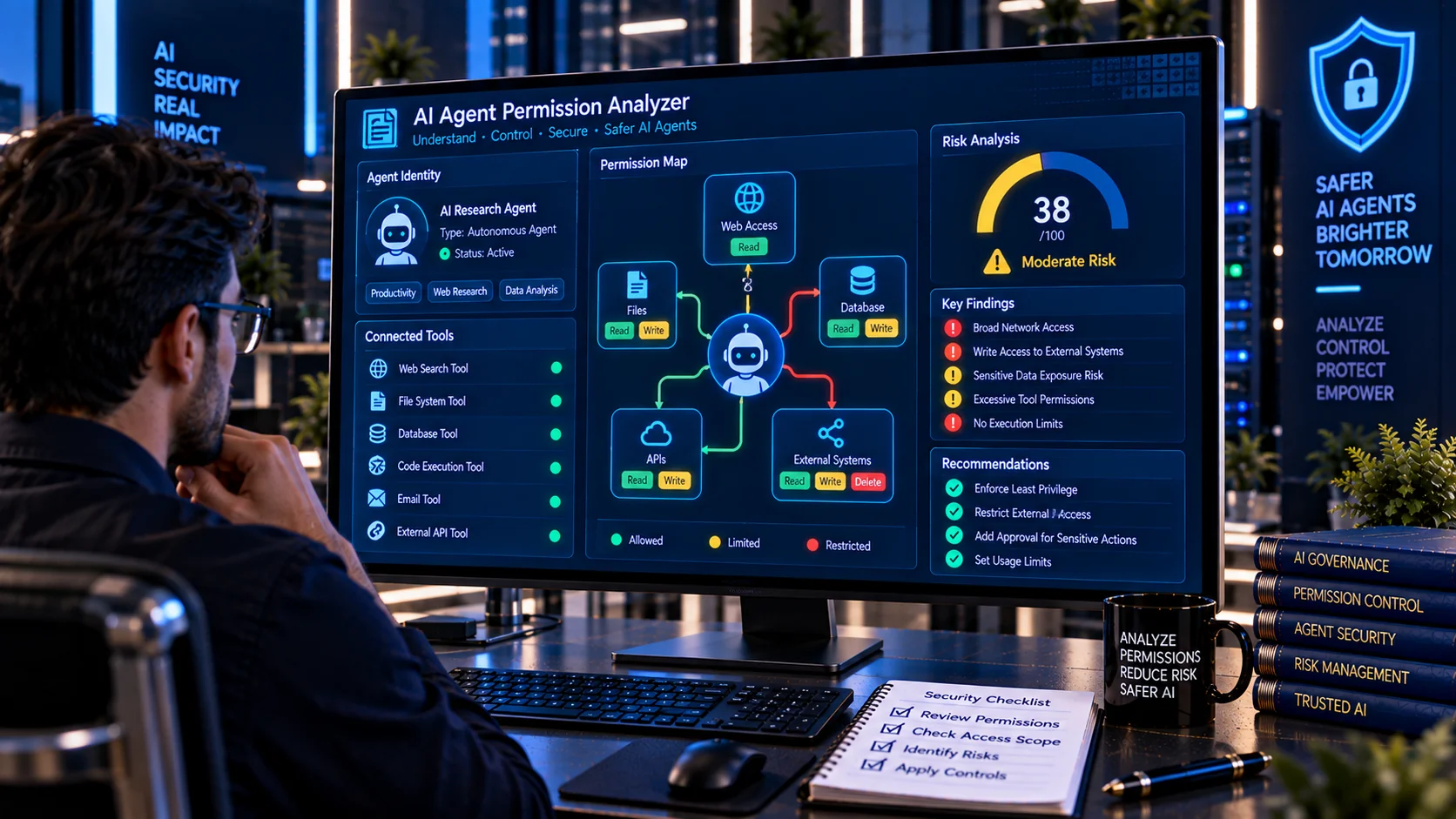
AI Agent Permission Analyzer helps developers and security teams review the permissions available to an AI agent and understand what the agent may be capable of doing across its connected tools and services. The analyzer maps declared tools and permission signals into a human-readable security report, helping identify excessive access, broad capabilities, risky actions, missing authorization boundaries, and other least-privilege concerns before an agent is deployed.
Modern AI agents can perform multi-step tasks by calling tools, APIs, plugins, databases, files, and other services. Because an agent may chain several capabilities together, reviewing the effective permission scope is an important part of AI security. OWASP recommends giving agents only the minimum tools required for their task and applying explicit permission scoping to individual tools.
AI Agent Permission Analyzer
Map an AI agent's declared tools and permissions into a human-readable risk report, with capability categories, scope signals, excessive-access findings, and security checks.
Permission Map
Security Findings
What Is an AI Agent Permission Analyzer?
An AI Agent Permission Analyzer is a security review tool that examines an agent’s declared tools, permissions, capabilities, and access signals to produce a structured view of its effective authority.
An agent may have access to capabilities such as:
- Reading files
- Writing files
- Deleting data
- Calling APIs
- Accessing databases
- Making network requests
- Executing code
- Reading secrets
- Sending communications
- Changing permissions
- Performing financial operations
- Accessing administrative systems
The purpose of permission analysis is to determine whether those capabilities are appropriate for the agent’s intended task.
Why Analyze AI Agent Permissions?
An AI agent can potentially combine several tools during one workflow. A tool that appears low risk in isolation can become more consequential when combined with other permissions.
For example:
Read Email → Download Attachment → Access File → Call API → Send External Message
creates a workflow with significantly broader potential impact than any one tool might suggest.
Microsoft’s current guidance recommends reviewing aggregate and effective permissions across roles, tools, and downstream systems rather than looking only at individual assignments.
Permission analysis can help identify where an agent has more authority than its intended job requires.
What Does the AI Agent Permission Analyzer Check?
The PKCapra AI Agent Permission Analyzer reviews agent permission information for signals such as:
- Read permissions
- Write permissions
- Delete permissions
- File-system access
- Network access
- Code execution
- Shell or command capabilities
- Database access
- Credential and secret access
- Administrative permissions
- Financial actions
- External communications
- Data export
- Permission changes
- Broad or wildcard permissions
- Cross-system access
- Cross-tenant access
- Excessive tool scope
- Missing authorization controls
- Missing approval requirements
- Agent identity signals
- Revocation and lifecycle considerations
The resulting report is designed to make an agent’s declared authority easier to understand and review.
Agent Permissions vs. Tool Permissions
An agent’s effective permissions may come from several layers.
These can include:
- Agent identity
- Tool definitions
- API permissions
- User delegation
- Service identities
- Database roles
- File permissions
- Cloud roles
- Application permissions
- Downstream system access
Reviewing only the agent’s top-level configuration may therefore provide an incomplete picture.
Microsoft recommends analyzing aggregate permissions across the agent, its tools, roles, and downstream services to understand the agent’s actual effective access.
Read, Write, and Delete Access
One of the simplest ways to understand agent authority is to separate permissions into read, write, and delete capabilities.
Read Access
Read permissions allow an agent to retrieve information.
Examples include:
- Reading documents
- Viewing customer records
- Querying databases
- Reading emails
- Retrieving reports
Read access can still expose sensitive information, so the accessible resources and data classification matter.
Write Access
Write permissions allow an agent to change or create information.
Examples include:
- Creating records
- Editing documents
- Updating databases
- Sending messages
- Publishing content
Write access generally requires more careful authorization than read-only access.
Delete Access
Delete permissions can produce irreversible or difficult-to-reverse consequences.
Examples include:
- Deleting files
- Removing database records
- Deleting cloud resources
- Revoking accounts
- Removing configurations
High-impact actions such as deletes may require additional authorization or human approval. Microsoft specifically identifies writes, deletes, payments, production changes, and external sends as examples of actions that may warrant human-in-the-loop controls.
Least Privilege for AI Agents
Least privilege means giving an agent only the access required to complete its intended task.
For example, a document summarization agent may only require:
Read → Approved Documents
rather than:
Read + Write + Delete → Entire File System
Similarly, a reporting agent may only require read access to specific reporting data rather than administrative database permissions.
OWASP recommends minimum required tools and per-tool permission scoping, including distinctions such as read-only versus write access.
Excessive Agent Permissions
An agent may be over-permissioned when it has capabilities that are not necessary for its assigned task.
Potential examples include:
- An assistant with unrestricted file access
- A reporting agent with database deletion rights
- A support agent with administrative permissions
- A read-only workflow with write access
- A content agent with unrestricted publishing rights
- An internal agent with unnecessary cross-tenant access
Excessive permissions increase the potential impact of prompt injection, model errors, compromised credentials, or workflow mistakes.
Wildcard and Broad Permissions
Wildcard permissions can make an agent’s effective scope difficult to control.
Examples include:
- All files
- All databases
- All users
- All API endpoints
- All commands
- All resources
- All tenants
- Any tool
- Any network destination
OWASP specifically advises against unrestricted tool access and wildcard permissions and recommends explicit tool authorization with least-privilege scopes.
Agent Identity and Accountability
A secure agent deployment should make it possible to determine which agent performed an action and under whose authority it operated.
Microsoft recommends giving agents dedicated identities with clear ownership and lifecycle management. This makes actions attributable to the specific agent and allows permissions to be reviewed or revoked.
Useful identity information can include:
- Agent name
- Agent ID
- Owner
- Sponsor
- Environment
- Assigned role
- Permission scope
- Credential type
- Lifecycle status
An analyzer can help identify whether important identity and accountability information appears to be missing from the reviewed configuration.
Authorization on Every Action
An agent should not necessarily receive permanent permission at the beginning of a session and then be trusted for every subsequent action.
Microsoft recommends authorization checks for individual actions and resources, including rechecking whether the requested action is permitted.
For example:
Agent → Tool → Resource → Action
should be evaluated according to the identity and scope involved in that specific operation.
This helps reduce risks associated with confused-deputy behavior and overly broad delegation.
High-Impact Agent Actions
Some actions deserve stronger controls because they can create significant consequences.
Examples include:
- Deleting information
- Changing permissions
- Sending external communications
- Making payments
- Publishing content
- Modifying production systems
- Exporting sensitive information
- Executing privileged commands
OWASP recommends separating decision-making from execution for irreversible operations and applying human oversight to high-risk actions.
Human Approval and Permission Boundaries
Human approval can provide an additional control for sensitive operations.
For example, an agent may be allowed to prepare a payment but require human approval before submitting it.
Similarly, an agent may prepare an email but require confirmation before sending it externally.
This creates a useful separation between:
AI Recommendation → Authorization → Execution
rather than allowing the model to directly control every consequential operation.
File and Data Access
Agent permissions should specify not only what an agent can do but also which resources it can access.
For example:
Read → /approved/customer-reports/
is more narrowly defined than:
Read → Entire storage account
Resource-level restrictions can reduce the impact of unexpected agent behavior.
Microsoft recommends scoping access to the specific data, tools, and systems required for the agent’s job.
Database Permissions
Database access should be reviewed carefully because a single database role can provide significantly different levels of authority.
Possible permissions include:
- SELECT
- INSERT
- UPDATE
- DELETE
- CREATE
- ALTER
- DROP
- Administrative operations
A reporting agent may only require read access, while an application-management agent may require narrowly defined write operations.
The analyzer can help identify permission signals that warrant additional review.
Network and External Access
Network access expands the systems an agent can potentially interact with.
An agent may have access to:
- Internal APIs
- External APIs
- Web services
- Webhooks
- Remote databases
- Cloud services
- Browser tools
Microsoft recommends sandboxing and egress controls for browsing and code-execution capabilities, while OWASP recommends limiting agent tools and explicitly authorizing sensitive operations.
Credential and Secret Access
Agent permissions should be reviewed for access to credentials and sensitive authentication material.
Potentially sensitive resources include:
- API keys
- Access tokens
- Passwords
- Private keys
- Cloud credentials
- Database credentials
- Session tokens
Credentials should be narrowly scoped and protected independently from model instructions.
Microsoft’s least-privilege guidance recommends scoped identities and minimizing the privileges available to agents and their connected services.
Cross-Tenant and Cross-System Access
An agent operating across multiple environments can introduce additional trust boundaries.
Examples include:
- Tenant A → Tenant B
- Development → Production
- Internal → External service
- User environment → Organization environment
- One business system → Another business system
Microsoft identifies cross-tenant and guest integrations as areas that should be explicitly reviewed, with unreviewed cross-tenant or guest paths denied by default in its least-privilege guidance.
Permission Creep
Agent permissions can grow over time.
An agent may initially need one tool and later accumulate additional integrations, roles, databases, APIs, and service permissions.
This creates permission creep.
Regular permission reviews should ask:
- Is every tool still required?
- Is every permission still necessary?
- Has the agent’s purpose changed?
- Are old integrations still active?
- Can broad roles be narrowed?
- Can temporary privileges be removed?
- Are unused permissions still assigned?
Microsoft recommends re-reviewing access when workflows, tools, data scope, or deployment environments materially change.
Permission Revocation
Security also depends on the ability to remove agent access quickly.
A practical lifecycle should support:
- Disable agent
- Revoke credentials
- Invalidate tokens
- Remove tool access
- Remove obsolete roles
- Disconnect integrations
- Review downstream permissions
Microsoft specifically recommends testing revocation paths, including disabling agents, rotating credentials, invalidating tokens, and removing stale permissions.
Audit Logging for Agent Permissions
Permission analysis should be complemented by runtime monitoring.
Useful audit information can include:
- Agent identity
- User identity
- Tool
- Action
- Resource
- Permission scope
- Authorization result
- Approval decision
- Correlation ID
- Timestamp
Microsoft recommends logging agent identity, role, scope, tool, action, and correlation information for traceability and incident investigation.
AI Agent Permissions and Prompt Injection
Prompt injection can become more consequential when an agent has powerful tools.
An attacker may attempt to manipulate an agent into using an authorized capability for an unintended purpose.
This is why permission analysis and prompt-injection defenses complement each other.
You can use the AI Prompt Injection Scanner to inspect suspicious text and the AI Tool Security Checker to review individual tool definitions.
OWASP recommends combining prompt-injection defenses with least-privilege tool access, explicit authorization, human approval, monitoring, and adversarial testing.
Browser-Based Permission Analysis
The PKCapra AI Agent Permission Analyzer is designed for browser-side heuristic analysis.
It can help developers and security teams review agent permission information without relying on an external AI analysis API.
This can be useful when reviewing:
- Agent configurations
- Tool manifests
- Permission lists
- Role definitions
- API access descriptions
- Agent deployment plans
- Security documentation
- AI workflow configurations
Always follow your organization’s data-handling requirements when reviewing confidential access configurations.
What This Analyzer Does Not Guarantee
Permission analysis is a diagnostic aid, not a complete authorization audit.
The analyzer uses heuristic signals and depends on the information supplied for analysis. A configuration may appear low risk while still having important permissions that are enforced elsewhere.
Therefore:
- A clean result does not prove an agent is secure.
- A finding does not automatically mean the permission is unsafe.
- Effective permissions may come from downstream systems.
- Runtime authorization must still be enforced.
- Tool combinations should be reviewed.
- High-impact actions may require approval.
- Permissions should be monitored and periodically revalidated.
Microsoft recommends evaluating effective aggregate permissions across the agent’s complete access path rather than relying only on a single configuration file.
A Practical AI Agent Permission Review
A useful permission review can follow this process:
Inventory → Map → Scope → Authorize → Approve → Monitor → Revoke
First inventory the agent’s tools, identities, roles, and integrations. Map what each permission allows. Reduce access to the minimum necessary scope. Enforce authorization for each action. Add approval requirements for high-impact operations. Monitor actual tool usage and maintain a tested revocation process.
This approach aligns with current least-privilege recommendations for agentic AI systems.
Frequently Asked Questions
What is an AI Agent Permission Analyzer?
An AI Agent Permission Analyzer reviews an agent’s declared tools and permission signals to create a human-readable view of its potential access and security risks.
Why is least privilege important for AI agents?
Least privilege limits the capabilities available to an agent and reduces the potential impact of unintended actions, prompt injection, compromised credentials, or workflow errors. OWASP recommends granting agents only the minimum tools and permissions required for their tasks.
What permissions should an AI agent have?
An agent should generally have only the permissions required for its defined task. The exact scope depends on the agent’s purpose, resources, tools, data sensitivity, and required actions.
What is excessive agent permission?
Excessive permission occurs when an agent has capabilities beyond what it needs to perform its intended function, such as unnecessary delete, administrative, financial, credential, or cross-system access.
Should AI agents have write permissions?
Write access can be appropriate when required by the workflow, but it should be narrowly scoped and independently authorized. High-impact writes may also require human approval.
Should an AI agent have delete permissions?
Delete access should be carefully restricted because deletion can be irreversible. Where appropriate, deletion should require stronger authorization or human approval.
Can this analyzer determine an agent’s actual permissions?
It can analyze the permission information supplied to it, but effective permissions may also come from identity providers, downstream APIs, databases, cloud roles, delegated access, or other systems. A complete authorization audit requires reviewing those layers as well.
How often should AI agent permissions be reviewed?
Permissions should be reviewed periodically and whenever the agent’s tools, workflow, data scope, identity, integrations, or deployment environment materially change.
Should every agent have a unique identity?
A dedicated identity improves accountability and makes access management, auditing, and revocation easier. Microsoft recommends unique agent identities with clear ownership and lifecycle management.
Should AI agents require human approval?
High-impact, irreversible, sensitive, or externally consequential actions may require human approval depending on the application’s risk model. OWASP and Microsoft both recommend additional controls for such operations.
What is the difference between an AI Agent Permission Analyzer and an AI Tool Security Checker?
The AI Agent Permission Analyzer focuses on the agent’s overall permission picture and effective authority across its tools and integrations. The AI Tool Security Checker focuses on individual tool definitions and their capabilities.
Related AI Security Tools
For a broader AI agent security workflow, you can also use: