
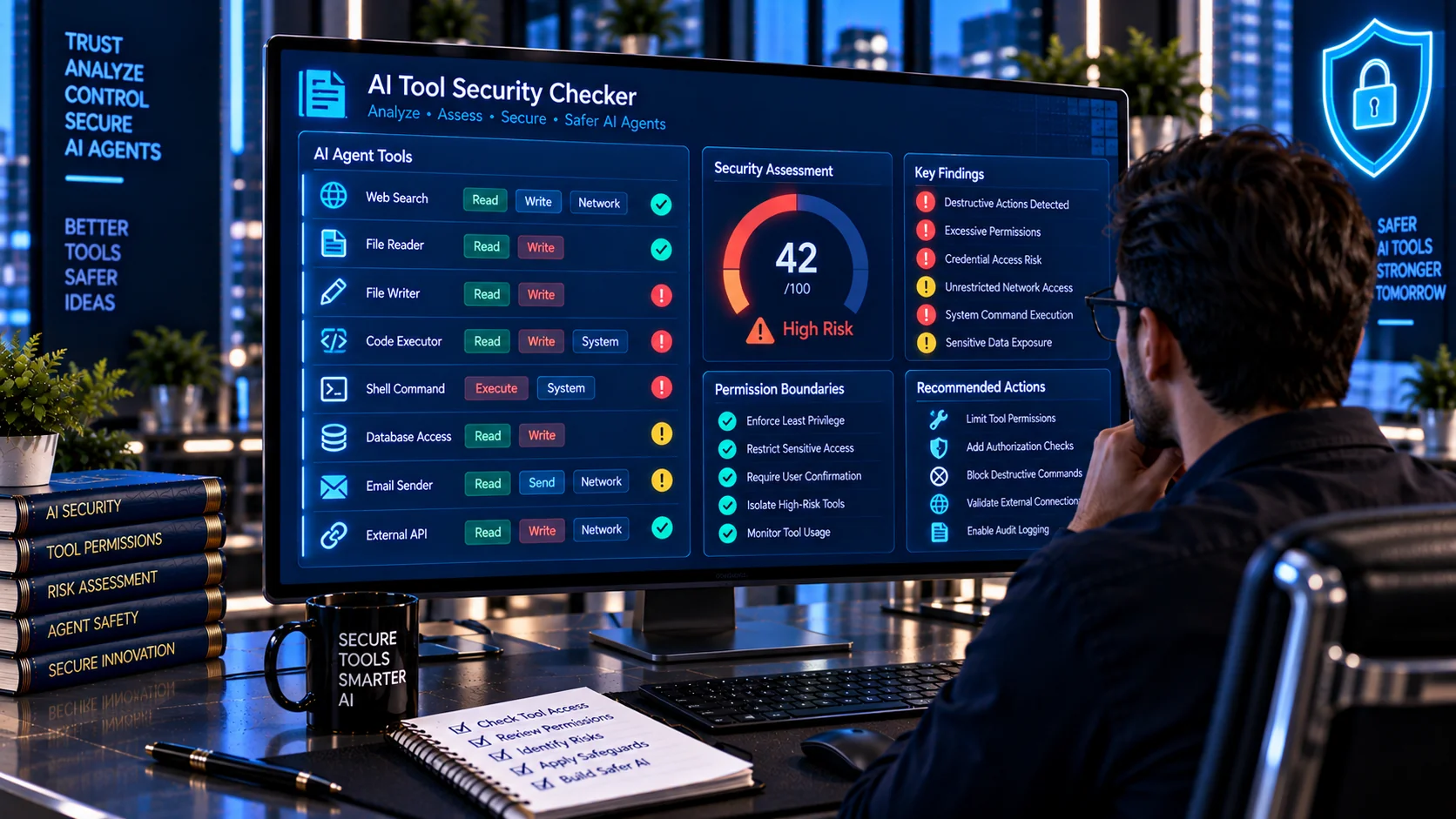
AI Tool Security Checker helps developers review AI tool definitions for security risks before connecting those tools to an AI assistant or agent. It analyzes tool capabilities, permissions, descriptions, parameters, external access, destructive actions, credential-related operations, and authorization boundaries to identify patterns that may indicate excessive or unclear tool authority.
AI agents can become significantly more capable when they can call external tools, APIs, databases, files, or automation services. That capability also creates additional security responsibility because an agent may use an authorized tool in an unintended way. Current AI-agent security guidance emphasizes least privilege, per-tool authorization, high-impact action controls, and auditing of tool activity.
AI Tool Security Checker
Audit an AI tool definition for risky permissions, dangerous capabilities, weak authorization boundaries, ambiguous descriptions, and other agent-security signals.
Security Findings
What Is an AI Tool Security Checker?
An AI Tool Security Checker is a security analysis utility for reviewing the definitions of tools that an AI model or agent can invoke.
An AI tool definition may describe:
- What the tool does
- Which parameters it accepts
- Which resources it can access
- Which actions it can perform
- What permissions it requires
- Whether it can read or write data
- Whether it can access external networks
- Whether it can execute commands
- Whether it can perform sensitive operations
Reviewing these capabilities before deployment can help identify excessive permissions and unclear security boundaries.
Why AI Tool Security Matters
Traditional software applications generally define exactly which operations a user or service can perform. AI agents add another layer because the model may dynamically decide which available tool to call and how to combine multiple tools.
This creates risks when tools are broader than the task requires.
For example, an agent that only needs to read a customer record may not need permission to delete records, modify account settings, execute arbitrary commands, or send external messages.
OWASP’s AI Agent Security guidance recommends granting agents only the minimum tools required for a task and applying per-tool permission scoping, including distinctions such as read-only versus write access.
What Does the AI Tool Security Checker Analyze?
The PKCapra AI Tool Security Checker examines tool definitions for security-related signals such as:
- Excessive tool capabilities
- Broad or wildcard permissions
- File-system access
- File deletion
- File modification
- Shell or command execution
- Code execution
- Network access
- External HTTP requests
- Database operations
- Credential access
- Secret handling
- Account or permission changes
- Financial operations
- Data export
- External communication
- Administrative actions
- Destructive operations
- Ambiguous tool descriptions
- Missing authorization boundaries
- Missing approval requirements
- Suspicious instruction-like descriptions
- Risky combinations of capabilities
The results are intended to provide a practical security review of the tool definition before it is connected to an AI workflow.
Read and Write Permissions
One of the most important distinctions when reviewing an AI tool is whether it can only read information or can modify it.
A read-only tool might retrieve:
- Customer information
- Product data
- Reports
- Documents
- Public information
A write-capable tool might:
- Create records
- Modify records
- Delete records
- Send messages
- Change configuration
- Publish content
Write access generally creates a larger security impact than read-only access, particularly when the action is irreversible or externally visible.
Microsoft recommends applying least privilege per tool and authorizing the exact action and target rather than relying on broad standing permissions.
Detecting File-System Access
AI tools that can access local or remote files should be reviewed carefully.
Potentially sensitive capabilities include:
- Reading arbitrary files
- Writing arbitrary files
- Deleting files
- Moving files
- Listing directories
- Accessing system directories
- Uploading files
- Downloading files
A tool that only needs to read a specific project directory should not automatically receive unrestricted file-system access.
Least-privilege design should limit both the operation and the resources the tool can access.
Detecting Command and Code Execution
Command-execution tools can provide an AI agent with powerful capabilities.
Examples include tools that can:
- Execute shell commands
- Run scripts
- Execute arbitrary code
- Start processes
- Install packages
- Modify system configuration
- Access operating-system resources
OWASP specifically warns against giving agents unrestricted tool access and recommends sandboxing for code execution.
A tool definition that exposes arbitrary command execution deserves additional security review before being connected to an autonomous agent.
Network and External Access
Network-enabled tools may allow an AI agent to interact with external systems.
Examples include:
- HTTP clients
- Browser automation
- Web requests
- API clients
- Webhooks
- Remote command interfaces
- External database connections
Network access can expand an agent’s attack surface because a tool may interact with systems outside the original application.
Microsoft recommends sandboxing and egress controls for code-execution and browsing tools, alongside explicit authorization of tool actions.
Credential and Secret Access
Tools that access credentials or secrets require particularly careful review.
Potentially sensitive resources include:
- API keys
- Access tokens
- Passwords
- Private keys
- Session tokens
- Database credentials
- Cloud credentials
- Environment secrets
A tool should generally expose only the minimum credential scope required for its specific function.
Microsoft’s AI-agent least-privilege guidance recommends scoped identities, short-lived access where practical, and explicit authorization rather than broad standing access.
Database and Data Modification Tools
Database tools can create substantial risk when they support arbitrary queries or unrestricted modification.
Potential capabilities include:
- Database reads
- Database writes
- Record creation
- Record modification
- Record deletion
- Schema changes
- Data exports
- Administrative queries
A reporting agent may only require read access to specific tables, while a data-management agent may need narrowly scoped write permissions.
The security objective is not to eliminate useful capabilities but to ensure that the tool’s authority matches the task.
Detecting Destructive Operations
Some tool actions are difficult or impossible to reverse.
Examples include:
- Delete
- Drop
- Purge
- Revoke
- Disable
- Reset
- Remove
- Destroy
- Overwrite
- Terminate
High-impact actions should generally receive stronger controls than ordinary read operations.
Microsoft recommends human approval for high-impact or irreversible actions such as writes, deletes, payments, production changes, and external sends.
Financial and External Actions
AI tools that can initiate financial or externally visible operations deserve additional scrutiny.
Examples include:
- Payments
- Purchases
- Refunds
- Transfers
- Sending emails
- Sending messages
- Publishing content
- Creating public posts
- Changing subscriptions
OWASP identifies high-impact action abuse as an agentic AI security risk and recommends appropriate human oversight and independent validation for consequential operations.
Tool Descriptions Are Part of the Security Surface
Tool descriptions are not merely documentation.
An AI model uses descriptions and schemas to understand what a tool does and when it should be used. An unclear or overly broad description can therefore contribute to incorrect tool selection or excessive use.
A good tool description should clearly state:
- Purpose
- Intended use
- Parameters
- Expected inputs
- Expected outputs
- Allowed scope
- Important limitations
- Security-sensitive behavior
- Conditions under which the tool should not be used
The description should not claim permissions or capabilities that the underlying implementation does not actually enforce.
Suspicious Instructions Inside Tool Definitions
Tool descriptions and metadata should also be reviewed for instruction-like content that attempts to influence model behavior beyond describing the tool.
Examples may include instructions that attempt to:
- Override system rules
- Ignore previous instructions
- Reveal hidden information
- Bypass authorization
- Automatically approve sensitive actions
- Conceal tool activity
- Treat external content as trusted instructions
This is especially relevant in ecosystems where tool definitions or metadata may originate from third-party sources.
For broader prompt-injection analysis, you can also use the AI Prompt Injection Scanner.
Tool Authorization Should Be Explicit
A tool definition should not be considered secure merely because its description says that an operation is restricted.
Authorization should be enforced by the application or underlying service.
For example, a tool description might say:
Only authorized administrators can delete records.
The actual API should still verify the caller’s identity and permission before performing the deletion.
Microsoft recommends authorization checks on every action rather than relying only on authorization established at the beginning of an agent session.
Least Privilege for AI Tools
Least privilege means giving a tool only the permissions required for its intended task.
Instead of:
Customer Management Tool → Read + Write + Delete + Export + Admin
a narrower design might be:
Customer Lookup Tool → Read specific customer fields
This reduces the consequences of:
- Prompt injection
- Model mistakes
- Compromised credentials
- Tool misuse
- Configuration errors
- Unexpected tool chaining
OWASP recommends minimum required tools and per-tool permission scoping, while Microsoft recommends reviewing aggregate permissions and restricting access to the specific data, tools, and systems required by an agent’s job.
Tool Chaining and Excessive Agency
An individual tool may appear relatively harmless, but several tools can create a much larger effective capability when combined.
For example:
Web Search → File Download → File Read → Database Write → External Email
may create a workflow with substantially more impact than any single tool appears to have.
Microsoft identifies excessive agency and over-broad delegation as agent-specific risks and recommends least functionality and least privilege across the tool layer.
Tool security should therefore consider not only individual capabilities but also how tools can be combined.
Human Approval for High-Risk Tools
Human approval can be useful when an action is:
- Irreversible
- Financial
- Administrative
- Externally visible
- Privacy-sensitive
- Production-impacting
- Destructive
The tool itself can expose the capability while the application requires explicit approval before execution.
This creates a separation between model recommendation and authorized execution.
OWASP recommends human oversight for high-impact actions, while Microsoft recommends approval gates for sensitive or irreversible operations.
Tool Identity and Accountability
AI tools should operate under clearly defined identities and authorization contexts.
A useful security model should make it possible to determine:
- Which agent invoked the tool
- Which user initiated the request
- Which permissions were used
- Which resource was accessed
- Which action was performed
- Whether approval was required
- Whether authorization succeeded
Microsoft recommends unique agent identities, scoped permissions, and audit information that connects identity, role, scope, tool, action, and resource.
Audit Logging for AI Tool Calls
Security does not end when a tool is configured.
Production systems should record important tool activity so unusual behavior can be investigated.
Useful audit information can include:
- Agent identity
- User identity
- Tool name
- Action
- Resource
- Input parameters
- Authorization result
- Approval information
- Timestamp
- Correlation ID
- Output or result metadata
Microsoft recommends logging tool invocations with inputs, outputs, identity, and authorization decisions for agent security and incident investigation.
Browser-Based Security Analysis
The PKCapra AI Tool Security Checker is designed for browser-side heuristic analysis.
Tool definitions can be reviewed without sending the content to an external AI analysis API.
This can be useful when reviewing:
- AI function definitions
- Tool schemas
- Agent configurations
- API tool manifests
- Function-calling definitions
- Automation tools
- Internal AI integrations
- MCP-style tool definitions
Always follow your organization’s data-handling requirements when working with confidential configurations, credentials, or proprietary code.
What This Checker Does Not Guarantee
A tool security scan cannot prove that an AI tool is completely secure.
The checker uses heuristic analysis to identify security-related patterns. A legitimate tool may produce a finding because its capabilities are inherently sensitive, while a sophisticated vulnerability may not match a known detection pattern.
Therefore:
- A clean result does not guarantee security.
- A finding does not automatically mean the tool is malicious.
- Tool authorization should be enforced technically.
- High-risk operations should have independent controls.
- Credentials should be narrowly scoped.
- Tool combinations should be reviewed.
- Production systems should maintain monitoring and audit logs.
OWASP recommends defense-in-depth practices including least privilege, explicit tool authorization, human oversight, sandboxing, monitoring, and adversarial testing.
A Practical AI Tool Security Review
A useful review process can follow:
Inventory → Analyze → Scope → Authorize → Approve → Monitor → Recheck
First identify every tool available to the agent. Analyze its capabilities and parameters. Reduce permissions to the minimum required scope. Enforce authorization outside the model. Add approval gates for high-impact actions. Monitor tool usage and periodically recheck permissions as the agent and its workflows change.
Microsoft recommends reviewing effective aggregate permissions, denying unreviewed tools by default, and reassessing access when workflows, tools, data scope, or deployment environments materially change.
Frequently Asked Questions
What is an AI Tool Security Checker?
An AI Tool Security Checker reviews AI tool definitions for potentially risky capabilities, excessive permissions, unclear descriptions, dangerous actions, credential access, network access, and missing authorization boundaries.
Why should AI tool permissions use least privilege?
Least privilege limits what an agent can do if the model behaves unexpectedly, receives a prompt injection, or its credentials are compromised. OWASP recommends granting agents only the minimum tools and permissions required for their task.
What makes an AI tool high risk?
Tools that can delete data, modify production systems, execute commands, access credentials, transfer sensitive information, make financial transactions, change permissions, or communicate externally can require additional controls.
Should an AI agent have unrestricted tool access?
Unrestricted tool access increases the agent’s effective authority. Current OWASP and Microsoft guidance recommends limiting tool access and applying least privilege.
Are tool descriptions security-sensitive?
They can be. Tool descriptions influence how an AI model understands and selects capabilities. Descriptions should be accurate, explicit, and consistent with the permissions actually enforced by the application.
Can this scanner detect every AI tool vulnerability?
No. It provides heuristic security analysis and cannot replace application security testing, authorization review, code review, or runtime monitoring.
Should destructive AI tool actions require approval?
High-impact or irreversible actions may warrant human approval depending on the application’s risk model. Microsoft specifically recommends approval gates for actions such as deletes, payments, production changes, and external sends.
How should AI tool permissions be enforced?
Permissions should be enforced by the application, identity system, API gateway, or underlying service rather than relying only on the model’s interpretation of a tool description.
Can tool security reduce prompt-injection impact?
Restricting tool permissions can reduce the potential impact of a successful prompt injection because the agent has fewer capabilities available to misuse. OWASP and Microsoft both emphasize least privilege and explicit action authorization as important agent-security controls.
Should AI tools be reviewed again after changes?
Yes. Tool permissions, integrations, data access, and agent workflows can change over time. Microsoft recommends re-reviewing access when workflows, tools, data scope, or deployment environments materially change.
Related AI Security Tools
For a broader AI and agent security workflow, you can also use: