
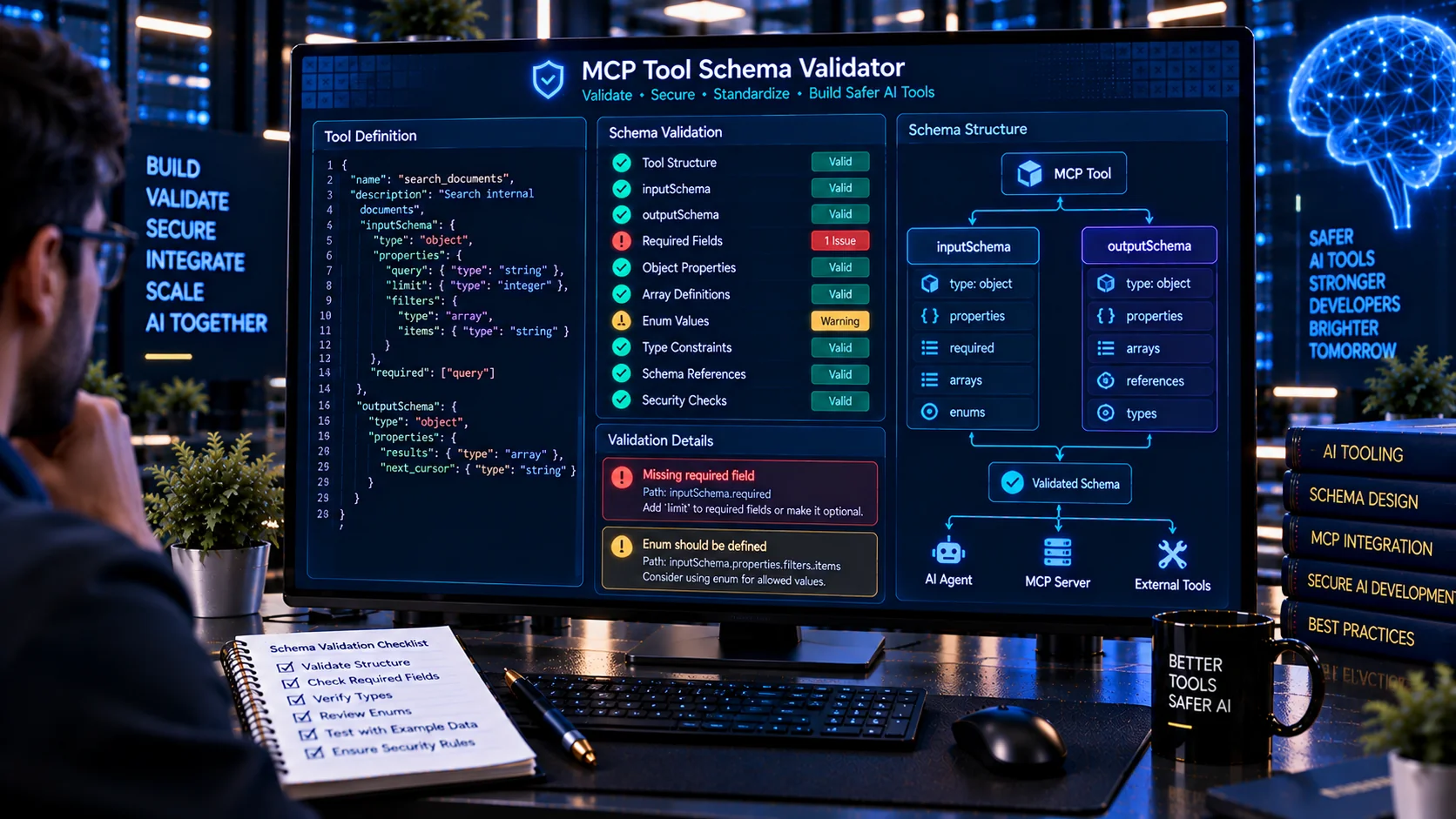
MCP Tool Schema Validator helps developers validate Model Context Protocol (MCP) tool schemas for structural errors, missing fields, invalid JSON Schema definitions, inconsistent required properties, malformed constraints, and other schema-quality issues before exposing tools to AI clients.
MCP Tool Schema Validator
Validate MCP tool definitions and their JSON Schemas for structural errors, invalid property declarations, missing types, broken required fields, unsupported or inconsistent schema constructs, and common input/output schema problems.
Detected Tools
Validation Findings
Validation Summary
What Is an MCP Tool Schema Validator?
An MCP Tool Schema Validator is a developer-focused utility for reviewing the machine-readable schemas associated with Model Context Protocol (MCP) tools.
MCP tools can expose functions that an AI application may call during an interaction. The tool definition provides important information about the tool name, description, input structure, output structure, and validation requirements.
A malformed or inconsistent schema can make a tool difficult to integrate, validate, test, or use reliably.
The MCP Tool Schema Validator helps developers identify structural issues before an MCP tool definition is used in a production workflow.
Why Validate MCP Tool Schemas?
A tool definition can look correct to a human while still containing structural problems that affect machine processing.
Common examples include:
- Missing or invalid schema types
- Required properties that are not declared
- Incorrect property definitions
- Missing
itemsdefinitions for arrays - Invalid nested object structures
- Incorrect
allOf,anyOf, oroneOfstructures - Invalid regular-expression patterns
- Inconsistent enumeration values
- Duplicate tool names
- Incorrect schema composition
- Missing output schemas
- Inconsistent annotations
- Unsupported or ambiguous validation constraints
Schema validation provides an additional quality-control step before a tool becomes part of an AI-agent workflow.
What Does the MCP Tool Schema Validator Check?
PKCapra’s MCP Tool Schema Validator analyzes MCP tool definitions for structural and schema-related signals such as:
- Individual MCP tool definitions
- Multiple tools in a
toolsarray inputSchemaoutputSchema- JSON Schema structure
typedeclarations- Object properties
- Required properties
- Required fields that are not declared
- Array
items prefixItems- Nested objects
allOfanyOfoneOf$defsdefinitionsenumpattern- String constraints
- Numeric constraints
- Array constraints
additionalProperties- Tool annotations
- Duplicate tool names
- Missing structural fields
- Inconsistent schema relationships
The results are intended to help developers locate schema problems that deserve review.
MCP Tool Definitions and Schemas
An MCP tool definition normally contains information describing the tool and the structure of data that can be passed to it.
The schema is important because it gives software and AI applications machine-readable information about expected inputs.
For example, a tool may require an object containing:
- A filename
- A document identifier
- A search query
- A numeric limit
- A boolean option
- An array of values
The schema should describe these values consistently.
A validator can help identify structural problems before the tool is integrated into a larger workflow.
Input Schema Validation
The input schema describes the structure of arguments that a tool expects.
Important elements may include:
- Object type
- Property names
- Property types
- Required fields
- Optional fields
- Nested objects
- Arrays
- Enumerated values
- String constraints
- Numeric constraints
- Validation patterns
For example, if a tool expects a filename property to contain a string, the schema should represent that expectation consistently.
Incorrect or incomplete input schemas can make tool invocation less predictable.
Required Properties
The required keyword identifies properties that must be supplied when an object is used.
A common schema problem occurs when a property appears in required but is not actually declared inside properties.
For example, a schema may identify filename as required while failing to define filename under the corresponding properties object.
The validator can identify this type of structural inconsistency so developers can review the definition.
Required fields should reflect the actual requirements of the tool rather than simply being added for completeness.
Properties and Data Types
Properties describe the individual fields accepted by an object schema.
Each property may have a type such as:
stringnumberintegerbooleanobjectarraynull
The schema should use types that correspond to the actual data expected by the tool.
A mismatch between the declared type and the tool implementation can lead to validation failures or unexpected behavior.
Array Schema Validation
Arrays require additional structural information because the schema may need to describe the type or structure of each item.
For example, an array may contain:
- Strings
- Numbers
- Objects
- Boolean values
- Nested arrays
The items keyword is commonly used to describe array elements.
The validator can identify missing or structurally inconsistent array definitions.
Nested Object Schemas
MCP tools may accept complex objects containing nested structures.
For example, a document-processing tool could receive an object containing:
- File information
- Processing options
- Output preferences
- Metadata settings
Each nested object should have a coherent schema.
Poorly structured nested schemas can make validation and integration more difficult.
The validator reviews nested schema structures to identify issues that deserve attention.
Enum Validation
The enum keyword restricts a value to a defined set of possible values.
For example, a property may accept only:
pdfdocxtxt
Enum definitions should be structurally valid and should correspond to the expected data type.
Inconsistent enum definitions can create validation problems or make tool behavior less predictable.
String Constraints
String schemas may contain additional validation rules.
Examples include:
minLengthmaxLengthpattern
These constraints can help define acceptable string values.
The validator can review these schema elements for structural problems and identify patterns that deserve further inspection.
Numeric Constraints
Numeric properties may contain constraints such as:
minimummaximumexclusiveMinimumexclusiveMaximummultipleOf
These constraints can define acceptable ranges for numeric arguments.
For example, a tool that accepts a page number may need a positive integer rather than an unrestricted numeric value.
Schema validation helps developers verify that numeric constraints are represented consistently.
Array Constraints
Array schemas can also define constraints such as:
minItemsmaxItemsuniqueItems
These rules can control the number and uniqueness of array elements.
The validator reviews these structures as part of the overall schema analysis.
allOf, anyOf, and oneOf
JSON Schema supports composition keywords that allow schemas to represent more complex validation logic.
These include:
allOfanyOfoneOf
They can be useful when a tool accepts multiple valid structures or when several schema requirements need to be combined.
However, incorrectly structured composition can make a schema difficult to validate or understand.
The validator can identify structural issues involving these composition keywords.
$defs and definitions
Reusable schema definitions can reduce duplication in complex JSON Schemas.
Modern schemas may use $defs, while some definitions may use the definitions keyword.
These structures can contain reusable schema components referenced elsewhere in the document.
The validator checks the structure of these areas and can identify problems that deserve review.
Output Schema Validation
Input validation is only one part of a tool definition.
Where an MCP tool provides a structured output schema, developers can also review the expected response structure.
An output schema can help describe the machine-readable result produced by a tool.
This can be especially useful when the result is consumed by another application, agent, workflow, or automated process.
The validator can identify missing or structurally problematic output-schema information where applicable.
Tool Name Validation
Tool names are an important part of an MCP tool definition.
When multiple tools are provided together, duplicate names can create ambiguity.
For example, two tools with the same name may make it difficult for a client or integration layer to determine which definition should be associated with a requested tool.
The validator can detect duplicate tool names within a submitted collection.
Multiple MCP Tools
Developers may need to validate a single tool or a collection of tools.
A multi-tool definition can contain many individual tool objects, each with its own:
- Name
- Description
- Input schema
- Output schema
- Annotations
- Configuration
Validating the collection can reveal problems that may not be obvious when reviewing each definition manually.
The validator therefore supports analysis of MCP tool collections as well as individual tool structures.
MCP Tool Annotations
Tool annotations can provide additional information about how a tool behaves.
Depending on the MCP implementation and tool definition, annotations may describe characteristics such as:
- Read-only behavior
- Destructive behavior
- Idempotent behavior
- Open-world behavior
Annotations should be reviewed alongside the actual tool implementation and schema.
A mismatch between annotations and real behavior may require additional security or integration review.
Additional Properties
The additionalProperties keyword can influence whether an object accepts properties beyond those explicitly defined in its schema.
For example, a strict object schema may intentionally restrict accepted fields.
Another schema may intentionally allow additional properties.
Neither approach is automatically correct in every application.
The important consideration is whether the schema behavior matches the intended tool contract.
The validator can highlight this area for review.
MCP Tool Schema and Tool Descriptions
A tool schema and a tool description serve different purposes.
The description explains the tool in natural language.
The schema defines the machine-readable structure of its inputs and, where supported, outputs.
Both should be consistent with the actual implementation.
For description-quality analysis, use the MCP Tool Description Checker.
For broader capability and permission analysis, use the AI Tool Security Checker.
For suspicious hidden instructions or tool-poisoning signals, use the AI Tool Poisoning Scanner.
These checks complement schema validation rather than replacing it.
MCP Tool Schema and Security
Schema validation is important, but a valid schema does not automatically mean that an MCP tool is secure.
Security review should also consider:
- Authentication
- Authorization
- Tool permissions
- Filesystem access
- Network access
- Credential access
- Code execution
- Destructive actions
- Data exposure
- Human approval
- Tenant boundaries
- Runtime implementation
- Server configuration
A structurally valid schema can still describe a tool with excessive or dangerous capabilities.
For broader tool-security analysis, use the AI Tool Security Checker.
MCP Tool Schema and Prompt Injection
Schema validation and prompt-injection analysis address different risks.
A schema validator focuses primarily on machine-readable structure.
Prompt-injection analysis looks for suspicious instructions, role manipulation, hidden directives, system-prompt extraction attempts, tool manipulation, or other potentially unsafe language.
If the MCP definition contains natural-language descriptions or other model-facing content, it can be useful to perform a separate security review.
The AI Prompt Injection Scanner and Generic Prompt Injection Detector can help identify prompt-injection-related signals.
MCP Tool Schema Review Workflow
A practical workflow can be:
- Export or prepare the MCP tool definitions.
- Remove or mask live credentials before sharing sensitive configuration.
- Run the definitions through the MCP Tool Schema Validator.
- Review structural errors first.
- Check tool names for duplicates.
- Review
inputSchemastructures. - Check required properties.
- Review arrays and nested objects.
- Review schema composition such as
allOf,anyOf, andoneOf. - Check reusable definitions such as
$defsanddefinitions. - Review output schemas where applicable.
- Review annotations.
- Compare schemas with actual tool behavior.
- Perform a separate tool-security review.
- Correct the schema.
- Run the validation again before deployment.
For description-specific checks, use the MCP Tool Description Checker.
For configuration-level review, use the MCP Server Configuration Validator.
MCP Tool Schema in Development and Production
Tool schemas should be reviewed throughout the development lifecycle.
A schema can change when:
- A new parameter is added
- A parameter is removed
- A property changes type
- A field becomes required
- An optional field becomes mandatory
- An array structure changes
- A new enum value is introduced
- An output structure changes
- A tool gains a new capability
- An MCP server is upgraded
Schema changes can affect existing clients and AI-agent workflows.
For this reason, schema validation should be part of the development and deployment review process rather than a one-time activity.
Schema Changes and Compatibility
A schema change may affect how existing integrations interact with a tool.
Changes to required fields can be particularly important because clients that previously supplied valid arguments may no longer satisfy the new schema.
Similarly, changing a property type, removing an accepted value, or altering nested object structures can affect downstream workflows.
Developers should review schema changes against the actual clients and applications that consume the tool.
Browser-Based Schema Analysis
PKCapra’s MCP Tool Schema Validator is designed for browser-side analysis.
The submitted MCP definition can be processed locally in the browser for the supported structural checks without requiring an external AI API.
This can be useful when reviewing:
- Development tool definitions
- MCP integrations
- Test configurations
- Schema changes
- Pre-deployment definitions
- AI-agent tool collections
Browser-side analysis does not automatically make sensitive input safe.
Avoid submitting live credentials, access tokens, passwords, or other secrets unless you have verified that doing so is appropriate for your environment.
JSON Reports
After analysis, PKCapra provides a structured report containing the detected schema findings and analysis information.
A structured report can be useful for:
- Development reviews
- Documentation
- Testing
- Internal audits
- Schema troubleshooting
- CI/CD-related workflows
- Comparing definitions
- Recording validation results
The report can also be copied or downloaded for further processing.
Validation Score and Results
The validator provides a diagnostic result based on the structural checks performed against the submitted MCP definition.
Results can identify areas such as:
- Errors
- Warnings
- Structural inconsistencies
- Missing fields
- Schema problems
- Duplicate names
- Annotation-related issues
- Areas requiring review
A validation result is a diagnostic aid.
A clean result does not prove that an MCP tool is secure, correctly implemented, or fully compatible with every client.
Important Limitations
The MCP Tool Schema Validator focuses on structural and schema-oriented analysis.
It cannot determine with certainty whether:
- A tool implementation is secure
- A tool is malicious
- Permissions are correctly authorized
- Authentication is correctly configured
- Runtime behavior matches the schema
- The MCP server is securely deployed
- An API endpoint is secure
- A schema is semantically appropriate for every use case
The validator does not replace:
- Code review
- Security testing
- Authorization testing
- MCP server testing
- Runtime monitoring
- Integration testing
- Human review
- Organizational security controls
A schema that passes validation can still require additional testing and security review.
Frequently Asked Questions
What is an MCP Tool Schema Validator?
It is a utility that analyzes MCP tool definitions and their JSON Schema structures for structural problems, missing fields, inconsistent requirements, invalid constraints, duplicate tool names, schema composition issues, and other validation signals.
What is MCP?
MCP, or Model Context Protocol, is a protocol used to connect AI applications with external tools, data sources, and services.
Why should MCP tool schemas be validated?
Schema validation can identify structural problems before an MCP tool is integrated into an AI application or agent workflow.
Does this tool validate JSON Schema?
It performs structural checks against JSON Schema-related elements used in submitted MCP tool definitions. It is intended as a diagnostic utility rather than a replacement for complete standards-compliance testing.
Can I validate multiple MCP tools?
Yes. The validator can analyze individual tool definitions as well as collections of tools.
Does it check required properties?
Yes. It can identify relationships between required properties and declared properties and flag structural inconsistencies.
Does it check arrays?
Yes. The validator can review array-related structures such as items, prefixItems, and array constraints.
Does it check allOf, anyOf, and oneOf?
Yes. The validator reviews these JSON Schema composition structures for supported structural issues.
Does it check output schemas?
Yes. Where an MCP tool definition provides an output schema, the validator can review its structure.
Does a valid schema mean the MCP tool is secure?
No. Schema validity is only one part of MCP tool quality and security. Permissions, authorization, implementation, server configuration, dependencies, runtime behavior, and infrastructure require separate review.
Does PKCapra send my MCP schema to an AI API?
The MCP Tool Schema Validator is designed for browser-side structural analysis and does not require an external AI API for these checks.
What should I do after finding a schema problem?
Review the specific finding, compare it with the intended tool contract and implementation, correct the schema, and run the validation again. For security-related concerns, perform a separate tool and server security review.
Related PKCapra Tools
For MCP tool descriptions and model-facing metadata, use the MCP Tool Description Checker.
For broader AI tool capabilities and security risks, use the AI Tool Security Checker.
For hidden instructions and tool-poisoning signals, use the AI Tool Poisoning Scanner.
For prompt-injection analysis, use the AI Prompt Injection Scanner and Generic Prompt Injection Detector.
For agent access and permission review, use the AI Agent Permission Analyzer, AI Agent Permission Diff Checker, and AI Agent Configuration Security Checker.
For system-prompt security analysis, use the AI System Prompt Security Checker.
For MCP server configuration review, use the MCP Server Configuration Validator.