
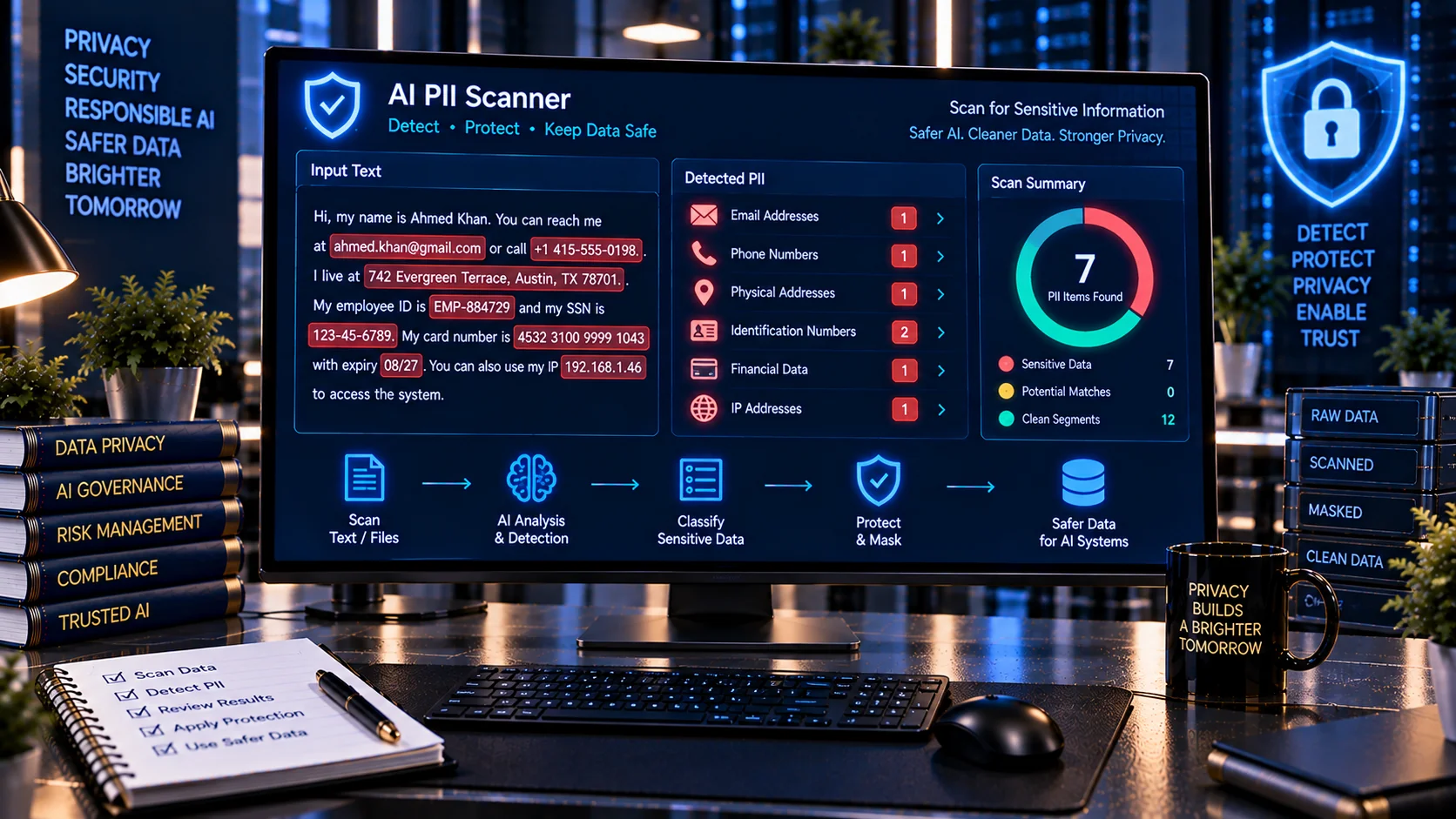
AI PII Scanner helps you identify potentially sensitive personally identifiable information (PII) before text, logs, documents, datasets, or other content is processed by an AI system. Scan for emails, phone numbers, identification numbers, addresses, payment-card-like numbers, IP addresses, health-related information, account identifiers, and other common PII patterns with browser-based analysis.
AI PII Scanner
Scan text and supported text-readable files for likely personally identifiable information such as email addresses, phone numbers, names, dates of birth, addresses, identity numbers, payment-card-like values and other privacy-sensitive data patterns.
Detected PII Categories
PII Findings
Privacy Review
What Is an AI PII Scanner?
An AI PII Scanner is a privacy-focused tool that detects patterns that may represent personally identifiable information in content prepared for AI processing.
PII can appear in many places, including:
- AI prompts
- Documents
- Customer records
- Support conversations
- Application logs
- CSV datasets
- JSON responses
- API payloads
- Knowledge-base content
- RAG datasets
- AI training or evaluation data
Finding sensitive information before it reaches an AI model or connected service can help organizations apply appropriate privacy controls.
Why Scan for PII Before Using AI?
AI workflows can process information from users, documents, databases, APIs, emails, and other sources. If those sources contain personal information, the data may require additional handling controls before being sent to an AI model or external service.
Sensitive information can include names, contact details, government identifiers, financial information, health information, account information, and other data that may identify or relate to an individual.
OWASP identifies sensitive information disclosure as an important risk for applications using large language models and recommends appropriate data handling, access controls, sanitization, and protection of sensitive information. (genai.owasp.org)
An initial PII scan can help reveal information that may otherwise be overlooked.
What Can the AI PII Scanner Detect?
PKCapra’s AI PII Scanner checks supplied content for a range of common personal-information patterns.
Depending on the input, it can identify signals associated with:
- Email addresses
- Phone numbers
- Dates of birth
- Social Security Number-like patterns
- Passport identifiers
- National or government identification numbers
- Driver’s license-like identifiers
- Postal and street addresses
- IPv4 addresses
- IBAN-like financial identifiers
- Payment-card-like numbers
- Health and medical information patterns
- Labeled personal names
- Account and user identifiers
- Potential PII contained in URL parameters
The results are presented as findings rather than definitive legal classifications.
Email Address Detection
Email addresses are among the most common forms of PII found in AI inputs.
They can appear in:
- Customer support transcripts
- User profiles
- Documents
- Logs
- CRM exports
- Email conversations
- API responses
- Spreadsheet data
The scanner identifies email-like patterns so they can be reviewed before the content is shared with an AI system.
Phone Number Detection
Phone numbers can appear in many different formats depending on the country and application.
Examples may include:
- International numbers
- Local numbers
- Numbers with spaces
- Numbers containing hyphens
- Numbers using parentheses
- Numbers embedded in structured records
The scanner looks for phone-number-like patterns and reports potential matches for review.
Because phone-number formats vary significantly across countries, pattern detection should be treated as an indicator rather than proof that every detected number belongs to a real person.
Government and Identification Numbers
AI datasets and documents may contain identifiers such as:
- Passport numbers
- Government identification numbers
- Social Security Number-like values
- Driver’s license-like values
- Other labeled personal identifiers
These values can be particularly sensitive when combined with names, addresses, dates of birth, or other personal information.
The scanner highlights matching patterns so developers and privacy teams can determine whether the data should be removed, masked, or otherwise protected.
Address Detection
Personal addresses can appear in invoices, applications, customer records, shipping information, contracts, and support conversations.
Address-related patterns can include:
- Street addresses
- Postal codes
- ZIP codes
- City and region combinations
- Labeled address fields
Detection is necessarily heuristic because ordinary text can contain numbers and place names that resemble addresses.
IP Address Detection
An IP address can sometimes be personal or sensitive depending on the context in which it is collected and used.
The scanner can identify IPv4-like values so they can be reviewed as part of a broader privacy assessment.
IP address detection is particularly useful when scanning:
- Application logs
- Server logs
- Debug output
- Security reports
- API responses
- AI troubleshooting data
Financial Information Detection
AI workflows may process invoices, payment records, customer profiles, transaction logs, or financial documents.
The scanner can identify payment-card-like numbers and IBAN-like patterns for further review.
A detected number should not automatically be treated as a valid financial credential. Pattern matching can produce false positives, particularly when ordinary numeric sequences resemble financial identifiers.
Health and Medical Information
Health-related information can be highly sensitive when it is connected to an identifiable person.
AI workflows may encounter health information in:
- Medical documents
- Patient communications
- Insurance records
- Appointment information
- Clinical notes
- Support conversations
- Healthcare datasets
The scanner can flag recognizable health-related information patterns and labels for privacy review.
Detection does not determine whether information legally qualifies as protected health information under a specific jurisdiction or regulation.
PII in URLs and Query Parameters
Personal information can sometimes appear inside URLs.
Examples include:
- Email addresses in query parameters
- User IDs
- Account identifiers
- Tracking values
- Search parameters
- Other personal data embedded in URLs
This can be easy to overlook because the information is mixed with technical URL components.
Scanning URLs can therefore be useful when reviewing application logs, API payloads, browser data, and AI-generated or retrieved content.
PII Detection in AI Prompts
Users sometimes paste personal information directly into AI prompts.
Examples include:
- Customer emails
- Phone numbers
- Addresses
- Account numbers
- Employee information
- Medical details
- Customer-support transcripts
An AI PII scan can be performed before sending such content to a model, helping users identify information that may need to be removed or masked.
PII Detection for RAG Data
Retrieval-augmented generation (RAG) systems commonly ingest documents and structured data into searchable knowledge stores.
If those documents contain personal information, the PII may later become available to an AI retrieval workflow.
A useful privacy workflow is:
- Collect the source documents.
- Scan for potential PII.
- Review detected findings.
- Remove or redact unnecessary information.
- Apply access controls to required personal information.
- Index the approved content.
- Test retrieval permissions.
- Monitor future ingestion.
PII scanning should therefore be considered one part of a broader RAG data-governance process.
PII in Application Logs
Application and AI-agent logs can unintentionally capture sensitive information.
Potential examples include:
- User prompts
- API parameters
- Email addresses
- IP addresses
- Account identifiers
- Tool-call arguments
- Error messages
- Retrieved documents
Before storing or sharing logs with AI systems, developers can scan them for potential PII and sensitive values.
This is particularly useful when preparing debugging data for external support, security analysis, or AI-assisted development.
PII Detection in JSON and Structured Data
Structured data often uses field names such as:
email
phone
address
user_id
customer_id
date_of_birth
account_number
The scanner can inspect structured content and identify values or labels that may represent personal information.
This makes it useful for reviewing:
- JSON
- CSV
- Logs
- API responses
- Exported records
- Structured AI tool results
PII Detection Does Not Mean Automatic Identification
Pattern-based PII detection has limitations.
For example, a sequence of digits may look like an identification number but actually be:
- An invoice number
- A product code
- A timestamp
- A transaction identifier
- A random number
Similarly, a person’s name may resemble an ordinary phrase.
The scanner therefore reports potential PII signals that should be reviewed in context.
PII Score and Risk Level
PKCapra’s AI PII Scanner provides an overall privacy-oriented assessment based on detected PII signals.
The result can include:
- PII findings
- Category breakdown
- Potentially sensitive matches
- Masked match previews
- Risk level
- PII score
- Line and column information
The score is intended to help prioritize review rather than serve as a legal privacy determination.
Masked PII Findings
When displaying detected information, masking sensitive values can reduce unnecessary exposure during review.
For example, instead of displaying a complete email address or identifier, a privacy-oriented workflow can show a partially masked representation.
This allows the reviewer to understand what type of information was detected while reducing the need to repeatedly expose the complete value.
Browser-Based PII Scanning
PKCapra’s AI PII Scanner is designed for browser-side analysis.
The supplied content can be analyzed locally in the browser without requiring an external AI API to perform the detection.
This can be useful when reviewing sensitive content before sending it to an AI service.
However, browser-side processing does not automatically make the content safe. Users should still follow their organization’s data-handling and privacy requirements.
Privacy Before AI Processing
A practical AI privacy workflow can look like this:
- Identify the content that will be processed.
- Run a PII scan.
- Review the detected information.
- Determine which information is actually necessary.
- Remove unnecessary personal information.
- Mask or redact sensitive values where appropriate.
- Apply access controls to information that must remain.
- Send only the required data to the AI workflow.
- Review storage, logging, and retention settings.
- Repeat the process when source data changes.
This follows the broader principle of minimizing unnecessary sensitive information exposure.
PII Scanning and Data Minimization
Data minimization means avoiding unnecessary collection, processing, retention, or sharing of personal information.
For AI applications, this can mean asking whether the model actually needs the personal information to perform the requested task.
For example, an AI system summarizing a customer complaint may need the complaint text but not necessarily the customer’s complete phone number or account identifier.
Removing unnecessary information before AI processing can reduce the amount of sensitive data exposed to downstream systems.
PII Scanning for AI Developers
Developers can use PII scanning during several stages of the AI development lifecycle.
Useful checkpoints include:
- Prompt development
- Dataset preparation
- RAG ingestion
- API testing
- Logging review
- Tool-response testing
- Evaluation datasets
- Debugging
- Security testing
- Pre-production validation
Scanning at multiple stages can help identify personal information that enters the workflow through different sources.
PII Scanning for Security Teams
Security teams can use PII detection as part of broader AI application reviews.
Potential use cases include:
- AI-agent security testing
- Log review
- Data-leakage investigations
- RAG security reviews
- API testing
- Data classification
- Privacy assessments
- Pre-deployment checks
PII detection should complement access controls, encryption, authorization, retention policies, monitoring, and other security measures.
PII Scanning for Documents and Files
Personal information frequently exists inside business documents.
Common examples include:
- Contracts
- Invoices
- Applications
- Employee documents
- Customer records
- Reports
- Forms
- Exported datasets
For document workflows, PII detection can be combined with extraction and document-safety checks before information is passed into an AI system.
Important Limitations
The AI PII Scanner uses pattern-based detection and cannot determine every instance of personal information.
Potential limitations include:
- False positives
- False negatives
- Country-specific identifier formats
- Context-dependent PII
- Unstructured personal information
- Names without identifying context
- Obfuscated or encoded data
- Images containing PII
- Encrypted information
- Information requiring domain-specific interpretation
A scan result should therefore be treated as a privacy review aid rather than a complete compliance assessment.
The tool does not determine whether your data processing complies with GDPR, HIPAA, CCPA, UAE privacy laws, or another specific legal or regulatory framework.
For regulatory decisions, consult the applicable law, organizational privacy policies, and qualified legal or privacy professionals.
Frequently Asked Questions
What is an AI PII Scanner?
An AI PII Scanner detects patterns that may represent personally identifiable information before content is processed by an AI system.
What types of PII can it detect?
It can detect patterns associated with emails, phone numbers, addresses, dates of birth, identification numbers, payment-card-like numbers, IBANs, IP addresses, health-related information, account identifiers, and other common PII signals.
Can I scan AI prompts for PII?
Yes. You can scan prompt content before sending it to an AI model to identify potentially sensitive personal information.
Can it scan JSON and CSV data?
Yes. The scanner can analyze structured formats such as JSON and CSV in addition to plain text and other supported content formats.
Does the scanner store my PII?
The tool is designed for browser-side analysis rather than requiring an external AI API for detection. You should still review your browser, organizational, and data-handling environment before processing highly sensitive information.
Does a PII finding mean the data is legally protected?
Not necessarily. The scanner identifies patterns and potential sensitive information. Legal definitions of PII and regulated data vary by jurisdiction, industry, and context.
Can the scanner detect every piece of personal information?
No. Pattern-based scanning cannot guarantee complete detection. Context, language, formatting, encoding, images, and unusual data structures can affect results.
Should I remove all PII before using AI?
Not necessarily. Some applications legitimately require personal information. The appropriate approach depends on the task, authorization, privacy requirements, security controls, and applicable regulations. Unnecessary personal information should generally be avoided where practical.
Related PKCapra Tools
For broader AI document and data security workflows, combine the AI PII & Secret Scanner with the AI Document Safety Scanner, AI Redaction Assistant, AI Document Metadata Privacy Checker, Hidden Unicode / Confusable Scanner, and AI Prompt Injection Document Scanner.
For AI-agent security, also review the AI Tool Security Checker, AI Tool Call Risk Analyzer, and AI Agent Permission Analyzer.