
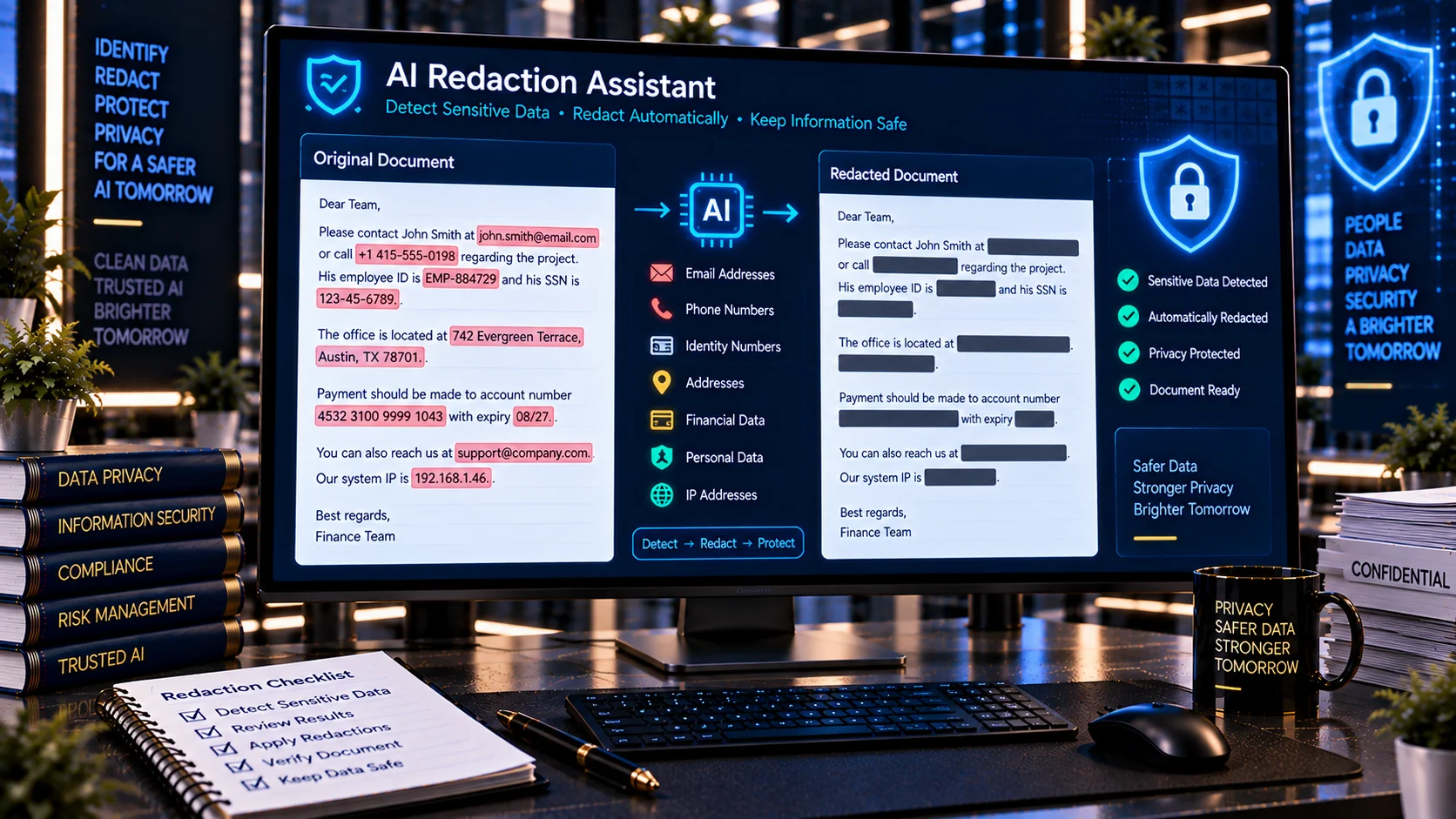
AI Redaction Assistant helps you identify and replace potentially sensitive information before text, documents, logs, datasets, or other content is shared with AI systems. Detect and redact common PII and sensitive data patterns such as email addresses, phone numbers, identification numbers, addresses, IP addresses, financial identifiers, health-related information, account identifiers, and sensitive URL parameters.
AI Redaction Assistant
Detect common privacy-sensitive patterns and create a redacted copy of text before sharing it with AI systems, external services, logs, or other workflows.
Input
Redacted Output
Detected Categories
Review Notice
What Is an AI Redaction Assistant?
An AI Redaction Assistant is a privacy-focused tool that helps remove or mask potentially sensitive information from content before it enters an AI workflow.
Personal and confidential information can appear inside prompts, documents, logs, API responses, customer records, datasets, support conversations, and retrieved content.
Instead of manually searching through large amounts of text, an automated redaction workflow can identify recognizable sensitive-data patterns and replace them with a standardized placeholder.
This can help reduce unnecessary exposure of personal information while preparing content for AI processing.
Why Redact Sensitive Information Before Using AI?
AI applications can process information from users, documents, databases, APIs, websites, emails, and other external sources.
If unnecessary personal or confidential information is included in that content, it may be exposed to model providers, connected tools, logs, retrieval systems, or other downstream components.
OWASP identifies sensitive information disclosure as an important risk for LLM applications and recommends appropriate data sanitization and protection of sensitive information.
Redaction can be one practical step in a broader data-minimization workflow.
What Can the AI Redaction Assistant Redact?
PKCapra’s AI Redaction Assistant can identify and replace common sensitive-data patterns, including:
- Email addresses
- Phone numbers
- Dates of birth
- Social Security Number-like values
- Passport identifiers
- Government identification numbers
- Driver’s license-like identifiers
- Street and postal addresses
- IPv4 addresses
- IBAN-like financial identifiers
- Payment-card-like numbers
- Health and medical information patterns
- Personal names
- Account and user identifiers
- Sensitive URL and query parameters
Detected information can be replaced using configurable redaction styles.
Email Redaction
Email addresses frequently appear in customer records, support conversations, documents, logs, and AI prompts.
For example, content containing:
Contact Sarah at sarah@example.com for the account details.can be transformed into a redacted version such as:
Contact [REDACTED: EMAIL] for the account details.This preserves the surrounding context while removing the specific email address.
Phone Number Redaction
Phone numbers can appear in many formats and can be difficult to identify manually in large text collections.
The assistant can detect phone-number-like patterns and replace them with a redaction marker.
This can be useful when preparing:
- Customer-support transcripts
- CRM exports
- Application logs
- Documents
- AI prompts
- Test datasets
Because telephone numbering systems differ across countries, pattern-based detection should be reviewed before relying on the result as a complete privacy control.
Identification Number Redaction
Documents and datasets may contain government or personal identifiers such as:
- Passport numbers
- Government IDs
- Social Security Number-like values
- Driver’s license-like identifiers
- Other labeled identity numbers
Redacting unnecessary identifiers can reduce the amount of personal information exposed during AI processing.
Address Redaction
Personal addresses can appear in invoices, contracts, applications, customer records, shipping information, and support conversations.
The assistant can identify address-like patterns and replace them with a standardized placeholder.
For example:
The customer lives at 125 Main Street, New York, NY 10001.can become:
The customer lives at [REDACTED: ADDRESS].The surrounding sentence remains available for summarization or analysis without exposing the complete address.
IP Address Redaction
Application logs and technical documents frequently contain IP addresses.
These values may be useful for troubleshooting but unnecessary for many AI tasks.
The assistant can identify IPv4-like patterns so they can be replaced before logs or technical content are shared with an AI system.
This can be especially useful for:
- Server logs
- Debug output
- Security reports
- Application traces
- API responses
- Incident documentation
Financial Data Redaction
Invoices, transaction records, customer profiles, and financial documents may contain sensitive financial identifiers.
The assistant can identify patterns associated with:
- Payment-card-like numbers
- IBAN-like identifiers
- Account identifiers
- Other financial-data patterns
A detected numeric sequence is not automatically confirmed to be a valid financial credential. Pattern-based detection can produce false positives and should be reviewed in context.
Health and Medical Information Redaction
Healthcare-related content may contain information that is sensitive when connected to an identifiable individual.
Examples include:
- Patient information
- Medical notes
- Insurance details
- Appointment records
- Health conditions
- Treatment-related information
The assistant can flag recognizable health-related patterns or labeled information for potential redaction.
It does not determine whether information legally qualifies as protected health information under a particular jurisdiction or regulation.
Name Redaction
Names can sometimes be detected when they appear in recognizable contexts or labeled fields.
For example:
Customer Name: John Smithmay be transformed into:
Customer Name: [REDACTED: NAME]Name detection is inherently context-sensitive, so results should be reviewed before finalizing a redacted document.
Redacting Sensitive URL Parameters
Sensitive information can sometimes appear inside URLs.
Examples include:
- Email addresses
- User IDs
- Account IDs
- Search values
- Tracking information
- Other personal parameters
For example:
https://example.com/account?email=user@example.comcould be transformed into a redacted representation.
This is particularly useful when preparing application logs, API responses, debugging information, and web data for AI analysis.
Redaction Styles
Different workflows may require different replacement formats.
PKCapra’s AI Redaction Assistant supports multiple redaction styles, including:
[REDACTED][REDACTED: TYPE]***REDACTED***- Masked characters
- Other standardized replacement representations supported by the tool
A typed placeholder can be useful when the AI still needs to understand the category of information that was removed.
For example:
Customer email: [REDACTED: EMAIL]
Customer phone: [REDACTED: PHONE]
The model can retain structural context without receiving the original values.
Preserve Context While Redacting
Effective redaction does not always require deleting an entire sentence or paragraph.
Replacing only the sensitive value can preserve useful context.
Original:
John Smith contacted us from john@example.com regarding account 458921.Redacted:
[REDACTED: NAME] contacted us from [REDACTED: EMAIL] regarding account [REDACTED: ACCOUNT ID].The resulting text can still be useful for summarization, classification, extraction, or analysis.
Redaction for AI Prompts
Users sometimes provide more personal information than an AI model needs to complete a task.
For example, a user may ask an AI system to summarize a customer complaint while including the customer’s full name, phone number, email address, and account number.
If those details are unnecessary, they can potentially be redacted before the prompt is sent.
This supports a data-minimization approach in which the AI receives only the information required for the task.
Redaction for RAG Data
Retrieval-augmented generation systems can ingest large collections of documents into searchable indexes.
If those documents contain unnecessary PII, the information may later become available to retrieval and generation workflows.
A practical workflow can include:
- Collect source documents.
- Extract the relevant text.
- Scan for sensitive information.
- Review detected findings.
- Redact unnecessary information.
- Validate the redacted content.
- Index the approved content.
- Test retrieval permissions.
OWASP guidance also emphasizes validating and sanitizing information before storing it in AI memory and minimizing the data exposed to AI systems.
Redacting Application Logs
AI applications and traditional software can produce logs containing information that was never intended to leave the application environment.
Examples include:
- User prompts
- API parameters
- Email addresses
- IP addresses
- Account IDs
- Tool-call arguments
- Error messages
- Retrieved content
Before sending logs to an AI assistant for debugging or analysis, unnecessary sensitive information can be redacted.
OWASP guidance recommends minimizing AI interaction data retained in logs and redacting or anonymizing prompt and output content where appropriate.
Redaction for AI Development and Testing
Developers often need realistic data when testing AI applications.
Using real personal information in development environments can create unnecessary privacy exposure.
A safer workflow is to:
- Identify sensitive values.
- Redact or replace them.
- Preserve the structure required for testing.
- Use the sanitized content in development.
- Keep production information separated from test environments.
Redaction does not replace proper test-data management, access controls, or environment isolation.
Redaction and Prompt Injection
Redaction and prompt-injection protection address different problems.
Prompt injection attempts to manipulate an AI system’s behavior through malicious or misleading instructions.
Redaction focuses on removing or masking sensitive information.
These controls can complement each other.
For example, content entering an AI workflow can first be checked for sensitive information and then separately analyzed for potentially malicious instructions.
OWASP identifies prompt injection as a vulnerability that can lead to sensitive-information disclosure, unauthorized function access, and other unintended outcomes.
Redaction and Sensitive Information Disclosure
Sensitive information can include:
- PII
- Financial details
- Health information
- Confidential business data
- Security credentials
- Legal documents
- Proprietary information
OWASP’s LLM security guidance specifically identifies these categories as potentially sensitive and recommends appropriate data sanitization and protection.
Redacting information that is unnecessary for the AI task can reduce the amount of sensitive data exposed to downstream systems.
Browser-Based Redaction
PKCapra’s AI Redaction Assistant is designed for browser-side processing.
The supplied content can be analyzed and transformed in the browser without requiring an external AI API to perform the redaction process.
This can be useful when preparing sensitive text before submitting it to an AI service.
However, browser-side processing should not be treated as a substitute for organizational privacy controls or secure data-handling practices.
Redaction Report
After processing content, the assistant can provide information about the redaction operation, including:
- Number of redactions
- Redaction categories
- Replacement counts
- Characters replaced
- Detected sensitive-data types
- Redacted output
- Structured JSON information
This can make it easier to review what was removed before using the sanitized content elsewhere.
Why Typed Redaction Can Be Useful
A generic [REDACTED] placeholder removes sensitive information but may also remove useful semantic context.
Typed placeholders can preserve that context.
For example:
Please contact [REDACTED: EMAIL] about the [REDACTED: ACCOUNT ID].This tells an AI model that two values were removed and what general categories they belonged to, without providing the original values.
Whether typed placeholders are appropriate depends on the sensitivity of the category and the purpose of the AI workflow.
A Practical AI Data Redaction Workflow
A practical workflow can be:
- Identify the data that will enter the AI system.
- Determine which information is necessary.
- Scan the content for PII and sensitive patterns.
- Review the findings.
- Redact unnecessary sensitive values.
- Verify that important context remains intact.
- Run additional security checks where appropriate.
- Send the minimized content to the AI workflow.
- Apply access control, logging, retention, and monitoring policies.
Redaction is one layer of a broader privacy and security architecture.
Important Limitations
Automated redaction is not guaranteed to identify every sensitive value.
Potential limitations include:
- False positives
- False negatives
- Unusual identifier formats
- Country-specific formats
- Context-dependent information
- Names without recognizable labels
- Obfuscated data
- Encoded information
- Sensitive information contained in images
- Encrypted or compressed content
- Domain-specific confidential information
For high-risk documents, review the redacted output before sharing or processing it.
The tool does not determine whether your data processing complies with GDPR, HIPAA, CCPA, UAE privacy requirements, or another specific legal or regulatory framework.
Do Not Treat Redaction as Authorization
Redaction reduces exposure of selected information, but it does not establish whether a user is authorized to access the underlying content.
Authorization should be enforced independently by the application and connected systems.
OWASP recommends that access-control decisions be enforced by application logic or a policy engine rather than relying on AI-generated behavior.
Frequently Asked Questions
What is an AI Redaction Assistant?
An AI Redaction Assistant identifies potentially sensitive information and replaces it with standardized redaction markers so content can be prepared for AI processing with less unnecessary personal information.
What information can be redacted?
Common categories include emails, phone numbers, addresses, identification numbers, IP addresses, financial identifiers, health-related information, names, account identifiers, and sensitive URL parameters.
Can I redact PII before sending a prompt to an AI model?
Yes. Redacting unnecessary personal information before submitting a prompt can reduce the amount of sensitive data exposed to the AI workflow.
Can redaction preserve useful context?
Yes. Typed placeholders such as [REDACTED: EMAIL] can preserve information about the category of the removed value while hiding the original value.
Can the tool redact sensitive information from logs?
Yes. Text-based logs can be scanned for recognizable sensitive-data patterns and transformed into a redacted version before further analysis.
Does redaction guarantee privacy?
No. Automated redaction can miss information or incorrectly identify ordinary text as sensitive. It should be combined with access controls, data minimization, secure storage, retention controls, and appropriate human review.
Does the tool provide legal compliance?
No. Redaction is a technical privacy measure and does not determine compliance with a particular privacy law or regulation.
Should all PII always be redacted?
Not necessarily. Some AI workflows legitimately require personal information. The objective is to remove unnecessary exposure while retaining information that is genuinely required and properly authorized.
Related PKCapra Tools
For identifying sensitive information before redaction, use the AI PII Scanner and AI PII & Secret Scanner.
For broader document security, use the AI Document Safety Scanner, AI Document Metadata Privacy Checker, and Hidden Unicode / Confusable Scanner.
For prompt and injection security, use the AI Prompt Injection Scanner and AI Prompt Injection Document Scanner.