
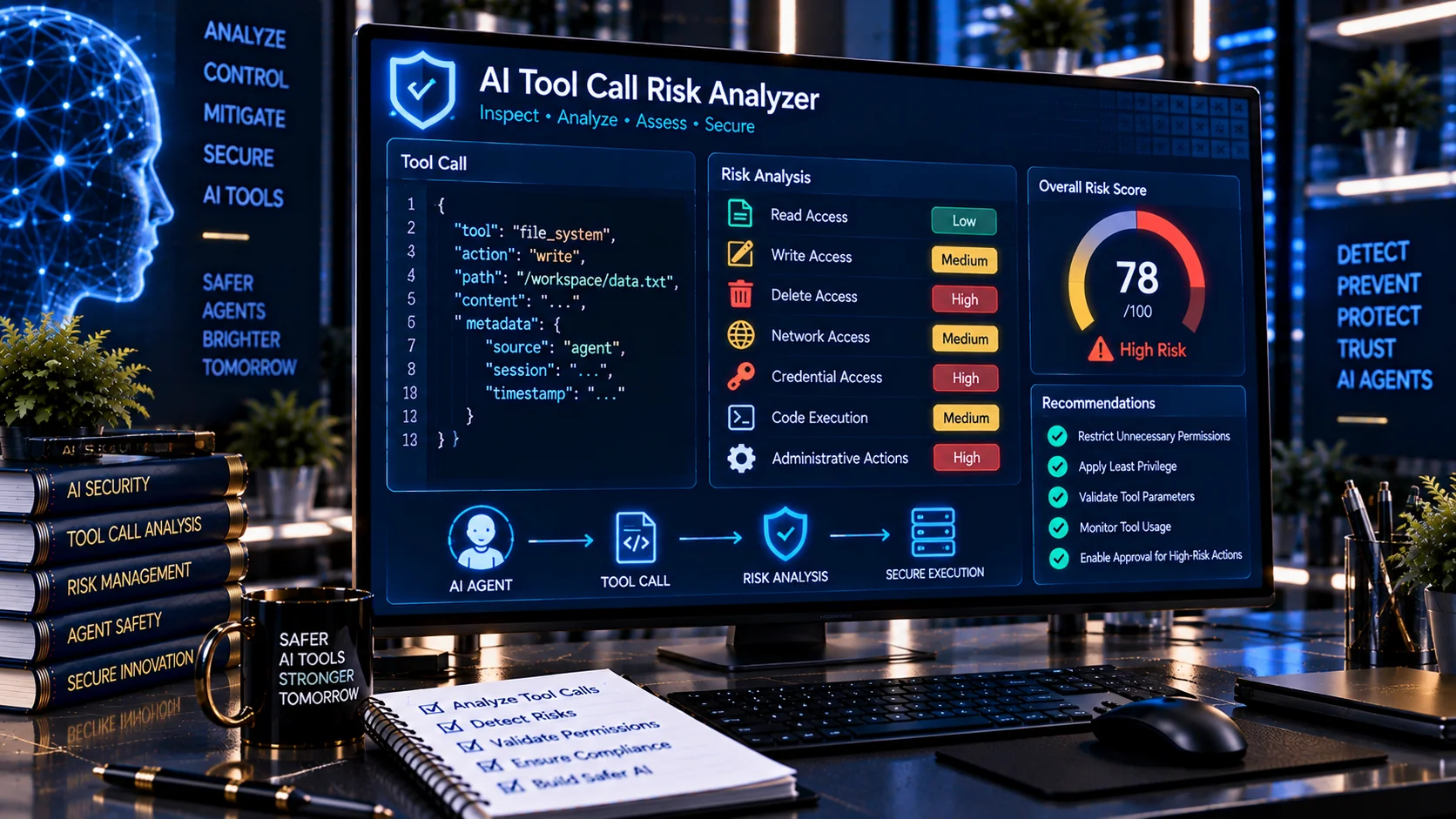
AI Tool Call Risk Analyzer helps developers and security teams inspect AI agent tool calls for potentially risky behavior before an action is executed. Analyze tool-call inputs for read, write, delete, code execution, network access, credential use, administrative actions, financial operations, external communication, and other security-sensitive behavior.
AI Tool Call Risk Analyzer
Analyze an AI agent tool call and classify potentially risky behavior such as read, write, delete, code execution, network access, credential use, administrative actions, financial actions and external communication.
Detected Behavior
Tool Call Risk Findings
Call Summary
What Is an AI Tool Call Risk Analyzer?
An AI Tool Call Risk Analyzer examines an individual tool call and identifies the type of action the AI agent is attempting to perform.
AI agents can interact with databases, files, APIs, cloud services, communication platforms, business systems, and other external resources. A tool call that appears simple can still carry significant security implications depending on its target, parameters, permissions, and potential impact.
For example, reading a public document is generally different from deleting a production database record, executing an arbitrary command, accessing credentials, or sending an external message.
OWASP recommends limiting agent tools and permissions to what is necessary, validating tool calls against authorization and session context, and applying additional controls to high-impact operations.
What Can This Tool Analyze?
The AI Tool Call Risk Analyzer looks for common security-sensitive action categories, including:
- Read operations
- Write operations
- File creation and modification
- Delete operations
- Code and command execution
- Shell or system commands
- Network and external requests
- API access
- Credential and secret access
- Administrative or privileged actions
- Financial and payment-related operations
- External communication
- Sensitive data access
- Broad or wildcard targets
- Cross-user or cross-tenant access
- Authorization and approval signals
- Potential approval bypass behavior
The analyzer provides a structured view of what a tool call appears capable of doing and highlights potentially sensitive behavior.
Why Tool Call Risk Analysis Matters for AI Agents
An AI agent may decide which tool to call based on model output, user instructions, retrieved content, or previous tool results. If the available tool has excessive functionality or permissions, an unexpected or manipulated tool call can have consequences beyond the original task.
OWASP describes excessive agency as a risk arising from excessive functionality, excessive permissions, or excessive autonomy. Recommended mitigations include minimizing available tools, restricting tool functionality, limiting downstream permissions, and requiring human approval for high-impact actions.
Analyzing the tool call itself provides an additional security checkpoint before execution.
Read, Write, and Delete Actions
The analyzer distinguishes between different types of data operations.
A read action may retrieve information without modifying it. A write action can change stored data, while a delete action can permanently remove information.
These distinctions matter because the potential impact of an action depends not only on what the agent can access but also on what it can change.
A tool designed only to retrieve information should not automatically receive unnecessary modification or deletion capabilities. OWASP specifically recommends minimizing extension functionality and permissions to the requirements of the task.
Code and Command Execution
Tool calls involving shell commands, scripts, code execution, or system-level operations deserve additional scrutiny.
Open-ended execution interfaces can expose a much broader action surface than a narrowly scoped tool. OWASP recommends avoiding open-ended extensions where possible and using more granular functionality instead.
The analyzer can flag tool-call patterns associated with command execution so developers can review whether the requested operation is appropriate.
Network and External Access
A tool call may attempt to access an external URL, API, service, endpoint, or network resource.
Network access can introduce additional considerations such as:
- External data transmission
- Untrusted destinations
- Internal service access
- Sensitive information leaving the expected environment
- Unexpected third-party interactions
- Cross-system activity
Tool calls should therefore be evaluated in the context of the agent’s intended task and authorization scope.
Credential and Secret Access
AI tool calls that reference API keys, access tokens, passwords, authentication credentials, secret stores, environment variables, or other sensitive authentication material require careful review.
A tool that only needs to perform a limited business operation should not necessarily have broad access to credentials or secret storage.
OWASP recommends protecting sensitive data and applying least-privilege access to agent tools and connected systems.
Administrative and Privileged Actions
Administrative operations can change permissions, configurations, infrastructure settings, accounts, or other security-sensitive resources.
The analyzer can identify patterns associated with privileged actions so developers can determine whether the requested operation should require stronger authorization or human approval.
OWASP’s agentic security guidance specifically addresses risks from unauthorized configuration and permission changes caused by overly broad action scope or excessive autonomy.
Financial and External Communication Actions
Some tool calls can create direct business or financial consequences.
Examples include:
- Sending payments
- Creating financial transactions
- Issuing refunds
- Purchasing services
- Sending emails
- Publishing content
- Posting messages
- Communicating with external users
These actions may require additional confirmation or authorization because they can create externally visible or difficult-to-reverse consequences.
OWASP recommends human-in-the-loop controls for high-impact actions and separating decision-making from execution for irreversible operations.
Wildcard and Broad Targets
A tool call can become substantially more risky when its target is unrestricted.
Examples include:
- All files
- All users
- All databases
- All records
- All resources
- Wildcard permissions
- Unrestricted commands
- Arbitrary URLs
Broad targets can expand the potential blast radius of a single tool invocation. The analyzer highlights broad targeting patterns so they can be reviewed before execution.
Authorization and Approval Signals
A tool call should not automatically be treated as authorized simply because an AI model generated it.
Security controls should be enforced independently of the model. OWASP recommends validating tool calls against user permissions and session context and implementing authorization in downstream systems rather than relying solely on the AI model to decide whether an action is permitted.
The analyzer helps identify tool calls that may warrant an authorization or approval checkpoint.
Risk Score and Risk Level
PKCapra’s AI Tool Call Risk Analyzer produces a risk-oriented assessment based on detected action characteristics.
The analysis can identify:
- Minimal-risk behavior
- Low-risk behavior
- Medium-risk behavior
- High-risk behavior
- Critical-risk behavior
The result is intended as a security review aid rather than a replacement for runtime authorization, sandboxing, policy enforcement, or human approval.
Example AI Tool Call
A tool call such as:
delete_file({
  "path": "/production/customer-data.csv"
})
contains several security-relevant signals.
The action is destructive, targets a specific file, and references a production resource. Depending on the surrounding authorization model, the operation may require explicit approval or stronger controls before execution.
By contrast, a narrowly scoped read operation against an explicitly authorized public resource may present a substantially different risk profile.
AI Tool Call Risk Analysis for MCP and Agent Workflows
AI agents and MCP-based systems increasingly connect models to tools for file operations, databases, APIs, cloud services, and other external capabilities.
Tool descriptions and tool definitions are part of the agent’s operating environment, making tool security an important part of the overall AI security model. OWASP recommends auditing connected tools, restricting which tools agents can invoke, reviewing tool descriptions, and applying least privilege.
The AI Tool Call Risk Analyzer can be used as an additional inspection step when reviewing individual calls generated by an agent or testing an agent workflow.
A Practical AI Tool Security Workflow
A useful workflow is:
- Generate or capture the AI tool call.
- Analyze the requested action with the AI Tool Call Risk Analyzer.
- Identify read, write, delete, execution, network, credential, administrative, or financial behavior.
- Review the target and parameters.
- Compare the requested action with the user’s actual authorization.
- Apply additional approval requirements to high-impact operations.
- Enforce authorization at the downstream system.
- Log important tool activity for auditing and monitoring.
Tool-call validation should complement, rather than replace, runtime security controls.
Browser-Based Analysis
PKCapra’s AI Tool Call Risk Analyzer is designed for browser-side analysis. The tool evaluates the supplied tool-call content locally using heuristic security checks rather than requiring an external AI API for the analysis.
This makes it useful for quick development reviews, security testing, troubleshooting, and pre-deployment inspection.
Do not paste live passwords, API keys, access tokens, private credentials, or other highly sensitive secrets into any analysis tool unless you have verified that doing so is appropriate for your environment.
Important Limitations
Risk analysis based on tool-call text cannot determine the complete security context of an operation.
The actual risk can depend on:
- User identity
- Authentication state
- Authorization policy
- Resource ownership
- Tool implementation
- Downstream permissions
- Network controls
- Runtime environment
- Sandbox configuration
- Transaction safeguards
- Human approval requirements
- Data sensitivity
- Business impact
A low-risk textual classification does not mean that an operation is automatically safe.
For high-impact actions, authorization and policy enforcement should remain outside the model and should be enforced deterministically by the application or downstream system.
Frequently Asked Questions
What is an AI Tool Call Risk Analyzer?
It is a security analysis tool that examines AI agent tool calls and identifies potentially risky behaviors such as deletion, writing, code execution, network access, credential use, administrative actions, and financial operations.
Why should AI tool calls be analyzed?
Tool calls can cause real changes in connected systems. Analyzing them can help developers identify potentially dangerous actions before execution and determine where additional authorization or approval may be appropriate.
Can this tool detect destructive AI actions?
It can identify tool-call patterns associated with destructive operations such as deleting files, records, resources, or other targets. Actual authorization and execution safety must still be enforced by the application.
Can it analyze MCP-related tool calls?
Yes. Tool calls associated with MCP and other AI agent workflows can be inspected when their action and parameters are supplied in a supported format.
Does a high-risk result mean the tool call is malicious?
No. A high-risk classification indicates that the action contains security-sensitive characteristics. A legitimate administrative operation can still be high impact and require stronger controls.
Does a low-risk result mean the tool call is safe?
No. Text-based analysis cannot establish the complete runtime security context. Authentication, authorization, tool implementation, target sensitivity, and downstream controls still matter.
Should AI agents have unrestricted tool access?
Security guidance generally recommends least privilege: agents should receive only the tools, functionality, and permissions required for their specific tasks.
Related PKCapra Tools
For broader AI agent security analysis, combine the AI Tool Call Risk Analyzer with the AI Tool Security Checker, AI Agent Permission Analyzer, AI Agent Permission Diff Checker, AI Agent Configuration Security Checker, AI Tool Poisoning Scanner, and AI Prompt Injection Scanner.
For document-based agent security, also consider the AI Document Safety Scanner and AI Prompt Injection Document Scanner.