
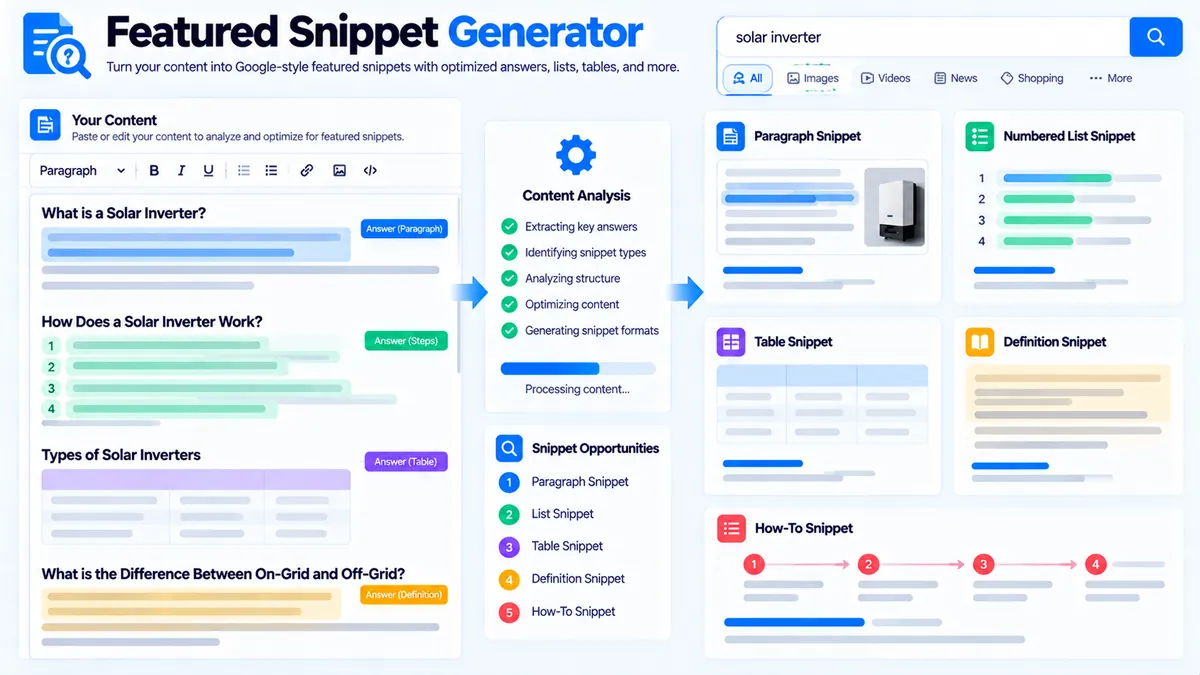
Featured Snippet Opportunity Finder helps you identify parts of your existing content that have a structure suitable for paragraph, list, table, definition, or step-style featured snippets. It analyzes the content you provide in your browser and uses structural and wording signals such as question alignment, heading-to-answer relationships, answer length, compactness, format, and optional topic alignment. It does not inspect live Google results, search volume, rankings, or current Featured Snippet ownership.
Featured Snippet Opportunity Finder
Find passages in your supplied content that are structurally suited to paragraph, list, table, definition, or step-style featured snippets.
Featured Snippet Opportunity Report
Structural opportunities found in the content you supplied.
View JSON report
How to Use the Featured Snippet Opportunity Finder in Simple Steps
- Add a Primary Query / Topic (optional). Enter the target query or topic you want to compare with your content, such as
technical SEO audit. The tool uses it for an additional local topic-alignment signal. - Choose the snippet format focus. Select All formats, Paragraph, List, Table, Definition, or Steps / How-to depending on the type of answer structure you want to investigate.
- Paste your content into Content to Analyze. You can provide an article, guide, landing page, or draft. The analyzer supports plain text and basic HTML headings, paragraphs, lists, and tables.
- Set the minimum score and result limit, then click Find Opportunities. The report shows the strongest matching candidates, their format, score, current heading, candidate answer, reasons for the signal, topic alignment when available, and a recommended next action.
What the Featured Snippet Opportunity Finder Checks
The tool looks for content structures that can function as concise search answers. It does not determine whether Google has selected your page for a Featured Snippet.
Paragraph opportunities
Paragraph candidates are based on answer-like text, particularly content that can work as a direct response beneath a descriptive heading. The tool also considers answer length and sentence compactness.
A practical structure is:
- Question-style or descriptive heading
- Direct 1–3 sentence answer
- Supporting explanation afterward
For example, a section headed What is technical SEO? followed immediately by a concise definition creates a clearer paragraph-style opportunity than a long introduction before the answer.
List opportunities
The analyzer detects consecutive list items and evaluates them as a possible list-style answer structure.
For example:
- Crawlability
- Indexability
- Canonicalization
- Internal linking
- Page speed
The report can suggest keeping the list scannable, giving it a descriptive heading, and making each item independently understandable.
Table opportunities
The tool recognizes table rows and evaluates grouped table content as a possible table-style answer structure.
A useful comparison table should have clear column headings and remain focused on the question the section is answering. The tool’s table signal is structural; it does not confirm that Google will display that table as a Featured Snippet.
Definition opportunities
Definition-style candidates are identified from definition wording such as statements containing terms like “is,” “are,” “means,” “refers to,” or “defined as.”
A stronger direct-answer pattern is:
What is a technical SEO audit?
A technical SEO audit is a structured review of technical website elements that can affect crawling, indexing, internal linking, and search visibility.
The tool can recommend rewriting the opening sentence as a direct definition and keeping the initial explanation concise.
Steps and how-to opportunities
The tool detects how-to and step-oriented structures and can classify them as Steps / How-to opportunities.
For example:
- Crawl the website.
- Review indexability signals.
- Check redirects and internal links.
- Prioritize the fixes.
For these candidates, the recommended action is to use an explicit how-to heading followed by numbered, ordered steps with one clear action per step.
How the Opportunity Score Works
The score is a deterministic structural heuristic rather than a Google ranking score.
The analyzer considers signals including:
| Signal | What it indicates |
|---|---|
| Question wording | The section resembles a query or direct question |
| Heading-to-answer relationship | A heading is followed by a relevant answer block |
| Definition wording | The content has direct definition language |
| How-to structure | The content contains step-oriented signals |
| List structure | Consecutive list items can form a list answer |
| Table structure | Grouped table rows can answer a comparison-style question |
| Answer length | The candidate falls within a concise or usable range |
| Sentence compactness | The answer is limited to a small number of sentences |
| Topic alignment | The candidate overlaps with the optional Primary Query / Topic |
A higher score means the supplied content has more of these snippet-friendly structural signals. It does not mean that Google will display the page as a Featured Snippet.
How to Interpret a Featured Snippet Opportunity
Use the report as an editing guide rather than as a prediction of Google’s SERP behavior.
High-scoring candidate
Check whether the candidate already answers a specific question clearly. If it does, preserve the direct answer and remove unnecessary wording before the supporting explanation.
Medium-scoring candidate
Look at the reasons shown in the report. A candidate may have a useful heading and answer but lack concise wording, strong topic alignment, or a clear snippet format.
No qualifying candidates
If no candidate meets the selected threshold, try All formats, reduce the minimum opportunity score, or provide more structured content. Keeping headings, lists, and tables in the pasted content gives the analyzer more structure to evaluate.
Primary Query / Topic and Topic Alignment
The Primary Query / Topic field is optional. When supplied, the tool compares it with the relevant heading and candidate answer using local text similarity.
For example, if the topic is:
technical SEO audit
a candidate discussing technical SEO audits can receive an additional topic-alignment signal.
This is only a local comparison against the content you supplied. It is not search-volume data, keyword difficulty, live SERP analysis, or Google’s interpretation of the query.
For broader keyword-to-content coverage, you can also use Content-to-Keyword Mapper to review whether target keywords are covered across your content.
Featured Snippet Opportunity Finder vs SERP Snippet Preview
These tools answer different questions.
SERP Snippet Preview is useful when you want to preview how a title, URL, and meta description may appear as a search-result snippet.
Featured Snippet Opportunity Finder is for identifying answer structures inside your content that could be suitable for paragraph, list, table, definition, or how-to style Featured Snippet formats.
The Opportunity Finder does not fetch Google’s current SERP.
Using the Tool With an Existing SEO Workflow
A practical workflow is:
- Use Search Intent Analyzer to clarify the likely search intent and content angle.
- Draft or review the relevant section of the page.
- Run the content through Featured Snippet Opportunity Finder.
- Review the highest-scoring candidates and their reasons.
- Rewrite weak answers into direct, concise responses where appropriate.
- Use Pillar Page Analyzer to review the broader page structure and supporting-topic coverage.
- Use Content Gap Analyzer when you need to identify missing topics before expanding the page.
The goal is not to turn every section into a Featured Snippet candidate. The goal is to make important answers easier to identify and understand when that format suits the search intent.
Browser-Side Processing and Privacy
The supplied content is analyzed locally in your browser. The tool does not send the content to an AI API, search engine, search-volume service, ranking database, or competitor database.
The analyzer is deterministic: the same supplied content and settings produce the same type of structural analysis.
The tool does not provide live Google or Bing SERP confirmation. It also does not claim that a query currently has a Featured Snippet or that your page will receive one.
Supported Content and Practical Limits
The Content to Analyze field supports up to 100,000 characters in the current tool interface.
You can provide:
- Plain text
- Basic HTML headings
- Paragraphs
- Lists
- Tables
Keeping headings in the supplied content is useful because the analyzer evaluates heading-to-answer relationships.
The report can show up to 5, 10, or 15 opportunities, depending on the selected maximum. The minimum opportunity score can be set to 40, 55, or 70.
Example: Turning a Paragraph Into a Better Answer Block
Suppose your article contains:
What is a technical SEO audit?
A technical SEO audit is a structured review of a website’s crawlability, indexability, internal links, metadata, performance, and other technical signals that can affect search visibility. It helps identify technical issues that may interfere with search engine access and page discovery.
The tool may identify this as a paragraph opportunity because it has:
- A question-style heading
- A clear heading-to-answer relationship
- Definition wording
- A relatively concise answer
- Compact sentence structure
- Topic alignment when a matching Primary Query / Topic is supplied
The next editing step is not necessarily to shorten the entire section. Keep the direct answer easy to find, then place deeper explanations, examples, and implementation details underneath it.
Developer Snippets (Automate This Tool Offline)
The browser tool does not expose an API endpoint. If you want to reproduce a simple offline Featured Snippet screening workflow for your own content pipeline, you can use deterministic local processing.
Python
import re

def word_count(text):
    return len(re.findall(r"\b[\w'-]+\b", text))

def sentence_count(text):
    return max(1, len(re.findall(r"[.!?]+", text)))

def is_question_heading(text):
    return bool(re.match(
        r"^(what|how|why|when|where|who|which|can|could|should|does|do|is|are|will|may)\b",
        text.strip(),
        re.I
    )) or text.strip().endswith("?")

content = """
## What is technical SEO?

Technical SEO is the process of improving technical website signals
that affect crawling, indexing, and search visibility.
"""

lines = [line.strip() for line in content.splitlines() if line.strip()]

for i, line in enumerate(lines[:-1]):
    if line.startswith("#") and is_question_heading(line.lstrip("#").strip()):
        answer = lines[i + 1]
        words = word_count(answer)
        if 18 <= words <= 90:
            print("Potential paragraph opportunity:")
            print(line)
            print(answer)
This is an offline screening example, not a replacement for the full PKCapra interface or its report.
PowerShell
$content = @"
## What is technical SEO?

Technical SEO is the process of improving technical website signals
that affect crawling, indexing, and search visibility.
"@

$lines = $content -split "`r?`n" | ForEach-Object {
    $_.Trim()
} | Where-Object { $_ }

for ($i = 0; $i -lt ($lines.Count - 1); $i++) {
    $heading = $lines[$i] -replace '^#+\s*', ''

    if ($heading -match '^(what|how|why|when|where|who|which|can|could|should|does|do|is|are|will|may)\b' -or $heading.EndsWith('?')) {
        $answer = $lines[$i + 1]
        $words = ($answer -split '\s+' | Where-Object { $_ }).Count

        if ($words -ge 18 -and $words -le 90) {
            Write-Output "Potential paragraph opportunity:"
            Write-Output $heading
            Write-Output $answer
        }
    }
}
Node.js
const content = `
## What is technical SEO?

Technical SEO is the process of improving technical website signals
that affect crawling, indexing, and search visibility.
`;

const lines = content
  .split(/\r?\n/)
  .map(line => line.trim())
  .filter(Boolean);

const isQuestion = text =>
  /^(what|how|why|when|where|who|which|can|could|should|does|do|is|are|will|may)\b/i.test(text) ||
  text.endsWith("?");

const wordCount = text =>
  (text.match(/\b[\w'-]+\b/g) || []).length;

for (let i = 0; i < lines.length - 1; i++) {
  const heading = lines[i].replace(/^#+\s*/, "");

  if (isQuestion(heading)) {
    const answer = lines[i + 1];
    const words = wordCount(answer);

    if (words >= 18 && words <= 90) {
      console.log("Potential paragraph opportunity:");
      console.log(heading);
      console.log(answer);
    }
  }
}
Excel Power Query Workflow
You can also use Excel Power Query when your content-review process already operates from spreadsheets.
A simple workflow is:
- Put each content section into a row with columns such as
Heading,Answer,Format, andTopic. - Load the table into Power Query.
- Add a word-count column using a text-length or delimiter-based transformation.
- Flag question-style headings by checking whether the heading starts with terms such as
what,how,why,when, orwhere, or ends with?. - Filter answer blocks into a practical word-count range.
- Add a manual review column such as
Keep,Rewrite, orExpand. - Use the resulting list as an editorial queue.
Power Query can help organize the review, but it does not provide live Google Featured Snippet confirmation. For broader keyword coverage, combine this workflow with Keyword Clustering or Keyword Grouping when those datasets are available in your workflow.
A Practical Featured Snippet Editing Workflow
Once the report identifies an opportunity, review the actual page section before changing it.
For paragraph candidates
Put the direct answer immediately below a descriptive or question-style heading. Keep the first answer concise and place supporting detail afterward.
For list candidates
Use a descriptive heading and make each list item understandable without requiring the reader to reconstruct the meaning from surrounding paragraphs.
For table candidates
Use clear column headings and remove unnecessary columns that do not help answer the underlying question.
For definition candidates
Lead with the definition rather than a long introduction. Explain the concept afterward.
For how-to candidates
Use an explicit how-to heading and numbered steps. Give each step one clear action before adding supporting explanation.
Featured Snippet Opportunity Finder can identify these structural patterns, but editorial judgment is still needed to decide whether a change improves the actual page.
Frequently Asked Questions
What is a Featured Snippet Opportunity Finder?
A Featured Snippet Opportunity Finder identifies supplied content structures that may be suitable for paragraph, list, table, definition, or step-style Featured Snippet answers.
Does this tool check Google Featured Snippets live?
No. It analyzes the content you provide locally and does not inspect Google’s live search results.
Does a high score mean Google will show my page as a Featured Snippet?
No. A high score means the supplied content contains more of the structural signals used by this tool to identify snippet-friendly candidates. It is not a Google ranking or SERP prediction.
What snippet formats does the tool analyze?
The tool supports Paragraph, List, Table, Definition, and Steps / How-to formats, with an All formats option.
Do I need to enter a Primary Query / Topic?
No. The field is optional. Adding one provides an additional local topic-alignment signal.
What does topic alignment mean?
Topic alignment is a local text-similarity signal between the supplied Primary Query / Topic and the relevant candidate heading and answer. It is not search-volume, keyword-difficulty, or live SERP data.
What content can I paste into the analyzer?
You can provide plain text or basic HTML containing headings, paragraphs, lists, and tables. The current input supports up to 100,000 characters.
Can I export the Featured Snippet Opportunity report?
Yes. The current tool provides Copy Report, Copy JSON, Download JSON, and Download PDF actions after a report is generated.
Does the tool use an AI API?
No. The analysis uses deterministic browser-side heuristics and does not query an AI API, search engine, search-volume service, ranking database, or competitor database.
What should I do when no opportunities are found?
Try All formats, lower the minimum opportunity score, or provide more structured content with headings, lists, tables, and concise answer sections. A result can also be absent because the supplied content does not contain candidates that meet the selected filters.