
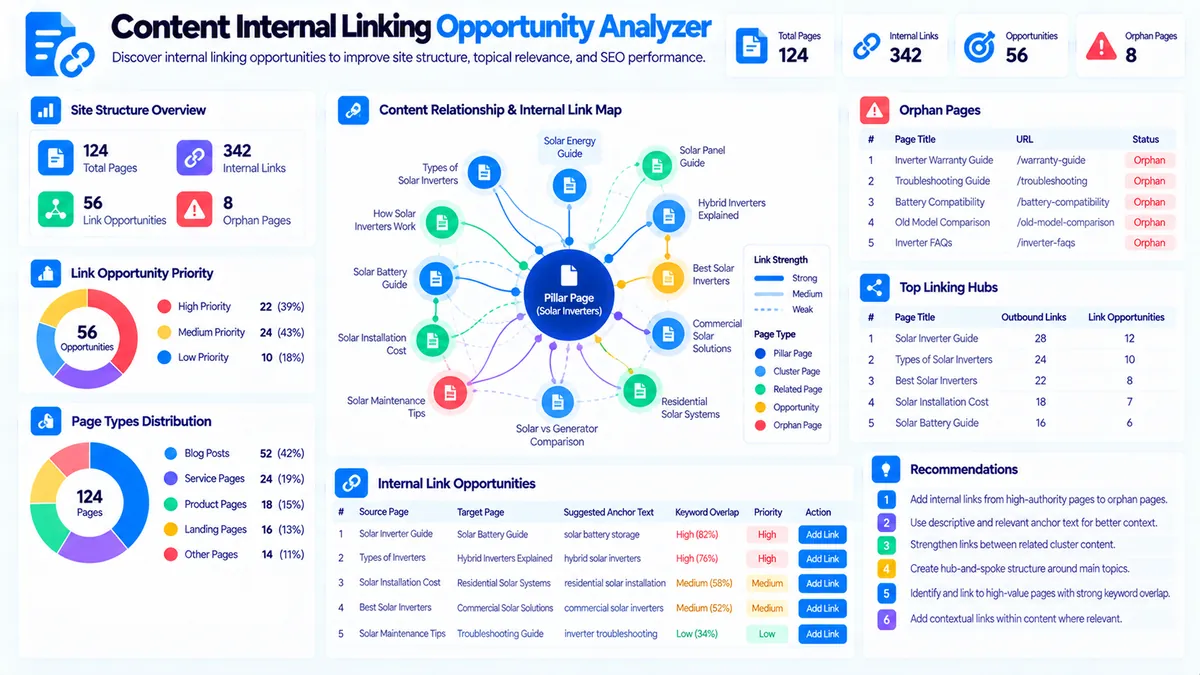
The Content Internal Linking Opportunity Analyzer helps you identify potential internal links between pages in a content inventory. Instead of manually comparing every page with every other page, you can provide each page’s URL, primary keyword, secondary keywords, and page title, then let the analyzer surface topic relationships and potential source-to-target linking opportunities.
The tool compares keyword and topic overlap between pages, identifies potential linking relationships, suggests anchor-text ideas, highlights pages that may need more incoming links, and organizes the results into priorities and page-level link maps.
Enter one page per line using this format:
URL | Primary Keyword | Secondary Keywords | Page Title
Then choose the analysis sensitivity, minimum keyword overlap, and maximum number of opportunities. The analysis runs in your browser and does not crawl your website or require an external SEO API.
Content Internal Linking Opportunity Analyzer
Find relevant source-to-target internal linking opportunities, anchor ideas, orphan-page signals, and high-value link relationships from a page inventory.
Pages to connect
Internal Linking Opportunity Report
Source-to-target recommendations are inferred from the supplied page topics, keywords, titles, and relationship signals.
View JSON report
How to Use the Content Internal Linking Opportunity Analyzer in Simple Steps
- Enter your Page Inventory with one page per line using
URL | Primary Keyword | Secondary Keywords | Page Title. Keep each page’s primary and secondary topics specific enough to distinguish it from related pages. - Choose Analysis Sensitivity. Use Focused for stronger relationships, Balanced for general audits, or Broad when you want more potential connections.
- Select the Minimum Keyword Overlap and Maximum Opportunities. A higher overlap requirement produces a more conservative list of potential links.
- Click Analyze Internal Linking and review the top priorities, suggested source-to-target links, anchor-text ideas, orphan-page signals, linking hubs, page map, and recommendations.
Use Load Example to test the analyzer with a sample content inventory or Clear to remove the current analysis.
The analyzer works from the page information you provide. It does not fetch the pages or verify whether an existing link is actually present on the live website.
What the Content Internal Linking Opportunity Analyzer Measures
The analyzer compares pages using the topical information contained in your inventory.
It evaluates:
- Primary keyword overlap
- Secondary keyword overlap
- Topic relationship strength
- Source-to-target relationships
- Potential link priorities
- Suggested anchor-text ideas
- Incoming-link patterns
- Outgoing-link patterns
- Potential orphan-page signals
- Potential linking hubs
- Page-level relationship maps
The goal is to turn a content inventory into a practical internal-linking plan.
The Page Inventory Format
Each page should use this structure:
URL | Primary Keyword | Secondary Keywords | Page Title
For example:
The analyzer uses the four fields differently.
URL
The URL identifies the page that could act as a source or target.
Use the actual page URL from your content inventory.
Primary Keyword
The primary keyword represents the main subject of the page.
For example:
technical SEO
or:
XML sitemap
or:
email marketing automation
The primary keyword provides a strong signal when comparing pages.
Secondary Keywords
Secondary keywords provide additional topical context.
For example:
crawlability, indexing, robots.txt, canonical tags
These terms help distinguish pages that share a broad subject but cover different subtopics.
Page Title
The page title gives the analyzer another topical signal and makes the resulting page map easier to understand.
Use the current title where available.
Why Internal Linking Opportunities Matter
Internal links connect related pages within the same website.
A useful internal link can help a reader move from a broad subject to a more specific explanation, from an informational guide to a supporting resource, or from one related topic to another.
For example, a broad page about:
technical SEO
may naturally link to more specific pages about:
- XML sitemaps
- Crawlability
- Canonical URLs
- Redirects
- Structured data
- Page speed
The analyzer helps identify these relationships from the page inventory you provide.
Source Pages and Target Pages
Every suggested relationship has two roles.
Source page: the page where an internal link could potentially be added.
Target page: the page that could receive that link.
For example:
Technical SEO Guide → XML Sitemap Guide
The technical SEO guide could introduce XML sitemaps and link readers to the more detailed XML sitemap resource.
The analyzer does not insert the link. It identifies the relationship for editorial review.
How Keyword Overlap Creates Opportunities
The analyzer looks for shared primary and secondary keywords between pages.
Suppose one page contains:
Primary:technical SEO
Secondary:crawlability, indexing, XML sitemap
Another page contains:
Primary:XML sitemap
Secondary:sitemap errors, sitemap URLs, search engines
These pages have a meaningful topical relationship.
The first page may be a suitable source for linking to the second page when the subject naturally appears in the content.
The overlap does not prove that a link belongs on the page. It provides a relationship signal that you can validate editorially.
Minimum Keyword Overlap
The Minimum Keyword Overlap setting controls how much shared terminology is required before a potential relationship is included.
Available options include:
- 1+
- 2+
- 3+
- 4+
1+ overlap
This produces a wider opportunity set.
Use it when you want to discover many possible relationships and manually filter the results.
2+ overlap
This provides a more focused relationship list and can reduce weak one-term matches.
3+ overlap
This is useful when your inventory contains many related pages and you want stronger topical evidence.
4+ overlap
This produces a highly conservative list based on stronger shared terminology.
A higher overlap threshold can reduce false-positive relationships but may also hide useful links between pages that use different vocabulary for related subjects.
Analysis Sensitivity
The analyzer provides three sensitivity levels.
Focused
Focused analysis favors stronger relationships and limits weaker connections.
Use it when you want a smaller list of more obvious linking opportunities.
Balanced
Balanced analysis provides a practical middle ground between relationship strength and opportunity discovery.
It is suitable for most content inventories.
Broad
Broad analysis allows more potential relationships to surface.
Use it when auditing a large content library where discovering possible connections is more important than keeping the initial list small.
Suggested Anchor Text
The analyzer provides anchor-text ideas based on the target page’s primary keyword, secondary keywords, and title.
For example, if the target page is:
XML Sitemap Guide
with a primary keyword of:
XML sitemap
possible anchor ideas may include:
- XML sitemap
- XML sitemap guide
- sitemap guide
These are suggestions for editorial review.
Do not use the same anchor phrase mechanically across every internal link. The anchor should fit the surrounding sentence and accurately describe the destination page.
Anchor Text Should Match the Destination
A useful anchor gives the reader a reasonable expectation of what they will find after clicking.
For example:
Learn more about XML sitemap errors
is more descriptive than an unrelated generic phrase when the target page specifically explains sitemap errors.
The analyzer can suggest candidate phrases, but the final anchor should be chosen based on the actual context of the source page and the content of the destination.
Link Priority
The report organizes potential relationships by priority.
High Priority
High-priority opportunities represent stronger topical relationships based on the inventory signals.
These are useful starting points for manual review.
Medium Priority
Medium-priority relationships have meaningful overlap but may require more editorial judgment.
The relationship may be useful if the source page naturally discusses the target subject.
Low Priority
Low-priority relationships have weaker or broader connections.
Review these after stronger opportunities and use them only where the link genuinely helps the reader.
Priority is based on the analyzer’s local relationship signals. It is not a measure of Google ranking value.
Top Linking Priorities
The report provides a Top Linking Priorities section so you can begin with the strongest suggested source-to-target relationships.
Each opportunity can include:
- Source page
- Target page
- Priority
- Overlap evidence
- Suggested anchor text
- Recommended action
This makes the output useful as an editorial task list.
Orphan-Page Signals
A page can be difficult to discover internally if no other pages in the supplied inventory appear to link toward it.
The analyzer can identify potential orphan-page signals from the relationship map.
An orphan signal means:
Based on the inventory supplied, this page does not have an identified incoming relationship from another page.
It does not prove that the page is a real orphan on the live website.
The analyzer does not crawl your site and therefore cannot verify the actual internal-link structure.
Use the signal as a prompt to check whether the page should receive contextual links from relevant existing content.
Potential Linking Hubs
Some pages have strong relationships with several other pages.
These pages may function as useful topical hubs.
For example, a broad guide about:
SEO basics
could have meaningful relationships with pages about:
- Keyword research
- Technical SEO
- Internal linking
- On-page SEO
- Content optimization
- Structured data
The analyzer can surface such relationship patterns so you can review whether the hub page should connect naturally to supporting resources.
A potential hub is not automatically a page that should contain every possible link.
Too many links can reduce clarity. Choose links that help readers continue to relevant information.
Page-Level Link Map
The page map summarizes the relationship structure across the supplied inventory.
It can help you identify:
- Pages with several potential outgoing relationships
- Pages with several potential incoming relationships
- Pages with few detected relationships
- Potential hub pages
- Potential orphan-page signals
- Clusters of closely related content
This provides a high-level view before you make individual editorial decisions.
Practical Example: SEO Content Cluster
Imagine your inventory contains:
SEO Guide
Primary: SEO
Secondary: search engines, rankings, keywords
Keyword Research Guide
Primary: keyword research
Secondary: search volume, keyword difficulty, search intent
Technical SEO Guide
Primary: technical SEO
Secondary: crawlability, indexing, XML sitemap
Internal Linking Guide
Primary: internal linking
Secondary: anchor text, orphan pages, link structure
The analyzer can identify relationships between these pages based on shared terminology and topic context.
You can then decide where contextual links make sense.
For example, a broad SEO guide may naturally introduce keyword research, technical SEO, and internal linking.
The individual guides can then link to each other when the surrounding content creates a genuine reason for the reader to continue.
Practical Example: Content Marketing Cluster
Consider a group of pages about content marketing:
- Content strategy
- Content calendar
- Content briefs
- Content optimization
- Content auditing
- Content distribution
The analyzer can surface relationships where the supplied primary and secondary keywords overlap.
A content strategy page might naturally link to a content calendar guide, while a content optimization page could link to a content auditing resource.
The final link placement should depend on the actual copy, not only the inventory relationship.
Practical Example: Product Content
Suppose an inventory contains:
Email Marketing Software
and supporting pages about:
- Email automation
- Subscriber segmentation
- Email deliverability
- Campaign analytics
- Email templates
The main software page may serve as a hub, while supporting pages provide deeper explanations.
The analyzer can identify these relationships from the page inventory.
This can help you create a more intentional internal-linking plan before manually editing each page.
How to Build an Internal Linking Workflow
A practical workflow is:
- Export or prepare your page inventory.
- Add each page’s primary keyword.
- Add meaningful secondary keywords.
- Add the current page title.
- Run the analyzer with Balanced sensitivity.
- Review High-priority source-to-target opportunities.
- Validate each relationship by reading the source and target pages.
- Choose natural anchor text.
- Add the link where it provides useful context.
- Re-run the analysis after major changes.
This process keeps the analyzer in the role of opportunity discovery rather than automatic link insertion.
How to Validate a Suggested Link
Before adding a suggested link, ask:
- Does the source page genuinely mention the target subject?
- Would the target page provide useful additional information?
- Is the destination page relevant to the sentence or section?
- Does the suggested anchor accurately describe the destination?
- Would the link help the reader continue their research?
- Is the source already linking to too many similar resources?
- Does the target page need more contextual visibility?
If the answer is no, skip the opportunity.
A lower number of relevant internal links can be more useful than a large number of forced connections.
Keyword Overlap Does Not Automatically Mean “Add a Link”
Two pages can share keywords without requiring an internal link.
For example, two articles might both mention:
SEO
keywords
and:
search engines
but cover completely different subjects.
The analyzer detects topical relationships from available inventory data. It does not understand the complete meaning of every sentence on the source page.
Always validate the relationship against the actual page content.
Broad vs. Specific Pages
Broad pages often have relationships with many narrower pages.
For example:
Technical SEO Guide
may relate to:
- XML sitemap
- Crawlability
- Canonical tags
- Redirects
- Robots.txt
A specific page may also link back to the broader guide when the reader needs additional context.
This creates a useful two-way relationship when both links make sense editorially.
The analyzer can help identify both directions, but it does not require every related page to link in both directions.
Internal Linking and Topic Clusters
Internal linking can support a structured content architecture by connecting related pages.
For example:
Pillar topic:Technical SEO
Supporting topics:
- Crawlability
- Indexing
- XML sitemaps
- Canonical URLs
- Redirects
- Structured data
The Topic Cluster Generator can help organize related subjects, while this analyzer can help identify potential relationships between pages that already exist.
For broader keyword organization, use Keyword Clustering or Keyword Grouping.
Technical Breakdown: How the Analyzer Works
The Content Internal Linking Opportunity Analyzer runs locally in the browser.
It first parses the page inventory into individual records.
For each page, it collects:
- URL
- Primary keyword
- Secondary keywords
- Page title
It then compares pages against each other and identifies shared keyword signals.
The relationship model considers primary-keyword matches, secondary-keyword matches, and normalized topical terms.
For each potential source-to-target relationship, the analyzer calculates a local relationship strength and applies the selected sensitivity and minimum-overlap settings.
The result is then converted into:
- Opportunity priority
- Suggested anchor text
- Source-target relationship
- Page map information
- Incoming/outgoing relationship signals
- Recommendations
The analysis is deterministic for the same inventory and settings.
Browser-Side Processing
The analyzer does not crawl the supplied URLs.
It does not fetch:
- Page HTML
- Existing internal links
- Google Search results
- Search Console data
- Search rankings
- External SEO databases
The analysis is based entirely on the page inventory you provide.
This makes it suitable for planning and auditing without granting the tool access to your website.
What the Tool Does Not Claim
The linking opportunities are not:
- Guaranteed ranking improvements
- Google-approved internal-link recommendations
- A replacement for reading the source page
- A live crawl of your website
- A measurement of PageRank
- A measurement of actual internal-link equity
- Proof that a page is truly orphaned
- A prediction of search performance
The tool identifies potential relationships that deserve editorial review.
Common Internal Linking Problems the Analyzer Can Expose
Pages with no detected incoming relationships
A page may have no incoming relationship in the supplied inventory.
Review whether relevant existing pages should link to it.
One page has many potential relationships
A broad page may naturally relate to many pages.
Review the strongest relationships and avoid adding links simply because the analyzer found them.
Weak keyword overlap
A relationship based on one broad term may not be meaningful.
Increase the minimum overlap threshold when you want a more conservative opportunity list.
Missing secondary keywords
A page may be relevant but difficult to connect because its inventory entry lacks useful secondary keywords.
Improve the inventory data and run the analysis again.
Inconsistent terminology
Related pages may use different terms for the same concept.
Review the primary and secondary keyword fields before assuming that no relationship exists.
Suggested anchor text is too generic
Use the target page’s actual subject to create descriptive, natural anchor text.
Too many links pointing to the same page
A useful target can still receive unnecessary links.
Prioritize contextual relationships instead of maximizing incoming-link counts.
Improving Your Inventory Before Analysis
The quality of the output depends partly on the quality of the page inventory.
For each page, try to provide:
- One clear primary keyword
- Several genuinely relevant secondary keywords
- The current page title
- The correct page URL
Avoid stuffing unrelated keywords into the secondary-keyword field.
For example, a page about XML sitemaps should not contain a long list of every SEO term simply to create more overlap.
Relevant inventory data produces more useful relationship signals.
Combining This Tool with Other PKCapra Tools
The Content Internal Linking Opportunity Analyzer works particularly well with other content-planning tools.
Use the Content-to-Keyword Mapper to understand the relationship between pages and keyword themes.
Use the Content Cannibalization Analyzer when you need to investigate pages competing around overlapping keyword themes.
Use the Content Gap Analyzer to identify missing content opportunities.
Use the Content Semantic Coverage Analyzer to review the concepts covered by individual pages.
Use the Content Entity Analyzer to inspect important entities and terminology within page content.
For broader content architecture, use the Topic Cluster Generator and Pillar Page Analyzer.
Developer Snippets (Automate This Tool Offline)
The following examples demonstrate a basic offline method for finding shared keywords between pages. They are intentionally smaller than the complete PKCapra analyzer and do not reproduce its full scoring, priority model, anchor suggestions, hub detection, or page-map logic.
Python
from itertools import combinations
import re

pages = [
    {
        "url": "/technical-seo/",
        "primary": "technical SEO",
        "secondary": "crawlability, indexing, XML sitemap"
    },
    {
        "url": "/xml-sitemap/",
        "primary": "XML sitemap",
        "secondary": "sitemap errors, indexing, search engines"
    },
    {
        "url": "/internal-linking/",
        "primary": "internal linking",
        "secondary": "anchor text, orphan pages, link structure"
    }
]

def terms(value):
    value = value.lower()
    value = re.sub(r"[^a-z0-9,\s-]", " ", value)

    return {
        item.strip()
        for item in value.split(",")
        if len(item.strip()) > 2
    }

for source, target in combinations(pages, 2):
    source_terms = terms(
        source["primary"] + ", " + source["secondary"]
    )

    target_terms = terms(
        target["primary"] + ", " + target["secondary"]
    )

    overlap = sorted(source_terms & target_terms)

    if overlap:
        print(
            f'{source["url"]} -> {target["url"]}: '
            f'{len(overlap)} shared terms'
        )
        print("Shared:", ", ".join(overlap))
PowerShell
$pages = @(
    @{
        Url = "/technical-seo/"
        Primary = "technical SEO"
        Secondary = "crawlability, indexing, XML sitemap"
    },
    @{
        Url = "/xml-sitemap/"
        Primary = "XML sitemap"
        Secondary = "sitemap errors, indexing, search engines"
    },
    @{
        Url = "/internal-linking/"
        Primary = "internal linking"
        Secondary = "anchor text, orphan pages, link structure"
    }
)

function Get-Terms($page) {
    $value = "$($page.Primary), $($page.Secondary)"
    $value = $value.ToLower()
    $value = $value -replace '[^a-z0-9,\s-]', ' '

    return $value.Split(',') |
        ForEach-Object { $_.Trim() } |
        Where-Object { $_.Length -gt 2 } |
        Select-Object -Unique
}

for ($i = 0; $i -lt $pages.Count; $i++) {
    for ($j = $i + 1; $j -lt $pages.Count; $j++) {

        $sourceTerms = Get-Terms $pages[$i]
        $targetTerms = Get-Terms $pages[$j]

        $overlap = $sourceTerms |
            Where-Object { $_ -in $targetTerms }

        if ($overlap.Count -gt 0) {
            Write-Output "$($pages[$i].Url) -> $($pages[$j].Url)"
            Write-Output "Shared: $($overlap -join ', ')"
        }
    }
}
Node.js
const pages = [
  {
    url: "/technical-seo/",
    primary: "technical SEO",
    secondary: "crawlability, indexing, XML sitemap"
  },
  {
    url: "/xml-sitemap/",
    primary: "XML sitemap",
    secondary: "sitemap errors, indexing, search engines"
  },
  {
    url: "/internal-linking/",
    primary: "internal linking",
    secondary: "anchor text, orphan pages, link structure"
  }
];

function getTerms(page) {
  return new Set(
    `${page.primary}, ${page.secondary}`
      .toLowerCase()
      .replace(/[^a-z0-9,\s-]/g, " ")
      .split(",")
      .map(value => value.trim())
      .filter(value => value.length > 2)
  );
}

for (let i = 0; i < pages.length; i++) {
  for (let j = i + 1; j < pages.length; j++) {

    const sourceTerms = getTerms(pages[i]);
    const targetTerms = getTerms(pages[j]);

    const overlap = [...sourceTerms]
      .filter(term => targetTerms.has(term));

    if (overlap.length) {
      console.log(
        `${pages[i].url} -> ${pages[j].url}`
      );
      console.log("Shared:", overlap.join(", "));
    }
  }
}
These examples demonstrate simple overlap detection. A production internal-linking workflow should additionally validate page context, direction, link relevance, anchor quality, existing links, and editorial suitability before inserting links.
Native Software Workflow: Build an Internal Linking Inventory in Excel with Power Query
Excel is useful for maintaining the page inventory that feeds the analyzer.
Create columns such as:
- URL
- Primary Keyword
- Secondary Keywords
- Page Title
- Incoming Link Opportunities
- Outgoing Link Opportunities
- Priority
- Suggested Anchor
- Source Page
- Target Page
- Action Status
A practical workflow is:
- Export your website’s page list or prepare your content inventory.
- Add one row for each page.
- Enter one primary keyword per page.
- Add relevant secondary keywords.
- Add the current page title.
- Use Power Query to clean whitespace and normalize formatting.
- Remove duplicate page records.
- Run the inventory through the analyzer.
- Review High-priority source-to-target relationships.
- Record approved links and their final anchor text in Excel.
- Mark each opportunity as planned, added, rejected, or needs review.
This creates a repeatable internal-linking workflow for larger content libraries.
Reporting and Export
After the analysis is complete, the report provides several output options.
Copy Report copies the human-readable internal-linking report.
Copy JSON copies the structured analysis data.
Download JSON creates a local JSON file containing the relationship and opportunity data.
Download PDF creates a direct PDF report containing the top priorities, suggested links, anchor ideas, page map, and recommendations.
These exports are useful for editorial planning, SEO audits, content migrations, and internal-linking task management.
Frequently Asked Questions
What is an internal linking opportunity analyzer?
An internal linking opportunity analyzer compares pages to identify relevant source-to-target relationships where an internal link may provide useful context to readers.
What information does this tool need?
Each page should include a URL, primary keyword, secondary keywords, and page title using the format URL | Primary Keyword | Secondary Keywords | Page Title.
Does the analyzer crawl my website?
No. It works from the page inventory you provide and does not fetch live URLs.
Does it check existing internal links?
No. It does not crawl page HTML to verify existing links. It identifies potential relationships based on the supplied inventory.
How does it find linking opportunities?
It compares primary keywords, secondary keywords, titles, and normalized topical terms between pages and identifies shared signals.
What does minimum keyword overlap mean?
It controls how many shared terms are required before a page relationship is included in the opportunity set.
What is a source page?
The source page is the page where an internal link could potentially be placed.
What is a target page?
The target page is the page that could receive the internal link.
Does the tool automatically add links?
No. It only identifies opportunities and provides suggested anchor-text ideas. You decide whether and where to add each link.
Does a high-priority opportunity guarantee SEO value?
No. Priority reflects the analyzer’s local relationship signals. The final value of an internal link depends on the actual page content, context, destination, and usefulness to the reader.
What is an orphan-page signal?
It is a page for which the supplied inventory does not show an identified incoming relationship. It does not prove that the page is actually orphaned on the live website.
Can I analyze a large content inventory?
Yes, but the practical usefulness depends on the size and quality of the inventory. Large inventories may produce many possible relationships, so higher overlap thresholds and focused sensitivity can help narrow the results.
How should I choose anchor text?
Choose descriptive wording that accurately represents the destination page and fits naturally into the source sentence. Treat the analyzer’s anchor suggestions as starting points rather than fixed text.
Continue Your Internal Linking Workflow
Use the Content Internal Linking Opportunity Analyzer to turn your existing page inventory into a practical list of potential internal-link relationships.
For broader content architecture, use the Topic Cluster Generator and Pillar Page Analyzer.
Use the Content-to-Keyword Mapper to connect pages with keyword themes, and the Content Cannibalization Analyzer to investigate overlapping page targets.
For semantic and topical review, use the Content Semantic Coverage Analyzer and Content Entity Analyzer.
For missing content opportunities, use the Content Gap Analyzer. For organizing related keywords, use Keyword Clustering and Keyword Grouping.
For additional page-level SEO checks, visit the SEO Website Tools collection.