
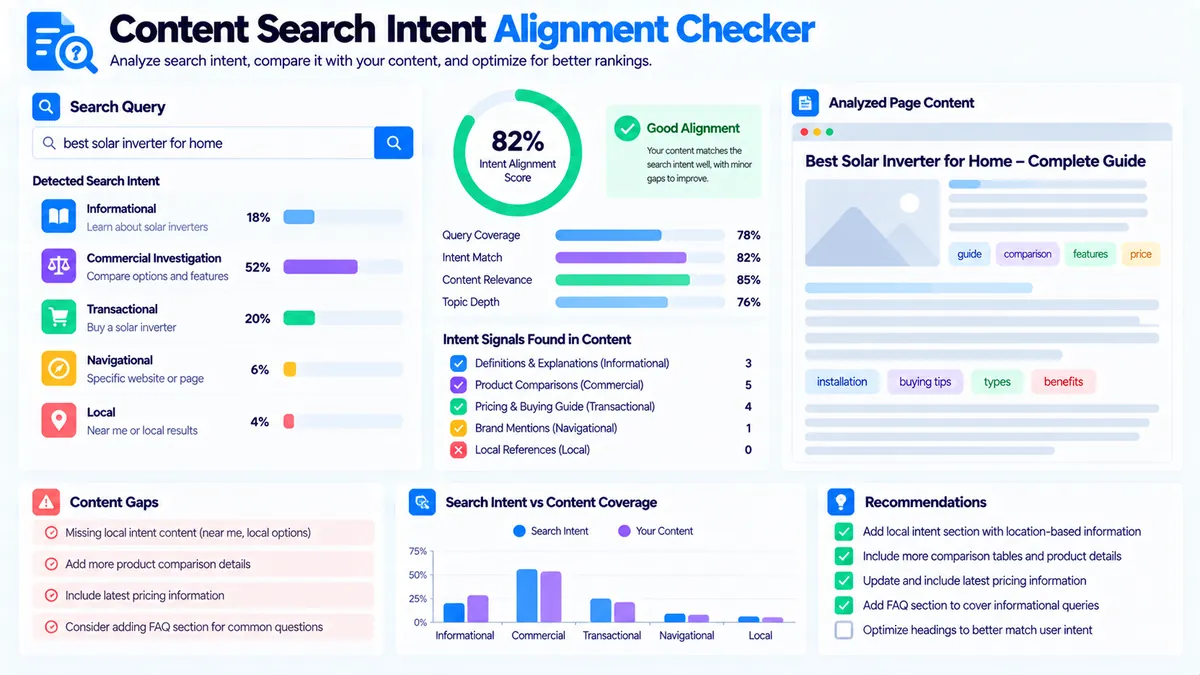
The Content Search Intent Alignment Checker helps you determine whether your page content is aligned with the search intent suggested by a target query. Enter the actual keyword or search query, optionally add the page title, paste the page content, and the tool evaluates likely intent, content intent signals, query-term coverage, alignment strength, intent gaps, and potential mismatches.
The checker supports five intent categories: Informational, Commercial Investigation, Transactional, Navigational, and Local. It uses transparent browser-side heuristics based on query wording and content patterns rather than live SERPs, rankings, or external SEO databases.
Content Search Intent Alignment Checker
Compare a target search query with your content to identify likely search intent, content intent signals, query coverage, alignment strength, and potential intent mismatches.
Target keyword or query
Content to analyze
Search Intent Alignment Report
Intent and alignment signals are inferred from the query, title, and supplied content using local heuristics.
View JSON report
How to Use the Content Search Intent Alignment Checker in Simple Steps
- Enter the Target keyword or query you want the page to satisfy. Use the actual search query where possible instead of a broad topic label.
- Leave Expected intent on Auto-detect from query, or manually select Informational, Commercial Investigation, Transactional, Navigational, or Local when you already know the intended search purpose.
- Optionally enter the Page title, then paste the article, landing-page copy, guide, product-page content, or HTML into the Content to analyze box.
- Click Check Intent Alignment and review the alignment score, detected query intent, content intent, query coverage, intent comparison, detected signals, gaps, and recommendations.
The target query supports up to 300 characters, while the content input supports up to 100,000 characters.
Use Load Example to test the tool quickly or Clear to reset the form and results.
What the Content Search Intent Alignment Checker Measures
Search intent is the underlying purpose behind a query. A person searching for “how to fix a broken link” is looking for an explanation or process, while someone searching for “best project management software for small teams” is generally evaluating available options.
The checker compares the wording of your target query with signals found in the supplied title and content.
It evaluates:
- Likely search intent
- Query-intent confidence
- Content intent
- Overall intent alignment
- Intent fit
- Query-term coverage
- Exact query-phrase presence
- Intent-specific content signals
- Conflicting intent cues
- Potential intent gaps
- Editorial recommendations
The result is designed to help you review whether the page is serving the purpose implied by the query.
The Five Search Intent Categories
Informational Intent
Informational queries usually seek an answer, explanation, definition, process, tutorial, guide, examples, or educational information.
Common query signals include phrases such as:
- how
- what
- why
- when
- guide
- tutorial
- definition
- explained
- tips
- steps
- checklist
- examples
The content checker looks for corresponding explanatory signals such as definitions, steps, explanations, examples, guides, tutorials, and answer-oriented structures.
For example:
how to create an XML sitemap
would generally produce informational signals.
A page targeting that query should provide useful instructions or an explanation rather than focusing primarily on purchasing or checkout actions.
Commercial Investigation Intent
Commercial Investigation queries usually indicate that the searcher is evaluating options before making a decision.
Common signals include:
- best
- top
- review
- reviews
- compare
- comparison
- versus
- alternatives
- pricing
- price
- cost
- software
- providers
- brands
The checker looks for comparison-oriented content such as features, pricing, reviews, pros and cons, alternatives, selection criteria, and comparison sections.
For example:
best project management software for small teams
suggests that the searcher wants to evaluate multiple options rather than simply learn what project management software means.
Transactional Intent
Transactional queries indicate a more direct intention to take an action such as buying, ordering, booking, subscribing, downloading, requesting a quote, or starting a trial.
Common signals include:
- buy
- order
- purchase
- shop
- checkout
- cart
- book
- booking
- hire
- subscribe
- sign up
- download
- coupon
- discount
- deal
- quote
- demo
- trial
- pricing
The checker looks for corresponding action-oriented content such as purchase information, booking options, pricing, quotes, demos, trials, sign-up paths, or other direct calls to action.
Navigational Intent
Navigational queries usually seek a known website, brand destination, account area, support resource, documentation page, or other specific destination.
Signals can include:
- login
- sign in
- official
- website
- homepage
- contact
- support
- portal
- dashboard
- account
- documentation
- docs
A page serving this type of query should make the intended destination or brand relationship clear.
For example, a query such as:
Google Search Console login
has a different purpose from:
what is Google Search Console
even though both contain the same product name.
Local Intent
Local queries usually seek a business, service, place, or geographically specific result.
Signals can include:
- near me
- nearby
- local
- near
- open now
- hours
- address
- directions
- location
The checker also looks for practical local-content signals such as service areas, addresses, directions, opening hours, maps, phone information, and location context.
For example:
SEO consultant near me
has a local component that a generic SEO guide would not satisfy.
Why the Target Query Matters
The checker is designed around the actual query you want the page to satisfy.
Using:
best email marketing software for startups
is more useful than entering:
email marketing
because the longer query contains additional intent signals. The words “best,” “software,” and “for startups” provide more context about what the searcher may be trying to accomplish.
The tool therefore recommends using the actual target query whenever possible.
Expected Intent: Auto-Detect or Manual Selection
The Expected intent field has two practical modes.
Auto-detect from query
The checker analyzes the wording of the target query and selects the strongest detected intent category.
It also reports a query-intent confidence value based on the relative strength of the detected signals.
Manual intent selection
You can manually select:
- Informational
- Commercial Investigation
- Transactional
- Navigational
- Local
Manual selection is useful when you already have an editorial or SEO strategy that defines the intended page purpose.
The checker then evaluates the content against that selected benchmark.
Understanding the Alignment Score
The Overall intent alignment score is a local diagnostic score from 0 to 100.
It combines three main elements:
- Intent fit between the selected benchmark and content signals
- Coverage of meaningful terms from the target query
- Confidence in the detected query intent
When a manually selected expected intent differs from the strongest detected query intent, the checker also applies an adjustment to reflect that conflict.
The score is classified as:
- Strong alignment: 75–100
- Moderate alignment: 55–74
- Weak alignment: below 55
- Mixed signals: used when the calculated score is high but the content signals indicate a notable intent conflict
These thresholds are part of the tool’s local heuristic model. They are not Google ranking thresholds or search-engine measurements.
Intent Fit vs. Query Coverage
These two metrics answer different questions.
Intent Fit asks whether the content contains language and structures associated with the selected search intent.
Query Coverage checks whether meaningful terms extracted from the target query appear in the page title or supplied content.
A page can therefore have high query coverage but weak intent alignment.
For example, a page might repeatedly mention:
best project management software
but provide only a definition of project management software. The important words may be present while the actual commercial-investigation purpose remains underdeveloped.
Likewise, a page can have strong informational structure while missing several meaningful terms from the target query.
Exact Query Phrase vs. Partial Coverage
The checker separately reports whether the complete target query appears exactly in the supplied title or content.
An exact phrase match is not required for useful alignment.
Natural content often uses variations, related terminology, or different grammatical forms. The coverage report therefore also evaluates individual meaningful query terms.
The tool explicitly treats query coverage as a diagnostic rather than a keyword-density target.
Intent Comparison
The report compares all five intent categories so you can see how the query and content behave across different intent types.
The comparison includes:
- Query signals
- Content strength
- Signal classification
- Query cues
This is useful when a page appears to serve more than one purpose.
For example, an article may have a commercial query but contain mostly informational language. The comparison can show that the content has stronger informational signals than commercial signals.
That does not automatically mean the page is wrong. It gives you evidence to review whether the page purpose and target query are actually aligned.
Detected Intent Signals
The report shows the phrases that contributed to each intent category.
It separates:
- Body signals
- Title signals
- Conflicting cues
For example, a commercial-investigation page may contain terms such as:
- compare
- features
- pricing
- alternatives
- reviews
while its title may contain:
Best Project Management Tools
Seeing the actual signals makes the result easier to audit than relying only on a single score.
Intent Gaps to Review
The tool checks for practical gaps associated with the selected intent.
Informational gap
If the page lacks clear explanatory signals, the report may suggest adding definitions, questions, steps, examples, or a clear answer section.
Commercial Investigation gap
If comparison-oriented evidence is limited, the report may suggest adding features, pricing, pros and cons, reviews, alternatives, or selection criteria.
Transactional gap
If the page lacks direct action signals, the report may suggest clearer pricing, booking, purchase, quote, demo, trial, checkout, or sign-up information.
Navigational gap
If the page does not clearly communicate the intended destination, the report may suggest relevant official-site, support, contact, login, dashboard, account, or documentation information.
Local gap
If the page is intended to satisfy local intent but lacks practical location information, the report may suggest adding address, service area, opening hours, directions, map, phone, or visit information.
The report can also flag meaningful query terms that are missing from the title and content.
Practical Example: Commercial Investigation
Imagine the target query is:
best project management software for small teams
and the page title is:
10 Best Project Management Tools for Small Teams
The content discusses:
- Features
- Pricing
- Collaboration
- Task management
- Integrations
- Pros and cons
- Comparisons
- Selection criteria
The checker can identify commercial-investigation signals across the title and body and compare them with the query’s detected intent.
Now imagine the same query points to a page that only explains:
What is project management software?
The query terms may still appear, but the content signals are much more informational.
That creates a useful editorial question: should the page be expanded to evaluate options, or should a different target query be used for the informational page?
Practical Example: Informational Intent
Consider:
how to create an XML sitemap
An aligned page would normally contain explanatory and instructional elements such as:
- What an XML sitemap is
- Why it is used
- How to create one
- How to validate it
- How to submit or reference it
- Common problems to check
If the page instead focuses mainly on purchasing an SEO tool, the content may contain transactional or commercial signals that do not match the primary purpose suggested by the query.
The checker helps expose that difference.
Practical Example: Local Intent
Consider:
SEO consultant near me
A page targeting this query would generally benefit from practical local information such as:
- Service location
- Address
- Service area
- Contact information
- Directions
- Opening hours
- Local context
A generic article explaining SEO consulting may contain relevant terminology but lack the local signals expected by the query.
The checker can highlight that gap.
How to Interpret a Potential Intent Mismatch
A mismatch does not automatically mean the page needs to be rewritten.
First check whether the target query itself accurately describes the page.
For example:
- The query may be commercial while the page is intentionally educational.
- The page may be designed for two related intents.
- The target keyword may be too broad.
- The title may suggest one purpose while the body serves another.
- A missing section may be causing the apparent mismatch.
Use the detected signals and intent comparison to identify the actual difference before making editorial changes.
Technical Breakdown: How the Checker Works
The Content Search Intent Alignment Checker performs its analysis locally in the browser.
For the query, it identifies intent-oriented terms associated with the five supported categories. It then compares those signals and calculates a dominant query intent with a confidence value.
For the page content, the tool looks for intent-related phrases in the body and optional title. Title signals receive additional weight because the title can communicate the page’s intended purpose directly.
The content analysis also considers:
- Intent-specific phrases
- Negative or conflicting cues
- Question marks
- Common intent-oriented headings and phrases
- Query-term presence
- Exact query-phrase presence
The resulting values are combined into an alignment diagnostic.
When HTML is supplied, the analyzer removes script, style, noscript, template, SVG, and head content before analyzing the remaining text.
Browser-Side Processing
The core analysis runs in the browser and does not require a third-party NLP service.
The checker does not query:
- Live Google Search results
- Live SERPs
- Search rankings
- External SEO databases
- External knowledge graphs
This makes it suitable for quick editorial checks without configuring an API key.
The trade-off is that the analysis is heuristic. Search engines use much more complex systems and can interpret a query or page differently.
What the Tool Does Not Claim
The alignment score is not:
- A Google ranking score
- A SERP similarity score
- A measure of actual search-engine performance
- A guarantee that a page will rank
- A substitute for reviewing real search results
- A measurement of search volume or competition
The checker evaluates the wording and content you provide.
For broader keyword and content analysis, you can also use the Search Intent Analyzer and Content-to-Keyword Mapper.
Improving a Page After the Check
If the report shows weak or moderate alignment, review the page in this order:
- Confirm that the target query accurately represents the page’s purpose.
- Check whether the opening section answers the primary search need.
- Review the title for clear intent signals.
- Inspect headings and sections for the structure expected by the selected intent.
- Address meaningful missing query terms where they are genuinely relevant.
- Add intent-specific evidence such as comparisons, explanations, pricing, actions, or local information when appropriate.
- Re-run the checker after making substantive changes.
Avoid adding words simply to increase a score. The purpose of the check is to identify useful content improvements, not to maximize keyword repetition.
Combining Intent Analysis with Other SEO Checks
Search intent is only one part of a page-level content review.
After checking intent alignment, you can review the page’s target terms with the Content-to-Keyword Mapper.
Use the Content Gap Analyzer when you need to investigate missing topic coverage.
Use the Keyword Clustering workflow to organize related search terms into meaningful groups.
For page-level metadata, review the Title Tag Analyzer and Meta Description Analyzer.
For broader content structures, the Topic Cluster Generator can help organize related topics into a connected content plan.
Developer Snippets (Automate This Tool Offline)
The following examples provide lightweight offline ways to identify basic intent cues from a search query. They are intentionally simpler than the complete browser-based checker and do not reproduce its full scoring, content analysis, coverage logic, or report generation.
Python
import re

INTENT_TERMS = {
    "informational": [
        "how", "what", "why", "guide", "tutorial",
        "definition", "steps", "examples"
    ],
    "commercial": [
        "best", "top", "review", "compare",
        "comparison", "alternative", "pricing"
    ],
    "transactional": [
        "buy", "order", "purchase", "book",
        "subscribe", "download", "quote", "demo"
    ],
    "navigational": [
        "login", "sign in", "official",
        "website", "support", "dashboard"
    ],
    "local": [
        "near me", "nearby", "local",
        "address", "open now", "directions"
    ]
}

query = "best project management software for small teams"
query = query.lower()

scores = {}

for intent, terms in INTENT_TERMS.items():
    scores[intent] = sum(
        1 for term in terms
        if re.search(r"\b" + re.escape(term) + r"\b", query)
    )

detected = max(scores, key=scores.get)

print("Detected intent:", detected)
print("Scores:", scores)
PowerShell
$query = "best project management software for small teams".ToLower()

$intentTerms = @{
    informational = @("how", "what", "why", "guide", "tutorial", "definition", "steps")
    commercial = @("best", "top", "review", "compare", "comparison", "alternative", "pricing")
    transactional = @("buy", "order", "purchase", "book", "subscribe", "download", "quote", "demo")
    navigational = @("login", "sign in", "official", "website", "support", "dashboard")
    local = @("near me", "nearby", "local", "address", "open now", "directions")
}

$scores = @{}

foreach ($intent in $intentTerms.Keys) {
    $score = 0

    foreach ($term in $intentTerms[$intent]) {
        if ($query -match [regex]::Escape($term)) {
            $score++
        }
    }

    $scores[$intent] = $score
}

$detected = $scores.GetEnumerator() |
    Sort-Object Value -Descending |
    Select-Object -First 1

Write-Output "Detected intent: $($detected.Key)"
$scores.GetEnumerator() | Sort-Object Value -Descending
Node.js
const query = "best project management software for small teams".toLowerCase();

const intentTerms = {
  informational: [
    "how", "what", "why", "guide",
    "tutorial", "definition", "steps"
  ],
  commercial: [
    "best", "top", "review", "compare",
    "comparison", "alternative", "pricing"
  ],
  transactional: [
    "buy", "order", "purchase", "book",
    "subscribe", "download", "quote", "demo"
  ],
  navigational: [
    "login", "sign in", "official",
    "website", "support", "dashboard"
  ],
  local: [
    "near me", "nearby", "local",
    "address", "open now", "directions"
  ]
};

const scores = {};

for (const [intent, terms] of Object.entries(intentTerms)) {
  scores[intent] = terms.filter(term =>
    query.includes(term)
  ).length;
}

const detected = Object.entries(scores)
  .sort((a, b) => b[1] - a[1])[0];

console.log("Detected intent:", detected[0]);
console.log("Scores:", scores);
These examples are useful for simple local preprocessing, but the PKCapra tool additionally analyzes supplied page content, optional titles, query coverage, conflicting content signals, intent-specific gaps, and recommendations.
Native Software Workflow: Review Search Intent Alignment in Excel with Power Query
You can use Excel as a content inventory before running pages through the checker.
Create columns such as:
- URL
- Target Query
- Expected Intent
- Page Title
- Content
- Alignment Score
- Query Coverage
- Editorial Action
Then use Power Query to clean the inventory before analysis.
A practical workflow is:
- Import your content inventory into Excel.
- Keep one page per row.
- Store the target query separately from the page title and content.
- Use Power Query to normalize whitespace and remove unnecessary formatting where appropriate.
- Filter the pages you want to review.
- Copy the target query into the checker.
- Select Auto-detect or the intended manual benchmark.
- Add the page title and content.
- Record the resulting alignment and coverage findings back in your inventory.
- Prioritize pages where the query purpose and content purpose clearly differ.
This workflow becomes particularly useful for large content audits where multiple pages target related queries.
You can combine the findings with Keyword Grouping to identify whether related queries have been assigned to pages with compatible search purposes.
Common Search Intent Alignment Problems
Informational query with a sales-heavy page
The query asks for an explanation, but the page focuses primarily on products, pricing, or calls to action.
Review whether the page needs more educational content or whether a different target query is more appropriate.
Commercial query with only one product
A query containing “best,” “compare,” or “alternatives” often signals evaluation. A page that discusses only one option may need clearer comparison criteria or a more appropriate target query.
Transactional query without an action path
If the searcher appears ready to buy, book, subscribe, or request a quote, the page should make the relevant action path clear.
Navigational query without the destination
A page targeting a known brand or destination should clearly provide the relevant website, support, account, documentation, or contact context.
Local query without local information
A page can discuss a service extensively while still lacking the address, service area, hours, directions, or other information that makes it useful for a local search.
High query coverage but poor intent fit
Including the query’s words does not automatically satisfy the searcher’s purpose.
The content must also provide the type of information or action implied by the query.
Reporting and Export
After the analysis is complete, the report provides several export options.
Copy Report copies a structured text summary containing the target query, benchmark intent, alignment score, intent comparison, coverage, gaps, and recommendations.
Copy JSON copies the complete structured analysis data.
Download JSON creates a local JSON file containing the analysis.
Download PDF creates a direct PDF report containing the main intent-alignment findings.
The report can therefore be used for individual editorial reviews as well as offline documentation and content-audit workflows.
Frequently Asked Questions
What is search intent alignment?
Search intent alignment means that the purpose and structure of a page match the likely purpose behind the search query it targets.
What search intents does this tool support?
The checker supports Informational, Commercial Investigation, Transactional, Navigational, and Local intent.
Does the tool check live Google results?
No. It does not read live Google results, SERPs, rankings, or external search-engine data.
How does the tool detect search intent?
It uses local browser-side heuristics that look for intent-oriented wording in the target query and corresponding signals in the supplied title and content.
Does an exact keyword match guarantee intent alignment?
No. Exact phrase presence and query-term coverage are separate from intent fit. A page can contain the complete query while still serving a different search purpose.
What does query coverage mean?
Query coverage measures whether meaningful terms extracted from the target query appear in the optional title or supplied content. It is not a recommended keyword-density percentage.
What does intent fit mean?
Intent fit measures how strongly the supplied title and content contain signals associated with the selected benchmark intent relative to the strongest detected content-intent signals.
Should I always use Auto-detect?
No. Auto-detect is useful when you want the query wording to establish the benchmark. Manual selection is useful when your content strategy already defines the intended page purpose.
Can I analyze HTML content?
Yes. The checker accepts plain text or HTML. When HTML is supplied, script, style, head, template, SVG, and similar non-content elements are excluded from the text analysis.
Does a strong alignment score mean the page will rank?
No. The score is a local editorial diagnostic. It does not predict rankings or reproduce a search engine’s interpretation of a query or page.
What should I do if the content intent and query intent are different?
First determine whether the target query or the page purpose is wrong. If both are intentional, review the report’s signals and gaps to decide whether the page needs additional intent-specific sections or whether another query is a better target.
Continue Your Content Analysis
Use the Content Search Intent Alignment Checker as a focused diagnostic inside a larger content workflow.
The Search Intent Analyzer can provide a separate query-focused intent analysis, while the Content-to-Keyword Mapper helps connect content with keyword themes.
For missing topical coverage, use the Content Gap Analyzer. For organizing related queries, use Keyword Clustering or Keyword Grouping.
If you are auditing the page itself, the Title Tag Analyzer, Meta Description Analyzer, and SEO Website Tools collection provide additional page-level checks.