
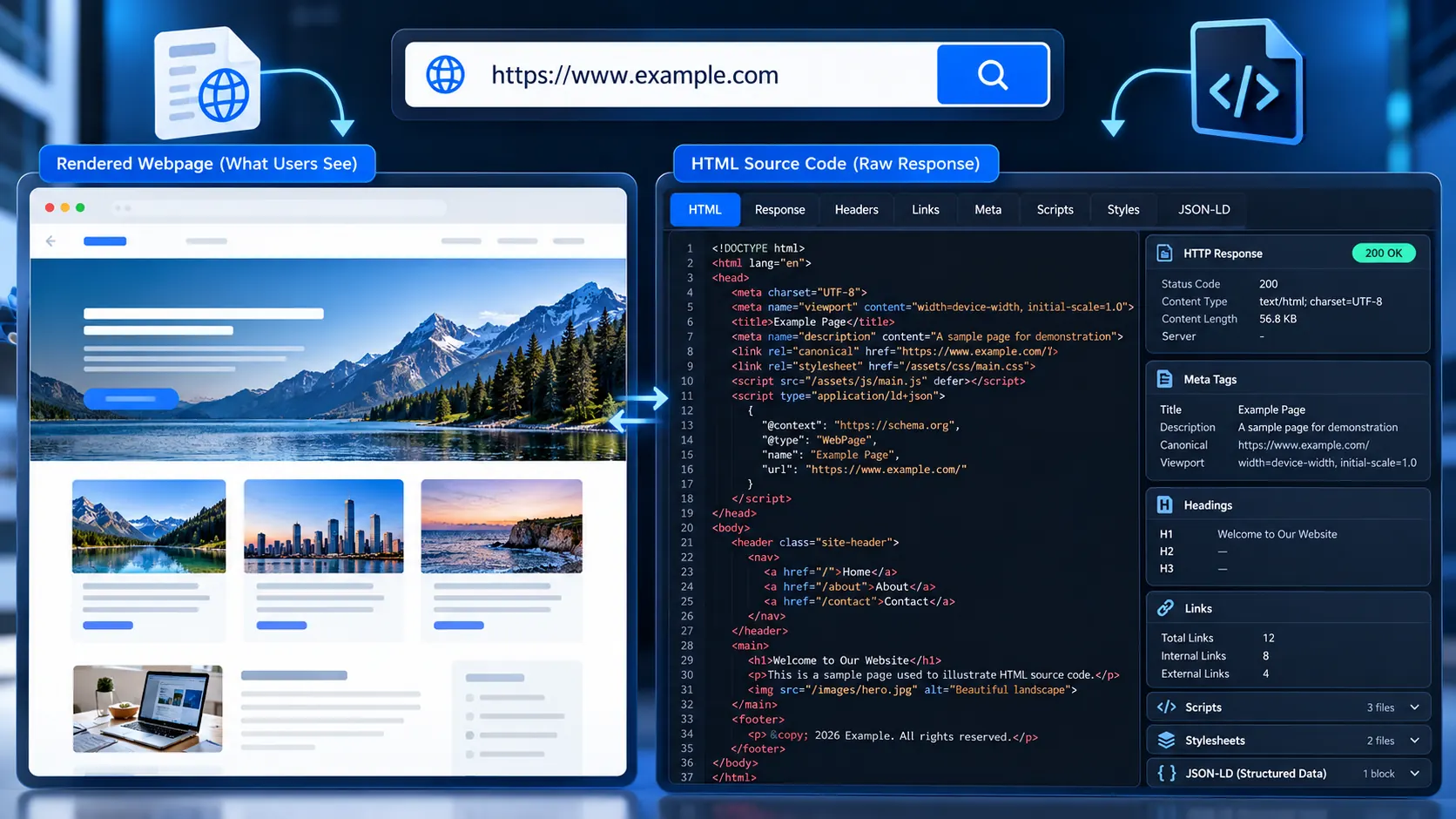
Getting the HTML source code of a webpage is useful when you need to see what the server actually returned—not just what appears visually in the browser. PKCapra’s Get Source Code of Webpage tool fetches a public HTTP/HTTPS URL and gives you the returned HTML source so you can inspect, copy, or download it.
Enter a public webpage URL, click Get Source Code, and the tool retrieves the response and presents the source together with useful response and HTML signals.
Get the HTML Source Code of Any Webpage
Fetch the public page source, inspect response headers, review key HTML signals, and copy or download the raw source.
Source code ready
What Is Webpage Source Code?
Webpage source code is the HTML document delivered by a web server to a browser.
It can contain information such as:
- The page title
- Meta description
- Canonical URL
- Robots directives
- Headings
- Links
- Images
- Forms
- Scripts and stylesheets
- JSON-LD structured data
- Language and charset declarations
- Viewport information
This makes source inspection useful for SEO debugging, web development, technical audits, troubleshooting, and understanding how a page is constructed.
What Does This Webpage Source Code Checker Actually Fetch?
The important distinction is between server-delivered HTML source and the final DOM created after JavaScript runs.
PKCapra fetches the public webpage response from the URL you provide and displays the returned HTML source. It does not claim to reproduce a fully JavaScript-rendered browser DOM.
That distinction matters.
For example, a page may initially return a relatively small HTML document and then use JavaScript to request additional content. Looking at the raw response helps you determine what was present in the original HTTP response before client-side JavaScript changed the page.
How to Get the Source Code of a Webpage
1. Enter the webpage URL
Paste the complete public URL into the Webpage URL field.
For example:
The tool supports public HTTP and HTTPS webpages.
2. Start the source fetch
Click Get Source Code.
The tool sends the request to the destination and waits for the webpage response.
3. Review the response information
Once the request finishes, you can inspect information associated with the retrieved page, including HTTP response details and detected HTML signals.
4. Inspect the HTML source
Review the returned source directly rather than relying only on what the rendered page looks like.
5. Copy or download the source
Use the available actions to copy the source or download the returned HTML when you need it for development, debugging, documentation, or further analysis.
What Can You Find in HTML Source?
The raw source can answer questions that are difficult to answer from the visual page alone.
Page title and metadata
You can quickly check whether the response contains:
- A
<title> - A meta description
- A canonical URL
- Robots metadata
- A language declaration
- A charset declaration
- A viewport declaration
If you are specifically investigating title or description implementation, you can also use PKCapra’s Title Tag Analyzer and Meta Description Analyzer.
Headings
Source inspection can reveal the actual heading elements included in the HTML.
This is useful when a heading appears visually styled but you want to determine whether it is really an <h1>, <h2>, or another element.
Links
The source can expose internal and external <a> elements, their destinations, and attributes that may not be obvious from the rendered page.
For more focused link investigation, use the Broken Link Checker.
Images
You can inspect image elements and their HTML attributes, including information such as src and alt.
For a dedicated accessibility and image-SEO check, use the Image Alt Text Checker.
Structured data
Many modern websites include JSON-LD inside <script> elements.
Viewing the source can help you determine whether structured data is actually present in the delivered HTML. For a more focused analysis, use a structured-data or schema analysis workflow where available.
Scripts and stylesheets
The source can show external JavaScript and CSS references, helping developers understand which resources the original HTML document requests.
Raw Source vs Rendered HTML: Why the Difference Matters
One of the easiest mistakes in webpage debugging is assuming that View Source and the browser’s final DOM are always identical.
They are not.
A simplified workflow looks like this:
Server → HTTP response → Initial HTML source → Browser parses HTML → JavaScript executes → Final DOM
PKCapra’s tool focuses on the HTTP response source.
That makes it particularly useful when you want to answer:
“What HTML did the server actually send?”
It is less suitable for answering:
“What does the DOM look like after every JavaScript application has finished running?”
For the second question, browser developer tools or a browser-rendering crawler may be more appropriate.
When Should You Use a Webpage Source Checker?
SEO troubleshooting
Use source inspection when you suspect an important SEO element is missing or different from what the page visually suggests.
Examples include:
- Missing title
- Missing meta description
- Unexpected robots directives
- Incorrect canonical
- Missing structured data
- Unexpected heading markup
- Links pointing somewhere different from expected
Web development
Developers can use the tool to inspect the response from a public page without opening the browser’s developer tools.
It is useful for quick checks of HTML structure, resource references, metadata, and response information.
Debugging redirects and HTTP behavior
The response information can help you understand what happened when requesting a URL.
For deeper redirect investigation, PKCapra also provides a Redirect Checker and HTTP Status Checker.
Comparing source between pages
You can fetch different public pages and compare their HTML structure, metadata, links, scripts, and other signals.
This can be useful when investigating:
- Template differences
- SEO implementation differences
- Migration issues
- Unexpected markup changes
- Production vs staging behavior
What This Tool Does Not Do
Transparency matters because “source code” can mean different things.
PKCapra’s tool retrieves the HTML response from the requested public webpage. It does not promise to:
- Execute the page’s JavaScript
- Reconstruct a fully rendered browser DOM
- Reveal server-side PHP, Python, Node.js, or other backend source code
- Bypass authentication
- Access private pages
- Expose server filesystem contents
- Retrieve confidential application code
- Circumvent access controls
If a website generates important content entirely after JavaScript execution, that content may not appear in the original HTML response.
Why You May See Less HTML Than Expected
A modern website can be highly dynamic.
A relatively small initial HTML response may load:
- Content through API requests
- Components through JavaScript
- Data from a CMS
- Images after page load
- Additional markup through client-side rendering
Therefore, a source-code result that looks “incomplete” does not necessarily mean the website is broken.
It may simply mean that the page relies heavily on client-side rendering.
Is It Safe to Inspect a Public Webpage?
The tool is designed for public HTTP/HTTPS webpage requests.
Private or local network targets are blocked rather than treated as ordinary webpage URLs. The tool also applies request limits to keep arbitrary URL fetching controlled.
You should still avoid submitting URLs containing sensitive information in query parameters or paths.
Most importantly, inspecting a public webpage does not give you permission to reproduce or redistribute copyrighted content. Use retrieved source responsibly and respect the website’s terms and applicable law.
Why HTTP Status and Content Type Matter
HTML source should not be judged independently of the response that delivered it.
For example, a URL might return:
200 OK- A redirect response
- A client or server error
- An unexpected content type
A page that looks like HTML in a browser can therefore behave differently when requested directly.
Checking the HTTP response alongside the source gives you a much more useful diagnostic picture.
Common Webpage Source Problems
“The source is different from what I see”
The page may be modifying its DOM with JavaScript after the initial response.
Compare the raw source with the browser’s Elements/DOM panel.
“The content I need is missing”
Check whether the page loads that content through JavaScript or an API after the initial HTML response.
“The page returns an error”
Check the HTTP status and response information first. A server-side error, redirect chain, access restriction, or unexpected response can change what the tool receives.
“The source looks compressed or difficult to read”
Minified HTML, inline scripts, generated markup, and framework output can make source difficult to interpret. The source is still the server response; formatting alone does not determine whether it is technically valid.
Source Code Inspection for SEO Audits
A useful technical SEO workflow is to inspect the source first, then use specialized analyzers for individual issues.
For example:
- Fetch the page source.
- Confirm the
<title>and meta description. - Check canonical and robots directives.
- Inspect headings.
- Look for structured data.
- Review important links.
- Check image markup and ALT attributes.
- Verify HTTP behavior separately.
- Investigate redirects where necessary.
- Compare the findings with the rendered page.
PKCapra’s SEO & Website Tools category provides additional tools for this type of technical investigation.
Source Code Is Evidence, Not the Whole Story
HTML source is extremely useful, but it is only one layer of a webpage.
A proper technical investigation may also require:
- HTTP headers
- Redirect behavior
- Robots.txt
- XML sitemaps
- Rendered DOM
- JavaScript requests
- Structured data validation
- Network resources
- Browser behavior
- Server configuration
That is why a source-code checker should be treated as a diagnostic instrument rather than a complete website audit.
Privacy and Processing
This tool is designed around server-side retrieval because the webpage itself must be requested from PKCapra’s server environment.
Only submit public webpage URLs that you are comfortable having requested by the tool.
The tool does not provide access to private or authenticated webpage content, and it should not be used to attempt to bypass access controls.
Frequently Asked Questions
Can I get the source code of any webpage?
You can use the tool for publicly accessible HTTP/HTTPS webpages that the server can retrieve. Private, local, or restricted destinations are not supported.
Does this show the complete website source code?
It shows the HTML source returned by the requested webpage. It does not expose private server-side application source code.
Does it execute JavaScript?
No. The tool is designed to retrieve the HTTP response rather than act as a full browser-rendering engine.
Why is the source different from the page I see?
JavaScript may modify the page after the initial HTML response is received. The browser’s final DOM can therefore differ substantially from the original source.
Can I download the webpage HTML?
Yes. After a successful source retrieval, the tool provides a download option for the returned HTML.
Can I copy the source code?
Yes. The source result includes a copy action so you can move the retrieved HTML into your development or analysis workflow.
Can I use this for SEO?
Yes. Source inspection is particularly useful for checking HTML-level SEO signals such as titles, descriptions, canonicals, robots directives, headings, links, images, and structured data.
Can it access a password-protected webpage?
No. The tool is intended for publicly accessible webpages and does not provide authenticated access or bypass protection.
Is webpage source the same as the DOM?
No. The initial HTML response and the final browser DOM can be different, particularly on JavaScript-heavy websites.
A Better Way to Use Source Inspection
Don’t inspect thousands of lines of HTML without a question in mind.
Start with the thing you are trying to verify:
SEO issue → inspect metadata, canonical, robots, headings, links, and structured data.
Development issue → inspect markup, scripts, stylesheets, forms, and resource references.
HTTP issue → inspect response status and then investigate redirects or server behavior.
Rendering issue → compare the returned source with the browser’s final DOM.
That turns raw HTML from a wall of code into useful technical evidence.
Conclusion
A webpage can look simple in the browser while its underlying HTML tells a very different story. PKCapra’s Get Source Code of Webpage tool gives you a direct look at the HTML response returned for a public URL, along with useful response and markup signals.
Use it when you need to verify what a server delivered, investigate an SEO implementation, troubleshoot HTML, or understand why the source differs from what appears on screen.
For deeper investigation, combine source inspection with PKCapra’s related HTTP Status Checker, Redirect Checker, Title Tag Analyzer, Meta Description Analyzer, and Broken Link Checker.