
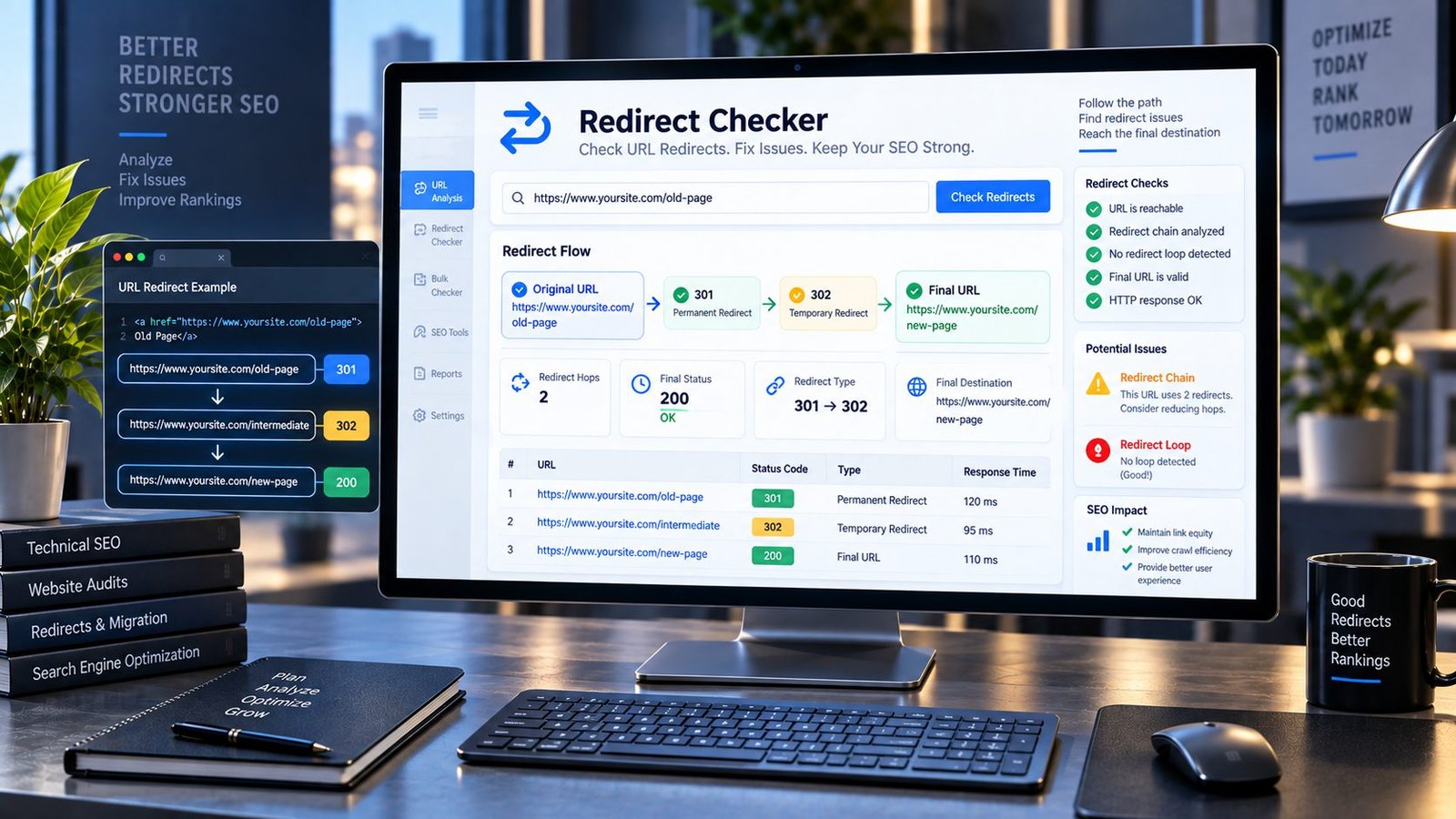
Redirects Are Not Just Server Tricks — They Are the Roads Your Website Uses
A visitor rarely thinks about what happens after clicking a link.
They click a URL, wait for the page, and expect to arrive at the right place.
Behind that simple action, however, a website may send the browser through one or more redirects before the final page appears.
Sometimes that is exactly what should happen.
A page has permanently moved. A domain has changed. An old URL has been replaced by a newer one. A website migration has taken place.
But sometimes a redirect chain is unnecessarily long, points somewhere unexpected, loops back on itself, or ends with an error.
That is where a Redirect Checker becomes useful.
PKCapra’s Redirect Checker helps you inspect what happens between a URL and its final destination. Instead of looking only at the URL you entered, you can see the response path, redirect status codes, destination URL, and final response.
That small difference can make technical SEO troubleshooting much easier.
Redirect Checker
Trace a public URL and see redirects, HTTP status codes, and the final destination.
—
Analysis uses the public URL you provide. Do not submit private, authenticated, or sensitive URLs.
What Is a URL Redirect?
A redirect tells a browser, crawler, or other HTTP client that the requested URL should lead somewhere else.
For example, a visitor may request:
example.com/old-page
The server may respond:
301 → example.com/new-page
The browser then requests the new address.
To the visitor, the process can feel almost invisible.
But technically, two different URLs were involved:
- the original URL
- the destination URL
The Redirect Checker is designed to help you see that journey.
Why Would a Website Need Redirects?
URLs change.
That is normal.
Pages get renamed. Websites are redesigned. Businesses change domains. Products move into new categories. Old articles are replaced. Website owners reorganize their content.
Without redirects, old URLs may simply stop working.
A well-managed redirect allows an existing URL to send visitors and crawlers toward an appropriate new destination.
For example, if an old article has moved permanently, a 301 redirect can communicate that the resource has moved to another URL.
Redirects can therefore be an important part of website maintenance, migrations, and URL management.
The problem is not that redirects exist.
The problem is when they are wrong, unnecessary, excessive, or broken.
What Does the PKCapra Redirect Checker Show?
PKCapra’s Redirect Checker is built around one practical question:
What happens when this URL is requested?
Enter a public HTTP or HTTPS URL and the tool checks its response path.
Depending on how the server responds, the results can show:
- the original URL
- redirect status codes
- intermediate URLs
- the redirect chain
- the final destination
- the final HTTP status
- redirect loops
- whether the final destination responds successfully
This makes the tool useful for SEO audits, website migrations, technical troubleshooting, link maintenance, and everyday URL verification.
301 Redirect Explained
A 301 indicates that a resource has been permanently moved.
It is commonly used when an old URL has been replaced by a new permanent URL.
For example:
/old-service/
could permanently redirect to:
/services/
A 301 is not automatically a problem.
In many situations, it is exactly what you want.
The important question is whether the redirect leads to the right destination.
If an old product page redirects to the correct replacement product, that can make sense.
If it redirects to an unrelated homepage simply because the original page disappeared, the situation deserves closer review.
302 Redirect Explained
A 302 traditionally indicates a temporary redirect.
The distinction between redirect types can become more nuanced in modern HTTP implementations, but the important practical point is simple:
Do not assume that every redirect should be treated the same way.
If a page has permanently moved, your redirect strategy should reflect that permanent change.
If a destination is genuinely temporary, a temporary redirect may be appropriate.
The context matters.
Redirect Chains: The Problem Hidden Between Two URLs
Consider this:
URL A → URL B → URL C → URL D
The visitor eventually reaches URL D.
Everything may appear fine.
But there are now multiple HTTP steps between the original request and the final destination.
This is called a redirect chain.
Redirect chains often appear after several rounds of website changes.
For example:
old-page
↓older-new-page
↓temporary-page
↓current-page
Nobody intentionally designed the chain.
It simply accumulated over time.
A Redirect Checker makes these hidden steps visible.
Why Long Redirect Chains Deserve Attention
Every additional redirect introduces another request and another dependency.
A long chain can make troubleshooting harder and can create unnecessary complexity in your URL structure.
If you control the website, it is often better to update internal links so they point directly to the current destination rather than repeatedly sending visitors through outdated URLs.
For example, if:
A → B → C
and C is the correct permanent destination, a cleaner structure may be:
A → C
And where possible, internal links should point directly to C.
This does not mean every redirect must immediately be removed.
It means you should understand why the chain exists.
What Is a Redirect Loop?
A redirect loop occurs when URLs keep sending the request back into another redirect path without reaching a final destination.
For example:
A → B
and:
B → A
The browser has nowhere to finish.
A similar problem can occur with more complicated chains involving several URLs.
Redirect loops can make a page inaccessible and can prevent visitors and automated systems from reaching the intended content.
If PKCapra identifies a redirect loop, investigate the redirect rules on the server, CDN, CMS, or related configuration.
Redirect Chains vs Redirect Loops
These two problems are often confused.
A redirect chain eventually reaches a destination:
A → B → C
A redirect loop never reaches a valid final destination:
A → B → A
The first may be inefficient.
The second is broken.
That distinction matters when diagnosing technical SEO issues.
What Does “Final URL” Mean?
The final URL is the destination reached after following the redirect sequence.
Suppose you enter:
example.com/old-guide
and the server responds:
301 → example.com/guide
The final URL is:
example.com/guide
Knowing the final destination helps answer an important question:
Is the visitor actually being sent where they should go?
A redirect can technically work while still sending users to the wrong page.
A Redirect Can Work and Still Be Wrong
This is one of the most important things to understand about redirects.
Imagine:
/best-laptop-guide/
redirects to:
/
The redirect works.
The server responds.
The visitor reaches a page.
But if the original guide has a much more relevant replacement elsewhere, the redirect may not be serving the visitor particularly well.
Technical success is not always the same as a good SEO or UX decision.
Always evaluate the destination.
Redirects After a Website Migration
Website migrations are one of the biggest reasons redirect problems appear.
A migration might involve:
- changing the domain
- moving from HTTP to HTTPS
- changing URL structures
- changing categories
- redesigning a website
- moving WordPress installations
- changing permalink formats
- merging pages
- removing outdated content
Every URL change creates the possibility of an old address becoming disconnected from its replacement.
A proper migration should therefore include redirect planning rather than treating redirects as an afterthought.
HTTP to HTTPS Redirects
Moving from HTTP to HTTPS is a common example.
A website may send:
http://example.com/page
to:
That is a redirect from one protocol to another.
When reviewing HTTPS redirects, check that:
- the final destination uses HTTPS
- the correct page is preserved
- there is no unnecessary chain
- the redirect does not loop
- important internal links are updated to HTTPS
A website should not make users travel through several avoidable redirect steps just to reach its secure version.
WWW and Non-WWW Redirects
Some websites use:
www.example.com
while others use:
example.com
Either can be part of a site’s chosen URL structure.
The important thing is consistency.
If your preferred version is:
you may redirect the non-www version there.
If your preferred version is:
you may redirect the www version there.
The Redirect Checker lets you see what actually happens rather than relying on what you think the server configuration is doing.
Redirects and Canonical URLs Are Not the Same Thing
This distinction is important.
A redirect sends the requester from one URL to another.
A canonical URL is a signal that identifies the preferred version of a page among duplicate or similar URLs.
They solve different problems.
If you are investigating URL consistency, you may want to use the Canonical URL Checker alongside the Redirect Checker.
For example, a page might redirect correctly while its canonical tag still points somewhere unexpected.
A proper technical SEO audit looks at the whole picture.
Redirects and Internal Links
Suppose your article contains an internal link to:
/old-page/
and that URL redirects to:
/new-page/
The visitor may still arrive at the right place.
But if you control the article, why make the visitor go through an unnecessary redirect?
Update the internal link to:
/new-page/
when appropriate.
This is one of the simplest ways to reduce unnecessary redirect activity.
It also makes your website easier to maintain because your internal linking structure reflects the URLs that actually exist.
Redirects and Broken Links Work Together
A Redirect Checker and Broken Link Checker answer related but different questions.
The Broken Link Checker asks:
“Which links are failing or becoming unreachable?”
The Redirect Checker asks:
“What path does this URL take before reaching its destination?”
You may discover that a URL you thought was broken actually redirects successfully.
Or you may discover that an apparently harmless redirect eventually ends at a 404 page.
Using both tools can therefore provide a clearer picture than relying on either check alone.
Redirects and Search Engines
Search engines need to understand where URLs lead.
Clear, logically configured redirects help communicate changes in URL structure.
But redirects should not be treated as a shortcut for creating a confusing website architecture.
If an old page has a genuine replacement, redirecting it can make sense.
If a page has no meaningful replacement, forcing it to redirect to an unrelated destination may not be the best solution.
The quality of the destination matters.
For Google’s current documentation on redirects and site moves, Google Search Central’s documentation is a useful authoritative reference.
How to Check a Redirect
Using PKCapra is straightforward.
Enter the URL
Paste the public HTTP or HTTPS address you want to inspect.
Start the check
The tool requests the URL and follows the available redirect path.
Read the chain
Look at each response rather than only the final destination.
Check the status codes
Identify whether the URL returns a 301, 302, another redirect response, or a final HTTP response.
Inspect the destination
Make sure the final page is the page you actually intended to reach.
Fix what needs fixing
Update links, simplify redirects, repair redirect rules, or investigate server configuration where necessary.
When Should You Use a Redirect Checker?
You do not need to check every URL every day.
Use it when there is a reason to investigate a URL.
Good situations include:
- after changing a page URL
- after a website migration
- after changing domains
- after moving from HTTP to HTTPS
- after changing permalink structures
- when an old URL behaves unexpectedly
- when a client reports a redirect problem
- when an internal link passes through multiple URLs
- when a page suddenly becomes inaccessible
- when you suspect a redirect loop
It is particularly useful when something looks correct on the surface but behaves differently underneath.
Redirect Checking After a WordPress URL Change
WordPress websites frequently change URLs as content structures evolve.
A post may move from:
/blog/article/
to:
/article/
Or a service may move from one category to another.
After making such changes, test important old URLs.
Do not simply assume that the redirect plugin, server configuration, or hosting platform handled everything correctly.
Verify.
A few minutes of checking can expose a redirect that points to the wrong location.
Redirect Problems Can Come From Different Layers
A redirect does not always originate from WordPress.
It can be created by:
- WordPress
- a redirect plugin
.htaccess- Nginx configuration
- a CDN
- a hosting platform
- a reverse proxy
- application code
- domain configuration
That is why a redirect checker is useful during troubleshooting.
It shows you what the outside world actually receives.
Once you know the behavior, you can investigate the layer responsible for producing it.
What Is a Redirect Hop?
Each redirect step can be thought of as a hop.
For example:
Original URL → Hop 1 → Hop 2 → Final URL
If a URL reaches the destination immediately, there may be no redirect hop.
If it passes through two redirects, there are two hops.
Understanding hops is useful because it turns a vague complaint such as “this URL redirects weirdly” into something concrete that you can investigate.
Don’t Judge a Redirect by the Number Alone
A redirect chain with two steps is not automatically disastrous.
A redirect exists for a reason.
The better questions are:
- Is the redirect necessary?
- Is the destination relevant?
- Is the chain stable?
- Does it eventually succeed?
- Is there a simpler path?
- Are internal links still pointing to old URLs?
- Did the redirect appear because of an outdated configuration?
Technical SEO is rarely about one number in isolation.
Context matters.
Redirects After Content Deletion
Deleting content creates another important decision.
Suppose a page has been permanently removed.
You might:
- redirect it to a highly relevant replacement
- return an appropriate gone/not-found response
- update links pointing toward it
- remove references from navigation
- replace it with a better resource
The correct choice depends on whether a genuinely useful replacement exists.
A redirect should not simply exist because the old URL makes someone uncomfortable.
It should serve a purpose.
Redirects and Ecommerce Websites
Ecommerce websites can generate large numbers of URL changes.
Products are:
- discontinued
- renamed
- replaced
- moved between categories
- temporarily unavailable
- permanently removed
This makes redirect management particularly important.
If a product has a genuine successor, redirecting the old product URL may make sense.
If there is no comparable product, a different response may be more appropriate.
The key is to avoid creating a maze of old product URLs that all point to unrelated pages.
Redirects and SEO Audits
A redirect audit works best when combined with other technical checks.
For example, you might inspect:
Redirects — where URLs actually lead.
Canonical URLs — which version of a page is preferred.
Indexability — whether pages can be crawled and indexed.
Sitemaps — which URLs the site is actively presenting to search engines.
Internal links — how visitors and crawlers move between pages.
That is why a technical audit might naturally continue from the Redirect Checker to PKCapra’s XML Sitemap Analyzer, Indexability & Crawlability Analyzer, or Meta Tags Analyzer.
The individual checks become much more useful when they are interpreted together.
A Practical Redirect Audit Checklist
When you find a redirect, ask:
1. Where does the URL start?
Record the original URL.
2. Does it redirect?
Identify the response code.
3. How many hops occur?
Look for unnecessary chains.
4. Where does it finish?
Check the final destination.
5. Is the destination relevant?
Do not judge only by whether it returns 200.
6. Is the redirect permanent or temporary?
Make sure the response matches the intended situation.
7. Can the source link be updated?
If you control it, consider linking directly to the final URL.
8. Is there a loop?
A redirect that never reaches a destination requires immediate investigation.
Common Redirect Mistakes
Redirecting everything to the homepage
This is easy, but it does not necessarily preserve the purpose of old URLs.
Building unnecessary redirect chains
Each website redesign can add another layer if old redirects are never cleaned up.
Leaving internal links pointing to redirected URLs
If you know the current destination, update the internal link where appropriate.
Using the wrong redirect type
A permanent move and a temporary situation are different.
Ignoring redirect loops
A loop can make the destination effectively inaccessible.
Assuming a successful redirect is automatically a good redirect
The destination still needs to make sense.
Redirect Checker FAQs
What is a Redirect Checker?
A Redirect Checker is a tool that shows how a URL responds and whether it redirects to another destination before reaching a final page.
What is a 301 redirect?
A 301 is commonly used to indicate that a URL has permanently moved to another location.
What is a 302 redirect?
A 302 is commonly associated with a temporary redirect. The appropriate redirect response depends on the actual purpose and implementation.
Are redirects bad for SEO?
No. Redirects are a normal part of managing changing URLs. Problems arise when redirects are misconfigured, unnecessarily chained, looped, or pointed toward inappropriate destinations.
What is a redirect chain?
A redirect chain occurs when one URL redirects to another URL, which redirects again before reaching the final destination.
What is a redirect loop?
A redirect loop occurs when redirects repeatedly send a request between URLs without reaching a final destination.
How many redirects are too many?
There is no single magic number that makes every redirect chain “bad.” The practical goal is to keep important URL paths as direct and understandable as reasonably possible.
Should internal links point to redirected URLs?
When you control the page, it is generally cleaner to update internal links to the final intended destination instead of unnecessarily passing through a redirect.
Can a redirect end on a 404 page?
Yes. A redirect can technically succeed in sending the request somewhere and still end at a page that returns an error. That is why checking the entire chain and final response matters.
Can I check HTTP and HTTPS URLs?
Yes, publicly accessible HTTP and HTTPS URLs can be checked.
Why does my browser behave differently from a redirect checker?
Servers, CDNs, security systems, cookies, authentication, and automated-request rules can sometimes produce different behavior for different clients. An unexpected result should therefore be investigated rather than automatically treated as a permanent failure.
Can a Redirect Checker fix redirects?
The purpose of the checker is diagnosis. It shows you what is happening so you can decide what needs to be changed in your website, server, CDN, or CMS configuration.
The Real Value of Checking a Redirect
A redirect is easy to ignore because visitors often never see it.
That is precisely why it deserves occasional attention.
A URL can look perfectly normal while quietly passing visitors through several destinations. An old page can redirect to the wrong section. A migration can leave behind chains. A configuration mistake can create a loop.
The Redirect Checker turns that invisible behavior into something you can actually inspect.
Instead of asking:
“Why does this URL behave strangely?”
you can ask:
“What response did it return, where did it redirect, how many hops occurred, and where did the request finally end up?”
That is a much better starting point for fixing technical SEO problems.
A healthy website is not simply a collection of pages that open.
It is a system of URLs that lead somewhere intentionally.
And when URLs change, the path between the old address and the new one should make sense.