
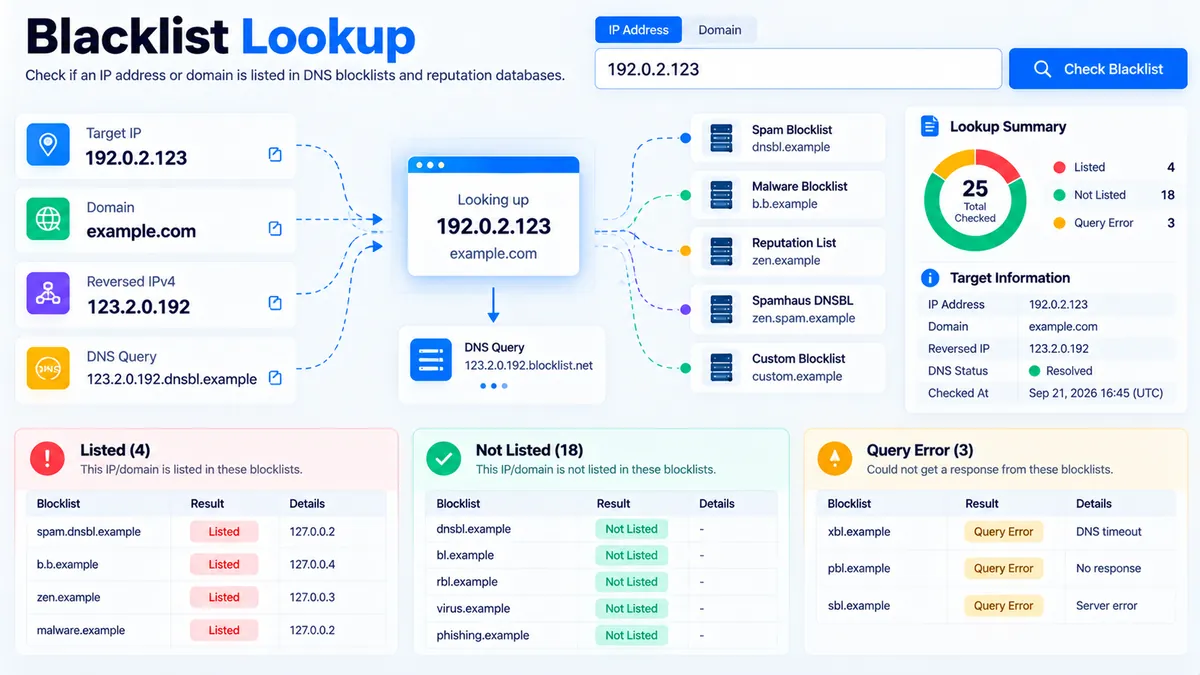
Blacklist Lookup checks an IPv4 address or domain against selected DNS-based blocklists and separates the result into listed, not listed, and query error states. It can resolve a domain to its public A records, check multiple resolved IPs, and show the DNS response details returned by the selected reputation lists.
Blacklist Lookup
Check an IPv4 address or domain against selected DNS-based blocklists and review listing, clean, and query-error results separately.
Blacklist Assessment
Live DNS-based results for the target and the blocklists that responded successfully.
View JSON report
How to Use the Blacklist Lookup in Simple Steps
- Enter an IPv4 address or a domain name into the lookup field. For an IP check, use the public IPv4 address you want to investigate. For a domain check, enter the domain associated with the service or mail infrastructure you are reviewing.
- Run the lookup and let the tool resolve the domain when a domain is supplied. A domain can resolve to more than one public IPv4 address, so the tool evaluates the returned addresses individually rather than assuming that one address represents the entire domain.
- Review each DNSBL result separately. The lookup checks selected services including Spamhaus ZEN, SpamCop Blocking List, Barracuda Reputation Block List, and Spamhaus DBL for domain checks. Each result is classified as Listed, Not Listed, or Query Error where applicable.
- Use Copy Report, Copy JSON, Download JSON, or Download PDF to preserve the result. If a query error appears, treat the result as inconclusive rather than interpreting it as a clean listing check.
What the Blacklist Lookup Actually Checks
A DNSBL is a Domain Name System-based blocklist that publishes reputation or blocking information through DNS queries. Spamhaus describes ZEN as an IP-address DNSBL and DBL as a domain-based DNSBL. :contentReference[oaicite:1]{index=1}
The PKCapra Blacklist Lookup uses DNS-based checks rather than pretending that every blacklist has the same data model.
IP address checks
For an IPv4 address, the tool queries the selected IP-based DNSBL zones using the standard reversed-IP lookup pattern.
The current implementation checks:
- Spamhaus ZEN —
zen.spamhaus.org - SpamCop Blocking List —
bl.spamcop.net - Barracuda Reputation Block List —
b.barracudacentral.org
SpamCop documents the reversed-DNS lookup method and uses a response such as 127.0.0.2 to indicate that an IP is listed. :contentReference[oaicite:2]{index=2}
Barracuda Central describes its reputation system as maintaining IP reputation information that contributes to decisions about whether mail should be blocked or allowed. :contentReference[oaicite:3]{index=3}
Domain checks
When a domain is supplied, the tool can resolve its public A records and check the resulting IPv4 addresses against the IP-oriented lists.
It also performs a separate Spamhaus DBL domain check through:
dbl.spamhaus.org
The DBL is a domain-only blocklist. Spamhaus explicitly states that DBL should not be used as an IP-address DNSBL and that it must be queried separately from ZEN. :contentReference[oaicite:4]{index=4}
This distinction matters because an IP reputation result and a domain reputation result answer different questions.
Listed, Not Listed, and Query Error Mean Different Things
The most important result distinction is between a clean response and a failed query.
Listed
Listed means at least one selected blocklist returned a response indicating that the queried IP or domain is present in that list.
A listing is a reputation or blocklist signal. It does not by itself explain the underlying cause, prove malicious activity, or mean that every receiving mail server will reject the address.
Not Listed
Not Listed means the selected checks completed successfully and none of those checks returned a listing.
It does not mean the address is globally trusted or absent from every blacklist on the Internet. The result only applies to the blocklists that were successfully queried by this tool.
Query Error
Query Error means the lookup could not obtain a reliable answer from one or more required DNS checks.
A query error is not converted into a clean result.
This is especially important for Spamhaus DNSBL queries. Spamhaus documents special DNS response codes for conditions such as public/open resolver queries and excessive query volume, and says those responses must not be interpreted as evidence that the queried object is listed. :contentReference[oaicite:5]{index=5}
If a DNSBL query fails, the correct action is to investigate the DNS/resolver condition and repeat the check rather than treating the result as Not Listed.
Why DNS Resolver Behavior Matters
DNSBLs are DNS zones, not ordinary websites that simply return a webpage containing a reputation result.
The DNS resolver used to perform the query can therefore affect the result. Spamhaus specifically documents restrictions and error conditions involving public or open DNS resolvers for its public DNSBL service. :contentReference[oaicite:6]{index=6}
The PKCapra implementation performs a resolver health check and preserves query errors instead of silently converting an unavailable DNS response into a clean result.
That behavior is useful when diagnosing mail-delivery or reputation problems because a failed reputation query should remain visibly different from a successful negative result.
Technical Breakdown of the Tool’s Architecture
The Blacklist Lookup uses a server-side DNS architecture rather than browser-only processing.
The browser sends the lookup request to the WordPress endpoint, and the server performs the DNS queries against the configured DNSBL zones. The AJAX endpoint is nonce-protected, and the server validates the submitted IPv4 address or domain before performing the lookup.
The processing flow is:
- Validate the submitted IP or domain.
- Reject private or reserved IPv4 addresses when an IP lookup is requested.
- Normalize the supplied domain.
- Resolve public A records when a domain is supplied.
- Reverse the IPv4 octets for DNSBL queries.
- Query the selected DNSBL zones.
- Interpret listing responses and known DNS error conditions.
- Return individual list results and the overall lookup state.
- Allow the browser to copy or export the resulting report.
Multiple public A records are handled individually. This matters for domains using multiple mail or hosting endpoints because one IP can have a different reputation from another.
The tool does not connect to Google Search Console, Google Analytics, Bing Webmaster Tools, a commercial keyword database, or a proprietary global blacklist database. Its result is based on the DNSBL sources actually queried by the implementation.
Interpreting a Blacklist Result Correctly
A blacklist result should be treated as an investigation signal rather than a complete diagnosis.
If an IP is listed, identify:
- Which DNSBL returned the listing.
- Which IP address was listed.
- Whether the IP belongs to your server, mail provider, hosting provider, CDN, or another upstream service.
- Whether the listing affects the service you are investigating.
- What remediation or delisting process the specific list documents.
If a domain resolves to several IPv4 addresses, inspect the individual IP results rather than treating the domain as having one universal reputation.
For email delivery problems, also compare the listed address with the IP shown in the bounce message. SpamCop’s documentation notes that a listed IP in a bounce can belong to an ISP or hosting provider rather than directly to the end user. :contentReference[oaicite:7]{index=7}
Common DNSBL Result Problems
A DNSBL returns a query error
Check the DNS resolver used by the server and repeat the lookup. Do not convert the error into a Not Listed conclusion.
A domain returns several IP addresses
Review each resolved IPv4 address separately. Different addresses can have different reputation records.
An IP is listed by one service but not another
That is possible because each DNSBL maintains its own dataset, criteria, and update process. The result should therefore be reported per list rather than merged into a single universal reputation score.
The domain itself is not listed but one of its IPs is listed
These are different reputation signals. A domain-level DBL result does not replace an IP-level DNSBL result.
Spamhaus produces an unusual response
Check whether the response represents a listing or a documented query-control/error condition. Spamhaus specifically publishes special return codes that must not be treated as ordinary listings. :contentReference[oaicite:8]{index=8}
Developer Snippets (Automate This Tool Offline)
The following PowerShell workflow performs DNSBL checks directly from a Windows machine without calling the PKCapra website. It still requires DNS/network access because DNSBL lookup is itself a DNS operation.
The script checks an IPv4 address against Spamhaus ZEN, SpamCop, and Barracuda, and reports whether each DNS query returned an address.
$TargetIp = "8.8.8.8"

$DnsblZones = @(
    "zen.spamhaus.org",
    "bl.spamcop.net",
    "b.barracudacentral.org"
)

function Test-Dnsbl {
    param(
        [Parameter(Mandatory = $true)]
        [string]$Ip,

        [Parameter(Mandatory = $true)]
        [string]$Zone
    )

    $Octets = $Ip.Split(".")
    if ($Octets.Count -ne 4) {
        throw "Invalid IPv4 address: $Ip"
    }

    $QueryName = "$($Octets[3]).$($Octets[2]).$($Octets[1]).$($Octets[0]).$Zone"

    try {
        $Result = Resolve-DnsName -Name $QueryName -Type A -ErrorAction Stop

        $Addresses = @(
            $Result |
            Where-Object { $_.Type -eq "A" } |
            Select-Object -ExpandProperty IPAddress
        )

        if ($Addresses.Count -gt 0) {
            [PSCustomObject]@{
                IP       = $Ip
                DNSBL    = $Zone
                Status   = "Listed/Response"
                Response = ($Addresses -join ", ")
            }
        }
        else {
            [PSCustomObject]@{
                IP       = $Ip
                DNSBL    = $Zone
                Status   = "No A Response"
                Response = ""
            }
        }
    }
    catch {
        [PSCustomObject]@{
            IP       = $Ip
            DNSBL    = $Zone
            Status   = "Query Error"
            Response = $_.Exception.Message
        }
    }
}

$Results = foreach ($Zone in $DnsblZones) {
    Test-Dnsbl -Ip $TargetIp -Zone $Zone
}

$Results | Format-Table -AutoSize

$Results |
    Export-Csv -Path ".\blacklist-lookup-results.csv" -NoTypeInformation -Encoding UTF8
The CSV output can then be imported into Excel, Power BI, or another reporting workflow.
For production mail infrastructure, use the DNSBL provider’s current usage documentation before automating high-volume queries. Spamhaus documents different conditions for free public DNSBL use and commercial/high-volume usage. :contentReference[oaicite:9]{index=9}
Native Software Workaround: Excel Power Query
Excel Power Query is useful for organizing repeated blacklist results after the DNS lookups have been performed locally.
A practical workflow is:
- Run the PowerShell DNSBL script for your list of IP addresses.
- Save the generated
blacklist-lookup-results.csvfile. - Open Excel and select Data → Get Data → From File → From Text/CSV.
- Select the CSV file.
- In Power Query, verify the
IP,DNSBL,Status, andResponsecolumns. - Use Transform → Format → Trim if the source contains unwanted whitespace.
- Use Home → Close & Load to create the worksheet.
- Add filters to separate
Listed/Response,No A Response, andQuery Error. - Refresh the query after generating a new CSV report.
This approach keeps Excel responsible for tabular analysis while PowerShell handles the DNS-specific operation that Excel does not provide as a standard blacklist lookup function.
Related PKCapra Workflows
Blacklist investigation is often part of a broader website or infrastructure check.
Use the HTTP Status Checker when you need to verify the HTTP response returned by a domain or URL.
Use the Redirect Checker when a domain or URL is unexpectedly redirecting through multiple destinations.
Use the Broken Link Checker when the reputation investigation is part of a wider website maintenance workflow.
For the wider collection of webmaster and SEO utilities, see SEO & Website Tools.
Frequently Asked Questions
What is a blacklist lookup?
A blacklist lookup checks an IP address or domain against one or more reputation or blocklist services. The result shows whether the selected DNSBL checks returned a listing, no listing, or an error.
Does Blacklist Lookup check every blacklist on the Internet?
No. Blacklist Lookup checks the DNSBL services implemented by the tool. A Not Listed result therefore applies only to the selected checks that completed successfully.
What does “Not Listed” mean?
“Not Listed” means the selected DNSBL queries completed without returning a listing. It does not mean that the IP or domain is absent from every other blocklist.
What does “Query Error” mean?
“Query Error” means the tool could not obtain a reliable result from one or more DNS checks. The result should be treated as inconclusive rather than clean.
Can I check a domain instead of an IP address?
Yes. A domain lookup can resolve its public A records and check the resulting IPv4 addresses, while the tool can also perform the separate Spamhaus DBL domain check.
Why can one domain have different blacklist results for different IP addresses?
A domain can resolve to multiple public IPv4 addresses, and each IP can have its own reputation history. The tool therefore reports the IP-level results separately.
Is Spamhaus ZEN the same as Spamhaus DBL?
No. ZEN is an IP-address DNSBL, while DBL is a domain-based blocklist. Spamhaus documents that DBL must be queried separately and should not be used as an IP DNSBL. :contentReference[oaicite:10]{index=10}
Does being listed prove that an IP is malicious?
No. A blocklist listing is a reputation signal maintained by the particular DNSBL service. The reason for the listing and the appropriate remediation depend on that service and the infrastructure associated with the IP or domain.
Why might a Spamhaus query return an error instead of a normal result?
Spamhaus documents several special response codes for DNSBL query conditions, including public/open resolver restrictions and excessive query volume. Those responses should not be interpreted as normal blacklist listings. :contentReference[oaicite:11]{index=11}
Is Blacklist Lookup a replacement for an email-deliverability investigation?
No. A DNSBL check is one diagnostic signal. Email deliverability can also depend on the sending IP, mail-server configuration, authentication, recipient policy, DNS records, message content, and the specific reputation systems used by the receiving provider.
🛠️ Protect Your Domain Health & Rankings
Finding out your blacklist status is only half the battle. If your IP or domain is flagged, it directly impacts your SEO visibility. Use our advanced digital suite to fix your rankings and maximize search performance:
- Content Optimization Opportunity Finder: Has a blacklist drop affected your traffic? Use our Opportunity Finder to instantly discover which pages need immediate content updates.
- Topic Coverage Analyzer: Ensure your content has maximum topical authority so search engine algorithms trust your clean domain. Run a scan on our Topic Coverage Analyzer.
- Keyword Clustering Tool: Group your semantic target keywords into optimized structures. Automate your strategy with the Keyword Clustering Tool.
- Content Gap Analysis: Map your entire domain against top competitors. Find out what you are missing using the Content Gap Analysis Tool.