
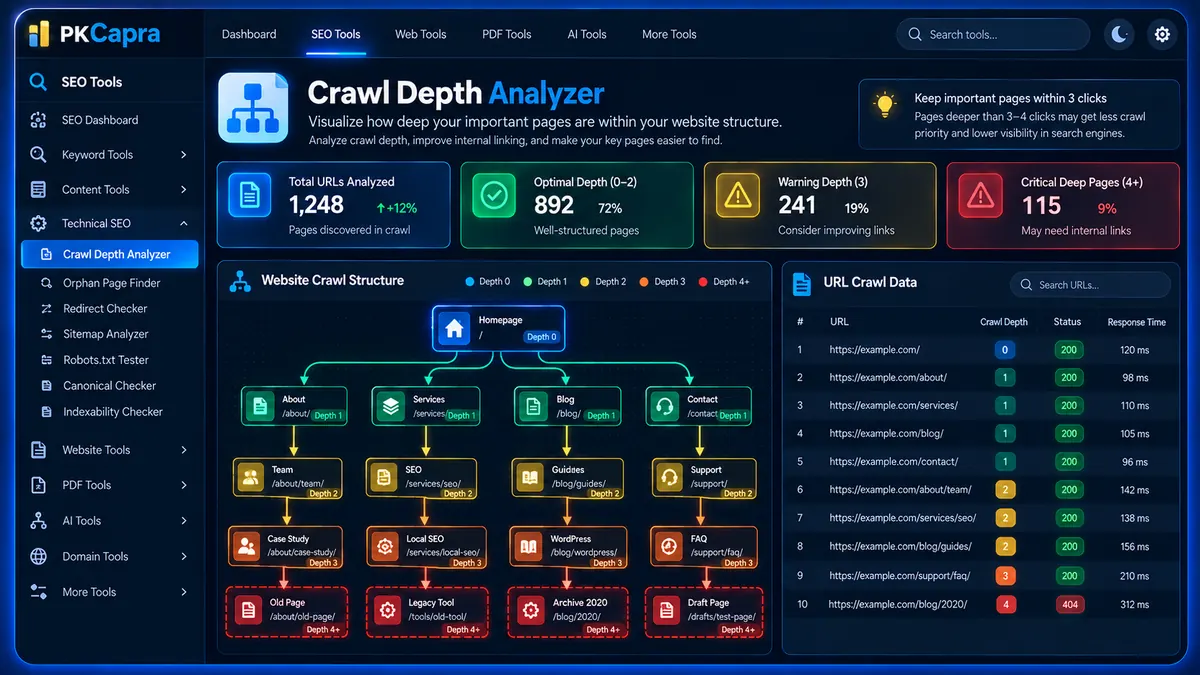
Analyze your website’s crawl depth and discover pages that are buried too deeply within your internal linking structure. PKCapra’s Crawl Depth Analyzer maps how many clicks or link steps are required to reach each discovered URL from your homepage, helping you identify pages at Depth 3, Depth 4, or deeper that may deserve a closer look.
Crawl Depth Analyzer
Map how many internal clicks separate each discovered page from your homepage. The asynchronous crawl uses small server-side batches designed for ordinary WordPress hosting.
Crawl Depth Matrix
Each discovered internal URL is assigned the shortest depth reached from the homepage during the breadth-first crawl.
| # | Page URL | Depth | HTTP Status | Latency |
|---|
What Is Crawl Depth?
Crawl depth describes how many internal link steps a crawler needs to follow to reach a page starting from the website’s initial homepage.
For example:
- Depth 0 — The homepage or starting URL.
- Depth 1 — A page linked directly from the homepage.
- Depth 2 — A page discovered through a Depth 1 page.
- Depth 3 — A page discovered through a Depth 2 page.
- Depth 4+ — A deeper page that may require several internal navigation steps to reach.
Crawl depth provides a useful way to understand how your website’s internal architecture is organized.
Why Crawl Depth Matters for SEO
A large website can contain hundreds, thousands, or even millions of URLs. Without a clear internal linking structure, some pages can become several link steps away from the homepage.
Deep pages are not automatically bad. Some content naturally belongs deeper in a website hierarchy. However, unexpectedly deep pages can indicate that important content is not sufficiently connected to the rest of the site.
Analyzing crawl depth can help you identify:
- Important pages buried deep in the site structure
- Excessively long internal navigation paths
- Pages discovered only after several crawl steps
- Deep URLs that return redirects or errors
- Potential internal linking opportunities
- Structural areas that may need investigation
How PKCapra Crawl Depth Analyzer Works
PKCapra’s Crawl Depth Analyzer starts from the website homepage and progressively follows internal links.
The analysis uses a sequential link-mapping approach:
- The homepage is fetched as the starting point.
- Internal links discovered on the homepage are mapped as Depth 1.
- Those URLs are then processed in batches.
- Internal links discovered from Depth 1 pages become Depth 2 URLs.
- The process continues through progressively deeper levels.
- Each discovered URL is associated with its earliest detected crawl depth.
- HTTP status and response latency are recorded during processing.
This creates a crawl-depth map showing how URLs are connected through the website’s internal link structure.
Crawl Depth Levels Explained
Depth 0 — Homepage
Depth 0 represents the starting URL used for the analysis, normally the website homepage.
It acts as the root of the crawl-depth structure.
Depth 1 — Directly Linked Pages
Depth 1 pages are discovered directly from the homepage.
Examples can include:
- Main service pages
- About pages
- Contact pages
- Primary category pages
- Important navigation destinations
These pages have a direct internal connection to the starting URL.
Depth 2 — Secondary Pages
Depth 2 pages are discovered through pages at Depth 1.
These can include individual articles, subcategories, product pages, or other secondary resources.
Depth 3 — Warning Depth
Depth 3 pages require an additional internal link step to reach.
Depth 3 does not automatically mean that a page has an SEO problem. Instead, it provides a useful signal for reviewing whether the page is appropriately positioned within the site’s architecture.
Depth 4+ — Critical Structural Review
Pages discovered at Depth 4 or deeper are significantly farther away from the starting page within the detected internal link structure.
These URLs deserve closer investigation, particularly when they represent important commercial, informational, or conversion-focused pages.
A deep page may be completely intentional, but an unexpectedly deep important page can indicate an opportunity to improve internal linking.
How to Use the Crawl Depth Analyzer
Step 1: Enter Your Website
Enter the website URL you want to analyze.
The crawler uses that URL as the starting point for building the internal link map.
Step 2: Start the Crawl
Start the analysis and allow the crawler to process the website progressively.
The frontend displays live progress while URL batches are processed.
Step 3: Monitor Crawl Progress
The progress interface shows the analysis as the crawler discovers and processes additional URLs.
Because URLs are processed in smaller batches, larger crawls can progress incrementally rather than attempting to process the entire site in a single server request.
Step 4: Review Crawl Depth Metrics
Once URLs are discovered, review the summary metrics:
- Total URLs Analyzed
- Optimal Depth Pages
- Warning Depth Pages
- Critical Deep Pages
These metrics provide a quick overview of the site’s detected crawl-depth distribution.
Step 5: Inspect Individual URLs
Use the results table to examine each discovered URL.
The table includes:
- Page URL
- Crawl Depth
- HTTP Status
- Response Latency
This makes it easier to investigate individual pages that are unusually deep or return unexpected responses.
Understanding the Dashboard
Total URLs Analyzed
This metric shows how many URLs have been processed during the current crawl.
It provides the overall size of the URL set successfully analyzed.
Optimal Depth Pages
This metric represents pages discovered at Depth 1 or Depth 2.
These URLs are relatively close to the starting page within the detected internal linking structure.
Warning Depth Pages
Warning-depth pages are URLs discovered at Depth 3.
These pages may deserve additional structural review depending on their importance and role within the website.
Critical Deep Pages
Critical-depth pages are URLs discovered at Depth 4 or deeper.
Review these pages carefully to determine whether their position is intentional or whether stronger internal links could provide a more direct path.
HTTP Status and Response Latency
Crawl depth alone does not tell the complete story.
A URL may be deeply nested and also return an unexpected HTTP response. PKCapra therefore records HTTP status information and response latency for encountered URLs.
For example:
- 200 — The URL responded successfully.
- 3xx — The URL redirects to another location.
- 4xx — The server reported a client-side error such as a missing page.
- 5xx — The server reported a server-side error.
- Timeout — The request did not complete within the available processing window.
Response latency provides additional context when investigating slow or problematic nodes within the crawl.
For dedicated HTTP response analysis, you can also use the HTTP Status Checker and Redirect Checker.
Understanding the Color Coding
The results use visual status categories to make the crawl easier to scan.
Green — Healthy
Green results generally represent:
- Depth 1–2 pages
- Successful HTTP responses
- Healthy internal crawl paths
These pages are relatively close to the starting point and responded successfully.
Yellow — Warning
Yellow results can indicate:
- Depth 3 pages
- Redirect responses
- Additional crawl distance requiring review
- Processing conditions that need attention
A yellow result does not automatically indicate a problem.
Red — Critical
Red results can indicate:
- Depth 4 or deeper
- 404 responses
- Timeout conditions
- Other significant crawl-path concerns
These URLs should be investigated based on their importance to the website.
Crawl Depth vs. Internal Linking
Crawl depth is closely connected to internal linking.
Suppose an important service page can only be reached through:
Homepage → Category → Subcategory → Article → Service Page
That page may have a deeper crawl depth than necessary.
If the service is commercially important, adding a relevant internal link from a higher-level page could create a shorter and more useful path.
PKCapra’s Internal Links Crawl Path Analyzer can be used alongside crawl-depth analysis when investigating internal linking relationships.
Crawl Depth vs. Orphan Pages
Crawl depth and orphan-page analysis measure different aspects of website architecture.
A page with a crawl depth can be reached through the detected internal link structure.
An orphan page, by contrast, has no detected internal inbound link from the pages examined by an orphan-page analysis.
A page can therefore be:
- Shallow and well connected
- Deep but intentionally structured
- Deep and potentially under-linked
- Included in a sitemap but disconnected from internal links
You can use the Orphan Page Finder to investigate pages that may have no detected internal inbound links.
What Does Depth 4+ Mean?
Depth 4+ should be treated as a structural review signal rather than an automatic SEO penalty.
Large websites often have legitimate reasons for deeper content structures.
For example, an ecommerce website may naturally have:
Homepage → Category → Subcategory → Product Type → Product
The important question is whether the depth is appropriate for the page’s purpose.
A high-value page buried deep within the architecture may benefit from additional contextual internal links even when the existing structure is technically valid.
Common Causes of Deep Pages
Complex Navigation Structures
Multiple nested categories can create long paths between the homepage and important content.
Weak Contextual Linking
A page may depend almost entirely on one deep navigation path instead of receiving relevant links from other related content.
Large Content Archives
Older content can become progressively deeper as new categories and articles are added.
Website Redesigns
Changes to navigation, categories, menus, or URL structures can unintentionally increase crawl distance.
Ecommerce Taxonomy
Large product catalogs frequently create multiple levels of categories and filters.
Poor Internal Linking Distribution
Important pages may not receive enough contextual links from high-value pages.
How to Improve Excessive Crawl Depth
If an important page appears at Depth 4 or deeper, review the surrounding architecture before making changes.
Potential improvements include:
- Add contextual internal links from relevant higher-level pages.
- Link important pages from appropriate category pages.
- Connect related articles to important commercial pages.
- Improve navigation where deeper levels are unnecessary.
- Review category and subcategory structures.
- Remove unnecessary intermediate pages from important navigation paths.
- Ensure important pages have multiple relevant discovery paths where appropriate.
The objective is not to make every page Depth 1. The objective is to create a logical, useful, and well-connected website architecture.
Crawl Depth and Crawlability
Crawl depth is one component of technical SEO.
A page can have a shallow crawl depth but still have crawlability problems caused by blocked resources, robots directives, server responses, or other technical configuration.
For a broader review, compare crawl-depth findings with the Crawlability Checker and Technical SEO Checker.
Crawl Depth and Indexability
Crawl depth should also be distinguished from indexability.
A page being discovered at Depth 1 does not guarantee that it is indexable.
Similarly, a Depth 4 page is not automatically excluded from search results.
Indexability depends on additional technical signals and directives.
Use the Indexability Checker when you need to investigate whether individual pages can be indexed.
Crawl Depth and Sitemap Structure
Your XML sitemap and internal link structure provide different types of information.
A sitemap identifies URLs that are included in the site’s submitted URL set, while crawl depth describes how those URLs are connected through internal links from the crawl starting point.
Comparing these perspectives can reveal useful structural differences.
Use the XML Sitemap Analyzer to inspect sitemap URLs alongside crawl-depth findings.
Best Practices for Website Crawl Architecture
A healthy internal architecture should make important pages reasonably easy to discover.
Consider these practices:
- Keep important pages connected through relevant internal links.
- Avoid unnecessary layers of navigation.
- Use descriptive and contextual anchor text.
- Link related content naturally.
- Review important pages after major site restructures.
- Investigate unexpectedly deep commercial or informational pages.
- Monitor redirects and broken responses within important crawl paths.
- Keep navigation useful for both visitors and crawlers.
Do not reduce crawl depth simply for the sake of producing lower numbers. Website architecture should reflect user intent and content relationships.
Who Should Use a Crawl Depth Analyzer?
PKCapra’s Crawl Depth Analyzer can be useful for:
- SEO professionals
- Technical SEO specialists
- Website owners
- WordPress developers
- Ecommerce teams
- Content managers
- SEO agencies
- Web development teams
It is particularly useful during technical SEO audits, website migrations, information-architecture reviews, and large content restructures.
When Should You Analyze Crawl Depth?
Crawl-depth analysis can be useful after:
- A website redesign
- A navigation restructure
- A major content migration
- An ecommerce taxonomy change
- A large publishing campaign
- Internal-linking improvements
- URL structure changes
- A technical SEO audit
Running the analysis again after major structural changes can help you compare whether important pages have become easier or harder to reach through internal links.
Frequently Asked Questions
What is crawl depth in SEO?
Crawl depth is the number of internal link steps required for a crawler to discover a URL from the starting page. In this tool, the homepage acts as the starting point, with directly linked pages classified as Depth 1.
What is a good crawl depth?
There is no universal depth that is correct for every website. Important pages should have sensible and useful internal paths, while unexpectedly deep pages should be investigated based on their purpose and importance.
Is Depth 4 bad for SEO?
Not necessarily. Depth 4 is a structural warning signal in this tool, not an automatic SEO penalty. Some websites naturally require deeper hierarchies.
What does Depth 1 mean?
Depth 1 means the URL was discovered directly from the starting homepage through an internal link.
What does Depth 2 mean?
Depth 2 means the URL was discovered through a page that was itself discovered at Depth 1.
What does Depth 3 mean?
Depth 3 means the URL requires three internal link steps from the starting page according to the detected crawl path.
What does Depth 4+ mean?
Depth 4+ means the URL was discovered after four or more internal link steps. These pages are highlighted for structural review because they are farther away from the crawl starting point.
Does crawl depth affect Google rankings?
Crawl depth is an architectural signal rather than a standalone ranking score. Its practical importance depends on the website, page importance, internal linking structure, and other technical factors.
Can a page have a deep crawl depth and still be indexed?
Yes. Crawl depth and indexability are separate concepts. A deeply located page can still be accessible and indexable.
Can crawl depth identify broken pages?
The tool records HTTP response information for encountered URLs, so broken or problematic responses can be identified alongside their crawl depth.
How can I reduce crawl depth?
Review important deep pages and consider adding relevant internal links from higher-level or contextually related pages. You can also simplify unnecessary navigation layers where appropriate.
Conclusion
PKCapra’s Crawl Depth Analyzer helps you understand how deeply pages are positioned within your website’s internal linking structure.
By progressively mapping internal links from the starting homepage, the tool identifies Depth 1, Depth 2, Depth 3, and Depth 4+ pages while also reporting HTTP status and response latency.
Use the results to investigate important pages that sit deep within your architecture, identify problematic crawl paths, and find opportunities to create a more logical internal linking structure.