
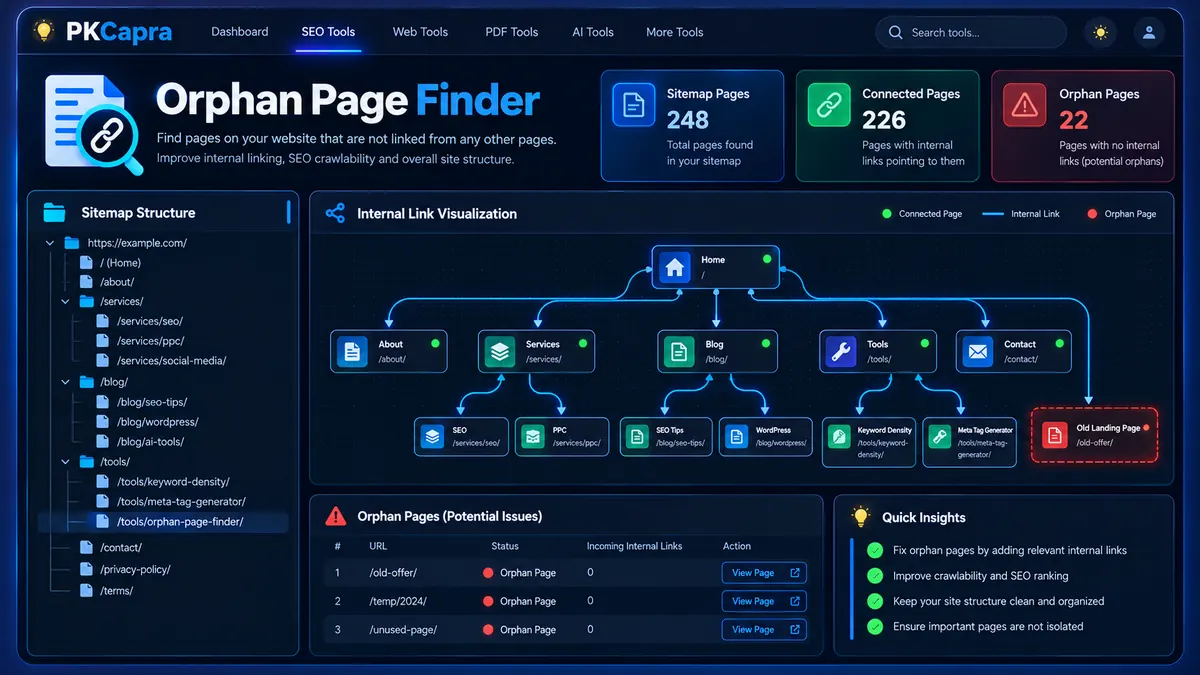
Find potential orphan pages and uncover internal linking gaps with PKCapra’s Orphan Page Finder. The tool compares URLs discovered through your XML sitemap with internal links found across your website to identify pages that may have no detected internal inbound links. Quickly review connected and orphan pages, HTTP response codes, and crawl progress to better understand your site’s internal linking structure and discover pages that may need stronger internal connections.
Orphan Page Finder
Cross-reference live XML sitemap URLs against internal HTML links to identify pages with no discovered internal inbound path. Built for free WordPress execution with asynchronous, shared-hosting-safe crawl batches.
Orphan Detection Matrix
Every sitemap URL is classified from the internal references discovered during the asynchronous crawl.
| # | Audited URL | Connectivity | HTTP | Inbound Refs |
|---|
Find Orphan Pages and Discover Internal Linking Gaps
An orphan page is a page that exists on your website but has no internal links pointing to it from other crawlable pages. These pages can still appear in an XML sitemap, but without useful internal connections, they may be harder for visitors and search engine crawlers to discover through your site’s internal structure.
PKCapra’s Orphan Page Finder helps you identify these potential internal linking gaps by comparing URLs discovered through your website’s sitemap with internal links found while crawling the site.
Enter your website URL, start the analysis, and review the results to see which sitemap pages are connected and which pages may need additional internal links.
What Is an Orphan Page?
An orphan page is a URL that has no detected internal inbound links from the pages examined during a site crawl.
For example, suppose your XML sitemap contains these pages:
/about//services//blog//old-service/
If the other pages on the site do not contain an internal link to /old-service/, the page may be identified as an orphan.
Orphan pages can occur for many reasons. A page may have been published without being added to navigation, an older article may have been removed from category pages, or a website redesign may have left some URLs disconnected from the current internal linking structure.
The Orphan Page Finder helps bring these URLs to your attention so you can investigate them and decide whether they should receive internal links, be redirected, consolidated, or intentionally remain outside the site’s primary internal navigation.
How PKCapra Finds Orphan Pages
The tool uses two important sources of information:
- Sitemap URLs — URLs discovered from the site’s XML sitemap or sitemap index.
- Internal links — links discovered while analyzing pages on the website.
The tool compares these URL sets.
When a sitemap URL has one or more detected internal inbound links, it is treated as a connected page.
When a sitemap URL has no detected internal inbound link from the pages analyzed, it is flagged as a potential orphan page.
This approach helps you investigate the relationship between your sitemap and your site’s internal linking structure.
How to Use the Orphan Page Finder
Step 1: Enter Your Website
Enter the URL of the website you want to analyze.
Use the main website URL rather than an individual article or page so the tool can begin building a site-wide internal linking map.
Step 2: Start the Analysis
Start the crawl and allow the tool to discover the site’s sitemap information and internal navigation links.
The analysis processes the site progressively so that larger websites can be examined in manageable batches.
Step 3: Review the Sitemap Pages
The tool identifies URLs available through the site’s XML sitemap or sitemap index.
These URLs form the page set that will be evaluated for internal connectivity.
Step 4: Analyze Internal Links
The crawler examines internal links discovered across the pages being analyzed.
Internal links are mapped back to their destination URLs so the tool can determine which sitemap pages have inbound internal connections.
Step 5: Review Potential Orphan Pages
After the analysis progresses, review the results table.
Pages with detected internal connections are shown as connected, while pages with zero detected internal inbound links are flagged as potential orphan pages.
Investigate each flagged URL before making SEO changes.
Understanding the Results
The Orphan Page Finder provides a dashboard with key site-level metrics and a detailed results table.
Total Sitemap Pages
This metric shows the number of sitemap URLs identified for the analysis.
It provides the overall page set against which internal connectivity is evaluated.
Connected Pages
Connected pages are sitemap URLs for which the crawler detected at least one internal inbound link from the pages analyzed.
These pages have an identifiable internal connection within the crawl data.
Orphan Pages
Orphan pages are sitemap URLs for which no internal inbound link was detected during the analysis.
A flagged page should be reviewed rather than automatically deleted or redirected. There may be legitimate reasons why a URL is not linked from the pages included in the crawl.
HTTP Response Code
The results also include the HTTP response code detected for each analyzed URL.
This can help you distinguish a potentially orphaned working page from a URL that also has a response or accessibility problem.
Connectivity Status
The status column makes the report easier to scan:
- Connected — an internal inbound link was detected.
- Orphan — no internal inbound link was detected.
- Partial or Delayed — the analysis has not yet completed enough processing to make a final determination.
- Timeout — the URL could not be processed within the available request window.
Why Internal Links Matter
Internal links help connect related pages within a website.
A strong internal linking structure can help users move between relevant resources and can also provide search engine crawlers with additional paths through the site.
For example, a detailed article about technical SEO can naturally link to related resources such as a Technical SEO Checker, Crawlability Checker, Indexability Checker, or Internal Links Crawl Path Analyzer.
When important pages become disconnected from the site’s internal structure, reviewing the internal linking architecture can help identify opportunities for improvement.
Orphan Pages vs. Sitemap Pages
Being present in an XML sitemap does not automatically mean that a page has strong internal connectivity.
A sitemap can tell search engines which URLs you consider important enough to include in the sitemap, while internal links provide navigational relationships between pages.
For this reason, sitemap coverage and internal linking should be considered together.
PKCapra’s Orphan Page Finder focuses specifically on the gap between these two signals: URLs discovered through the sitemap and internal inbound links discovered during crawling.
You can also use the XML Sitemap Analyzer to investigate sitemap information separately.
Common Causes of Orphan Pages
Orphan pages can appear naturally as a website grows.
New Pages Added Without Internal Links
A newly published page may be added to the sitemap automatically but never linked from an existing article, category, service page, or navigation element.
Website Redesigns
Changes to menus, categories, templates, or URL structures can remove links that previously connected important pages.
Removed Navigation Links
A page may remain live while its only internal navigation path is removed.
Old Content
Older articles and landing pages can become disconnected as newer content replaces them in menus and category structures.
Incorrect Internal Linking
A page may technically have links, but those links may point to an outdated URL, redirected URL, or different version of the page.
For broader URL and response-code investigation, you can also use the HTTP Status Checker and Redirect Checker.
What Should You Do With an Orphan Page?
Finding an orphan page does not automatically mean the page should be removed.
First determine whether the page is still valuable.
If the Page Is Important
Add relevant internal links from appropriate pages.
For example, an important service page could be linked from related service content, relevant blog articles, navigation elements, or category pages.
If the Page Is Useful but Old
Consider updating the content and connecting it with newer, relevant pages.
If the Page Has Been Replaced
A redirect or consolidation strategy may be more appropriate than adding new internal links.
If the Page Should Not Exist
Review whether it should remain accessible, be redirected, or be removed according to your site’s content and SEO strategy.
Always investigate the page’s purpose before taking action.
Orphan Pages and Crawlability
Internal linking and crawlability are closely related areas of technical SEO.
A well-connected site gives crawlers additional paths for discovering relationships between pages.
However, an orphan-page finding should not be interpreted as proof that a search engine cannot discover or index the URL. A page may have other discovery signals, including a sitemap or external links.
For a broader technical investigation, compare the findings with PKCapra’s Crawlability Checker and Indexability Checker.
Orphan Pages and Indexability Are Different
Orphan status and indexability are not the same thing.
A page can be:
- Internally connected but not indexable.
- Internally connected and indexable.
- Orphaned but still accessible and potentially discoverable through other sources.
- Orphaned and affected by additional technical problems.
This is why orphan-page analysis should be used as one part of a broader technical SEO review.
You can use the Canonical URL Checker when investigating canonicalization issues and the Full SEO Site Audit for a broader website-level review.
Best Practices for Fixing Orphan Pages
When reviewing the results, focus on relevance rather than simply increasing the number of internal links.
A useful internal link should:
- Point to a relevant destination.
- Help users discover related information.
- Use descriptive anchor text.
- Come from a page where the link makes contextual sense.
- Point to the correct canonical URL.
- Avoid unnecessary repetition.
Do not add artificial links to every orphan page simply to change its status.
The goal is to build a logical internal information architecture, not to maximize the raw number of links.
Limitations to Keep in Mind
Orphan detection depends on the URLs discovered through the sitemap and the internal links successfully processed during the crawl.
A page can therefore be flagged as an orphan when:
- The sitemap contains a URL that is not linked from the pages examined.
- A relevant linking page was not successfully crawled.
- A page was temporarily unavailable.
- The crawl encountered a timeout.
- Internal links were generated dynamically and were not available to the analysis.
- The site uses unusual navigation or rendering patterns.
For this reason, treat an orphan result as an investigation signal rather than an automatic SEO action.
Who Can Use the Orphan Page Finder?
The tool can be useful for:
- SEO professionals
- Technical SEO specialists
- Website owners
- WordPress developers
- Content teams
- Ecommerce site managers
- Bloggers
- Agencies managing multiple websites
It can be particularly useful after a website migration, redesign, large content update, or restructuring of navigation and categories.
Orphan Page Finder for Website Audits
Internal linking is only one part of technical SEO.
For a more complete audit, combine orphan-page analysis with checks for crawlability, indexability, canonical URLs, redirects, sitemap structure, and other technical signals.
PKCapra provides dedicated tools for several of these areas, including the Technical SEO Checker, XML Sitemap Analyzer, Robots.txt Analyzer, and Internal Links Crawl Path Analyzer.
Using these tools together can give you a more complete picture of how your website’s pages are connected and technically accessible.
Frequently Asked Questions
What is an orphan page in SEO?
An orphan page is a page that has no detected internal inbound links from other pages within the analyzed website. It may still be available through a sitemap, external link, or another discovery method.
Does an orphan page mean Google cannot index it?
No. An orphan-page finding does not by itself prove that a page cannot be indexed. It indicates that no internal inbound link was detected during the analysis.
Can a sitemap contain orphan pages?
Yes. A URL can be listed in an XML sitemap while having no detected internal links from other pages.
Should every orphan page be deleted?
No. First determine whether the page is useful, obsolete, duplicated, replaced, or intentionally isolated. The appropriate action depends on the purpose and status of the URL.
How can I fix an orphan page?
If the page is valuable, add relevant internal links from appropriate pages. If the page is obsolete or replaced, consider whether consolidation, redirection, or removal is more appropriate.
Can orphan pages affect site architecture?
Potentially. Orphan pages represent URLs that are disconnected from the internal linking structure detected by the crawler. Reviewing them can help identify weaknesses in your site’s information architecture.
Is an orphan page the same as a non-indexed page?
No. Orphan status describes internal linking connectivity, while indexability describes whether a page can be indexed under applicable technical and search-engine rules.
How often should I check for orphan pages?
There is no universal schedule. Checking after major site migrations, redesigns, content restructures, navigation changes, or large publishing campaigns can help identify newly disconnected URLs.
Conclusion
PKCapra’s Orphan Page Finder helps you investigate the relationship between your XML sitemap and internal linking structure.
By comparing sitemap URLs with internal inbound links discovered during the crawl, the tool highlights pages that may be disconnected from the site’s internal architecture.
Use the results as an SEO investigation starting point. Review important orphaned URLs, add relevant internal links where appropriate, and combine the findings with broader technical checks for crawlability, indexability, redirects, canonicalization, and sitemap configuration.