
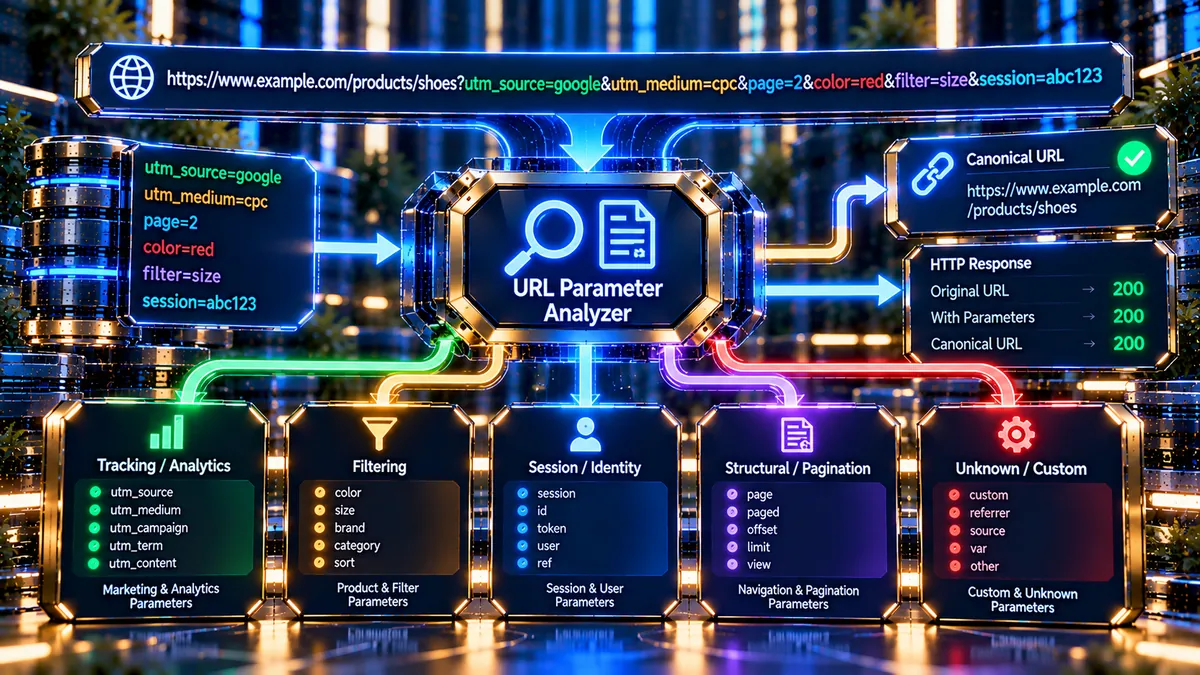
The URL Parameter Analyzer helps you understand what query parameters are doing to a URL and whether the page provides a canonical signal that identifies the preferred version of that URL.
Enter any public HTTP or HTTPS URL and the analyzer checks the URL’s query string, classifies detected parameters, retrieves the page response, records the HTTP status, inspects the returned HTML for a canonical link, and presents the findings in a traffic-light diagnostic dashboard.
This is useful when you are investigating tracking parameters, pagination URLs, filtering URLs, session identifiers, custom parameters, or other URL variations that may create unnecessary URL versions.
URL Parameter Analyzer
Analyze query parameters, classify their purpose, inspect canonical handling, and identify potential URL-structure risks.
What the URL Parameter Analyzer Checks
The analyzer starts with the URL itself and separates the query string from the rest of the address.
For example:
contains three query parameters:
color=blueutm_source=newsletterpage=2
The analyzer identifies each parameter separately and assigns it to a practical category.
It also requests the supplied URL and examines the returned page rather than stopping after parsing the URL. This means a URL without parameters can still be checked for its HTTP response and canonical information.
The main checks include:
- Total number of detected parameters
- Parameter names and values
- Parameter classification
- Tracking and analytics parameters
- Filtering and faceted-navigation parameters
- Session and identity parameters
- Structural and pagination parameters
- HTTP response status
- Final URL returned after the request
- Canonical link presence
- Canonical URL
- Self-referential canonical relationship
- Diagnostic risk signals
Why URL Parameters Matter
A query parameter is not automatically a problem.
Parameters can have legitimate purposes. An ecommerce site may use parameters to represent product variants, filters, sorting, pagination, internal search states, or campaign tracking. Some applications genuinely need the parameterized URL to represent a distinct state of the page.
The technical SEO question is therefore not simply:
“Does this URL contain parameters?”
The more useful question is:
“What role do these parameters play, and how does the site tell search engines which URL should represent the content?”
Google describes canonicalization as the process of selecting a representative URL from a group of duplicate or substantially similar URLs. Google can consider several signals when selecting a canonical, including redirects, HTTPS, sitemap inclusion and rel="canonical". A canonical declaration is a preference signal rather than an absolute guarantee of Google’s final selection.
For additional background, see Google’s documentation on URL canonicalization.
How the Analyzer Interprets Parameters
The analyzer groups detected query keys into five practical classifications.
Tracking / Analytics
This category covers parameter names containing patterns such as:
utm_fbclidgclidmsclkid_ga
These parameters are commonly associated with campaign attribution, advertising clicks, analytics, or measurement.
For example:
The presence of a tracking parameter does not by itself mean the URL is incorrect. The important question is whether tracking variants are appropriately handled and whether the underlying page has a clear preferred URL relationship.
Faceted Navigation / Filtering
This category includes parameter names containing patterns such as:
sortorderfilterpricecolorsizecategory
These parameters commonly appear on ecommerce, directory, listing, archive and catalog pages.
For example:
Filtering can create many possible URL combinations. A site with several independent filters can therefore produce a much larger URL space than the number of pages visible through normal navigation.
The analyzer highlights four or more filtering parameters as a potential structural-overhead signal. That does not mean four parameters are inherently harmful; it means the URL deserves closer inspection.
Session / Identity
This category includes parameter names containing patterns such as:
sidsessionphpsessidauth
Session identifiers are particularly important because placing identity or session information directly in URLs can create URLs that should not normally be treated as ordinary public page variations.
If a session-related identifier appears in the visible URL, the analyzer raises a red diagnostic condition.
Structural / Pagination
This category covers parameter keys matching the analyzer’s structural rules, including patterns containing:
ppageoffsetlimit
Examples include:
and:
Pagination parameters can be completely legitimate. The important issue is how the site handles the resulting URLs and whether the parameterized pages represent meaningful content states.
Unknown / Custom
Any parameter that does not match the analyzer’s defined classification patterns is reported as:
Unknown / Custom
This is not an error.
Web applications frequently use application-specific parameters such as:
?view=grid
?ref=homepage
?variant=blue
or:
?search=laptop
A custom parameter should be interpreted according to the site’s actual functionality rather than automatically treated as a technical SEO problem.
What the HTTP Status Tells You
The analyzer retrieves the supplied URL and records the HTTP response status returned by the server.
Common examples include:
200— the requested resource returned a successful response301— the resource permanently redirects elsewhere302— the resource temporarily redirects elsewhere307— a temporary redirect that preserves the request method308— a permanent redirect that preserves the request method404— the requested resource was not found- Other
4xxor5xxresponses — additional client or server-side conditions may exist
The HTTP status and URL-parameter analysis answer different questions.
For example, a URL can contain zero parameters and still return a 301. Conversely, a parameterized URL can return 200 and contain a canonical element.
That is why the analyzer captures the HTTP response independently instead of assuming that parameter count determines the server response.
For deeper HTTP diagnostics, you can continue with the HTTP Status Checker or Redirect Checker.
Understanding the Canonical Result
The analyzer retrieves the returned HTML and looks for a canonical link element.
A typical canonical declaration looks like:
<link rel="canonical" href="https://example.com/products/">
The analyzer extracts the canonical destination and compares it with the URL being analyzed.
Self-Referential Canonical
A self-referential canonical means the page identifies its own URL as the preferred canonical representation.
For example:
returns a canonical pointing to:
When the analyzer confirms this relationship, the result can receive a green canonical signal.
A self-referential canonical does not mean every parameter is automatically desirable. It simply confirms that the returned HTML contains a canonical relationship matching the tested URL.
Canonical Pointing Elsewhere
A page may contain a canonical URL that differs from the tested parameterized URL.
For example:
Tested URL:
Canonical:
This tells you that the page is declaring another URL as its preferred representation.
That can be intentional and useful, particularly for tracking parameters or URL variations that do not represent a separate canonical page.
It should nevertheless be reviewed against the site’s actual content and URL strategy.
No Canonical Detected
If the analyzer retrieves the HTML successfully but does not find a canonical link element, the dashboard reports that no canonical was detected.
When the URL contains active parameters, this deserves more attention because there is no rel="canonical" signal in the returned HTML for the analyzer to evaluate.
The absence of a canonical tag does not automatically prove that Google will index the URL incorrectly. Canonicalization is based on multiple signals, and a site may intentionally rely on other mechanisms.
For troubleshooting canonical selection, Google’s canonicalization documentation provides the broader framework.
How the Traffic-Light Result Works
The dashboard is designed to make the most important finding visible quickly.
Green — No Immediate Parameter Signal
Green is used when:
- The URL contains zero query parameters, or
- Parameters are present and a valid self-referential canonical relationship is confirmed
A green result does not mean the entire website is technically perfect. It means the specific parameter/canonical condition evaluated by this tool did not produce the defined higher-risk signal.
Yellow / Orange — Review Recommended
Yellow is used for situations such as:
- Tracking parameters requiring review
- Structural or pagination parameters requiring review
- A large number of filtering parameters
- A canonical relationship that needs further investigation
- Other situations where the tool has information but cannot establish the strongest green condition
Yellow is a diagnostic prompt, not a declaration that the URL is broken.
Red — Higher-Risk URL Signal
Red is used when:
- A session or identity identifier is exposed in the visible URL, or
- Active query parameters are present and no canonical link element is detected in the returned HTML
A red result means the URL deserves investigation.
It does not mean that the page should automatically be removed, blocked, redirected or canonicalized without understanding what the parameter actually does.
Practical Examples
Example 1: No Parameters
There is no query string.
The analyzer reports:
- Parameters: 0
- Tracking: 0
- Filtering: 0
- Session / Identity: 0
The tool can still retrieve the page and inspect its HTTP response and canonical information.
This distinction is important because zero parameters does not mean that the page should skip technical inspection.
Example 2: Campaign Tracking
The analyzer identifies the UTM parameters as Tracking / Analytics.
If the page also declares a suitable canonical relationship, the tracking parameters can be understood as campaign-related URL variations rather than automatically treating them as separate preferred pages.
The correct interpretation depends on how the site is designed to handle those URLs.
Example 3: Pagination
The page parameter is classified as Structural / Pagination.
This is not inherently an error.
You should investigate whether the paginated URL serves meaningful content, whether it is discoverable through the site’s navigation, and whether its canonical and indexing signals match the intended architecture.
Example 4: Faceted Navigation
Several parameters are classified as filtering or structural signals.
Four or more filtering parameters can create many combinations across a large catalog. The analyzer therefore highlights potential structural overhead.
This is where a broader crawl and indexability review becomes useful.
The Indexability / Crawlability Analyzer can help investigate whether important URLs are accessible for crawling, while the XML Sitemap Analyzer can be used to inspect sitemap URL signals.
Example 5: Session Identifier
The analyzer identifies the session-related parameter and raises a red diagnostic signal.
The important next step is not simply to remove the parameter manually. Determine why the session identifier is appearing in a public URL and whether the application’s session architecture can keep session state out of indexable URL addresses.
What to Do When You Get a Red Result
Start by identifying exactly why the result is red.
If the issue is a session identifier:
- Determine which application component generates the parameter.
- Confirm whether it is a real session or identity token.
- Check whether public pages are exposing the value.
- Review application/session configuration.
- Test whether the same page can function without the session identifier.
- Re-run the analyzer after the underlying configuration is corrected.
If the issue is an active query string with no canonical detected:
- Identify what each parameter does.
- Determine whether the parameter changes the primary content.
- Decide whether the parameterized URL represents a genuine page state.
- Check whether another URL should represent the preferred version.
- Review redirects, internal links and sitemap signals where applicable.
- Add or correct the appropriate canonical strategy when it is technically justified.
- Re-test the URL.
For broader duplicate-URL investigation, use the Duplicate Content / URL Consistency Analyzer.
What to Do With Tracking Parameters
Tracking parameters are often necessary for campaign measurement.
The goal is not to eliminate every UTM or advertising parameter.
Instead, separate the measurement function from the preferred URL architecture.
For example:
may be useful for campaign attribution while the underlying product page remains:
The correct implementation depends on the site’s analytics, canonical and URL-handling setup.
If you are diagnosing the URL itself rather than its tracking purpose, the URL Parameter Analyzer gives you a quick way to identify those tracking strings and then inspect the canonical relationship.
What to Do With Filtering Parameters
Filtering deserves a different approach from simple campaign tracking.
Consider a store with:
- color
- size
- brand
- category
- price
- availability
- rating
- sort order
If every combination creates a crawlable URL, the theoretical URL space can become extremely large.
That does not mean all filter URLs are useless. Some may represent valuable, search-demand-driven landing pages. Others may be temporary combinations that do not deserve independent indexing.
The right question is:
“Which parameter combinations represent useful, stable content that should be discoverable?”
Then align the site’s crawling, indexing, internal linking, canonical and sitemap strategy with that decision.
For link-level investigation, the Internal Links / Crawl Path Analyzer can help you understand how URLs are connected within the site.
Parameter Analysis Is Not the Same as Indexability Analysis
A common mistake is to treat these as the same problem.
The URL Parameter Analyzer tells you:
- What parameters exist
- What categories they match
- What HTTP response was returned
- What canonical signal appears in the HTML
- Which defined diagnostic conditions were detected
It does not establish every indexing decision a search engine will make.
It does not replace:
- A complete crawl
- Search Console URL Inspection
- Robots.txt analysis
- Indexability analysis
- Sitemap analysis
- Redirect-chain analysis
- Internal-link analysis
- Server-log analysis
For robots rules, see the Robots.txt Analyzer.
For broader metadata and page-source signals, the Meta Tags Analyzer provides another layer of inspection.
Common Problems When Analyzing URL Parameters
The URL has parameters but the page is intentionally unique
Do not remove or canonicalize a parameter simply because it appears in the URL.
If the parameter changes the primary content or represents a meaningful product, category, language, location or application state, it may have a legitimate purpose.
Analyze what the parameter actually changes before making an SEO decision.
A tracking parameter creates a different URL
This is common with campaign URLs.
The existence of utm_source, utm_medium, gclid or similar tracking data does not by itself establish a duplicate-content problem.
The important question is how the site handles the underlying page and its preferred URL.
A canonical exists but points to another URL
This can be intentional.
Compare the tested page with the canonical destination and determine whether they represent the same primary content or whether the canonical relationship is incorrectly configured.
If the canonical points somewhere unexpected, inspect the page source and CMS/plugin configuration.
The tool reports no canonical
First determine whether the page actually returned usable HTML.
A failed network request and a successfully retrieved page without a canonical are different conditions.
The analyzer therefore reports HTTP and canonical information independently where the server response permits it.
If the page is reachable but has no canonical element, decide whether a canonical is actually appropriate for that page rather than adding one mechanically.
The parameter name is classified unexpectedly
The analyzer uses defined name-pattern rules.
For example, a custom parameter may contain characters or text that happen to match one of those rules.
Classification is therefore a diagnostic aid, not a semantic understanding of your application’s source code.
When the classification looks unusual, inspect what the parameter actually controls.
A Practical URL Parameter Audit Workflow
Use this sequence when investigating a parameterized URL:
- Enter the exact public URL into the analyzer.
- Record the parameter count and classifications.
- Check the HTTP response status.
- Review the final URL returned by the server.
- Read the canonical status and canonical destination.
- Identify session or identity parameters immediately.
- Separate tracking parameters from functional parameters.
- Identify filtering and pagination behavior.
- Determine whether the parameter changes the primary page content.
- Review the site’s broader canonical and redirect configuration.
- Check internal links and sitemap signals when relevant.
- Re-test the URL after making a technical change.
For a broader canonical investigation, use the Canonical URL Checker.
For redirect behavior, use the HTTP/HTTPS Redirect Checker.
For URL construction and structural issues, use the URL Structure Analyzer.
What This Tool Does Not Tell You
The URL Parameter Analyzer is intentionally focused on URL parameters and the server/page signals it can inspect from the supplied URL.
It does not independently determine:
- Whether Google will index the URL
- Which URL Google will ultimately select as canonical
- Whether a parameter has search demand
- Whether a parameterized page should rank
- Whether a page is valuable enough to index
- Whether robots.txt blocks a URL
- Whether a URL is present in a sitemap
- Whether every internal link points to the preferred URL
- Whether server logs show extensive crawler activity
- Whether a parameter changes the rendered page after JavaScript execution
- Whether an application-specific parameter is semantically necessary
Those questions require additional evidence.
Google’s own documentation notes that canonical selection uses multiple signals and that a declared canonical is a preference rather than a guarantee. Use this analyzer as one diagnostic layer rather than treating its traffic-light result as a search-engine verdict.
Privacy and Processing
The analyzer is designed as a free server-side diagnostic tool.
The supplied public URL is requested by the PKCapra server so the tool can inspect the HTTP response and returned HTML for the checks described above.
Do not submit private, internal, localhost, intranet, credential-bearing or otherwise sensitive URLs.
The analyzer is intended for publicly reachable HTTP and HTTPS addresses. Network and server configuration can affect what information is available to the analyzer.
Frequently Asked Questions
What is a URL parameter?
A URL parameter is information appended to a URL after a question mark and used by a website to modify, identify or track a request.
For example:
Here, color=blue is a query parameter.
Are URL parameters bad for SEO?
No. URL parameters have many legitimate uses.
The SEO concern depends on what the parameter changes, how many URL variations it creates, whether those variations are useful, and how canonical, crawling and indexing signals are configured.
Does every parameterized URL need a canonical tag?
Not necessarily.
A canonical strategy should reflect the relationship between the URL and the site’s preferred content architecture. Some parameterized URLs represent meaningful unique states, while others may simply be tracking or duplicate variations.
The analyzer reports what the returned HTML actually declares rather than assuming that every parameter should be removed.
What does a green result mean?
A green result means the URL passed one of the analyzer’s defined green conditions: either no parameters were found, or a self-referential canonical relationship was confirmed.
It is not a complete SEO audit.
What does a yellow result mean?
Yellow means the analyzer found a condition that deserves review, such as tracking or structural parameters, substantial filtering parameters, or a canonical relationship that does not establish the strongest green condition.
It is a diagnostic warning rather than an automatic penalty.
What does a red result mean?
Red indicates a higher-risk condition defined by this tool, such as a session/identity parameter appearing in the URL or active query parameters being present without a canonical link detected in the returned HTML.
Investigate the underlying implementation before making changes.
Can tracking parameters create duplicate URLs?
Tracking parameters can create different URL strings pointing to the same underlying content.
Whether that becomes an SEO problem depends on how the site handles those variations and the signals it provides to crawlers.
What is a self-referential canonical?
A self-referential canonical is a canonical link that identifies the URL being inspected as its own preferred canonical URL.
For example, if the tested URL is:
and the page declares:
as its canonical destination, the relationship is self-referential.
Why does the analyzer check HTTP status separately from parameters?
Because URL structure and server response are different technical layers.
A URL can contain no parameters and return a redirect or error. A parameterized URL can return 200 OK.
Separating these metrics prevents the parameter count from hiding an important server-response problem.
Does the analyzer replace Google Search Console?
No.
It provides a focused URL-level diagnostic. Search Console and other crawling tools provide additional information about how search engines actually process and select URLs.
Should I remove every filtering parameter?
No.
Some filtering parameters represent useful page states and can be part of a deliberate site architecture.
The correct approach is to understand which combinations are valuable, stable and intended for discovery, then configure crawling and canonical signals accordingly.
Why is my custom parameter classified as Unknown / Custom?
The analyzer uses predefined parameter-name patterns. A custom application variable that does not match those patterns is placed into the Unknown / Custom category.
That does not indicate a problem.
Can the analyzer inspect a private URL?
No. The tool is designed for publicly reachable HTTP and HTTPS URLs and includes server-side protections against private, local and otherwise unsafe targets.
Useful Next Action
Start with an exact URL that you are currently investigating rather than testing only the homepage.
If the URL contains parameters, first determine what each parameter changes. Then use the analyzer’s HTTP status, canonical result and classification data to decide what deserves a deeper technical investigation.
For a broader technical SEO workflow, combine the results with the Canonical URL Checker, HTTP Status Checker, Redirect Checker, Robots.txt Analyzer, XML Sitemap Analyzer, and Internal Links / Crawl Path Analyzer.
The goal is not to eliminate parameters simply because they exist. The goal is to understand what they represent and make the site’s URL, canonical, crawling and indexing signals consistent with the content architecture.