
One URL per line. You can paste URLs from a crawl, sitemap, spreadsheet, or manual audit.
Optional row-by-row comparison. Leave blank if you only want URL consistency analysis.
Consistency Findings
Normalized URL Comparison
| # | Original URL | Normalized URL | Notes |
|---|
Canonical Comparison
| # | Page URL | Canonical URL | Result |
|---|
This is a pattern and consistency analyzer. It does not fetch pages, verify server redirects, read live canonical tags, or determine Google's selected canonical. Use it as an audit aid and verify important URLs in your crawler, server logs, or Google Search Console.
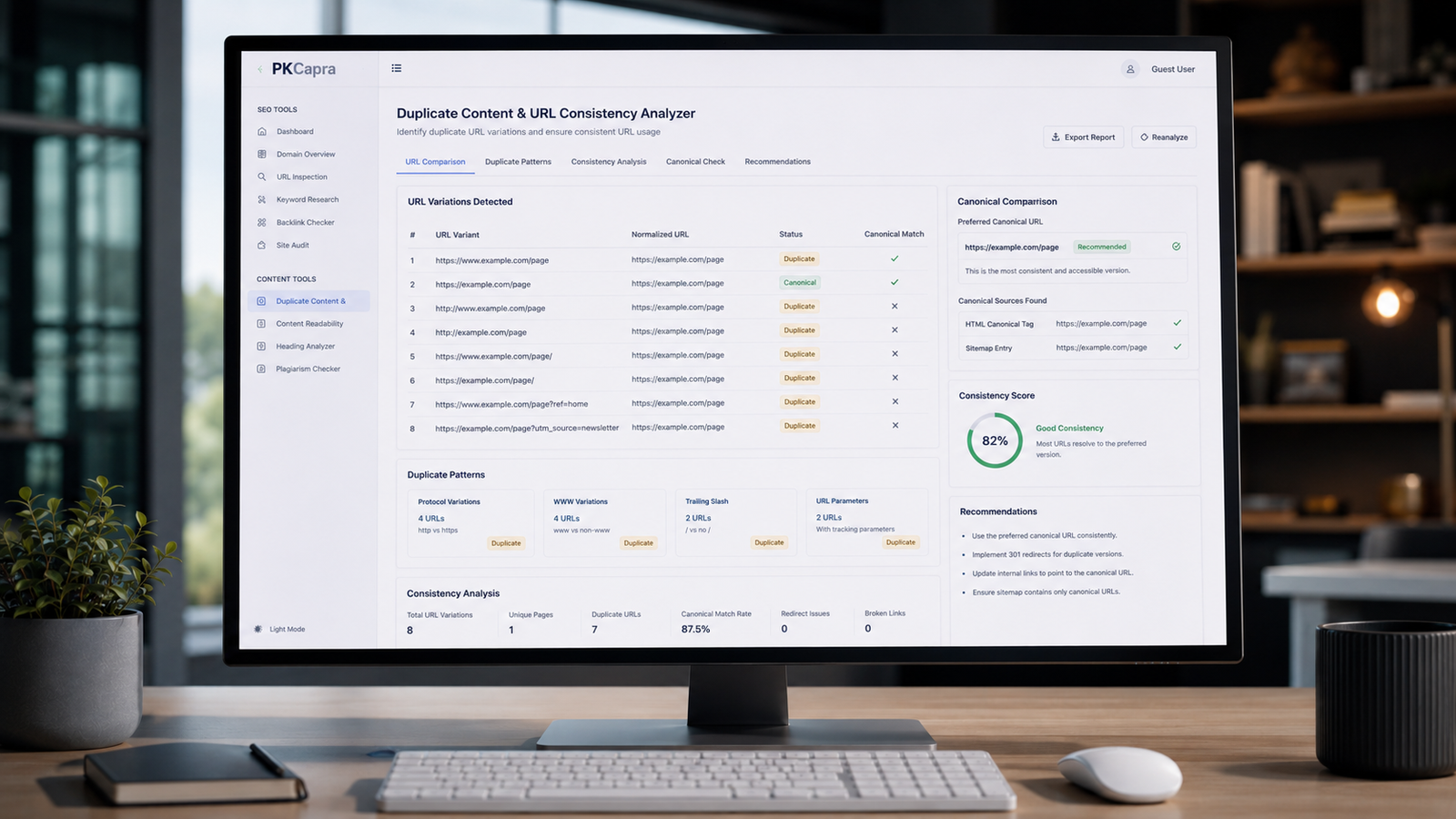
Duplicate Content & URL Consistency Analyzer
Find URL Variations, Duplicate Patterns, and Consistency Issues
A website can have multiple URL variations that point to the same or very similar content.
For example, a page might appear as:
https://example.com/pagehttps://example.com/page/https://www.example.com/pagehttp://example.com/pagehttps://example.com/page?utm_source=email
These URLs are not necessarily all problematic. Some variations may be intentional, while others can create unnecessary duplication or make a website’s URL structure harder to manage.
The PKCapra Duplicate Content & URL Consistency Analyzer helps you review URL lists for common consistency patterns. Paste your URLs into the tool to identify protocol differences, hostname variations, trailing-slash differences, query strings, normalized duplicate patterns, and other issues worth investigating.
You can also optionally provide canonical URLs for a row-by-row comparison.
Paste your URLs above and select Analyze URLs to begin.
What Is a Duplicate Content & URL Consistency Analyzer?
A duplicate content and URL consistency analyzer is an SEO auditing tool that helps identify multiple URL variations that may represent the same page or similar content.
Search engines can encounter duplicate or near-duplicate pages through different URLs. Google explains that when multiple URLs contain the same or very similar content, it may select one representative URL, known as the canonical URL.
The goal is not to make every URL identical.
Instead, the goal is to understand which URL variations are intentional, which are unnecessary, and which should be consolidated or controlled through appropriate technical signals.
Why URL Consistency Matters for SEO
A consistent URL structure makes a website easier to manage and can help search engines understand which URL should represent a piece of content.
Common sources of URL variation include:
- HTTP and HTTPS versions
- www and non-www hostnames
- Trailing slashes
- URL parameters
- Different URL casing
- Tracking parameters
- Multiple paths leading to similar content
- Legacy URLs
- CMS-generated URL variations
Not every variation creates an SEO problem.
For example, tracking parameters can be useful for analytics while still representing the same underlying page.
The important task is to understand how those variations are handled.
What Does the PKCapra Analyzer Check?
The tool performs a pattern-based analysis of the URLs you provide.
It does not crawl your website or make changes to your pages.
HTTP vs HTTPS
The analyzer identifies whether your URL list contains HTTP, HTTPS, or both.
If both protocols are present, review which version is intended to be the preferred site URL.
For modern websites, HTTPS is generally the expected secure protocol, but the correct implementation should also include appropriate redirects and canonical signals where applicable.
The analyzer flags the presence of both protocols so you can investigate the underlying configuration.
www vs Non-www
A website may use either:
or:
Both formats can be valid.
The problem arises when multiple versions are accessible without a clear preferred configuration.
PKCapra identifies www and non-www hostname variations within your URL list so you can review whether the difference is intentional.
Trailing Slash Consistency
These URLs can represent different URL forms:
and
The analyzer identifies trailing-slash and non-trailing-slash variations.
Your preferred format depends on your website’s configuration.
The important thing is to maintain a predictable URL structure and handle alternative versions appropriately.
Query Strings
The tool identifies URLs containing query parameters.
For example:
https://example.com/article?utm_source=newsletter
Query parameters can serve legitimate purposes such as analytics, filtering, sorting, or session-related functionality.
However, some parameter combinations can create many URL variations for the same underlying content.
The analyzer flags query-string URLs so you can determine whether they are intentional and whether they need additional technical handling.
Normalized URL Comparison
PKCapra creates a normalized representation of each valid URL.
This makes it easier to spot URL variants that differ in superficial ways but point toward the same underlying path and hostname pattern.
Normalization helps with auditing, but it does not prove that two URLs serve identical content.
Two different URLs can normalize similarly while producing different pages.
Always verify important cases on the actual website.
Potential Duplicate URL Groups
If multiple URLs normalize to the same comparison pattern, the tool groups them as potential duplicates.
This does not mean the URLs are definitely duplicate-content pages.
Instead, it gives you a shortlist of URLs that deserve further investigation.
That distinction is important because URL similarity alone cannot determine whether two pages contain identical or substantially similar content.
Canonical URL Comparison
The tool includes an optional canonical comparison field.
You can paste a preferred canonical URL for each URL in the same order as your URL list.
PKCapra then compares the supplied canonical URL with the normalized page URL and reports whether they match or differ.
This is a comparison aid, not a live canonical validator.
The tool does not fetch the page to inspect its actual <link rel="canonical"> element.
What Is a Canonical URL?
A canonical URL is the URL you indicate as the preferred version of a page when multiple URLs represent the same or very similar content.
Google describes canonicalization as the process of selecting a representative URL from duplicate or very similar pages.
A canonical signal can help communicate your preferred URL.
However, a canonical declaration is not an absolute command to Google. Search engines can use multiple signals when determining the canonical version.
That is why canonicalization should be considered part of a broader URL and site architecture strategy.
Common URL Consistency Problems
HTTP and HTTPS Versions
A page may be accessible through both HTTP and HTTPS.
If both versions remain independently accessible, investigate redirects, canonical signals, internal links, and other configuration details.
www and Non-www Versions
Both hostname versions may exist in a site’s URL ecosystem.
Choose a preferred format and make sure your website consistently references and handles it.
Trailing Slash Variations
Mixed trailing-slash formats can create unnecessary URL variations.
Check your CMS, server configuration, internal links, sitemap URLs, and redirects for consistency.
Tracking Parameters
Marketing platforms often add parameters such as:
?utm_source=google
or:
?utm_campaign=spring
These parameters can be legitimate and useful.
The important question is whether parameterized URLs are being treated appropriately in your site’s technical architecture.
Legacy URLs
Website migrations can leave old URL structures behind.
Old URLs may still appear in internal links, external references, analytics reports, or crawl data.
A URL consistency audit can help identify patterns that need further investigation.
How to Use the Duplicate Content & URL Consistency Analyzer
Step 1: Collect Your URLs
Export URLs from your crawler, XML sitemap, CMS, analytics data, spreadsheet, or manual audit.
Place one URL on each line.
Step 2: Paste the URLs
Paste your URL list into the URLs to Analyze field.
Step 3: Add Canonicals if Needed
If you already have a list of preferred canonical URLs, paste them into the optional canonical field in the same row order.
You can skip this field if you only want to analyze URL consistency.
Step 4: Analyze URLs
Click Analyze URLs.
The tool processes the URL list in your browser and produces the results.
Step 5: Review the Findings
Look for:
- Mixed HTTP and HTTPS
- Mixed www and non-www
- Mixed trailing-slash formats
- Query-string URLs
- Potential duplicate normalized URLs
- Invalid URLs
- Canonical URLs that differ from the normalized page URL
Step 6: Investigate Before Making Changes
Do not automatically redirect or delete URLs simply because the analyzer flags them.
First determine why the URL exists and whether it serves a legitimate purpose.
Example URL Audit
Suppose a crawl contains:
http://example.com/products
https://www.example.com/products
The analyzer identifies multiple URL-format variations.
That does not automatically mean all four URLs contain duplicate content.
Instead, it tells you that the website has multiple representations of the same apparent resource and that you should inspect how the server, CMS, canonical tags, internal links, and redirects handle them.
This is the difference between finding a pattern and diagnosing the underlying SEO issue.
Duplicate Content Does Not Always Mean a Penalty
Duplicate or similar content is often misunderstood.
Finding similar URLs does not automatically mean that Google will penalize a website.
Search engines routinely encounter duplicate content for legitimate reasons.
The more useful SEO question is:
Which URL should represent this content, and are the site’s technical signals consistent with that choice?
That approach leads to better audits than simply trying to eliminate every repeated URL.
How to Fix URL Consistency Issues
The correct solution depends on why the duplicate or alternative URL exists.
Possible approaches include:
Use Consistent Internal Links
Where appropriate, link internally to your preferred URL version rather than repeatedly referencing different variants.
Use Appropriate Redirects
If an old or alternative URL should no longer be independently used, a server-side redirect may be appropriate.
Redirect decisions should be based on the purpose and relationship of the URLs, not simply on the fact that they look different.
Use Canonical Signals
For genuinely duplicate or substantially similar pages, a canonical signal can communicate your preferred representative URL.
Google recommends using canonicalization methods consistently rather than sending conflicting signals.
Keep Sitemaps Consistent
Your XML sitemap should generally contain the URLs you want search engines to consider as important canonical versions.
Review CMS and Server Configuration
If URL variations are being generated automatically, investigate the underlying CMS, plugin, server, or routing configuration.
Fixing the source is usually better than repeatedly correcting URLs after they are generated.
URL Consistency Audit Checklist
Use this checklist when reviewing a website:
- Is HTTPS consistently used?
- Is the preferred www or non-www hostname clear?
- Are trailing slashes handled consistently?
- Are internal links using preferred URL versions?
- Are sitemap URLs consistent with preferred URLs?
- Are tracking parameters creating unnecessary crawlable variations?
- Are old URLs still referenced internally?
- Are canonical signals consistent?
- Are redirects pointing to the intended destination?
- Are important pages available through unnecessary URL variants?
- Are duplicate URL patterns intentional?
- Have important findings been verified on the live website?
URL Consistency and Internal Linking
Internal links are an important part of URL architecture.
If a website consistently links to one preferred URL while alternative versions remain accessible, search engines receive a clearer set of signals about which URL the site prefers.
During an audit, compare your internal links with your preferred canonical URL structure.
You can use the PKCapra Internal Links & Crawl Path Analyzer for a deeper look at internal linking and crawl paths.
URL Consistency and XML Sitemaps
XML sitemaps are another useful source of URL information.
If your sitemap contains one URL version while internal links repeatedly reference another, investigate the difference.
For sitemap-specific analysis, use the PKCapra XML Sitemap Analyzer.
The goal is not simply to make every technical signal identical in every situation, but to avoid unnecessary contradictions.
URL Consistency and Crawlability
URL duplication can also increase the number of URL variations that crawlers encounter.
This becomes particularly important on larger websites where parameters, filters, faceted navigation, or dynamic URL generation can create many possible combinations.
Use the PKCapra Indexability & Crawlability Analyzer alongside this tool when investigating broader crawling and indexing issues.
What This Tool Does Not Check
Transparency matters in an SEO auditing tool.
The PKCapra Duplicate Content & URL Consistency Analyzer does not:
- Crawl your website
- Download live pages
- Compare page body content
- Inspect live canonical tags
- Verify HTTP redirects
- Determine Google’s selected canonical
- Check server response codes
- Decide whether two pages are truly duplicate
- Modify your website
It analyzes the URL information you provide.
This makes it useful for an initial audit, data cleanup, and identifying patterns before deeper technical verification.
When Should You Use This Tool?
The analyzer is particularly useful during:
- Technical SEO audits
- Website migrations
- Domain migrations
- HTTP-to-HTTPS migrations
- www/non-www changes
- CMS migrations
- URL restructuring
- Large content audits
- Sitemap reviews
- Internal-link audits
- Canonicalization reviews
- Duplicate URL investigations
It can also be useful before launching a major website restructure because identifying URL patterns early can reduce avoidable technical inconsistencies later.
Frequently Asked Questions
What is duplicate content in SEO?
Duplicate content generally refers to substantially similar or identical content appearing at multiple URLs.
Multiple URLs do not automatically mean a website has an SEO penalty. The appropriate response depends on why the URLs exist and how the website communicates its preferred versions.
How do I find duplicate URLs?
Start by collecting URLs from a crawl, sitemap, CMS, analytics data, or other sources. Then compare URL patterns and investigate URLs that appear to represent the same resource.
The PKCapra analyzer can help identify potential duplicate URL patterns through normalization.
Is www or non-www better for SEO?
Neither format is inherently the universal SEO winner.
Choose the hostname that fits your website and keep its implementation consistent.
Should URLs have trailing slashes?
Either format can be used.
The important consideration is consistency and how your website handles alternative versions.
Do URL parameters cause duplicate content?
They can create multiple URL variations, but parameters are not automatically an SEO problem.
Some parameters have legitimate purposes, such as analytics, filtering, sorting, or site functionality.
Review how those URLs behave and whether they create unnecessary crawlable variations.
Does a canonical tag guarantee Google will use that URL?
No.
A canonical tag is a signal about your preferred URL. Google may consider other signals when selecting the canonical version.
Can this tool check my live website?
No. This tool analyzes the URLs you paste into it. It does not crawl or fetch your website.
For live-site verification, use an appropriate crawler or inspect the relevant pages and server responses directly.
Is the PKCapra URL Consistency Analyzer free?
Yes. The tool is available as a free online SEO auditing utility from PKCapra.
Audit First. Change Second.
The most useful SEO audits do not treat every automated warning as an error.
A URL variation may be intentional. A query parameter may be necessary. Multiple H1s may come from a legitimate component structure. A canonical difference may have a specific reason.
Use the analyzer to discover patterns, then investigate the context behind those patterns.
That approach produces cleaner technical decisions and avoids unnecessary SEO changes.
Analyze Your URL Structure
Paste your URL list into the PKCapra Duplicate Content & URL Consistency Analyzer to identify common URL variations and potential consistency issues.
Review the results, investigate the important cases, and make changes based on how your website actually works.
Better URL consistency starts with understanding your URL patterns.