
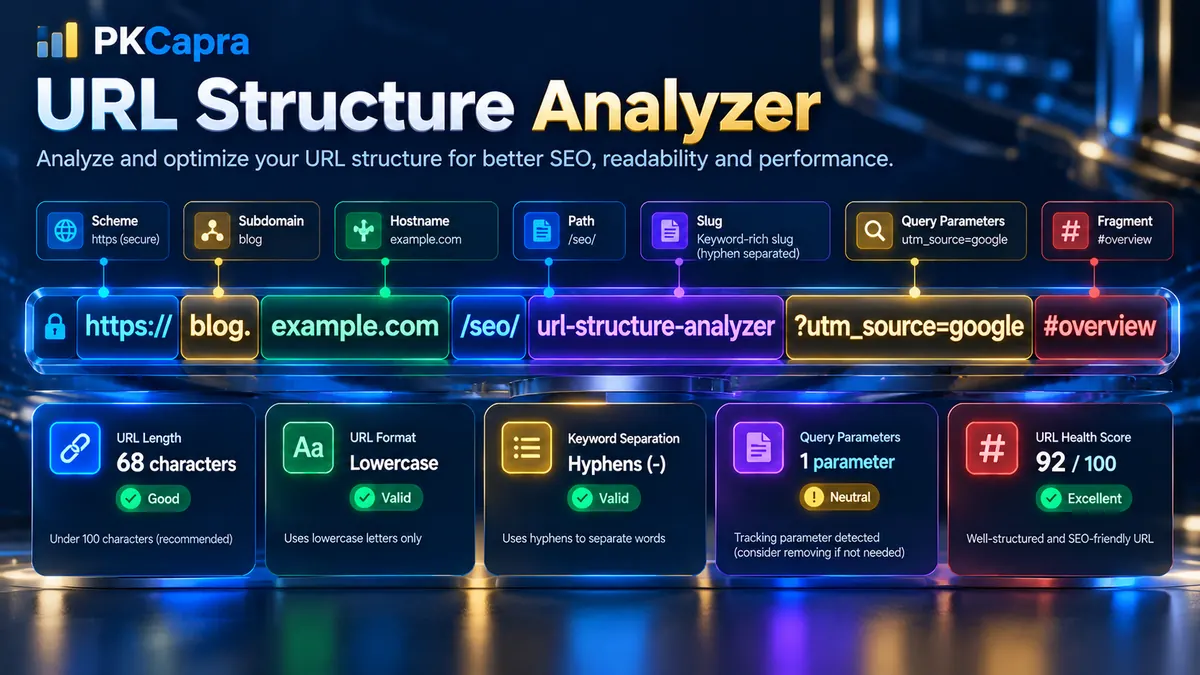
URL Structure Analyzer
Analyze URL geometry, length, characters, query parameters, slug structure, and subdomain depth.
URL Diagnostic Matrix
Review each structural check, detected value, technical explanation, and status.
| Check | Detected Value | Analysis | Status |
|---|
A clean and logical URL structure makes it easier to understand what a webpage represents before the page is even opened. PKCapra’s URL Structure Analyzer examines the architecture of a URL and identifies structural issues involving length, capitalization, separators, special characters, query parameters, subdomains, path depth, and other URL components.
Enter a URL to analyze its structure and receive a detailed diagnostic report. The analyzer breaks the URL into its core components, evaluates individual structural signals, calculates an overall URL Health Score, and explains which parts of the URL may need optimization.
What Is URL Structure?
URL structure refers to the way a web address is organized into its individual components.
A typical URL can contain several parts:
- Scheme
- Host
- Path
- Query parameters
- Fragment
- Subdirectories
- Slug segments
- Subdomains
For example:
Each part has a different technical purpose.
A well-organized URL can communicate useful information about the location and topic of a resource while avoiding unnecessary complexity.
What Does the URL Structure Analyzer Check?
PKCapra’s URL Structure Analyzer performs a series of independent structural checks.
The analysis can examine:
- Total URL character length
- URL scheme
- Hostname
- Subdomain structure
- Path structure
- Path depth
- Slug segments
- Hyphen usage
- Underscores
- Uppercase characters
- Spaces
- Special characters
- Query parameters
- Tracking parameters
- Dynamic parameters
- Fragment identifiers
- Percent-encoded characters
- Repeated slug terms
- Keyword separation
- URL sanitization
The results are presented in a diagnostic matrix so that you can see the detected value and the reason behind each status.
URL Geometry Parser
The URL Geometry Parser separates the submitted URL into its architectural components.
Using the URL structure itself, the analyzer identifies elements such as:
Scheme
The scheme identifies the protocol used by the URL.
Examples include:
httpshttp
For modern websites, HTTPS is generally expected for secure website delivery.
PKCapra also provides a dedicated HTTPS Checker when you need to investigate HTTPS implementation separately.
Host
The host identifies the domain or hostname.
For example:
www.example.com
The hostname is separated from the path so that the analyzer can evaluate domain and URL-path structure independently.
Path
The path identifies the resource location after the hostname.
For example:
/blog/technical-seo/url-structure/
The analyzer examines path segments, separators, depth, capitalization, and other structural characteristics.
Query Parameters
Query parameters appear after a question mark.
For example:
?id=123&utm_source=google
Parameters can be legitimate and useful, but unnecessary parameters can make URLs more complicated and may create multiple URL variations for similar content.
Fragment
A fragment appears after a hash symbol.
For example:
#technical-details
Fragments commonly point to a particular section or location within a page.
The analyzer identifies fragment usage so you can distinguish the main URL path from client-side fragment information.
URL Length Analysis
Long URLs can become difficult to read, share, copy, and maintain.
The analyzer measures the complete URL character count and provides a status based on the configured thresholds.
The tool uses these practical indicators:
- Under 60 characters: strong structural signal
- 60–75 characters: monitor length
- More than 75 characters: optimization warning
URL length alone does not determine whether a URL is technically valid or whether a page can rank.
A long URL can still work correctly. The purpose of the length check is to identify URLs that may contain unnecessary structural complexity.
Character Sanity Check
A clean URL generally uses predictable and readable characters.
The analyzer checks for potentially problematic patterns such as:
- Spaces
- Uppercase letters
- Underscores
- Unusual symbols
- Excessive punctuation
- Encoded characters
These checks help identify URLs that may be harder to read or maintain.
Hyphens vs Underscores
Hyphens are commonly used to separate words in readable URL slugs.
Example:
/technical-seo-guide/
An underscore-based structure looks different:
/technical_seo_guide/
The analyzer detects underscores so that you can identify them during a URL cleanup or migration project.
Uppercase Characters
The analyzer detects uppercase letters in the URL.
For example:
/Technical-SEO/
is structurally different from:
/technical-seo/
Consistent lowercase URL structures are generally easier to standardize and reduce potential inconsistencies between differently capitalized URL variants.
Spaces and Unsafe Characters
Spaces and unusual characters can create encoded URLs that are less readable.
For example, a browser may encode a space as:
%20
The analyzer identifies these patterns so that the URL can be reviewed for unnecessary complexity.
Query Parameter Analysis
Query parameters are additional values attached to a URL after the ? character.
For example:
The analyzer identifies query variables and reports their count.
This is useful because parameter-heavy URLs can become complicated and may generate multiple URL variations.
Common Query Parameters
Examples include:
idpagesortfiltercategoryutm_sourceutm_mediumutm_campaign
Not every parameter is a problem.
Some parameters are required for legitimate functionality, filtering, pagination, analytics, or application behavior.
The analyzer therefore identifies parameters rather than automatically declaring every parameter invalid.
Tracking Parameter Detection
Tracking parameters are commonly added to URLs for analytics and campaign attribution.
Examples include:
utm_sourceutm_mediumutm_campaignutm_termutm_content
For example:
These parameters can be useful for measurement.
However, they can also make a URL longer and create multiple URL representations of the same underlying page.
The analyzer highlights their presence so you can distinguish the clean page path from tracking information.
Dynamic ID Detection
Some websites generate URLs containing identifiers such as:
?id=12345
or:
?product_id=8472
Dynamic parameters can be necessary for database-driven websites and applications.
The presence of a dynamic parameter does not automatically mean that the URL is technically incorrect.
Instead, the analyzer flags the structure so you can determine whether the parameter is required and whether search engines should encounter multiple parameterized versions of the same content.
For more detailed URL and HTTP diagnostics, you can also use the HTTP Status Checker.
Keyword Optimization Guess
The analyzer examines the path structure and separates the slug into recognizable blocks.
For example:
/technical-seo/url-structure-guide/
contains distinct path and word segments.
This helps you review whether the URL communicates the subject of the page clearly.
The analyzer does not attempt to decide which keywords should rank or guarantee search-engine performance. Instead, it provides structural information about how the URL is organized.
A readable URL should generally describe the resource without unnecessarily repeating words or adding meaningless segments.
Keyword Separation
Hyphens can make multi-word URL slugs easier to read.
For example:
/technical-seo-checker/
is visually easier to interpret than a continuously concatenated string.
The analyzer examines separator usage and reports the structure of the slug.
This is particularly useful when reviewing large websites where URL conventions have changed over time.
Subdomain Depth Counter
A hostname can contain one or more subdomain levels.
For example:
shop.example.com
contains one subdomain level before the root domain.
A deeper structure might look like:
uk.shop.example.com
The analyzer counts these components so you can identify unusually nested hostname structures.
Subdomains are not inherently bad.
Large organizations may legitimately use separate subdomains for:
- Stores
- Applications
- Documentation
- Regional websites
- Support systems
- Development environments
The purpose of the check is to make the structure visible rather than automatically classify every subdomain as a problem.
Path Depth Analysis
URL path depth describes how many directory-like segments appear after the hostname.
For example:
/blog/seo/url-structure/
contains multiple path segments.
Deep URL paths can reflect a meaningful website architecture, but unnecessary nesting may make URLs longer and harder to maintain.
Review path depth together with your actual site architecture rather than using one fixed depth as a universal rule.
For broader website architecture analysis, PKCapra also provides the Crawl Depth Analyzer.
URL Health Score
The URL Health Score summarizes the results of the individual structural checks.
The score is calculated from the checks performed by the analyzer and provides a quick overview of how clean the submitted URL is according to the tool’s structural rules.
The score should be interpreted as a diagnostic indicator rather than a search-engine ranking score.
A high score indicates that the URL passes more of the configured structural checks.
A lower score indicates that more structural conditions require review.
The diagnostic matrix remains the most useful part of the report because it explains exactly which checks produced warnings or critical findings.
Understanding the Diagnostic Matrix
The Visual Diagnostic Matrix provides a detailed explanation of every structural test.
Each check can include:
- Check name
- Detected value
- Technical explanation
- Status
Green Status
Green indicates that the URL passes the corresponding structural check.
Examples include:
- Short URL
- Lowercase path
- Hyphen-separated words
- No unnecessary special characters
- No problematic query parameters
Yellow Status
Yellow indicates an issue that deserves review but is not necessarily a critical structural problem.
Examples can include:
- Longer URL length
- Multiple subdomain levels
- Underscore usage
- Deeper path structure
Red Status
Red indicates a stronger structural concern that may require attention.
Examples can include:
- Unsafe characters
- Spaces
- Significant dynamic query strings
- Uppercase structural inconsistencies
- Other critical URL-format findings
The status color should always be interpreted alongside the explanation shown in the matrix.
URL Sanitization Verdict
The URL Sanitization Verdict provides a concise summary of the structural condition.
Possible outcomes include:
- Clean
- Optimization Needed
A clean verdict indicates that the URL satisfies the analyzer’s main structural checks.
Optimization Needed means that one or more URL characteristics should be reviewed.
The verdict does not mean that a page is indexed or ranked. It only describes the structural characteristics detected by the analyzer.
How to Use the URL Structure Analyzer
Step 1: Enter a URL
Enter the complete URL you want to analyze.
For example:
Step 2: Run the Analysis
Start the analyzer.
The URL is parsed locally using native URL parsing and string analysis logic.
Step 3: Review the Health Score
Start with the URL Health Score for a quick overview.
Then move to the individual checks to understand the reasons behind the result.
Step 4: Review URL Geometry
Check the:
- Scheme
- Host
- Path
- Query
- Fragment
This gives you the basic architectural structure of the URL.
Step 5: Review the Diagnostic Matrix
Inspect each individual check and its detected value.
Pay particular attention to warnings involving:
- Length
- Uppercase characters
- Underscores
- Special characters
- Query parameters
- Subdomain depth
- Path depth
Step 6: Copy or Export the Report
Use Copy JSON when you need structured diagnostic data.
Use Download PDF Report when you need a portable report for documentation, audits, client reviews, or development records.
URL Structure and Technical SEO
URL structure is only one part of technical SEO.
A technically sound URL can still point to a page with problems involving:
- Indexability
- Canonicalization
- Redirects
- HTTP status
- Crawlability
- Internal linking
- Structured data
- Page performance
For a broader technical review, use the Technical SEO Checker.
For a complete website-level audit, use the Full SEO Site Audit.
URL Structure and Canonicalization
URL structure becomes particularly important when multiple URLs can represent the same content.
Potential variations can involve:
- Query parameters
- Uppercase characters
- Trailing slashes
- HTTP vs HTTPS
- Different hostnames
- Tracking parameters
- Redirected versions
A structural analyzer identifies the URL characteristics, while a canonical analysis examines which URL version a page identifies as its preferred version.
Use the Canonical URL Checker when you need to investigate canonical signals.
URL Structure and Redirects
Changing an established URL can affect existing links and visitors.
Before changing a URL, consider:
- Existing backlinks
- Internal links
- Search-engine references
- Bookmarks
- Social shares
- Canonical tags
- XML sitemap references
A proper redirect strategy may be required when a live URL is permanently replaced.
PKCapra’s Redirect Checker can be used to inspect redirect behavior.
URL Structure During Website Migrations
URL structure analysis is especially useful during:
- Domain migrations
- HTTPS migrations
- WordPress redesigns
- Taxonomy restructuring
- Blog migrations
- Ecommerce restructuring
- CMS migrations
Before launch, analyze representative URLs from the old and new structures.
Look for unexpected changes in:
- Path depth
- Slug format
- Uppercase characters
- Query parameters
- Subdomains
- URL length
- Resource paths
A consistent URL architecture can make large migrations easier to manage.
Common URL Structure Problems
URLs Are Too Long
Long URLs may contain unnecessary directories, repeated words, or parameters.
Review whether every path segment is needed.
URLs Use Underscores
Underscores can be detected during an audit so that inconsistent URL conventions can be identified.
URLs Contain Uppercase Letters
Mixed capitalization can create inconsistent URL patterns.
Review whether your website can use a consistent lowercase convention.
URLs Contain Many Parameters
Parameter-heavy URLs may be generated by filtering systems, tracking platforms, ecommerce systems, or applications.
Determine which parameters are functional and which are only used for tracking or temporary purposes.
URLs Have Excessive Path Depth
Deep paths can result from nested categories or legacy website structures.
Review whether the hierarchy reflects the actual information architecture.
URLs Contain Special Characters
Special characters and encoded sequences can make URLs harder to interpret and maintain.
Review whether they are required by the application.
Should You Change an Existing URL?
Do not change a live URL simply because the analyzer reports a warning.
An established URL can have:
- External backlinks
- Internal references
- Search-engine history
- Existing traffic
- Social references
- Marketing materials
Changing it can introduce unnecessary migration work.
If a URL needs to be changed, plan the migration carefully and ensure appropriate redirects and internal references are updated.
URL Structure Best Practices
A practical URL structure should generally aim for:
- Clear words
- Consistent lowercase formatting
- Meaningful path segments
- Hyphen-separated words
- Reasonable URL length
- Minimal unnecessary parameters
- Consistent directory conventions
- Logical hierarchy
- Stable URLs
- Predictable patterns across the website
Avoid creating URL structures that are unnecessarily complicated merely to satisfy an arbitrary rule.
The best structure is one that is understandable, maintainable, technically functional, and appropriate for the website’s information architecture.
Frequently Asked Questions
What is a URL Structure Analyzer?
A URL Structure Analyzer examines the architecture and formatting of a URL, including its scheme, hostname, path, query parameters, fragments, length, capitalization, separators, special characters, and structural depth.
What does URL Structure Analyzer check?
It checks URL length, lowercase formatting, underscores, hyphens, special characters, spaces, query parameters, tracking parameters, dynamic IDs, slug separation, subdomain depth, path structure, fragments, and other URL characteristics.
What is a good URL length?
There is no universal maximum URL length for SEO. PKCapra uses practical diagnostic thresholds, with URLs above 75 characters flagged for review and shorter URLs receiving a cleaner structural assessment.
Are long URLs bad for SEO?
Not automatically. Length is one structural characteristic among many. A long URL may be completely legitimate if its structure is meaningful and necessary.
Are underscores bad in URLs?
Underscores can be used in URLs, but hyphens are commonly preferred for readable word separation. PKCapra detects underscores so they can be identified during structural audits.
Should URLs always be lowercase?
Consistent lowercase URLs can reduce structural inconsistency. The analyzer identifies uppercase characters so you can review whether your website follows a consistent convention.
Are URL parameters always bad?
No. Parameters can be required for search, filtering, ecommerce functionality, pagination, analytics, or applications.
The analyzer identifies parameters so you can determine whether they are necessary.
What are UTM parameters?
UTM parameters are tracking parameters commonly used for campaign and analytics attribution, such as utm_source, utm_medium, and utm_campaign.
What is URL path depth?
URL path depth refers to the number of path segments after the hostname.
For example:
/blog/seo/url-structure/
contains multiple path segments.
What is subdomain depth?
Subdomain depth describes how many hostname components exist before the main domain.
For example:
shop.example.com
contains the shop subdomain.
Does URL Structure Analyzer change my URLs?
No. The analyzer is diagnostic. It reports structural characteristics and does not automatically modify your website URLs.
Can I analyze a URL before publishing a page?
Yes. Testing a planned URL before publishing can help identify unnecessary length, capitalization, separators, parameters, and other structural issues.
Can I export the URL analysis?
Yes. The analyzer provides Copy JSON and Download PDF Report functionality for the current unique analysis container.
Does the URL Health Score represent a Google ranking score?
No. It is a diagnostic score based on the structural checks performed by PKCapra’s analyzer. It is not a Google ranking score or a prediction of search performance.
Conclusion
PKCapra’s URL Structure Analyzer provides a detailed technical view of how a URL is constructed.
It breaks the URL into its core components, checks length and character patterns, identifies query and tracking parameters, evaluates slug separation, measures path and subdomain depth, and presents the results through a structured diagnostic matrix.
Use it when creating new URLs, auditing existing website structures, preparing migrations, reviewing ecommerce parameters, or standardizing URL conventions across a large WordPress website.
For broader technical analysis, combine the results with PKCapra’s Technical SEO Checker, Canonical URL Checker, Redirect Checker, and Full SEO Site Audit.