
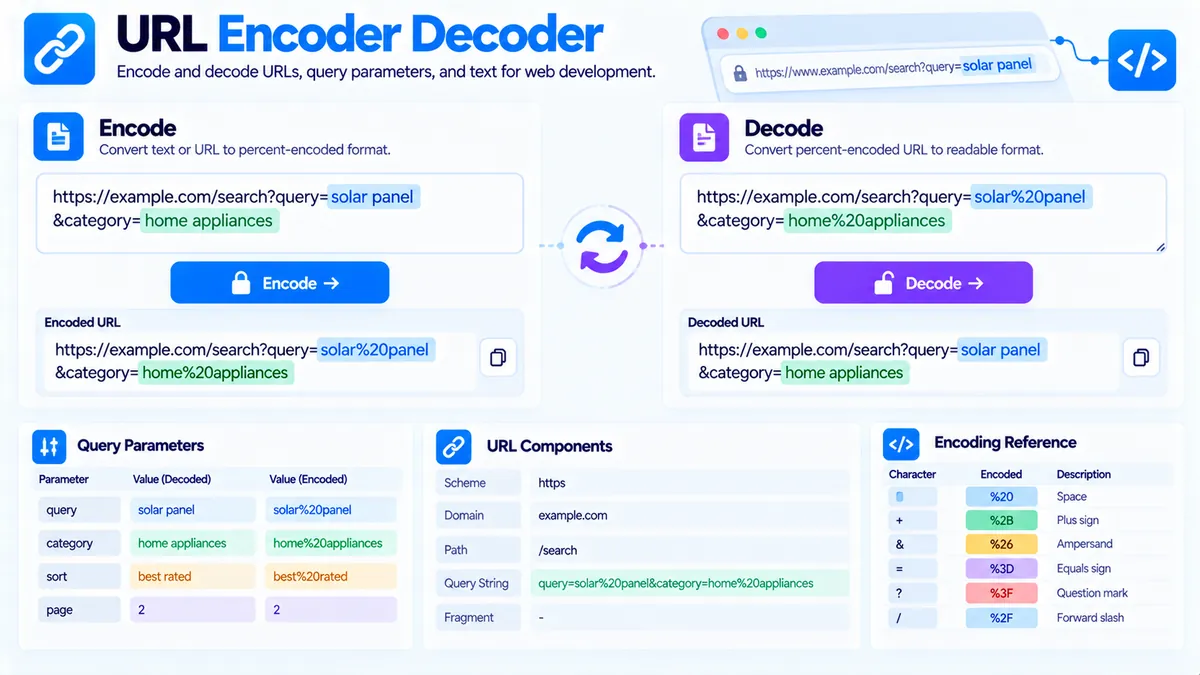
Encode and decode URLs, URL components, and query strings directly in your browser. The PKCapra URL Encoder Decoder helps you convert special characters into percent-encoded values, decode encoded URLs back into readable text, inspect URL structure, review query parameters, and copy or export the result for development, SEO, analytics, and debugging workflows.
URL Encoder Decoder
Encode or decode URL text, query parameters, and URL components, inspect the parsed URL, and copy developer-ready results.
URL or text to process
Choose the operation
Processed URL text
URL summary
Parameters
JavaScript-ready values
How to Use the URL Encoder Decoder in Simple Steps
- Enter your URL or text. Paste a URL, query string, parameter value, or other text into the input field. The character counter helps you see the amount of content being processed.
- Choose the operation and mode. Select Encode or Decode, then choose the appropriate mode such as URL, URL Component, or form-style query encoding. Use URL Component when you are encoding an individual parameter value rather than an entire URL.
- Run the conversion. Click the main Encode or Decode action. The tool processes the input in your browser and displays the converted result. Invalid encoded input produces an error instead of silently returning an unreliable result.
- Review, copy, or export the result. Inspect the decoded URL structure and query parameters when available, then use Copy Result, Copy Input, Copy JavaScript Literal, Copy Report, Copy JSON, Download JSON, or the direct PDF report as needed.
What URL Encoding Actually Does
URL encoding converts characters that have special meaning in URLs, or characters that cannot safely be transmitted in their original form, into percent-encoded representations.
For example:
hello world
can become:
hello%20world
The %20 represents the encoded space character.
Encoding is particularly important when user-entered text becomes part of a URL, query parameter, redirect destination, tracking value, API request, or application-generated link.
Decoding performs the reverse operation for valid percent-encoded input.
For example:
hello%20world
can be decoded back to:
hello world
URL Encoding vs URL Component Encoding
The distinction between encoding an entire URL and encoding an individual URL component is important.
Full URL Mode
Full URL processing is useful when working with a complete URL or URL-like string.
For example:
contains multiple URL components with different meanings.
Encoding an entire URL indiscriminately can change characters that are supposed to retain their structural meaning, such as separators between components.
URL Component Mode
URL Component encoding is intended for individual values that will be placed inside a URL.
For example, if a search parameter contains:
red shoes & boots
the value can be encoded before being inserted into a query string.
The encoded value preserves the data as one parameter value rather than allowing characters such as & to be interpreted as a separator.
This distinction is especially important when building URLs programmatically.
Form-Style Query Encoding
Query-string workflows sometimes represent spaces with + rather than %20.
For example:
red shoes
can appear as:
red+shoes
when using application/x-www-form-urlencoded conventions.
This is different from simply treating + as a universal replacement for a space in every URL context.
Use the form-style option when your workflow specifically expects query/form encoding behavior.
Decode URL Parameters Safely
Encoded parameters can make URLs difficult to read during debugging.
For example:
is easier to understand after decoding the parameter value:
red shoes & boots
The URL Encoder Decoder can help expose these encoded values so you can inspect what the URL is actually carrying.
When decoding external URLs, remember that a decoded value is still data. Do not automatically treat decoded parameters as trusted HTML, JavaScript, SQL, shell commands, or other executable input.
Inspect URL Structure
When processing a complete URL, the tool can expose useful structural information such as:
- Protocol
- Host
- Path
- Query string
- Hash
- Query parameter count
- Individual query parameters
For example:
contains:
- Protocol:
https - Host:
example.com - Path:
/products - Query:
category=shoes&color=blue - Hash:
#reviews
The query parameters can then be reviewed individually instead of treating the entire URL as one block of text.
Query Parameter Analysis
Query parameters are commonly used for:
- Search terms
- Filters
- Pagination
- Sorting
- Campaign tracking
- Product selections
- Application state
- API requests
A URL such as:
contains three query parameters:
category=shoescolor=bluepage=2
Reviewing parameters individually makes it easier to identify unexpected values, encoding problems, duplicated parameters, or malformed query strings.
For analytics URLs, this can also help you inspect tracking parameters before sharing or publishing a link.
JavaScript-Ready Output
The tool can provide a JavaScript-ready string representation of the processed value.
This is useful when you need to move a URL or encoded value into JavaScript source code without manually escaping it.
For example:
const url = "https://example.com/search?q=red%20shoes";You can then use the variable in application code without manually rebuilding the string.
For production applications, continue to use the appropriate native URL and URLSearchParams APIs rather than relying on manually concatenated strings.
Common URL Encoding Problems
Spaces Are Encoded Incorrectly
A common issue is confusing %20 with +.
Both can appear in URL-related workflows, but they belong to different encoding conventions and contexts.
If an application expects form-style query encoding, + may represent a space. If you are working with ordinary percent encoding, %20 is the explicit percent-encoded representation of a space.
Ampersands Break Parameter Values
Suppose a parameter value is:
shoes & boots
If the value is inserted into a query string without proper component encoding, the & can be interpreted as the beginning of another parameter.
The safer structure is to encode the parameter value before adding it to the query string.
Question Marks and Hashes Have Special Meaning
A question mark introduces the query portion of a URL, while a hash introduces the fragment.
If these characters are intended to be data inside a parameter value rather than URL structure, the value should be encoded as a component.
Double Encoding
Double encoding happens when an already encoded value is encoded again.
For example:
%20
can become:
%2520
because the % itself has been encoded.
This can cause applications to decode the value only once and still receive an encoded representation instead of the intended character.
When debugging an encoding problem, check how many times the value has been encoded or decoded.
Technical Breakdown and Competitive Edge
The PKCapra URL Encoder Decoder is designed as a practical browser-side utility rather than a remote URL-processing service.
Its workflow includes:
- URL encoding
- URL decoding
- URL component encoding
- URL component decoding
- Form-style query encoding
- Invalid-input detection
- Input/output swapping
- Query parameter extraction
- Protocol inspection
- Host inspection
- Path inspection
- Query inspection
- Hash inspection
- Parameter counting
- JavaScript-ready output
- Copyable result formats
- Structured JSON export
- PDF reporting
Browser-Side Processing
The core conversion happens in the browser, so the URL or text does not need to be sent to an external encoding API for the conversion itself.
This is useful when working with:
- Internal URLs
- Development URLs
- Search queries
- Tracking links
- Test parameters
- API request values
- Sensitive query strings that you do not want to send to a separate conversion service
Browser-side processing does not automatically make the URL safe or private in every context. If you later send the generated URL to another service, that service can still receive the URL.
Invalid Encoded Input
Decoding requires valid encoded input.
If a value contains malformed percent encoding, the tool reports an error rather than presenting a potentially misleading decoded result.
This is useful when troubleshooting URLs copied from applications, logs, spreadsheets, browser tools, or third-party systems.
Practical SEO and Web Development Workflow
URL encoding becomes particularly useful when building search URLs, tracking links, redirects, filters, and dynamic pages.
For example, before adding a user-entered search term to a URL, encode the value as a URL component rather than manually replacing individual characters.
A JavaScript implementation can use:
const query = "red shoes & boots";
const encoded = encodeURIComponent(query);

const url = `https://example.com/search?q=${encoded}`;
This produces a URL where the search term remains a single parameter value.
For SEO workflows, you can combine URL inspection with the URL Slug Generator when creating clean page slugs and the UTM Builder when constructing campaign URLs.
If you are troubleshooting redirects, the Redirect Checker can help inspect redirect behavior, while the HTTP Status Checker can help identify HTTP response status information.
For broader website QA, the Broken Link Checker can help identify links that need investigation.
Developer Snippets (Automate This Tool Offline)
The following examples use native language functions and do not require an external API.
Python
from urllib.parse import quote, quote_plus, unquote, urlparse, parse_qsl

value = "red shoes & boots"

encoded = quote(value)
form_encoded = quote_plus(value)
decoded = unquote(encoded)

print("Encoded:", encoded)
print("Form encoded:", form_encoded)
print("Decoded:", decoded)

url = "https://example.com/search?q=red%20shoes&color=blue"

parsed = urlparse(url)

print("Protocol:", parsed.scheme)
print("Host:", parsed.netloc)
print("Path:", parsed.path)
print("Query:", parsed.query)
print("Parameters:", parse_qsl(parsed.query))
PowerShell
$value = "red shoes & boots"

$encoded = [System.Uri]::EscapeDataString($value)
$decoded = [System.Uri]::UnescapeDataString($encoded)

Write-Output "Encoded: $encoded"
Write-Output "Decoded: $decoded"

$url = [System.Uri]"https://example.com/search?q=red%20shoes&color=blue"

Write-Output "Protocol: $($url.Scheme)"
Write-Output "Host: $($url.Host)"
Write-Output "Path: $($url.AbsolutePath)"
Write-Output "Query: $($url.Query)"
Node.js
const value = "red shoes & boots";

const encoded = encodeURIComponent(value);
const decoded = decodeURIComponent(encoded);

console.log("Encoded:", encoded);
console.log("Decoded:", decoded);

const url = new URL(
  "https://example.com/search?q=red%20shoes&color=blue"
);

console.log("Protocol:", url.protocol);
console.log("Host:", url.host);
console.log("Path:", url.pathname);

for (const [key, value] of url.searchParams) {
  console.log(key, value);
}
For production applications, prefer the language’s native URL parsing and encoding functions instead of manually replacing reserved characters. Manual replacement can easily produce malformed URLs or double-encoded values.
Excel Power Query Workaround
Excel is useful when you need to review or prepare many URLs in a spreadsheet.
Create a table with columns such as:
| URL | Encoded Value | Decoded Value | Parameter |
|---|---|---|---|
https://example.com/search?q=red%20shoes | red%20shoes | red shoes | q |
https://example.com/search?q=blue%20boots | blue%20boots | blue boots | q |
Load the table into Power Query and use text transformations to normalize values before further analysis.
For a larger URL dataset, you can separate the query string into rows or columns, extract parameter names, and review repeated or malformed values.
A practical spreadsheet workflow is:
- Import the URL list.
- Extract the query portion.
- Split query parameters using the appropriate delimiter.
- Separate parameter names from values.
- Decode values where required.
- Review unexpected characters or duplicated parameters.
- Export the cleaned dataset.
Power Query is useful for batch spreadsheet workflows, while the PKCapra tool is better suited to interactive encoding, decoding, and individual URL inspection.
Frequently Asked Questions
What is URL encoding?
URL encoding converts characters into percent-encoded representations so they can be safely represented within URL-related data. For example, a space can be represented as %20.
What is URL decoding?
URL decoding converts valid percent-encoded sequences back into their corresponding characters.
What is the difference between URL encoding and URL component encoding?
URL encoding works with URL-related structures, while component encoding is intended for an individual value that will be placed inside a URL component such as a query parameter.
Should I use %20 or + for spaces?
It depends on the encoding context. %20 is the percent-encoded representation of a space, while + is commonly used for spaces in form-style query encoding.
Why does my URL contain %25?
%25 represents the percent character %. It commonly appears when a percent sign from an already encoded value has been encoded again, which can indicate double encoding.
Why does decoding sometimes produce an error?
Malformed percent-encoded sequences cannot be safely decoded. The tool reports invalid encoded input rather than returning an unreliable result.
Can I decode query parameters?
Yes. The tool can inspect query parameters in a URL and decode values so they are easier to read and troubleshoot.
Can I encode a search query?
Yes. URL Component mode is useful when a search query or other user-entered value needs to be safely inserted into a URL parameter.
Does the tool send my URL to an external API?
No. The core encoding, decoding, and URL inspection workflow runs in your browser without requiring an external URL-processing API.
Can I export the result?
Yes. You can copy the result, copy the input, copy the JavaScript-ready output, copy the report, copy JSON, download JSON, or generate a direct PDF report.