
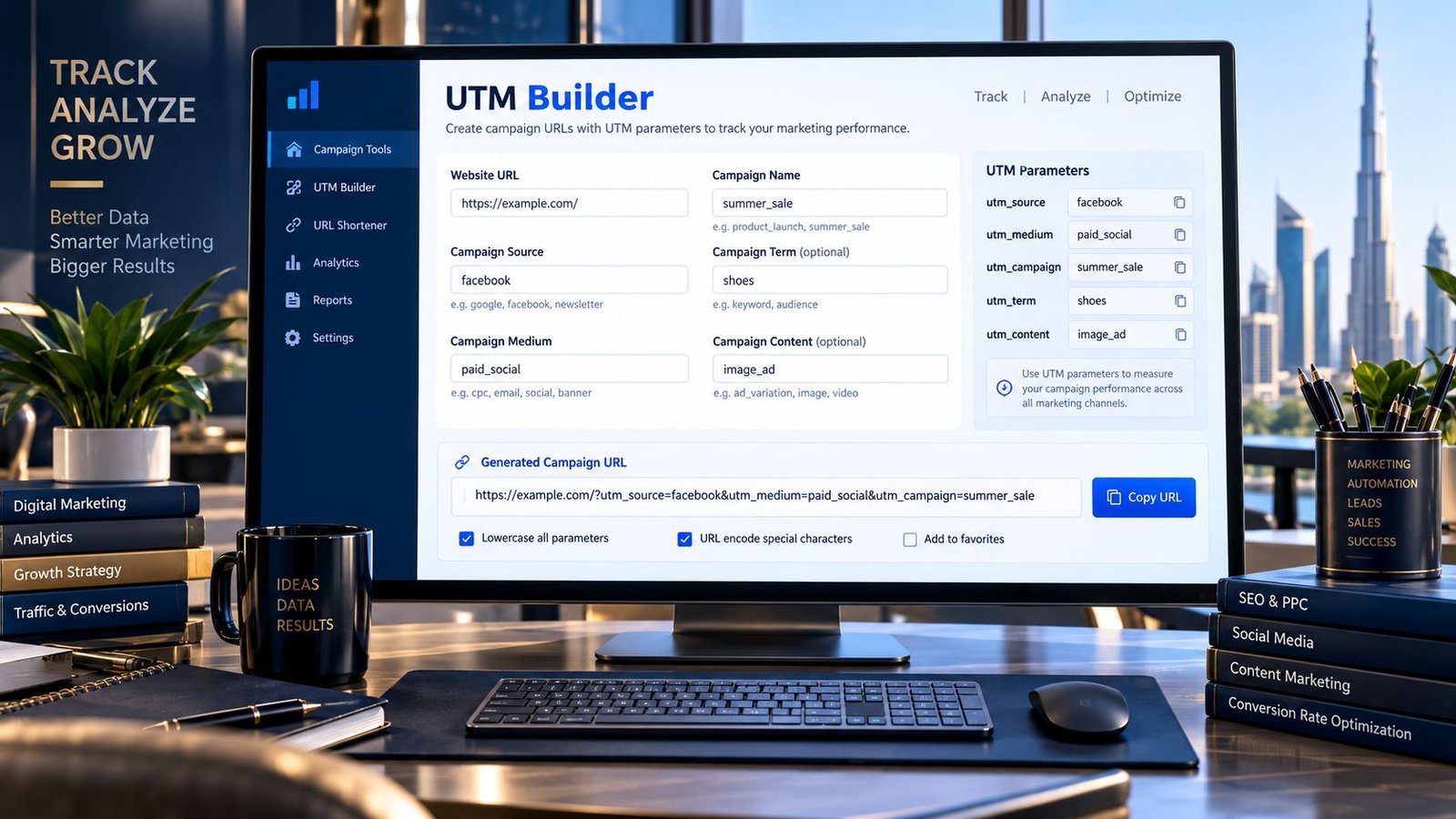
Track marketing campaigns more consistently with a simple UTM Builder that creates campaign URLs from your destination URL and UTM parameters.
Enter your website URL, campaign source, medium and campaign name. Add optional term and content values, choose your preferred URL formatting, and generate a ready-to-use tracking URL.
Google Analytics uses UTM campaign parameters to identify campaign and traffic-source information in its reports. Google recommends using utm_source, utm_medium, and utm_campaign when adding campaign parameters to URLs.
UTM Builder
Create campaign URLs with UTM parameters for consistent marketing and analytics tracking.
- Use consistent naming conventions across campaigns and teams.
- Keep source, medium and campaign names meaningful and easy to report on.
- Use
utm_termandutm_contentonly when they add useful campaign detail. - Do not add UTM parameters to internal links unless you intentionally need campaign attribution.
- Never put passwords, private data or sensitive personal information into tracking parameters.
The URL is generated in your browser. PKCapra does not publish the campaign or change your website analytics settings.
What Is a UTM Builder?
A UTM Builder is a tool that adds UTM parameters to a URL so you can identify where campaign traffic comes from.
For example, a normal URL such as:
can become:
The additional parameters help analytics platforms associate visits with particular marketing campaigns.
Google Analytics supports campaign parameters including utm_source, utm_medium, utm_campaign, utm_term, and utm_content, along with additional campaign-related parameters.
What Does the PKCapra UTM Builder Do?
PKCapra’s UTM Builder lets you create campaign tracking URLs without manually constructing the query string.
You can enter:
- Website URL — the destination page for your campaign
- Campaign Source — where the traffic originates
- Campaign Medium — the marketing channel
- Campaign Name — the campaign identifier
- Campaign Term — optional keyword or term
- Campaign Content — optional creative, placement or variation identifier
The tool then generates the complete URL for you.
Understanding UTM Parameters
utm_source
Identifies the source sending traffic.
Examples include:
facebookinstagramnewsletterpartner-site
utm_medium
Identifies the marketing medium or channel.
Examples include:
emailcpcpaid_socialreferral
utm_campaign
Identifies the specific campaign.
Examples:
summer_saleproduct_launchblack_friday
utm_term
Can be used to identify a paid keyword or other campaign term.
utm_content
Can distinguish different links, creatives, buttons or variations within the same campaign.
Google specifically describes utm_content as useful for differentiating creatives or multiple links within the same campaign.
Why Use UTM Tracking URLs?
UTM parameters can make campaign reporting more structured.
Instead of seeing traffic only as a general source, properly tagged URLs can help you distinguish different campaigns, mediums and sources.
For example, two links could point to the same landing page:
Email campaign
?utm_source=newsletter&utm_medium=email&utm_campaign=summer_sale
Paid social campaign
?utm_source=facebook&utm_medium=paid_social&utm_campaign=summer_sale
This allows campaign data to be separated according to the values you assign.
Google Analytics makes campaign and traffic-source information available through its acquisition reporting.
UTM Naming Consistency Matters
One of the most important parts of UTM tracking is maintaining consistent naming conventions.
For example:
facebookFacebookFACEBOOK
should not be treated as interchangeable naming conventions.
Google notes that campaign parameter values are case-sensitive and recommends standardized naming to prevent reporting fragmentation.
That’s why PKCapra’s UTM Builder includes a lowercase option.
A consistent naming convention can make campaign reports easier to interpret and maintain.
Should You Use Lowercase UTM Values?
For most marketing teams, using lowercase naming conventions is a practical way to reduce accidental variations.
For example, choose:
facebook
instead of mixing:
Facebook, FACEBOOK, and facebook.
The important principle is consistency. Google Analytics documentation specifically notes that different capitalization can produce different values in reporting.
UTM Encoding
URLs can contain spaces and special characters that need to be represented safely within a URL.
PKCapra’s UTM Builder provides an URL encoding option so parameter values can be encoded when needed.
For example, a campaign name such as:
Summer Sale
may be represented in an encoded URL rather than inserting the raw space into the query string.
The tool handles this formatting for you instead of requiring you to manually construct the URL.
How to Use the UTM Builder
Step 1: Enter Your Website URL
Enter the complete destination URL where visitors should arrive.
Example:
The URL should use HTTP or HTTPS.
Step 2: Add the Campaign Source
Enter the platform, publisher or source that is sending the traffic.
Example:
facebook
Step 3: Enter the Campaign Medium
Identify the marketing channel.
Example:
paid_social
Step 4: Enter the Campaign Name
Give the campaign a consistent name.
Example:
summer_sale
Step 5: Add Optional Parameters
If necessary, add:
- Campaign Term
- Campaign Content
Then generate your tracking URL.
Step 6: Copy the Generated URL
Review the generated URL and use it as the destination link for the relevant campaign.
UTM Builder Features
PKCapra’s UTM Builder includes:
- Campaign URL generation
- Website URL validation
- Required source, medium and campaign fields
- Optional campaign term
- Optional campaign content
- Lowercase conversion
- URL encoding
- Generated URL preview
- UTM parameter breakdown
- One-click URL copying
- Mobile-responsive interface
- Browser-side URL generation
The tool does not publish campaigns, modify your website or make changes to Google Analytics.
UTM Builder vs Manually Creating UTM URLs
You can create UTM URLs manually by adding parameters after a question mark and separating parameter/value pairs with ampersands.
For example:
A builder reduces the amount of manual URL formatting required and makes it easier to apply the same structure repeatedly.
Google’s documentation also provides a Campaign URL Builder for creating custom campaign URLs.
UTM Best Practices
Use Consistent Source Names
Decide how platforms will be named before launching campaigns.
For example:
facebook
rather than alternating between:
facebook, Facebook, and fb.
Keep Medium Values Consistent
Define a standard set of mediums for your marketing operation.
For example:
emailpaid_socialcpcdisplay
Use Clear Campaign Names
Campaign names should make sense when you see them later in an analytics report.
Instead of:
campaign123
consider something descriptive such as:
summer_sale_2026
Use Content for Variations
If multiple creatives or links belong to the same campaign, utm_content can help distinguish them.
For example:
hero_bannersidebar_ctavideo_ad
Use Term When Appropriate
utm_term can identify paid keywords or other useful campaign-level terms where relevant.
Don’t Put Personal Information in UTM Parameters
Avoid putting names, email addresses, phone numbers, customer IDs or other personally identifiable information into campaign parameters.
Google’s campaign URL guidance specifically warns against sending personally identifiable information to Analytics.
Important: UTM Parameters Are Not an SEO Ranking Factor
UTM parameters are designed for campaign and traffic-source measurement. They are not a method for improving organic search rankings.
Use them to organize marketing attribution and campaign reporting, not as an SEO ranking technique.
Should You Add UTM Parameters to Internal Links?
Use UTM parameters primarily for links representing external campaign activity or other intentional traffic-source tracking.
Adding campaign parameters indiscriminately to ordinary internal navigation can complicate analytics attribution and reporting.
For internal website navigation, normal internal URLs are generally preferable unless there is a specific measurement requirement.
UTM Parameters and Google Ads
Google Analytics documentation notes that Google Ads can use auto-tagging, so you should understand the tracking configuration of the advertising platform before manually adding campaign parameters.
Google also warns that manually adding campaign values alongside existing Google Click ID data can result in attribution issues in certain situations.
If you use Google Ads, review your existing auto-tagging and analytics configuration before creating a manual UTM strategy.
UTM Builder Privacy
PKCapra’s UTM Builder performs URL generation in the browser.
Your campaign information is used to construct the URL displayed by the tool. The tool does not need to publish your campaign or modify your analytics account.
Privacy reminder: never enter passwords, API keys, customer information or other sensitive data into campaign parameters.
UTM Builder Limitations
A UTM Builder creates correctly formatted campaign URLs, but it does not determine whether your overall tracking strategy is correct.
The quality of your analytics reporting still depends on:
- consistent naming conventions
- correct campaign implementation
- analytics configuration
- advertising-platform configuration
- attribution settings
- avoiding conflicting tracking parameters
The generated URL should therefore be reviewed before being used in a live campaign.
Frequently Asked Questions
What is a UTM builder?
A UTM builder creates URLs containing campaign tracking parameters such as utm_source, utm_medium, and utm_campaign.
What are the three main UTM parameters?
The commonly used core parameters are utm_source, utm_medium, and utm_campaign. Google recommends using these when adding campaign parameters to URLs.
What is the difference between UTM source and medium?
utm_source identifies where traffic originates, while utm_medium identifies the marketing medium or channel.
For example:
utm_source=facebook
utm_medium=paid_social
What is utm_campaign?
utm_campaign identifies the particular marketing campaign associated with the URL.
What is utm_content used for?
utm_content can distinguish different creatives, links or variations within the same campaign.
What is utm_term used for?
utm_term can be used to identify a paid keyword or other campaign term when that level of tracking is useful.
Do UTM parameters improve SEO?
No. UTM parameters are primarily used for campaign and traffic-source measurement. They are not an SEO ranking technique.
Can I use the UTM Builder for email campaigns?
Yes. You can create tracking URLs for email campaigns by using an appropriate source, medium and campaign name.
Can I use UTM links for social media campaigns?
Yes. UTM parameters can be used to distinguish traffic from social platforms and individual campaigns.
Does PKCapra store my UTM parameters?
The PKCapra UTM Builder generates the campaign URL in your browser. It does not need to publish the campaign or modify your analytics account.
Related PKCapra Tools
When working on campaign URLs, you can also use PKCapra’s other SEO and webmaster tools, including the URL Slug Generator for creating clean URL slugs and the Open Graph Analyzer for reviewing social sharing metadata.
For broader technical SEO checks, the Meta Tags Analyzer can help review important page metadata.
Final Takeaway
A UTM tracking URL gives your campaign links additional information that analytics platforms can use to identify traffic sources and campaigns.
The key is not simply adding parameters—it is using a consistent naming system.
Use clear values for source, medium and campaign, keep capitalization consistent, use optional parameters only when they provide useful information, and avoid placing personal information inside tracking URLs.
PKCapra’s UTM Builder makes the URL-generation part quick and straightforward so you can spend less time manually constructing campaign links and more time managing your marketing data.