
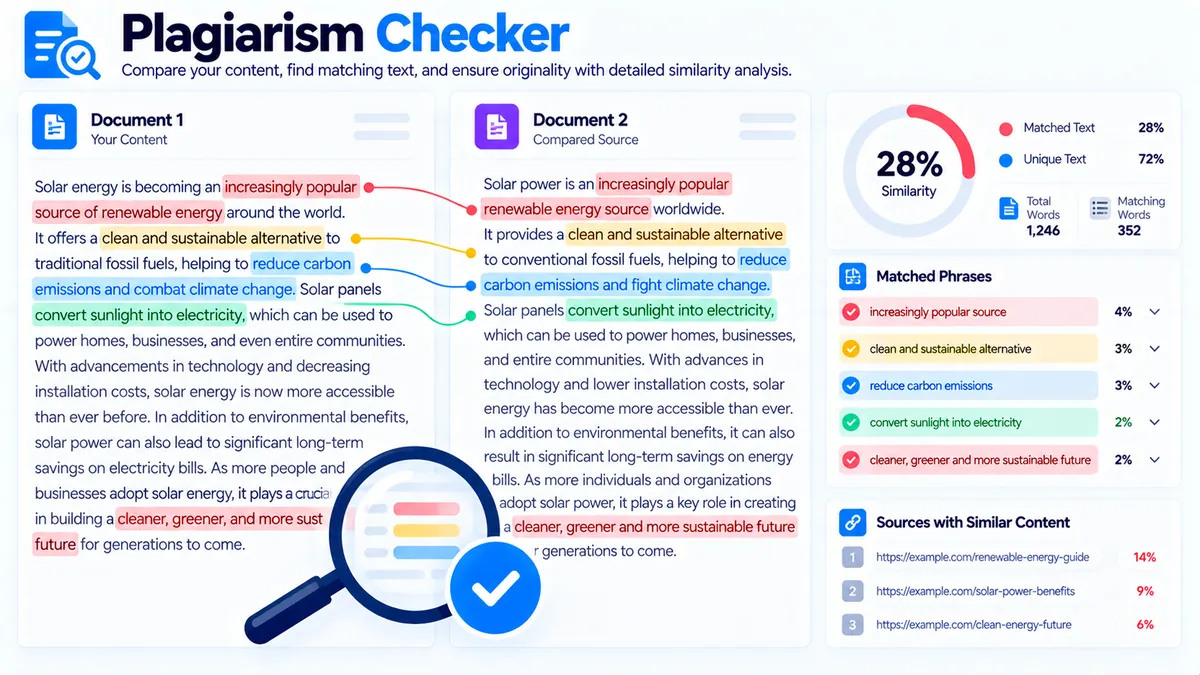
Check your content against a supplied comparison corpus to identify exact and near-phrase matches, measure local similarity signals, review flagged passages, and create an originality-focused revision. The Plagiarism Checker works directly in your browser and analyzes the text you provide without claiming to search the entire web.
Plagiarism Checker
Check supplied content against supplied source text, identify exact and near phrase matches, and create an originality-focused rewrite for flagged passages.
Text to check
Source text
Plagiarism & Originality Report
Review the matching passages and source context before deciding whether a passage needs citation, quotation, permission, or rewriting.
View JSON report
How to Use the Plagiarism Checker in Simple Steps
- Enter your content. Paste the article, paragraph, product description, assignment, or other text you want to check into Your Content. The tool supports large text inputs and shows a character counter so you can see how much content you have entered.
- Add the comparison corpus. Paste the source text, reference material, previous draft, competitor copy, or other text you want to compare against into Comparison Corpus. For multiple sources, separate them with
--- SOURCE ---so the findings can be reviewed source by source. - Choose your detection settings. Select a detection mode, minimum matching phrase length, and maximum number of findings. A higher minimum phrase length focuses the analysis on longer matching expressions, while a lower threshold can surface shorter overlaps.
- Click Check Plagiarism. Review the similarity signal, matched phrases, flagged passages, source context, and coverage information. If a passage needs rewriting, use Fix Flagged Text, review the proposed revision, and copy the revised content only after checking that the meaning remains accurate.
What the Plagiarism Checker Actually Analyzes
The tool uses browser-side text comparison rather than pretending to provide a universal internet-wide plagiarism verdict. It can identify exact n-gram phrase matches, sentence-level phrase overlap, token similarity, phrase coverage, and source-by-source findings within the comparison corpus you provide.
The result includes a similarity or overlap percentage that should be treated as a local similarity signal, not as a probability that plagiarism has occurred. A high overlap can indicate substantial matching language, but legitimate quotations, technical terminology, common phrases, properly attributed material, and intentionally reused wording can also create matches.
Exact and Near-Phrase Matching
The checker looks for matching word sequences between your content and the supplied comparison material. The Minimum matching phrase setting controls the shortest phrase considered significant.
For example, if the minimum is set to 8 words, the checker concentrates on matching sequences containing at least eight meaningful words rather than flagging every short common phrase.
Sentence-Level Review
The tool also evaluates where matching phrases occur inside individual sentences. This makes the findings easier to interpret because you can see the flagged passage alongside relevant source context rather than receiving only a single similarity number.
Multiple Comparison Sources
Use --- SOURCE --- between supplied sources when you want to compare your content against several documents.
This is useful for workflows such as:
- Comparing a new article against several previous drafts
- Reviewing content against supplied research notes
- Checking a rewritten page against an original version
- Auditing multiple reference documents
- Reviewing several source passages before publication
Detection Modes
The available modes change how aggressively the tool looks for matching language.
Strict is useful when you want to focus more heavily on meaningful phrase overlap.
Balanced provides a general-purpose comparison between exact phrase matching and broader similarity signals.
Broad is useful when you want to surface more potential overlap, including shorter or less exact similarities.
Use the mode that matches the purpose of your review rather than treating one setting as universally correct.
How to Interpret the Results
The checker can classify detected similarity signals into levels such as High, Moderate, Low, or Minimal. These labels describe the detected overlap within the supplied corpus; they do not establish that a document is legally or academically plagiarized.
Pay particular attention to the actual flagged text.
A useful review process is:
- Read the flagged passage.
- Compare it with the source context.
- Decide whether the overlap is intentional, properly attributed, unavoidable terminology, or wording that should be changed.
- Rewrite only where appropriate.
- Check the revised passage for accuracy and meaning.
- Run the comparison again when necessary.
For example, if your content says:
Search engines use internal links to help users discover related pages.
and the comparison corpus contains almost the same sentence, the matching phrase itself is more informative than a standalone percentage. You can then decide whether the wording needs attribution, quotation, or an original formulation.
Fix Flagged Text Without Losing the Original
Fix Flagged Text creates an originality-focused revision for flagged passages. The generated revision is produced locally in the browser and is intended as a starting point for manual editing.
The tool does not claim that a rewritten passage automatically becomes original, nor does it guarantee that similarity will fall to zero. Always review the proposed wording for:
- Factual accuracy
- Meaning and context
- Technical terminology
- Citations and attribution
- Grammar and readability
- Brand or editorial requirements
The safest workflow is to compare the original and revised text side by side before using Use Fixed Content.
Technical Breakdown and Competitive Edge
The Plagiarism Checker is designed around transparent text comparison rather than an unexplained score.
Its analysis can combine:
- Exact n-gram phrase matching
- Sentence-level phrase matching
- Token similarity
- Phrase coverage
- Source-specific findings
- Configurable phrase thresholds
- Configurable maximum findings
- Detection modes
- Flagged passage and source context
- Local originality-focused rewriting
Because the comparison happens against text supplied to the tool, the result is reproducible for the same inputs and settings. This makes it useful for controlled content-review workflows where you already have the documents or passages that need to be compared.
What It Does Not Claim
A browser-only checker cannot honestly guarantee 100% plagiarism detection across the entire internet without access to the relevant external content and databases.
This tool does not claim to crawl the entire web, search every published document, access private plagiarism databases, or provide a universal plagiarism verdict.
Its strongest use case is comparison against the corpus you provide.
That distinction matters when interpreting results. A document can show minimal similarity against your supplied corpus while still containing matching material that was not included in that corpus.
Practical Content Review Workflow
For SEO content, a practical workflow is to first map the page’s target topics and keywords with the Content-to-Keyword Mapper, then review competing or reference material with the Plagiarism Checker before final editing.
If you are investigating whether several pages cover similar subjects, the Content Gap Analyzer can help identify missing topic coverage. For question-focused content, use the FAQ Finder to identify useful questions before finalizing the page.
You can also review search-intent alignment with the Search Intent Analyzer and organize related terms with the Keyword Clustering or Keyword Grouping tools.
The key is to treat plagiarism checking as one part of content quality control rather than as a replacement for editorial review.
Developer Snippets (Automate This Tool Offline)
The following examples reproduce the core idea of comparing word sequences locally. They are designed for offline workflows and do not connect to a plagiarism database or the internet.
Python
import re
from collections import Counter

def normalize(text):
    return re.findall(r"\b[\w'-]+\b", text.lower())

def ngrams(words, size):
    return {
        tuple(words[i:i + size])
        for i in range(len(words) - size + 1)
    }

def compare_texts(content, source, phrase_length=8):
    content_words = normalize(content)
    source_words = normalize(source)

    content_phrases = ngrams(content_words, phrase_length)
    source_phrases = ngrams(source_words, phrase_length)

    matches = content_phrases & source_phrases

    return {
        "content_words": len(content_words),
        "source_words": len(source_words),
        "matching_phrases": len(matches),
        "phrases": [" ".join(p) for p in sorted(matches)]
    }

content = """
Search engines use internal links to help users discover related pages.
"""

source = """
Search engines use internal links to help users discover related pages
and understand the structure of a website.
"""

result = compare_texts(content, source, phrase_length=8)
print(result)
PowerShell
function Get-Words {
    param([string]$Text)

    [regex]::Matches(
        $Text.ToLower(),
        "\b[\w'-]+\b"
    ) | ForEach-Object { $_.Value }
}

function Get-NGrams {
    param(
        [string[]]$Words,
        [int]$Size
    )

    $results = @()

    for ($i = 0; $i -le $Words.Count - $Size; $i++) {
        $results += ($Words[$i..($i + $Size - 1)] -join " ")
    }

    return $results
}

$content = "Search engines use internal links to help users discover related pages."
$source = "Search engines use internal links to help users discover related pages and understand website structure."

$contentWords = Get-Words $content
$sourceWords = Get-Words $source

$contentPhrases = Get-NGrams $contentWords 8
$sourcePhrases = Get-NGrams $sourceWords 8

$matches = $contentPhrases | Where-Object {
    $sourcePhrases -contains $_
} | Select-Object -Unique

$matches
Node.js
function words(text) {
  return text
    .toLowerCase()
    .match(/\b[\w'-]+\b/g) || [];
}

function ngrams(tokens, size) {
  const result = new Set();

  for (let i = 0; i <= tokens.length - size; i++) {
    result.add(tokens.slice(i, i + size).join(" "));
  }

  return result;
}

function compare(content, source, phraseLength = 8) {
  const contentWords = words(content);
  const sourceWords = words(source);

  const contentPhrases = ngrams(contentWords, phraseLength);
  const sourcePhrases = ngrams(sourceWords, phraseLength);

  const matches = [...contentPhrases]
    .filter(phrase => sourcePhrases.has(phrase));

  return {
    contentWords: contentWords.length,
    sourceWords: sourceWords.length,
    matchingPhrases: matches.length,
    phrases: matches
  };
}

const result = compare(
  "Search engines use internal links to help users discover related pages.",
  "Search engines use internal links to help users discover related pages and understand website structure."
);

console.log(result);
These offline examples are intentionally simpler than the WordPress tool. They demonstrate deterministic phrase comparison without pretending to reproduce every browser-side analysis feature.
Excel Power Query Workaround
You can perform a basic supplied-text comparison workflow in Excel with Power Query when your source material is already stored in a workbook.
A practical setup is:
- Put your content in one table column named
Content. - Put the comparison material in another table or worksheet named
Source. - Load both tables into Power Query.
- Convert the text to lowercase for normalization.
- Split the text into words using spaces or a custom transformation.
- Create comparable phrase sequences from the normalized word lists.
- Join the phrase lists to identify repeated sequences.
- Filter the output by your chosen minimum phrase length.
- Review the matching phrases alongside the original content before deciding whether wording needs to change.
Power Query is useful for repeatable internal audits, but it is not a substitute for a commercial plagiarism database or a complete web crawl. It works from the data you provide.
Frequently Asked Questions
Does this plagiarism checker scan the entire internet?
No. It compares your content against the comparison corpus supplied to the tool. It does not claim to search the entire internet or every external plagiarism database.
What does the similarity percentage mean?
The percentage is a local similarity or overlap signal based on the supplied comparison material. It is not a probability that plagiarism has occurred.
Can I compare multiple sources?
Yes. Separate multiple supplied sources with --- SOURCE --- so the findings can be reviewed source by source.
What does the minimum matching phrase setting do?
It controls the shortest matching phrase the analysis considers significant. Increasing the setting focuses the results on longer matching expressions, while decreasing it can reveal shorter overlaps.
Which detection mode should I use?
Strict, Balanced, and Broad provide different levels of matching sensitivity. Balanced is a practical general-purpose starting point, while Strict can focus the review on more substantial phrase overlap and Broad can surface more potential matches.
Does Fix Flagged Text guarantee original content?
No. The rewrite is an originality-focused revision intended as a starting point for editing. You should review the result for accuracy, meaning, citations, terminology, and remaining similarity.
Can a common phrase be flagged even when there is no plagiarism?
Yes. Common wording, standard terminology, technical expressions, quotations, and legitimately reused language can create matching phrases.
Is a low similarity result proof that content is original?
No. A low result means that little matching language was detected against the comparison corpus you supplied. It does not prove that the content has no similarity to material outside that corpus.
Can I copy the plagiarism report?
Yes. Use Copy Report for a readable report or Copy JSON when you need structured analysis data for another workflow.
Can I save the analysis?
Yes. The tool provides Download JSON and a direct PDF report option so you can retain the result for editorial or audit workflows.