
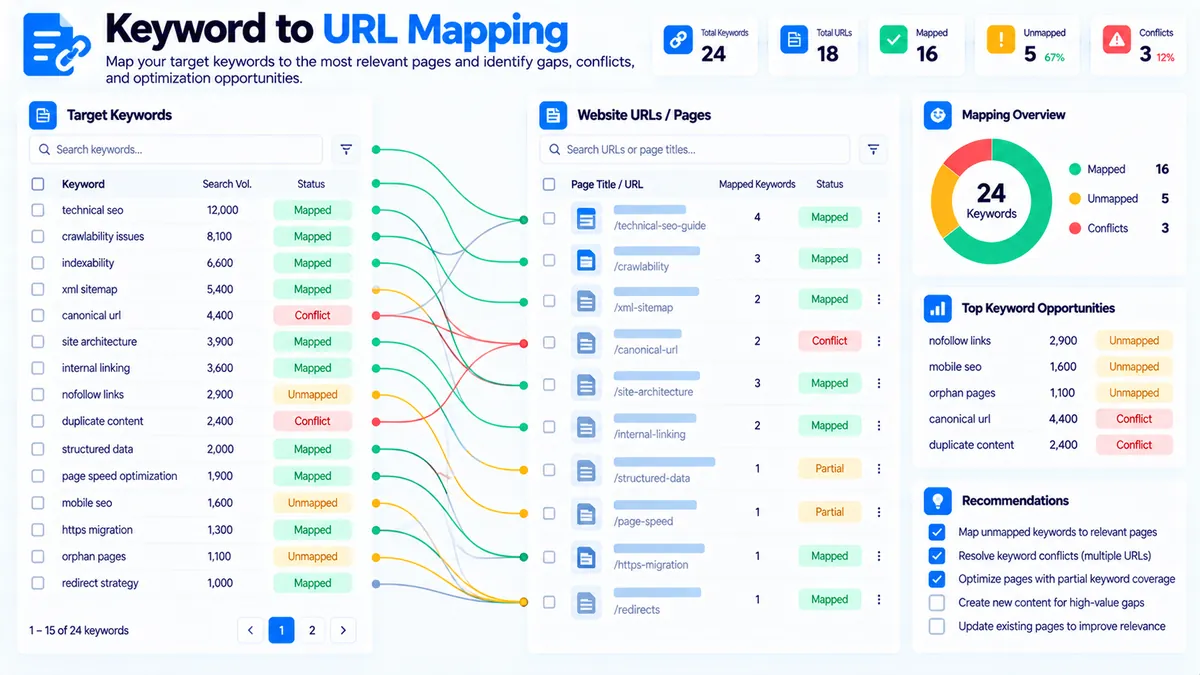
The Keyword-to-URL Mapping Tool helps you organize target keywords against the most relevant URLs in your website inventory. It identifies likely keyword-to-URL matches, highlights unmapped keywords, detects competing or conflicting mappings, and shows URLs that may not currently have a clear keyword target. The analysis runs in your browser and is designed for practical SEO planning without requiring an API key or live search data.
Keyword-to-URL Mapping Tool
Map keywords to the most relevant URLs, detect conflicts, find unmapped terms, and spot URL coverage gaps from data you provide.
Keyword-to-URL Mapping Report
Deterministic mapping analysis based only on the keywords, URLs, titles, topics, and mappings you supplied.
View JSON report
Recommended URLs are local relevance suggestions, not ranking predictions. A real canonical target should also reflect search intent, page purpose, existing site architecture, and your editorial strategy.
How to Use the Keyword-to-URL Mapping Tool in Simple Steps
- Enter your target keywords. Add one keyword or phrase per line in the keyword list. For example:
seo audit,technical seo audit,website seo checker, andseo audit tool. - Add your URL inventory. Enter the URLs you want to evaluate, one per line. The tool uses the URL structure and available text signals to determine which URLs are relevant to each keyword.
- Add existing mappings when available. If you already have keyword-to-URL assignments, enter them so the tool can identify existing mappings, conflicts, and opportunities for improvement.
- Choose the matching sensitivity and run the analysis. Review mapped, recommended, unmapped, conflict, and other diagnostic results. Use the Copy, JSON, or PDF actions when you need to save or share the report.
What the Keyword-to-URL Mapping Tool Checks
The tool turns a keyword list and URL inventory into a structured mapping analysis. Instead of treating every keyword as an isolated item, it evaluates the relationship between the keyword and available URLs and separates clear matches from uncertain or conflicting cases.
The report can identify:
- Mapped keywords that already have an associated URL.
- Recommended mappings where the tool finds a relevant URL candidate.
- Unmapped keywords that do not have a sufficiently strong candidate.
- Mapping conflicts where a keyword is associated with more than one URL or where competing URL candidates create ambiguity.
- Ambiguous candidates where several URLs appear relevant and the match should be reviewed manually.
- Unused or orphan URLs that do not receive a clear keyword assignment.
- Alternative URL candidates for keywords where another URL may also be relevant.
- Mapping diagnostics that explain why a particular relationship was detected.
- Overall URL coverage so you can see how much of the keyword set has a usable URL relationship.
This makes the tool useful before publishing new pages, during site restructuring, and when reviewing an existing keyword map.
Keyword-to-URL relevance
A useful keyword map should connect each important search topic to the URL that is actually intended to satisfy it. The tool therefore looks for local relevance signals between the supplied keywords and URL inventory.
For example, if your keyword list contains technical seo audit and your URL inventory contains a URL built around a technical SEO audit topic, the tool can identify that relationship as a candidate mapping.
The result is a planning signal, not a claim about Google’s current ranking system.
Mapping statuses
The report separates different situations so you can act on them rather than treating every keyword as successfully mapped.
Mapped means an existing or detected relationship is available.
Recommended means the tool has identified a URL candidate that appears relevant enough to use as a suggested mapping.
Unmapped means no URL reached the selected matching threshold.
Conflict indicates that the current mapping situation contains competing URL relationships that should be reviewed.
The exact result should always be checked against your intended page purpose because URL relevance alone does not determine the correct canonical page.
Multiple URLs competing for one keyword
A common problem in keyword mapping is assigning the same primary keyword to several pages without a clear reason.
For example:
/seo-audit//technical-seo-audit//seo-audit-checklist/
could all contain related SEO-audit terminology. That does not automatically mean all three pages should target the same primary keyword.
The tool surfaces competing candidates so you can decide whether the pages have genuinely different search purposes or whether the keyword targeting needs to be clarified.
Unmapped keywords
Unmapped keywords are useful planning signals. They can indicate that:
- the site does not currently have a suitable page;
- the available URLs are too broad;
- the keyword requires a different page type;
- the URL inventory is incomplete; or
- the matching threshold is too strict for that particular keyword.
An unmapped keyword should not automatically become a new page. Review the topic, intent, existing content, and site architecture before creating a URL.
Unused URLs
The tool can also reveal URLs that are not receiving a clear keyword relationship.
That can help you identify pages that may need:
- a clearer primary topic;
- better keyword targeting;
- consolidation with another page;
- stronger internal content alignment; or
- manual review before being treated as an important SEO landing page.
An unused URL is not automatically a problem. Some pages, such as utility pages, navigation pages, legal pages, or supporting resources, may not need a conventional target keyword.
Matching Sensitivity and Confidence
The tool provides matching sensitivity controls so you can adjust how strict the keyword-to-URL relationship should be.
A Focused setting can be useful when you want stronger topical alignment and fewer loose candidates.
A Balanced setting provides a middle-ground analysis for general keyword mapping.
A Broad setting can surface more possible relationships when your URL inventory uses varied wording or when you are still exploring the site structure.
The confidence threshold gives you another way to control how much evidence is required before a relationship is presented as a usable candidate.
A higher threshold generally produces a more selective mapping set. A lower threshold can expose additional candidates that require manual review.
How to Interpret the Mapping Report
Start with the keywords marked Unmapped. These are the items where the current URL inventory does not provide a sufficiently strong candidate.
Next, review Conflicts and Ambiguous Candidates. These deserve attention because multiple pages may be competing for the same topical space.
Then review the Recommended mappings. Confirm that the proposed URL genuinely matches the page’s intended purpose before accepting the relationship.
Finally, inspect Unused URLs. Determine whether each URL has a legitimate role even though it does not have a conventional keyword assignment.
The goal is not to force every keyword and every URL into a one-to-one relationship. The goal is to make the intended relationship between topics and pages easier to see and manage.
Practical Keyword-to-URL Mapping Example
Suppose you have these keywords:
content gap analysiscontent gap toolfind content gapskeyword mappingkeyword to url mapping
And your URL inventory includes:
/content-gap-analyzer//content-to-keyword-mapper//keyword-to-url-mapping/
The tool can help distinguish between these related topics instead of treating all of them as one keyword group.
For example, a content-gap keyword may align with a content-gap page, while a keyword-to-URL phrase may belong to the dedicated mapping page.
The important point is that closely related keywords do not necessarily belong to the same URL.
Use the Tool for Content Planning
Keyword-to-URL mapping becomes especially useful before creating new content.
Start with your complete keyword list and your existing URL inventory. Run the analysis before deciding which new pages to publish.
If several keywords remain unmapped but describe the same underlying topic, they may represent a content opportunity rather than several separate pages.
You can then combine the mapping analysis with your broader keyword organization workflow. For example, Keyword Clustering can help organize related queries into topical groups, while Keyword Grouping can help structure keyword sets before you assign them to URLs.
For content-to-page relationships, Content-to-Keyword Mapper can provide a useful follow-up by checking how supplied content aligns with target keywords.
Use the Tool During a Site Restructure
A URL migration or site restructure can create mapping problems quickly.
Before changing your URL structure, export or prepare your current URL inventory and keyword map. Run the existing relationships through the tool and review conflicts and unmapped keywords.
After planning the new URLs, repeat the analysis with the updated inventory.
This gives you a simple way to compare the intended keyword architecture before implementation. It does not replace a redirect plan, crawl, analytics review, or technical migration testing.
For URL and redirect work, PKCapra also provides a Domain Redirect Map Generator and a Redirect Checker.
Use the Tool to Reduce Keyword Cannibalization Risk
Keyword cannibalization is not simply a situation where two pages mention the same word. Multiple pages can legitimately cover related terminology when their purposes differ.
The useful question is whether several URLs are being treated as the intended destination for the same primary topic without a clear reason.
The Keyword-to-URL Mapping Tool helps surface these relationships for review. When a keyword has multiple strong URL candidates, inspect the pages themselves and determine whether they serve distinct needs.
For example, a general SEO audit page and a specialized technical SEO audit page can both be relevant to SEO audit terminology while serving different scopes. The mapping report helps you notice the overlap; your editorial and site-architecture decisions determine how it should be handled.
Copy, JSON, and PDF Reports
After analysis, you can use Copy Report when you want a readable version of the findings.
Use Copy JSON or Download JSON when you want structured output for another workflow, spreadsheet, script, or internal documentation.
Use Download PDF when you need a portable report for review or sharing.
The PDF action is designed as a direct download rather than opening a print dialog.
Browser-Based Processing and Privacy
The Keyword-to-URL Mapping Tool performs its mapping analysis in the browser. The supplied keyword and URL data are processed locally by the tool rather than being sent to a Google, search-volume, or external AI service for the mapping calculation.
The tool does not require an API key and does not depend on live Google or Bing rankings.
Because the analysis is based on the information you provide, it does not automatically know whether a URL is currently indexed, ranking, receiving traffic, or satisfying searchers.
Limitations You Should Know
The tool provides deterministic mapping signals rather than live search-engine intelligence.
It does not provide:
- Google ranking data;
- Bing ranking data;
- search volume;
- live SERP results;
- click-through-rate data;
- Google Search Console data;
- competitor crawling;
- live content crawling;
- automatic ranking predictions; or
- an official Google keyword-cannibalization score.
A suggested URL is therefore a planning recommendation based on the supplied inputs and matching signals. Review important mappings manually before changing your site architecture or publishing new pages.
Troubleshooting and Edge Cases
No keywords are mapped: Check that the keyword list and URL inventory are both populated. If they are populated, try a broader matching sensitivity or lower confidence threshold and review the resulting candidates.
Too many candidate URLs appear: Increase the confidence threshold or use a more focused matching mode. Then review the strongest candidates manually.
A correct URL is marked unmapped: URL wording may not contain enough directly matching signals. Try a broader sensitivity setting and consider whether the URL inventory accurately represents the site’s intended topics.
A keyword shows multiple candidates: Review the competing URLs and determine whether they represent different page purposes or overlapping targeting.
An URL appears unused: Confirm that it is actually intended as a keyword-targeted landing page. Utility, legal, navigation, and other supporting URLs may legitimately remain outside the keyword map.
Results change when sensitivity changes: This is expected. Matching thresholds control how strict the tool is when presenting candidate relationships.
Developer Snippets (Automate This Tool Offline)
The core mapping concept can also be reproduced offline for simple keyword and URL inventories. The snippets below are intentionally lightweight and do not call Google, an external API, or a remote service.
Python
import re
from urllib.parse import urlparse

STOP_WORDS = {
    "a", "an", "and", "for", "in", "of", "on", "the", "to", "with"
}

def tokens(text):
    words = re.findall(r"[a-z0-9]+", text.lower())
    return {w for w in words if w not in STOP_WORDS and len(w) > 1}

def url_tokens(url):
    parsed = urlparse(url)
    path = parsed.path.replace("-", " ").replace("_", " ")
    return tokens(path)

def similarity(keyword, url):
    k = tokens(keyword)
    u = url_tokens(url)
    if not k or not u:
        return 0.0
    return len(k & u) / len(k)

keywords = [
    "content gap analysis",
    "keyword mapping",
    "technical seo audit"
]

urls = [
    "https://example.com/content-gap-analyzer/",
    "https://example.com/keyword-mapping/",
    "https://example.com/technical-seo-audit/"
]

for keyword in keywords:
    candidates = sorted(
        ((url, similarity(keyword, url)) for url in urls),
        key=lambda item: item[1],
        reverse=True
    )
    print(keyword)
    for url, score in candidates:
        print(f"  {score:.0%}  {url}")
PowerShell
$keywords = @(
    "content gap analysis",
    "keyword mapping",
    "technical seo audit"
)

$urls = @(
    "https://example.com/content-gap-analyzer/",
    "https://example.com/keyword-mapping/",
    "https://example.com/technical-seo-audit/"
)

function Get-Tokens($Text) {
    $Text.ToLower() -split '[^a-z0-9]+' |
        Where-Object { $_ -and $_.Length -gt 1 }
}

foreach ($keyword in $keywords) {
    $keywordTokens = @(Get-Tokens $keyword)

    $results = foreach ($url in $urls) {
        $path = ([Uri]$url).AbsolutePath -replace '[-_]', ' '
        $urlTokens = @(Get-Tokens $path)

        $matches = @(
            $keywordTokens |
            Where-Object { $urlTokens -contains $_ } |
            Select-Object -Unique
        )

        $score = if ($keywordTokens.Count) {
            $matches.Count / $keywordTokens.Count
        } else {
            0
        }

        [PSCustomObject]@{
            URL = $url
            Match = "{0:P0}" -f $score
        }
    }

    Write-Host "`n$keyword"
    $results | Sort-Object Match -Descending | Format-Table -AutoSize
}
Node.js
const { URL } = require("url");

const keywords = [
  "content gap analysis",
  "keyword mapping",
  "technical seo audit"
];

const urls = [
  "https://example.com/content-gap-analyzer/",
  "https://example.com/keyword-mapping/",
  "https://example.com/technical-seo-audit/"
];

function tokens(value) {
  return new Set(
    value
      .toLowerCase()
      .split(/[^a-z0-9]+/)
      .filter(word => word.length > 1)
  );
}

function score(keyword, targetUrl) {
  const keywordTokens = tokens(keyword);
  const path = new URL(targetUrl).pathname.replace(/[-_]/g, " ");
  const urlTokens = tokens(path);

  if (!keywordTokens.size || !urlTokens.size) return 0;

  let matches = 0;
  for (const token of keywordTokens) {
    if (urlTokens.has(token)) matches++;
  }

  return matches / keywordTokens.size;
}

for (const keyword of keywords) {
  const ranked = urls
    .map(url => ({ url, score: score(keyword, url) }))
    .sort((a, b) => b.score - a.score);

  console.log(`\n${keyword}`);
  ranked.forEach(item => {
    console.log(`${Math.round(item.score * 100)}% ${item.url}`);
  });
}
Native Software Workaround: Keyword-to-URL Mapping in Excel Power Query
Excel can be useful when you need to maintain a larger keyword map alongside your content inventory.
Create one table containing your keywords and another containing your URLs. Keep the keyword column and URL column separate so you can filter, sort, and review the relationships.
A simple workflow is:
- Import your keyword list into Excel.
- Import your URL inventory into another table.
- Normalize both fields by converting text to lowercase and removing unnecessary punctuation.
- Split keywords into useful terms.
- Compare keyword terms against URL-path terms.
- Calculate a match count or simple match ratio.
- Sort candidate URLs by the resulting score.
- Manually review conflicts and ambiguous matches.
- Keep one clearly documented primary URL where your site architecture calls for one.
- Re-run the mapping after major URL or content changes.
Power Query is particularly useful when the keyword inventory is maintained as a recurring spreadsheet process. The PKCapra tool is more convenient for quick browser-based checks, while Excel provides a familiar environment for teams that need to retain and edit the mapping table over time.
Frequently Asked Questions
What is keyword-to-URL mapping?
Keyword-to-URL mapping is the process of assigning target keywords or topics to the website URLs intended to satisfy those searches.
Why should I map keywords to URLs?
Keyword-to-URL mapping gives you a clear view of which page is intended to target each important topic and can expose unmapped keywords, competing URLs, and unclear page targeting.
Does this tool use Google search results?
No. The tool does not depend on live Google or Bing SERPs, rankings, or search-volume data.
Does the tool need an API key?
No. The Keyword-to-URL Mapping Tool is designed to work without an external API key.
Can it detect keyword cannibalization?
It can identify multiple or competing URL candidates for the same keyword, which can help you investigate possible keyword-targeting conflicts. It does not provide an official search-engine cannibalization diagnosis.
Does a recommended mapping mean the URL is the correct page?
No. A recommendation is a deterministic matching signal based on the supplied keyword and URL inventory. Important mappings should be reviewed against the actual page topic and purpose.
Can every URL have a keyword?
No. Some URLs legitimately do not need a conventional target keyword, including certain utility, legal, navigation, and supporting pages.
Can I download the mapping report?
Yes. You can copy the readable report, copy or download JSON, and download a PDF report after running the analysis.
Is my keyword list sent to an external AI service?
No. The mapping analysis is performed in the browser and does not require an external AI API.
What should I do with unmapped keywords?
Review whether an appropriate existing URL is missing from your inventory, whether the keyword belongs to another page, or whether it represents a genuine content opportunity. Do not create a new page solely because a keyword is unmapped.