
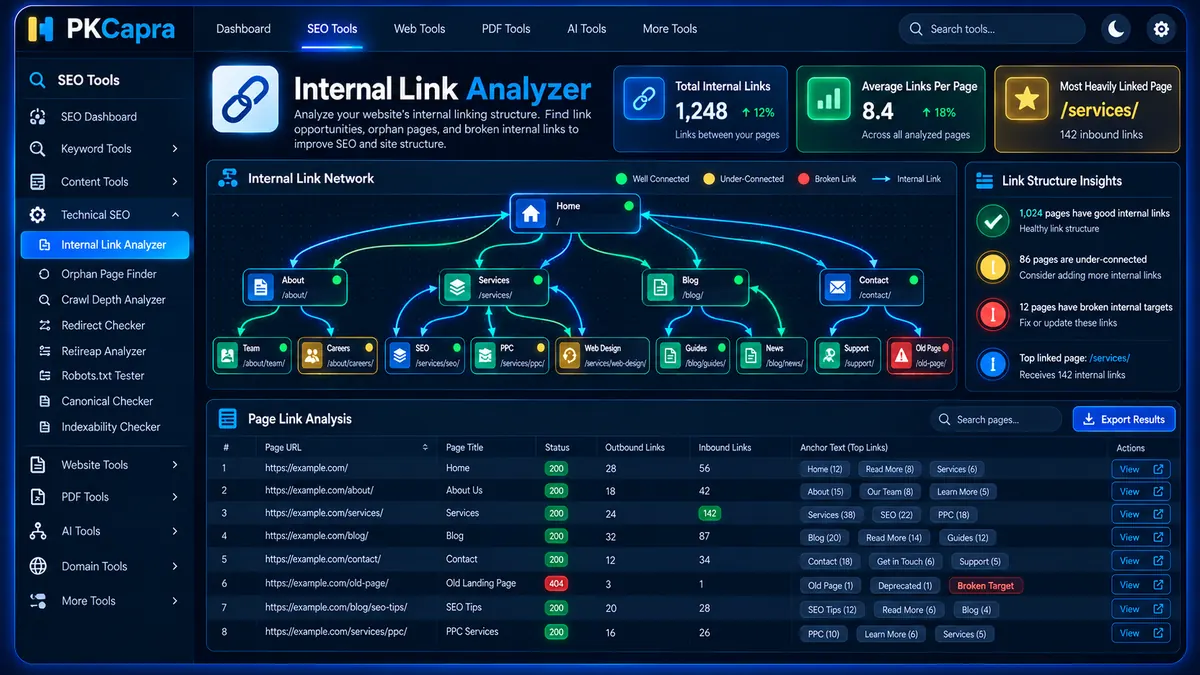
Analyze your website’s internal linking structure with PKCapra’s Internal Link Analyzer. Discover how pages link to each other, measure inbound and outbound internal links, inspect the anchor texts used across internal paths, and identify pages that may be under-connected or affected by broken internal targets.
Internal Link Analyzer
Map inbound and outbound internal links, inspect anchor-text usage, and identify under-connected or broken internal targets with an asynchronous local crawl.
Internal Link Matrix
Each discovered page shows outbound and inbound internal-link counts. Expand a row to inspect unique anchor text pointing to that target.
| # | Page URL | Outbound | Inbound | Status | Anchor Texts |
|---|
What Is an Internal Link Analyzer?
An internal link analyzer examines the links connecting pages within the same website.
Internal links create relationships between your website’s pages and help visitors move between related content. They also provide search engine crawlers with paths for discovering and understanding your site’s content structure.
PKCapra’s Internal Link Analyzer maps these relationships by analyzing the site’s internal URLs and building inbound, outbound, and anchor-text data for the pages it processes.
Why Internal Links Matter
Internal linking is an important part of website architecture.
A well-structured internal linking system can make important pages easier to discover, connect related topics, and provide clearer navigation paths throughout a website.
Internal links can connect:
- Blog articles
- Service pages
- Product pages
- Category pages
- Guides and resources
- Landing pages
- Supporting informational content
The goal is not simply to create more links. The goal is to create useful relationships between pages that make sense for visitors and the overall site structure.
How PKCapra’s Internal Link Analyzer Works
The analyzer begins with a seed URL and progressively discovers internal URLs from the pages it processes.
The crawl works in smaller batches rather than attempting to process the entire site through one large server request.
The general process is:
- The seed URL is fetched.
- Internal links are extracted from the page.
- Unique internal URLs are added to the crawl map.
- URLs are processed in small asynchronous batches.
- Each processed page contributes its outbound internal links.
- Destination pages receive corresponding inbound-link counts.
- Anchor text is collected for internal destinations.
- HTTP status and response timing are recorded where available.
- The resulting link matrix is displayed in the dashboard.
This approach provides a practical overview of how the analyzed pages connect to one another.
What Does the Internal Link Analyzer Measure?
The analyzer focuses on three core areas:
Outbound Internal Links
Outbound internal links represent the number of internal links going from a particular page to other pages on the same website.
For example, if an article contains links to five other pages on the same domain, the analyzer can record those internal destinations as outbound links from that source page.
Inbound Internal Links
Inbound internal links represent the number of internal links pointing toward a particular page from other analyzed pages.
A page with many relevant inbound links has more detected internal connections within the analyzed crawl.
Anchor Text
Anchor text is the visible text used for an internal hyperlink.
For example:
Technical SEO Checker
could be the anchor text pointing to a technical SEO resource.
The analyzer collects the anchor texts associated with detected internal destinations so you can review how pages are being referenced throughout the site.
Understanding Inbound and Outbound Links
Inbound and outbound link counts provide different perspectives.
Consider two pages:
Page A
- 8 outbound internal links
- 2 inbound internal links
Page B
- 3 outbound internal links
- 15 inbound internal links
These profiles describe different positions within the internal-link structure.
Page A links outward to several destinations but receives fewer detected internal links.
Page B receives many internal references but links to fewer other pages.
Neither pattern is automatically good or bad. The appropriate structure depends on the page’s purpose, importance, and relationship to other content.
Understanding Anchor Text Distribution
Anchor text provides context about how a page is referenced internally.
For example, a page about technical SEO might receive internal links using phrases such as:
- Technical SEO
- Technical SEO Checker
- technical SEO analysis
- website technical audit
Reviewing anchor-text variations can help you understand whether internal references are descriptive and contextually useful.
The analyzer displays unique anchor texts associated with each destination page so you can inspect the internal references without manually opening every source page.
Internal Link Analyzer Dashboard
The dashboard provides key metrics to help you understand the analyzed link structure.
Total Internal Links Scanned
This metric represents the total number of internal links identified during the current analysis.
It provides a high-level view of the internal linking volume detected across the analyzed pages.
Average Links Per Page
This metric provides the average number of detected internal links per analyzed page.
It can help you understand whether pages generally contain a small or large number of internal destinations.
Most Heavily Linked Page
This metric identifies the page receiving the highest detected number of inbound internal links within the analyzed dataset.
Use this information as a structural signal rather than an automatic measure of page importance.
Internal Link Results Table
The results table provides a page-by-page view of the internal link structure.
It includes:
- Page URL
- Outbound internal-link count
- Inbound internal-link count
- Anchor-text details
Anchor-text details can be expanded to inspect the unique anchor text associated with a destination.
This makes it easier to identify pages receiving many internal references and pages that receive comparatively few.
Understanding the Status Colors
The analyzer uses visual status indicators to make structural issues easier to identify.
Green — Healthy Link Structure
Green indicators can represent pages with a healthy or balanced internal-link profile and successful internal targets.
These pages generally do not show an obvious structural warning based on the analyzer’s available measurements.
Yellow — Review Required
Yellow indicators can highlight pages with relatively low inbound-link counts or unusually high outbound-link activity.
These results deserve review rather than automatic correction.
A page may legitimately have many outbound links or relatively few inbound links depending on its role.
Red — Critical Target Issue
Red indicators can identify broken internal targets such as 404 responses or URLs that could not be processed because of a timeout.
These URLs should be investigated because broken internal destinations can create poor navigation paths and unnecessary crawl problems.
What Are Under-Connected Pages?
An under-connected page is a page that receives comparatively few detected internal links within the analyzed website.
This does not necessarily mean the page is an orphan.
An orphan page has no detected internal inbound links, while an under-connected page may have one or a small number of internal references.
Important pages with very few internal connections may deserve additional review.
For dedicated orphan-page investigation, use the Orphan Page Finder.
What Are Excessive Outbound Links?
A page with a large number of outbound internal links may have a broader navigation role, such as a category, directory, resource hub, or navigation page.
However, unusually large outbound-link counts can also indicate:
- Overloaded navigation
- Automatically generated link sections
- Large tag or category archives
- Excessive contextual linking
- Poorly controlled internal-link templates
The correct interpretation depends on the page type and its intended purpose.
How to Use the Internal Link Analyzer
Step 1: Enter Your Website URL
Enter the URL of the website you want to analyze.
The analyzer uses this URL as the starting point for discovering internal pages.
Step 2: Start the Analysis
Click Analyze Internal Links to begin processing.
The crawler starts from the seed page and discovers internal URLs that belong to the same website.
Step 3: Monitor Progress
The dashboard displays crawl progress while URLs are processed in small batches.
This asynchronous approach helps reduce the amount of work performed during a single server request.
Step 4: Review the Metrics
Review:
- Total Internal Links Scanned
- Average Links Per Page
- Most Heavily Linked Page
These metrics provide a quick summary of the detected internal architecture.
Step 5: Inspect Individual Pages
Use the results table to examine inbound and outbound link counts for individual URLs.
Expand the anchor-text section to see the unique internal anchor phrases associated with a destination.
Step 6: Investigate Warnings
Review pages with unusually low inbound links, excessive outbound linking, broken internal destinations, or crawl timeouts.
Investigate the underlying page structure before making changes.
How to Improve Internal Linking
If an important page has very few relevant inbound internal links, consider adding contextual links from related content.
For example, a detailed article about technical SEO can naturally link to a relevant Technical SEO Checker when the tool genuinely helps the reader.
Similarly, pages about crawlability and indexing can connect to the Crawlability Checker and Indexability Checker where appropriate.
The link should provide genuine value to the reader rather than being inserted solely to increase a link count.
Internal Links and Anchor Text Best Practices
Useful internal anchor text should describe the destination accurately.
For example:
Descriptive:
- Technical SEO Checker
- Crawlability Checker
- Internal Link Analysis
Less descriptive:
- Click here
- Read more
- This page
- Learn more
Generic anchors are not automatically wrong, but descriptive text can provide clearer context when it fits naturally within the content.
Avoid repeatedly forcing the exact same keyword phrase into every internal link.
Use natural variations where appropriate and make sure the destination actually matches the anchor text.
Internal Linking and Crawlability
Internal links create paths between pages.
A website with strong internal connections can provide multiple routes through related content, while disconnected areas may require additional investigation.
Internal-link analysis should therefore be considered alongside broader crawlability checks.
Use the Crawlability Checker to investigate crawl-related issues and the Crawl Depth Analyzer to understand how many internal steps separate discovered pages from the crawl starting point.
Internal Linking and Crawl Depth
Internal-link counts and crawl depth provide complementary information.
The Internal Link Analyzer tells you how pages connect through detected internal links.
The Crawl Depth Analyzer shows how many link steps are required to discover pages from the starting URL.
For example, a page may have several inbound links but still be located relatively deep within the site’s architecture.
Using both analyses can provide a clearer picture of the website’s internal structure.
Internal Links and Orphan Pages
Orphan-page analysis focuses on pages with no detected internal inbound links.
Internal Link Analyzer provides the broader link matrix, including pages with one or more inbound links.
This distinction is useful when investigating under-connected content.
A page with:
- 0 inbound links may be a potential orphan.
- 1 inbound link may be under-connected depending on its importance.
- Many inbound links may have stronger internal visibility within the analyzed crawl.
For a dedicated orphan analysis, use the Orphan Page Finder.
Broken Internal Links
Internal link analysis can also expose broken destinations.
If an internal link points to a page returning a 404 response, the source page may contain a broken navigation path.
Common causes include:
- Deleted pages
- Changed URLs
- Incorrect links
- Website migrations
- Typographical errors
- Outdated content
Broken internal links should be reviewed and corrected where appropriate.
For dedicated response-code investigation, use the HTTP Status Checker and Redirect Checker.
Internal Links After a Website Migration
Website migrations can significantly change internal-link relationships.
URLs may be renamed, pages may be moved, and navigation structures may be redesigned.
After a migration, internal-link analysis can help identify:
- Links pointing to old URLs
- Broken internal targets
- Pages receiving fewer internal references
- Unexpected changes in internal navigation
- New structural gaps
Combine internal-link analysis with redirect and HTTP status checks when reviewing a migrated website.
Common Internal Linking Problems
Important Pages Receive Too Few Links
A commercially or informationally important page may be difficult to discover through the internal structure if it receives very few relevant inbound links.
Broken Internal Targets
Links to deleted or unavailable URLs create unnecessary navigation paths.
Excessive Sitewide Links
Header, footer, sidebar, or template-generated links can produce large numbers of repeated internal references.
Weak Anchor Text
Internal links may use vague anchor phrases that provide little context about the destination.
Deep Content With Limited Connections
Some valuable content may become buried within the site architecture when it receives links only from distant or rarely visited pages.
Should Every Page Have Many Internal Links?
No.
Different pages have different roles.
A homepage, category page, resource hub, article, product page, and legal page will naturally have different internal-link profiles.
The objective is not to maximize internal-link counts.
Instead, internal links should create meaningful relationships between pages and help users discover relevant information.
How Many Internal Links Should a Page Have?
There is no single universal number that applies to every page.
The appropriate number depends on:
- Page type
- Content length
- Website size
- Topic relationships
- Navigation structure
- User experience
- Number of genuinely relevant destinations
Focus on relevance and usefulness rather than targeting an arbitrary link count.
Who Can Use the Internal Link Analyzer?
PKCapra’s Internal Link Analyzer can help:
- SEO professionals
- Technical SEO specialists
- Website owners
- WordPress developers
- Content teams
- Ecommerce teams
- SEO agencies
- Web development teams
It can be particularly useful for large websites where manually reviewing internal links becomes difficult.
When Should You Run an Internal Link Analysis?
Consider analyzing your internal linking structure after:
- Publishing a large amount of new content
- Redesigning website navigation
- Changing categories
- Migrating a website
- Changing URL structures
- Removing old content
- Launching a new content section
- Performing a technical SEO audit
Regular analysis can help you identify structural changes as your website grows.
Export Your Internal Link Data
After analysis, you can use the Copy JSON function to copy the detected results for further processing or documentation.
The Download PDF Report function provides a report-friendly version of the analysis that can be retained for SEO audits, development reviews, or client reporting.
Internal Link Analysis as Part of a Technical SEO Audit
Internal linking is one component of a larger technical SEO system.
A broader audit may also examine:
- Crawlability
- Indexability
- Canonical URLs
- XML sitemaps
- HTTP responses
- Redirects
- Crawl depth
- Orphan pages
For a broader website assessment, use PKCapra’s Full SEO Site Audit.
You can also use the Technical SEO Checker to investigate other technical areas.
Frequently Asked Questions
What does an Internal Link Analyzer do?
An Internal Link Analyzer maps internal links between pages and reports outbound links, inbound links, and the anchor text associated with detected internal destinations.
What is an inbound internal link?
An inbound internal link is a link from another page on the same website pointing to the destination page being analyzed.
What is an outbound internal link?
An outbound internal link is a link from a page to another URL within the same website.
What is anchor text?
Anchor text is the visible clickable text used for a hyperlink. Internal anchor text can provide context about the destination page.
Does a high inbound-link count mean a page is more important?
Not automatically. A high inbound-link count indicates that the page receives many detected internal references, but the number alone does not determine the page’s importance or value.
Should pages with low inbound links always receive more links?
No. Review the purpose and importance of the page first. Some pages naturally require fewer internal connections.
Can the Internal Link Analyzer find broken internal links?
The analyzer can identify internal targets returning problematic HTTP responses, including 404 responses, during the crawl.
Is an orphan page the same as a page with one inbound link?
No. An orphan page has no detected internal inbound links, while a page with one inbound link is connected but may still be under-connected depending on its role.
How does anchor-text analysis help SEO?
It lets you review the language used to reference internal destinations and identify whether important pages are being linked with clear, relevant, and varied anchor text.
Can I export the analysis?
Yes. The tool provides Copy JSON and Download PDF Report functions for the analyzed data.
Is the Internal Link Analyzer free?
PKCapra’s Internal Link Analyzer is designed to run locally through the WordPress plugin without requiring premium API keys, paid proxy services, or an external crawler platform.
Conclusion
PKCapra’s Internal Link Analyzer provides a practical view of how pages connect across your website.
By analyzing inbound links, outbound links, anchor text, HTTP responses, and internal destinations, you can identify under-connected pages, broken internal targets, unusual linking patterns, and opportunities to improve your site’s internal architecture.
Use the analyzer together with crawl-depth, orphan-page, crawlability, indexability, sitemap, and technical SEO checks to build a clearer picture of your website’s overall structure.