
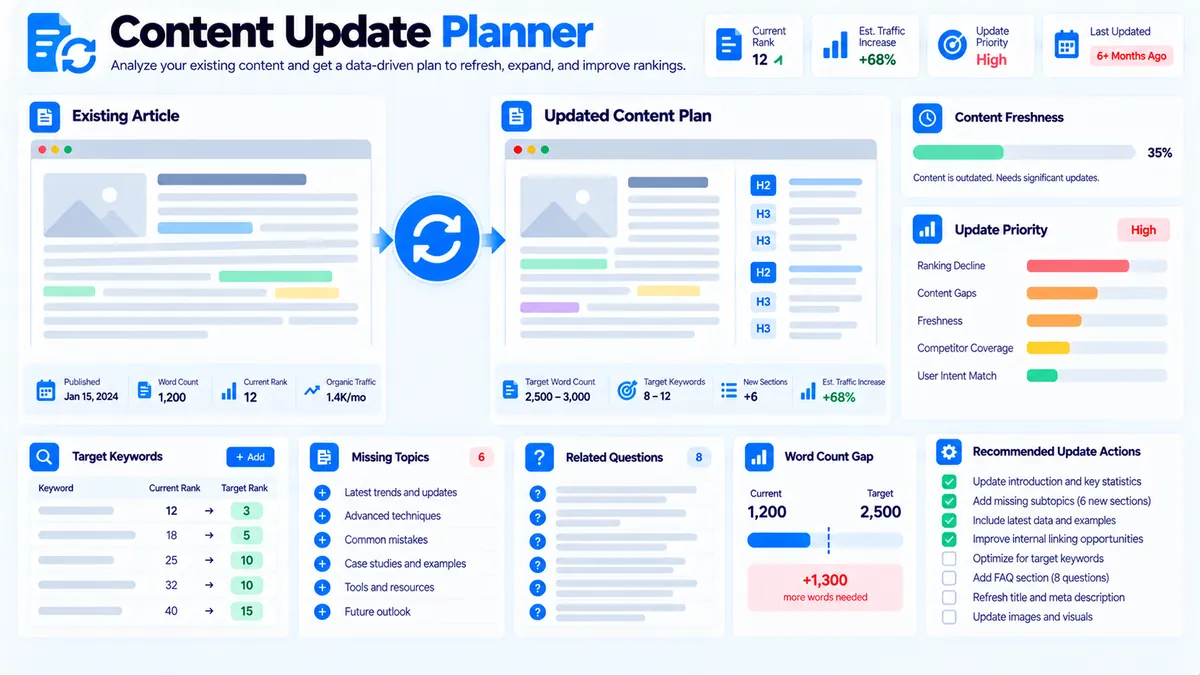
Content Update Planner turns an existing page’s freshness, keyword, topic, content-length, and question signals into a practical refresh plan. Enter the page details and current content you want to review, then use the generated plan to identify what should be refreshed, expanded, restructured, or reviewed before republishing. The analysis runs locally in your browser and does not require an AI API, Google Search Console connection, or automatic website crawling.
Content Update Planner
Turn an existing page's freshness, keyword, topic, length, and question signals into a practical content-refresh plan.
Content Update Plan
Deterministic planning based on the page information and update signals you supplied.
View JSON report
This is an editorial update-planning signal, not a Google ranking or traffic prediction. The tool does not crawl the supplied URL or connect to search analytics automatically.
How to Use the Content Update Planner in Simple Steps
- Enter the page details. Add the optional Page URL, Page Title, Primary Topic, Last Major Update date, Current Word Count, and Target Word Count.
- Paste the current content and planning inputs. Add the existing page content, Target Keywords, New / Missing Topics, and Questions to Add or Recheck.
- Choose the update settings. Select the Update Goal, Freshness Window, and whether to include an FAQ section in the update plan.
- Click Plan Content Update. Review the generated update priority, freshness status, keyword coverage, word-count gap, recommended update plan, update order, effort guidance, and other planning signals. You can then copy or export the report.
What the Content Update Planner Checks
The planner combines several editorial signals so you can evaluate an existing page before deciding how to refresh it.
It can use:
- Page freshness
- Current word count
- Target word count
- Primary topic
- Target keyword coverage
- New or missing topics
- Questions to add or recheck
- Selected update goal
- Selected freshness window
- Optional FAQ planning
The output is an editorial planning report, not a live ranking analysis.
Page Freshness
The Last Major Update date and Freshness Window are used to determine the page’s freshness status.
Available freshness windows are:
- 6 months
- 12 months
- 18 months
- 24 months
For example, if a page was last substantially updated more than 12 months ago and the selected freshness window is 12 months, the planner can identify freshness as an update signal.
Freshness alone does not mean a page needs a complete rewrite. Some evergreen pages may remain accurate for longer periods, while topics affected by changing information may require more frequent review.
Current and Target Word Count
Enter the current word count and an intended target word count when you have a meaningful content-length goal.
The planner can use the difference between these values as an editorial planning signal.
For example:
- Current: 1,850 words
- Target: 2,800 words
- Planned difference: 950 words
The 950-word difference does not mean you should add 950 words of filler. Use the missing-topic, keyword, and question signals to determine whether additional content is actually useful.
A shorter, more focused article can be preferable to a longer article that repeats information.
Target Keyword Coverage
The Target Keywords field lets you specify phrases that the refreshed page should address.
The planner compares those keywords with the Current Content and classifies them as:
- Covered
- Partial
- Missing
For example, a technical SEO page might use:
- technical SEO audit
- technical SEO checklist
- crawlability audit
- indexability audit
If the existing content clearly contains one target phrase but only partial wording for another, the report can identify that difference for review.
For a more dedicated post-draft keyword coverage analysis, Content-to-Keyword Mapper provides a separate content-to-keyword workflow.
New / Missing Topics
Use New / Missing Topics for subjects that should be reviewed or added during the update.
For example:
- AI search visibility
- JavaScript SEO
- Core Web Vitals updates
These topics become part of the update plan rather than being treated as automatic publishing requirements.
Review each suggested topic against the page’s actual purpose. A new topic should improve the page’s usefulness and topical coverage rather than simply increasing its length.
If you need a broader comparison of missing or partially covered topics, Content Gap Analyzer can support that planning process.
Questions to Add or Recheck
Questions are useful when an older page needs to be updated around changing reader concerns.
Example questions include:
- What should a technical SEO audit include?
- How often should technical SEO be checked?
- What changed in technical SEO recently?
The planner uses these questions as update-planning inputs.
It does not independently verify whether those questions are currently popular in search.
For extracting question-like content from an existing article, Question Finder serves a different purpose. FAQ Finder can also help identify FAQ opportunities from existing content.
Choosing the Update Goal
The Update Goal determines the editorial direction of the plan.
Refresh & Modernize
Use this when the page is broadly useful but contains information that needs reviewing or updating.
Typical actions include checking dated statements, replacing obsolete examples, reviewing terminology, and improving sections that no longer reflect the intended page.
Expand Topic Coverage
Use this when the page needs additional subjects, subtopics, or questions.
This is useful when the current page has a solid foundation but the supplied New / Missing Topics indicate meaningful areas that are not covered.
Major Rewrite
Use this when the existing page needs substantial restructuring rather than a few isolated edits.
A major rewrite can involve reorganizing sections, changing the content flow, revisiting keyword coverage, and rebuilding outdated explanations.
Restructure & Improve Clarity
Use this when the information is useful but the organization or readability needs improvement.
The objective is to make the existing material easier to navigate and understand without automatically increasing its length.
Freshness Window and Update Decisions
The freshness window is a planning threshold, not a universal SEO rule.
For example, a page about a rapidly changing technical subject may deserve a review sooner than a stable educational definition.
Use the freshness result together with:
- Topic changes
- Keyword coverage
- Missing topics
- Reader questions
- Current content quality
- Target word count
A page should not be rewritten solely because a calendar threshold has been reached.
Update Priority
The planner produces an Update Priority signal from the information you provide.
Use it to organize your editorial workload rather than treating it as a Google ranking score.
A page with an older update date, missing target keywords, important new topics, unanswered questions, and a significant planned content gap can generate stronger update signals than a page whose supplied information is already well covered.
The priority helps answer:
What should I review first in this existing page?
It does not answer:
Which page will rank higher after I update it?
Recommended Update Plan
The generated report converts the supplied signals into a practical update plan.
Depending on your inputs, the plan can direct attention toward areas such as:
- Review freshness and dated information.
- Check target keyword coverage.
- Review missing or newly required topics.
- Add or recheck important questions.
- Address the word-count gap when additional content is justified.
- Apply the selected update goal.
- Review FAQ opportunities when enabled.
- Recheck the updated page before publishing.
The exact plan depends on the data and settings you provide.
Recommended Update Order
The Recommended Update Order helps turn the analysis into an editing sequence.
A useful update process is to resolve structural and factual issues before polishing smaller wording details.
For example:
- Review outdated information.
- Fix missing major topics.
- Address important keyword gaps.
- Add or improve answers to relevant questions.
- Restructure unclear sections.
- Review the final content length.
- Perform a final SEO and content-quality check.
This keeps the update focused on meaningful improvements rather than superficial edits.
Estimated Effort
The planner provides an effort signal to help you understand the approximate scope of the planned refresh.
A small refresh with limited keyword and topic changes is different from a page requiring a major rewrite, new sections, multiple unanswered questions, and significant restructuring.
Treat the effort output as a planning aid rather than a precise time estimate.
Actual editing time depends on the complexity of the subject and the amount of research required outside the tool.
Optional FAQ Planning
Enable Include FAQ in update plan when the refreshed page would benefit from direct answers to relevant questions.
FAQ planning can be particularly useful when the Questions to Add or Recheck field contains genuine reader questions that are not currently addressed.
Do not add FAQs merely to increase page length. Each question should have a clear relationship to the page’s primary purpose.
Practical Example
Suppose you are refreshing a page titled:
Technical SEO Audit Guide
You enter:
- Primary Topic:
Technical SEO - Last Major Update:
June 2025 - Current Word Count:
1,850 - Target Word Count:
2,800
Your target keywords might include:
- technical SEO audit
- technical SEO checklist
- crawlability audit
- indexability audit
You might add these new or missing topics:
- AI search visibility
- JavaScript SEO
- Core Web Vitals updates
And questions such as:
- What should a technical SEO audit include?
- How often should technical SEO be checked?
- What changed in technical SEO recently?
With Expand Topic Coverage selected and a 12-month freshness window, the planner can turn these inputs into an update workflow.
The important step is to review each signal against the actual page. A missing topic should be added when it improves the resource, and a keyword should be incorporated naturally rather than forced into existing sentences.
Content Update Planner and Content Decay Checker
Content Decay Checker and Content Update Planner address related but different stages of content maintenance.
Content Decay Checker is designed to evaluate supplied performance and freshness signals such as clicks, impressions, CTR, average position, update date, and word-count information.
Content Update Planner focuses on turning the available page, keyword, topic, question, freshness, and word-count inputs into an editorial refresh plan.
A practical workflow is:
- Use Content Decay Checker when you have performance or freshness signals to review.
- Identify pages that deserve closer attention.
- Use Content Update Planner to define the actual refresh work.
- Update the page.
- Recheck the finished content with the relevant PKCapra analyzers.
Content Update Planner and Topical Coverage
Topical Authority Analyzer evaluates the breadth and depth of a supplied content inventory across a topic map.
Content Update Planner works at the individual-page update level.
For example:
- Topical Authority Analyzer identifies that a content hub lacks sufficient coverage around a topic.
- Content Update Planner helps determine what an existing page can be expanded or refreshed with.
- Pillar Page Analyzer can then be used to review the structure of an important pillar page.
This makes the tools complementary rather than interchangeable.
Browser-Side Processing and Privacy
The Content Update Planner processes the supplied planning information locally in the browser.
It does not require:
- An AI API
- An API key
- Google Search Console
- Live Google search results
- Automatic website crawling
- A search-volume database
- A ranking database
The Page URL field is optional and is used as page information in the planning workflow. The tool does not automatically fetch the URL’s live content.
The analysis therefore depends on the information you enter, especially the Current Content, keywords, topics, questions, update date, and word counts.
Input Formats and Limits
The tool accepts plain text or basic HTML in the Current Content field.
Target Keywords can be entered one per line, with commas and semicolons also supported.
New / Missing Topics use the same practical list format.
Questions to Add or Recheck should be entered one per line and should represent questions relevant to the intended audience.
The planner uses the supplied values rather than independently researching or validating them.
What the Content Update Planner Does Not Measure
The tool does not directly measure:
- Google rankings
- Organic traffic
- Search volume
- Keyword difficulty
- Competitor rankings
- Search Console clicks or impressions
- Live SERP changes
- Backlinks
- Google’s freshness systems
- Google’s ranking algorithms
The Update Priority is therefore an editorial planning signal, not a ranking prediction.
Likewise, a freshness warning does not prove that Google considers a page outdated.
Developer Snippets (Automate This Tool Offline)
The PKCapra Content Update Planner does not expose an external API. You can reproduce a simplified local content-refresh workflow with standard scripting.
Python
import re
from datetime import date, datetime

def normalize(text):
    return " ".join(
        re.sub(r"[^a-z0-9\s-]", " ", text.lower()).split()
    )

def contains_term(content, term):
    return normalize(term) in normalize(content)

current_content = """
A technical SEO audit reviews crawlability, indexability,
redirects, canonical URLs, internal links, and XML sitemaps.
"""

target_keywords = [
    "technical SEO audit",
    "technical SEO checklist",
    "crawlability audit",
    "indexability audit"
]

for keyword in target_keywords:
    status = "Covered" if contains_term(current_content, keyword) else "Missing"
    print(f"{keyword}: {status}")

current_words = len(re.findall(r"\b[\w'-]+\b", current_content))
target_words = 2800

print(f"Current words: {current_words}")
print(f"Target words: {target_words}")
print(f"Word gap: {max(0, target_words - current_words)}")
PowerShell
$content = @"
A technical SEO audit reviews crawlability, indexability,
redirects, canonical URLs, internal links, and XML sitemaps.
"@

$keywords = @(
    "technical SEO audit",
    "technical SEO checklist",
    "crawlability audit",
    "indexability audit"
)

foreach ($keyword in $keywords) {
    if ($content.ToLower().Contains($keyword.ToLower())) {
        Write-Output "$keyword : Covered"
    } else {
        Write-Output "$keyword : Missing"
    }
}

$currentWords = ($content -split '\s+' | Where-Object { $_ }).Count
$targetWords = 2800
$wordGap = [Math]::Max(0, $targetWords - $currentWords)

Write-Output "Current words: $currentWords"
Write-Output "Target words: $targetWords"
Write-Output "Word gap: $wordGap"
Node.js
const content = `
A technical SEO audit reviews crawlability, indexability,
redirects, canonical URLs, internal links, and XML sitemaps.
`;

const keywords = [
  "technical SEO audit",
  "technical SEO checklist",
  "crawlability audit",
  "indexability audit"
];

const normalized = content.toLowerCase();

for (const keyword of keywords) {
  const status = normalized.includes(keyword.toLowerCase())
    ? "Covered"
    : "Missing";

  console.log(`${keyword}: ${status}`);
}

const currentWords = (content.match(/\b[\w'-]+\b/g) || []).length;
const targetWords = 2800;
const wordGap = Math.max(0, targetWords - currentWords);

console.log(`Current words: ${currentWords}`);
console.log(`Target words: ${targetWords}`);
console.log(`Word gap: ${wordGap}`);
These examples demonstrate simple local keyword and word-count checks. They do not reproduce the complete PKCapra planning logic or report interface.
Excel Power Query Workflow
If your content inventory is managed in Excel, Power Query can help prepare update-planning data before you use the tool.
A useful spreadsheet structure is:
| Page | Last Major Update | Current Words | Target Words | Primary Topic | Target Keywords | New Topics |
|---|---|---|---|---|---|---|
| Technical SEO Audit Guide | 2025-06-28 | 1850 | 2800 | Technical SEO | technical SEO audit; crawlability audit | JavaScript SEO |
| Internal Linking Guide | 2025-08-15 | 1600 | 2200 | Internal Linking | internal linking; site architecture | contextual links |
Use Power Query to:
- Remove blank rows.
- Standardize date formats.
- Trim page titles and topic names.
- Remove duplicate keyword entries.
- Normalize keyword separators.
- Calculate word-count gaps.
- Filter pages by freshness window.
- Export or copy the relevant values into Content Update Planner.
For keyword coverage after an update, Content-to-Keyword Mapper can provide a more focused post-edit review.
A Practical Content Refresh Workflow
A strong refresh process separates why the page needs attention from what should be changed.
Step 1: Review the page’s freshness
Enter the last major update date and select an appropriate freshness window.
Step 2: Review the existing content
Paste the current content instead of relying only on the page title or word count.
Step 3: Define the intended coverage
Add target keywords, missing topics, and questions that genuinely belong on the page.
Step 4: Select the update goal
Choose whether the page needs modernization, broader coverage, a major rewrite, or clearer structure.
Step 5: Generate the plan
Review the update priority, freshness status, keyword coverage, word gap, effort, and recommended update sequence.
Step 6: Make the changes
Edit the actual page based on the useful findings. Avoid adding content simply because the planner identifies a numerical gap.
Step 7: Recheck the finished page
After updating, use relevant PKCapra tools to verify the final content. For example, Search Intent Analyzer can help review the intended search goal, while Pillar Page Analyzer can help review the structure of a major resource.
Exporting the Update Plan
After generating a plan, the tool provides actions for working with the results.
You can:
- Copy the report
- Copy the JSON data
- Download JSON
- Download the PDF report
The PDF is generated directly in the browser rather than opening a browser print workflow.
The JSON version is useful when you want to store the update plan or process it in another local workflow.
Frequently Asked Questions
What is a Content Update Planner?
A Content Update Planner turns page freshness, keyword coverage, word-count, topic, and question inputs into a structured content-refresh plan.
Does the tool automatically crawl my page URL?
No. The Page URL is an optional planning field. The tool does not automatically fetch the live page content.
Does it use Google Search Console?
No. The Content Update Planner does not connect to Google Search Console.
Does it use AI?
No. The planner uses deterministic browser-side processing rather than an AI API.
What does the freshness window mean?
The freshness window is the period used to evaluate the supplied Last Major Update date as a planning signal. Available options are 6, 12, 18, and 24 months.
What is Update Priority?
Update Priority is an editorial planning signal based on the information supplied to the tool. It is not a Google ranking score or ranking prediction.
Can the tool identify missing keywords?
Yes. When you provide Target Keywords and Current Content, the planner can classify supplied keywords as Covered, Partial, or Missing.
Can I add topics that were not in the original article?
Yes. Use the New / Missing Topics field to identify subjects that should be reviewed or considered for inclusion during the update.
Can I add questions to the refresh plan?
Yes. The Questions to Add or Recheck field lets you supply relevant reader questions for the update plan.
Can I use the tool for a major rewrite?
Yes. Select Major Rewrite as the Update Goal when the existing page needs substantial restructuring or replacement rather than a small refresh.
Can I include an FAQ in the update plan?
Yes. Enable Include FAQ in update plan when FAQ planning is relevant to the page.
Does the tool tell me exactly how many words to add?
The tool can use your Current Word Count and Target Word Count to identify the planned word-count gap. The gap is an editorial planning signal, not a requirement to add filler.
Can I download the update plan as a PDF?
Yes. The current tool provides direct PDF report download without opening a browser print dialog.
Is my page content sent to a server?
No. The planner processes the supplied content locally in the browser.