
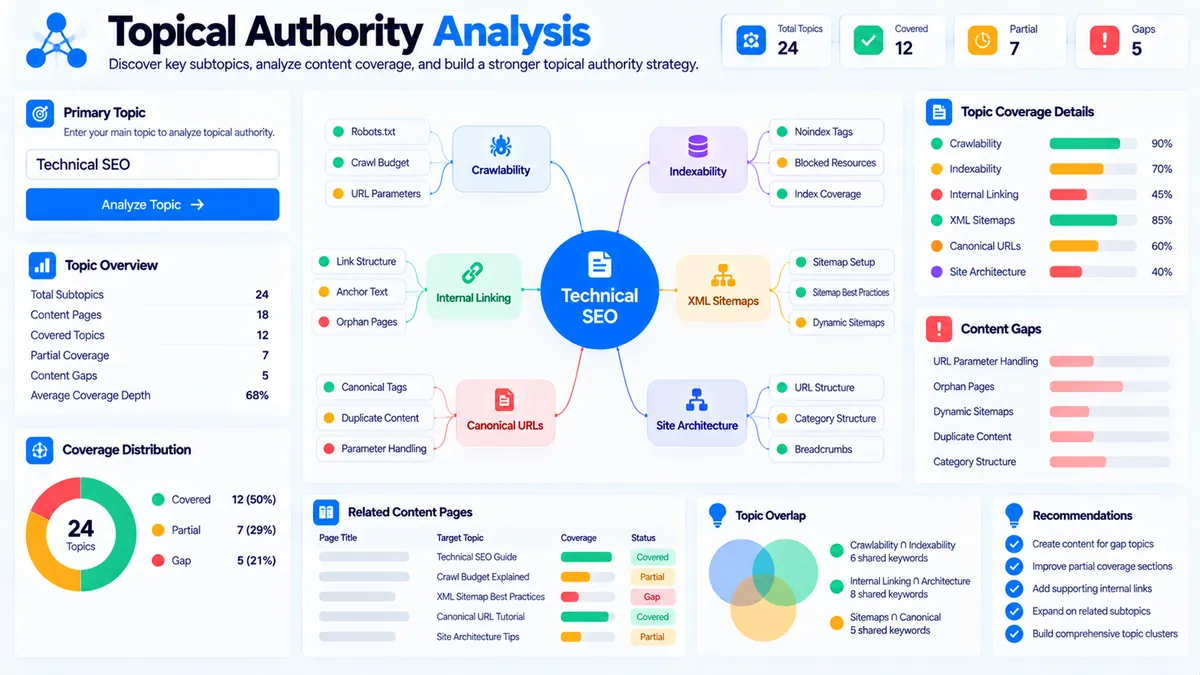
Topical Authority Analyzer helps you evaluate the breadth and depth of a content hub using the topic map and content inventory you provide. It identifies covered, partial, and uncovered topics, measures repeated topic coverage, checks primary-topic alignment, flags potential topic overlap between pages, and produces an authority signal for planning purposes. The analysis is deterministic and browser-based; it does not crawl your website, query search engines, or claim to measure Google’s actual topical-authority score.
Topical Authority Analyzer
Measure topic breadth, coverage depth, gaps, and overlap across a content inventory you provide.
Page title | topic, topic, topicTopical Authority Coverage Report
Deterministic analysis of the topic map and content inventory you supplied.
This is a content-coverage diagnostic, not a Google topical-authority score or ranking prediction. Results depend on the topics and content inventory you provide.
How to Use the Topical Authority Analyzer in Simple Steps
- Enter your Primary Topic. Add the main subject your content hub is designed to cover, such as
Technical SEO. - Add Core Topics / Subtopics. Enter the important topics you want your content hub to cover. You can enter one topic per line, or separate topics with commas or semicolons.
- Add your Content Inventory. Enter one page per line using the format
Page title | topic, topic, topic. The topics should represent the subjects covered by each page. - Choose the coverage settings and analyze. Select a coverage threshold of
1+,2+, or3+ pages, choose Low, Medium, or High overlap sensitivity, decide whether to include primary-topic alignment, and click Analyze Topical Coverage.
What the Topical Authority Analyzer Checks
The analyzer evaluates the relationship between your primary topic, core topics, and supplied content inventory.
It produces several planning metrics:
- Authority Signal
- Topic Breadth
- Coverage Depth
- Average Pages per Topic
- Primary Alignment
- Topic Coverage status
- Priority Findings
- Potential Topic Overlap
- Recommended Next Actions
The report is based only on the information entered into the tool.
Topic Breadth
Topic breadth measures how many of your listed core topics have at least one matching page in the supplied inventory.
For example, if you provide 10 core topics and 8 have matching pages, the topic breadth is 80%.
A broad topic map with many uncovered areas can indicate that the content hub has subjects still waiting for dedicated coverage.
Coverage Depth
Coverage depth looks at how repeatedly your listed topics are represented across the supplied inventory.
The analyzer considers up to three matching pages per topic when calculating this planning metric. Repeated coverage can therefore contribute more to depth than a topic represented by only one page.
Depth is different from breadth:
- Breadth: How many topics have any coverage?
- Depth: How substantially are those topics represented across pages?
A site can have broad coverage but shallow depth if almost every topic appears on only one page.
Average Pages per Topic
This metric shows the average number of matching inventory pages per supplied core topic.
For example, an average of 2.0 means the supplied topic map has approximately two matching pages per listed topic.
This is an inventory diagnostic rather than a recommended number of pages for every topic.
Primary-Topic Alignment
When Include primary-topic alignment is enabled, the analyzer checks how strongly the topic labels attached to your inventory pages overlap with the Primary Topic.
For example, with Technical SEO as the primary topic, pages labelled with topics such as technical audits, crawlability, and indexability can contribute to the alignment analysis.
The alignment calculation uses the topic labels you provide. It does not inspect the actual page content.
Understanding Covered, Partial, and Gap Status
Each core topic receives one of three statuses.
Covered
A topic is marked covered when the number of matching pages reaches the selected coverage threshold.
For example, with a 2+ pages threshold, a topic with two or more matching pages is covered.
Partial
A topic is partial when matching pages exist but the number of matching pages is below your selected threshold.
With a 2+ pages threshold, one matching page would therefore produce a partial result.
Gap
A topic is a gap when no matching page is detected in the supplied content inventory.
A gap does not automatically mean that a new page should be created. Review the topic’s importance and whether it represents a distinct search need before expanding the content hub.
Choosing the Coverage Threshold
The tool provides three coverage thresholds:
| Threshold | Meaning |
|---|---|
| 1+ page | Treat one matching page as sufficient coverage |
| 2+ pages | Look for repeated coverage across at least two pages |
| 3+ pages | Look for deeper repeated coverage across at least three pages |
A lower threshold is useful for checking basic topic breadth.
A higher threshold is useful when you want to identify topics that have only limited representation in a larger content hub.
Do not interpret the threshold as a universal SEO rule. Different topics can require different amounts of content depending on their scope and search needs.
Choosing Overlap Sensitivity
The Overlap Sensitivity setting controls how similar topic labels must be before they are treated as matching or potentially overlapping.
Low
Low sensitivity uses a more permissive matching approach.
This can identify broader relationships between closely related topic labels.
Medium
Medium is the default setting and provides a balanced comparison between exact topic matches and meaningful word overlap.
High
High sensitivity requires stronger similarity before topic labels are treated as related.
This can be useful when you want to reduce broader matches and focus on more obvious topic relationships.
Potential Topic Overlap
The analyzer also compares topic labels assigned to pairs of inventory pages.
For example, if these pages are both labelled with highly similar topics:
Internal Linking GuideSite Architecture Guide
the report may flag them for review.
An overlap signal does not mean that the pages are duplicates or that one should automatically be deleted.
Instead, review whether the pages serve different:
- Search intents
- Audiences
- Subtopics
- Use cases
- Content depths
If two pages genuinely answer different needs, keeping both can be appropriate. If they substantially address the same need, you may want to differentiate their scope or consolidate their coverage.
Understanding the Authority Signal
The Authority Signal is a planning metric calculated from three supplied-data measurements:
- Topic breadth: 50%
- Coverage depth: 35%
- Primary-topic alignment: 15%
The resulting value is shown on a 0–100 scale.
This weighting is part of the tool’s deterministic calculation. It is not a Google topical-authority score, domain-authority score, ranking score, or prediction of search performance.
For example, a high signal means your supplied inventory has strong breadth, repeated topic coverage, and primary-topic alignment according to this tool’s rules. It does not establish that a search engine considers the website authoritative.
How to Interpret Priority Findings
The report highlights practical issues detected in your supplied inventory.
Common findings include:
- Core topics with no matching page
- Topics below the selected coverage threshold
- Low primary-topic alignment
- Page pairs with high topic-label overlap
Use these findings as an editorial review queue.
For example, if several important topics are gaps, you can investigate whether they deserve dedicated pages. If many pages overlap, review their intent and scope before deciding whether to rewrite, differentiate, or consolidate them.
Building a Topical Authority Content Hub
A practical workflow is to treat topical coverage as a system rather than simply creating more pages.
Start with a primary topic such as Technical SEO. Build a list of meaningful subtopics:
- Crawlability
- Indexability
- Technical audits
- Internal linking
- XML sitemaps
- Canonical URLs
- Site architecture
Then map your existing pages to those topics.
A content inventory might look like:
Technical SEO Audit Guide | technical audits, crawlability, indexability
Internal Linking Guide | internal linking, site architecture
XML Sitemap Guide | XML sitemaps, crawlability
Canonical URL Guide | canonical URLs, indexability
Site Architecture Guide | site architecture, internal linking
The analyzer can then show which topics are covered, partial, or gaps and where pages may overlap.
Topical Authority Analyzer and Topic Cluster Planning
Topical coverage and topic clustering are closely related but serve different planning purposes.
Topic Cluster Generator helps turn a core topic and related subtopics into a pillar-and-supporting-page structure.
Topical Authority Analyzer is useful after you have an actual or proposed content inventory and want to evaluate how that inventory covers your topic map.
A practical workflow is:
- Define the core subject.
- Identify important subtopics.
- Use Topic Cluster Generator to plan the broader content structure.
- Build or collect your content inventory.
- Run the inventory through Topical Authority Analyzer.
- Review gaps, partial coverage, and overlap.
- Improve the content structure where the analysis identifies meaningful weaknesses.
Topical Authority Analyzer and Content Gap Analysis
Content Gap Analyzer focuses on comparing your topics or existing content with competitor/reference topic sets and identifying missing or partial coverage.
Topical Authority Analyzer focuses on the internal structure of the content inventory you provide.
You can use them together:
- Content Gap Analyzer: identify topics that may be missing from your comparison set.
- Topical Authority Analyzer: evaluate how your own content inventory covers the resulting topic map.
This creates a more practical content-planning workflow than relying on page count alone.
Using Pillar Pages and Supporting Content
A broad topic hub often contains a major resource supported by narrower pages.
Pillar Page Analyzer can be used to review the structure of an individual pillar page, including supporting-topic coverage and internal-link signals.
Topical Authority Analyzer works at the content-inventory level.
For example:
- Pillar page: Technical SEO
- Supporting page: Crawlability
- Supporting page: Indexability
- Supporting page: XML Sitemaps
- Supporting page: Canonical URLs
- Supporting page: Internal Linking
- Supporting page: Site Architecture
The analyzer can help you see whether those topics are represented across the inventory and whether some areas are still gaps.
Browser-Side Processing and Privacy
The analyzer evaluates the data you supply in your browser. It does not crawl your website and does not query Google or other search engines.
The content inventory is not sent to an AI API for analysis.
The tool uses deterministic text normalization, topic matching, overlap calculations, and coverage rules based on the supplied labels.
Because the analyzer does not fetch your live site, its results depend on the accuracy and completeness of the content inventory you enter.
Input Format and Current Limits
The Primary Topic field accepts up to 180 characters.
The Core Topics / Subtopics field accepts up to 12,000 characters.
The Content Inventory field accepts up to 30,000 characters.
Core topics can be entered:
- One per line
- Separated by commas
- Separated by semicolons
Content inventory should use one page per line:
Page title | topic, topic, topic
For example:
Technical SEO Audit Guide | technical audits, crawlability, indexability
The analyzer evaluates the topic labels supplied after the | separator. If a page has no topic labels, its title is used as its topic input.
What the Analyzer Does Not Measure
The tool does not directly measure:
- Google topical authority
- Search rankings
- Search volume
- Keyword difficulty
- Organic traffic
- Backlinks
- Domain authority
- Live SERP results
- Competitor rankings
- Actual page content
- Google Search Console performance
The analyzer is therefore best used as a content-coverage diagnostic and editorial planning tool.
Developer Snippets (Automate This Tool Offline)
The PKCapra tool does not expose an external API. You can reproduce a simplified topic-coverage workflow locally when you need to process an inventory outside WordPress.
Python
import re

def normalize(text):
    text = text.lower()
    text = re.sub(r"[^a-z0-9\s-]", " ", text)
    return " ".join(text.split())

def token_set(text):
    return {
        word for word in normalize(text).split()
        if len(word) > 2
    }

def overlap_score(a, b):
    first = token_set(a)
    second = token_set(b)

    if not first or not second:
        return 0

    shared = len(first.intersection(second))
    return round(shared / max(len(first), len(second)) * 100)

primary_topic = "Technical SEO"

topics = [
    "crawlability",
    "indexability",
    "technical audits",
    "internal linking",
    "XML sitemaps",
    "canonical URLs",
    "site architecture"
]

inventory = [
    ("Technical SEO Audit Guide", ["technical audits", "crawlability", "indexability"]),
    ("Internal Linking Guide", ["internal linking", "site architecture"]),
    ("XML Sitemap Guide", ["XML sitemaps", "crawlability"]),
    ("Canonical URL Guide", ["canonical URLs", "indexability"]),
    ("Site Architecture Guide", ["site architecture", "internal linking"])
]

for topic in topics:
    matches = []

    for title, page_topics in inventory:
        if any(
            normalize(page_topic) == normalize(topic)
            or overlap_score(page_topic, topic) >= 60
            for page_topic in page_topics
        ):
            matches.append(title)

    status = "gap" if not matches else "covered"
    print(topic, status, matches)
This is a simplified offline example and does not reproduce every report calculation or interface feature of the PKCapra tool.
PowerShell
function Normalize-Text($Text) {
    $value = $Text.ToLower()
    $value = $value -replace '[^a-z0-9\s-]', ' '
    return ($value -replace '\s+', ' ').Trim()
}

$primaryTopic = "Technical SEO"

$topics = @(
    "crawlability",
    "indexability",
    "technical audits",
    "internal linking",
    "XML sitemaps",
    "canonical URLs",
    "site architecture"
)

$inventory = @(
    @{
        Title = "Technical SEO Audit Guide"
        Topics = @("technical audits", "crawlability", "indexability")
    },
    @{
        Title = "Internal Linking Guide"
        Topics = @("internal linking", "site architecture")
    },
    @{
        Title = "XML Sitemap Guide"
        Topics = @("XML sitemaps", "crawlability")
    }
)

foreach ($topic in $topics) {
    $matches = @()

    foreach ($page in $inventory) {
        foreach ($pageTopic in $page.Topics) {
            if ((Normalize-Text $pageTopic) -eq (Normalize-Text $topic)) {
                $matches += $page.Title
                break
            }
        }
    }

    if ($matches.Count -eq 0) {
        Write-Output "$topic : gap"
    } else {
        Write-Output "$topic : covered ($($matches.Count) page(s))"
    }
}
Node.js
function normalize(text) {
  return String(text || "")
    .toLowerCase()
    .replace(/[^a-z0-9\s-]/g, " ")
    .replace(/\s+/g, " ")
    .trim();
}

function tokens(text) {
  return new Set(
    normalize(text)
      .split(/\s+/)
      .filter(word => word.length > 2)
  );
}

function overlapScore(a, b) {
  const first = tokens(a);
  const second = tokens(b);

  if (!first.size || !second.size) return 0;

  let shared = 0;

  for (const word of first) {
    if (second.has(word)) shared++;
  }

  return Math.round(
    shared / Math.max(first.size, second.size) * 100
  );
}

const topics = [
  "crawlability",
  "indexability",
  "technical audits",
  "internal linking"
];

const inventory = [
  {
    title: "Technical SEO Audit Guide",
    topics: ["technical audits", "crawlability", "indexability"]
  },
  {
    title: "Internal Linking Guide",
    topics: ["internal linking", "site architecture"]
  }
];

for (const topic of topics) {
  const matches = inventory.filter(page =>
    page.topics.some(pageTopic =>
      normalize(pageTopic) === normalize(topic) ||
      overlapScore(pageTopic, topic) >= 60
    )
  );

  console.log({
    topic,
    pages: matches.length,
    status: matches.length ? "covered" : "gap"
  });
}
Excel Power Query Workflow
If your content inventory already exists in Excel, Power Query can help clean and organize the data before using the analyzer.
A practical structure is:
| Page Title | Topic 1 | Topic 2 | Topic 3 |
|---|---|---|---|
| Technical SEO Audit Guide | technical audits | crawlability | indexability |
| Internal Linking Guide | internal linking | site architecture | |
| XML Sitemap Guide | XML sitemaps | crawlability | |
| Canonical URL Guide | canonical URLs | indexability |
Use Power Query to:
- Remove blank page rows.
- Trim whitespace from page titles and topic fields.
- Standardize capitalization.
- Remove duplicate page entries.
- Review inconsistent topic names such as
XML sitemapandXML sitemaps. - Combine the topic columns into the format required by the analyzer.
- Paste the cleaned inventory into Content Inventory.
If you are starting with a large keyword list rather than an existing page inventory, Keyword Clustering can help organize related terms before you build the topic map.
Turning Findings Into Content Actions
The most useful way to use the report is to convert findings into specific editorial decisions.
When a topic is a gap
First verify that the topic deserves dedicated coverage.
If it represents a meaningful subject within the content hub, consider creating a focused page rather than forcing the topic into an unrelated article.
When a topic is partial
Review the existing page and determine whether the topic needs another dedicated resource or deeper coverage.
Do not automatically create additional pages just to increase the count.
When several pages overlap
Compare their search intent and scope.
If the pages answer different questions, improve their differentiation.
If they substantially cover the same need, consider whether consolidation or a clearer page hierarchy would make the content hub easier to understand.
When primary alignment is low
Review the topic labels attached to your inventory.
Low alignment can result from an incomplete inventory, inconsistent topic labels, or pages that genuinely sit outside the intended content hub.
Frequently Asked Questions
What is a Topical Authority Analyzer?
A Topical Authority Analyzer evaluates the breadth, repeated coverage, primary-topic alignment, and topic overlap of a content inventory that you provide.
Does it measure Google’s topical authority?
No. The Authority Signal is a PKCapra planning metric based on supplied topic coverage, depth, and primary-topic alignment. It is not a Google score.
Does the analyzer crawl my website?
No. It evaluates only the content inventory and topic labels you enter.
What does a content inventory line look like?
A content inventory line uses the format Page title | topic, topic, topic.
For example: Technical SEO Audit Guide | technical audits, crawlability, indexability.
What is the difference between breadth and depth?
Breadth measures how many listed topics have at least one matching page. Depth measures repeated topic coverage across the supplied inventory, using up to three matching pages per topic in the depth calculation.
What does the coverage threshold control?
The coverage threshold determines how many matching pages are required for a topic to be classified as covered. The available settings are 1+, 2+, and 3+ pages.
What does overlap sensitivity change?
Overlap sensitivity changes how strongly topic labels must resemble each other for the analyzer to identify matches and potential page overlap.
Does the tool analyze the actual text of my pages?
No. The content inventory uses page titles and the topic labels you provide. The analyzer does not fetch or crawl the actual page content.
Can the analyzer tell me which new pages I should create?
It identifies topic gaps, partial coverage, and priority findings. The recommended next actions help turn those findings into an editorial plan, but the tool does not automatically decide that every gap requires a new page.
Can I export the report?
Yes. After analysis, the tool provides Copy Report, Copy JSON, Download JSON, and Download PDF actions.
Is the PDF generated directly?
Yes. The current tool generates the PDF report in the browser rather than opening a browser print dialog.
Is the analysis processed on a server?
No. The topical coverage analysis is performed in the browser using deterministic processing.