
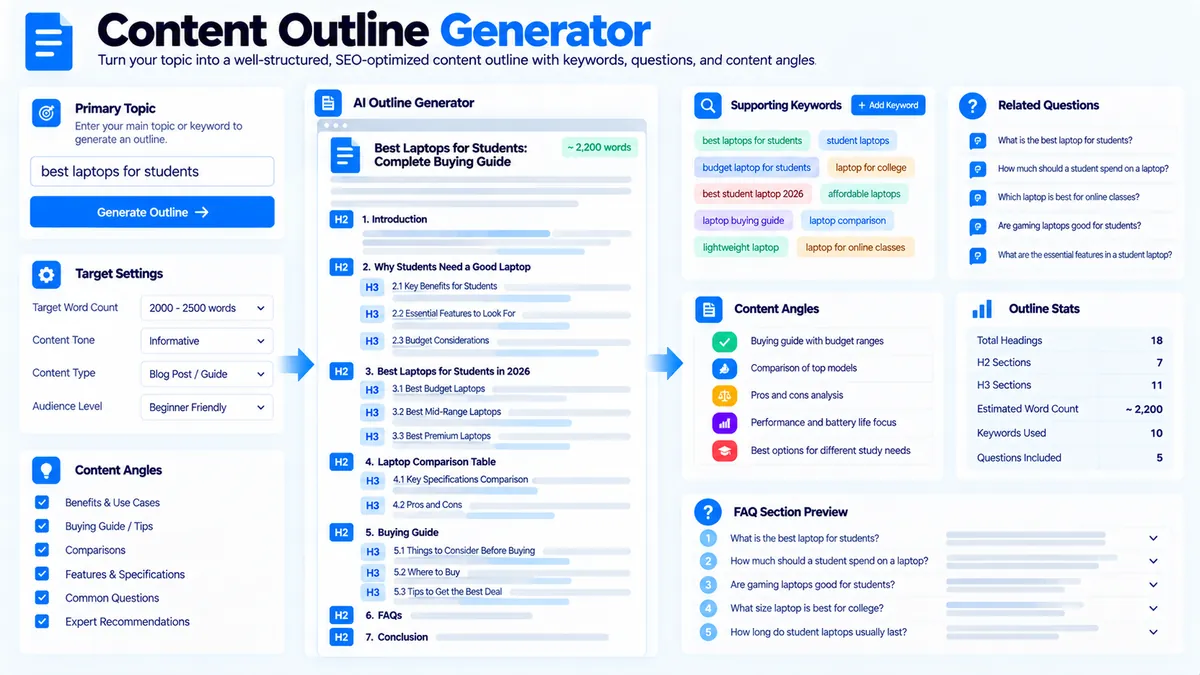
Content Outline Generator helps you turn a primary topic, supporting keywords or subtopics, and questions into a structured content plan. It creates a practical H2/H3 outline, maps supplied keywords and questions into the structure, estimates section-level word allocation, identifies basic intent signals, and can optionally include an FAQ section. The analysis runs in your browser and does not require an AI API, API key, Google data, or live SERP access.
Content Outline Generator
Turn a topic, supporting terms, and questions into a structured H2/H3 content outline using deterministic browser-side planning signals.
Content Outline Blueprint
Generated from the topic, terms, questions, and planning options you supplied.
View JSON report
How to Use the Content Outline Generator in Simple Steps
- Enter your Primary Topic. Start with the main subject you want the article or guide to cover, such as
technical SEO audit. - Add Supporting Keywords / Subtopics and Questions to Cover. Enter related terms, subtopics, and real questions you want represented in the outline. These inputs help the generator organize the planned coverage.
- Choose the content settings. Select the Content Angle, Outline Depth, Target Length, and whether you want an FAQ section included.
- Generate and review the outline. Review the suggested title, intent signal, H2/H3 structure, keyword and question mapping, estimated word allocation, and recommended next actions. You can then copy or export the generated report.
What the Content Outline Generator Produces
The generator is designed to move from a topic idea to an organized editorial structure without requiring an external keyword or SERP API.
Suggested content title
The generated plan includes a suggested page title based on the primary topic and selected content angle.
Treat the title as a working option rather than a final SEO title. Review it against the actual page purpose, audience, and search intent before publishing.
Search intent signal
The tool provides an intent signal based on the information supplied to it. This is a local planning signal, not live Google intent data.
For example, a topic such as how to audit internal links naturally contains a how-to orientation, while a topic such as technical SEO audit checklist suggests a more informational and practical structure.
For a dedicated intent analysis, you can also use Search Intent Analyzer.
H2 and H3 outline
The main output is a structured outline.
For example:
- H2: Introduction
- H3: What the topic means
- H3: Why it matters
- H2: Key Areas to Cover
- H3: Area one
- H3: Area two
- H2: How to Apply the Process
- H3: Step-by-step workflow
- H3: Common mistakes
- H2: Frequently Asked Questions
The exact headings are generated from the supplied topic, supporting inputs, questions, selected content angle, and outline depth.
Keyword and subtopic mapping
Supporting keywords and subtopics are mapped into the planned outline so you can see where they belong instead of treating them as a disconnected keyword list.
This makes the outline useful as an editorial brief: each section has a reason to exist and a relationship to the main topic.
For an existing article, Content-to-Keyword Mapper can be used afterward to check how well your actual content covers the target terms.
Question mapping
Questions supplied in the Questions to Cover field can be associated with relevant planned sections.
This helps prevent important questions from being collected in a separate list and then forgotten during drafting.
If you already have content and want to extract question-like sentences from it, use Question Finder when that page is available in your verified site structure.
Choosing the Content Angle
The Content Outline Generator provides several planning approaches.
Comprehensive Guide
This angle is designed for broad coverage of a topic. The resulting structure can accommodate definitions, important subtopics, practical sections, questions, and supporting explanations.
Use it when the topic requires a complete educational resource rather than a narrow answer.
How-to Guide
This angle emphasizes process and implementation. It is useful when the reader needs to understand how to complete a task.
A how-to outline should normally make the sequence of actions obvious and keep supporting explanations close to the relevant step.
Comparison / Evaluation
This angle is designed for topics where the reader needs to compare options, approaches, features, or use cases.
The outline should make the comparison criteria clear before individual options are discussed.
Beginner Explainer
This angle emphasizes accessible explanations and logical progression for readers who may not know the subject well.
Start with definitions and fundamentals before moving into more detailed implementation or evaluation.
Choosing the Outline Depth
The Outline Depth setting controls how detailed the generated heading structure becomes.
H2 Only
Choose this when you need a simple editorial skeleton.
It is useful for quickly planning the major sections of a shorter article or when the writer prefers to decide the H3 structure during drafting.
H2 + H3
Choose this when you want a more developed writing blueprint.
The additional H3 structure makes it easier to assign individual questions, subtopics, and supporting keywords to specific parts of the article.
Choosing the Target Length
The generator provides target-length options of approximately:
- 1,000 words
- 1,500 words
- 2,500 words
- 3,500 words
The selected target length is used for planning and word allocation. It is not a guarantee of the final article length.
A longer target should normally be justified by the topic’s coverage requirements rather than used simply to increase word count.
Optional FAQ Planning
You can enable the FAQ section when the topic benefits from direct question-and-answer coverage.
The FAQ option is useful when your supplied questions represent genuine reader concerns that deserve concise answers after the main subject has been explained.
For a separate analysis of existing content for FAQ candidates and opportunities, see FAQ Finder.
For extracting actual question-like sentences from supplied content, Question Finder serves a different purpose.
How to Interpret the Generated Outline
The generated outline is a planning framework, not a finished article.
Review each section and ask:
- Does this section directly support the primary topic?
- Does it answer a real reader need?
- Is the section placed in a logical order?
- Are related keywords being used naturally?
- Are supplied questions assigned to useful sections?
- Is any section unnecessarily repetitive?
- Does the target word allocation match the importance of the topic?
Remove sections that do not add meaningful coverage. Add a section manually when an important subject is missing from your planning inputs.
Content Outline Generator and Topic Clustering
An outline and a topic cluster solve different planning problems.
The Content Outline Generator focuses on the structure of one piece of content.
Topic Cluster Generator is useful when you need to organize a broader topic into a pillar page and supporting content paths.
A practical workflow is:
- Identify the main topic.
- Use topic clustering when the subject needs multiple supporting pages.
- Select the primary topic for the individual article.
- Build its H2/H3 outline with Content Outline Generator.
- Map keywords and questions into the planned sections.
- Draft the article.
- Review the finished page with Pillar Page Analyzer when it serves as a major resource.
Using Content Gap Analysis Before Building an Outline
If you are planning content against existing coverage, Content Gap Analyzer can help identify topics that are missing or only partially covered in the material you compare.
The two tools can then be used sequentially:
- Content Gap Analyzer: identify what needs coverage.
- Content Outline Generator: organize that coverage into a coherent article structure.
This avoids building an outline around keywords alone without first considering the actual information gaps.
Browser-Side Processing and Privacy
The Content Outline Generator performs its planning logic in the browser. It does not require an AI API or an API key, and it does not depend on live Google or Bing SERP data.
The tool does not provide live search volume, keyword difficulty, competitor rankings, or current search-result positions.
Its output should therefore be treated as a deterministic content-planning aid based on the information and settings you provide.
Practical Example
Suppose your Primary Topic is:
technical SEO audit
You add supporting subtopics such as:
- crawlability
- indexability
- redirects
- canonical URLs
- internal links
- structured data
You could also add questions such as:
- What is a technical SEO audit?
- How do you perform a technical SEO audit?
- What should a technical SEO audit include?
- How often should a technical SEO audit be performed?
A useful outline can then organize these inputs into sections such as:
- Introduction
- What a Technical SEO Audit Covers
- Crawlability and Indexability
- Redirects and Canonical URLs
- Internal Linking
- Structured Data
- How to Perform the Audit
- Common Technical SEO Issues
- Frequently Asked Questions
The value of the generator is not simply producing headings. It is connecting the supplied topic, subtopics, questions, content angle, depth, and target length into a usable writing plan.
Developer Snippets (Automate This Tool Offline)
The Content Outline Generator does not expose an external API. If you want to build a simple offline outline workflow for your own editorial process, you can reproduce the basic structure with local scripts.
Python
import re

topic = "technical SEO audit"

subtopics = [
    "crawlability",
    "indexability",
    "redirects",
    "canonical URLs",
    "internal links",
    "structured data"
]

questions = [
    "What is a technical SEO audit?",
    "How do you perform a technical SEO audit?",
    "What should a technical SEO audit include?"
]

print(f"# Content Outline: {topic.title()}")
print("")
print("## Introduction")
print(f"### What is {topic}?")
print("### Why the topic matters")
print("")

for index, item in enumerate(subtopics, start=1):
    print(f"## {index}. {item.title()}")

print("")
print("## Frequently Asked Questions")

for question in questions:
    print(f"### {question}")
PowerShell
$topic = "technical SEO audit"

$subtopics = @(
    "crawlability",
    "indexability",
    "redirects",
    "canonical URLs",
    "internal links",
    "structured data"
)

$questions = @(
    "What is a technical SEO audit?",
    "How do you perform a technical SEO audit?",
    "What should a technical SEO audit include?"
)

Write-Output "# Content Outline: $($topic.Substring(0,1).ToUpper())$($topic.Substring(1))"
Write-Output ""
Write-Output "## Introduction"
Write-Output "### What is $topic?"
Write-Output "### Why the topic matters"
Write-Output ""

$index = 1
foreach ($item in $subtopics) {
    Write-Output "## $index. $item"
    $index++
}

Write-Output ""
Write-Output "## Frequently Asked Questions"

foreach ($question in $questions) {
    Write-Output "### $question"
}
Node.js
const topic = "technical SEO audit";

const subtopics = [
  "crawlability",
  "indexability",
  "redirects",
  "canonical URLs",
  "internal links",
  "structured data"
];

const questions = [
  "What is a technical SEO audit?",
  "How do you perform a technical SEO audit?",
  "What should a technical SEO audit include?"
];

console.log(`# Content Outline: ${topic}`);
console.log("");
console.log("## Introduction");
console.log(`### What is ${topic}?`);
console.log("### Why the topic matters");
console.log("");

subtopics.forEach((item, index) => {
  console.log(`## ${index + 1}. ${item}`);
});

console.log("");
console.log("## Frequently Asked Questions");

questions.forEach(question => {
  console.log(`### ${question}`);
});
These snippets demonstrate local outline assembly. They do not reproduce every planning signal or interface feature of the PKCapra tool.
Excel Power Query Workflow
If your keyword and question research is already stored in Excel, Power Query can help prepare the inputs before you build the final outline.
A practical workflow is:
- Create a table with columns such as
Primary Topic,Supporting Keyword,Subtopic, andQuestion. - Load the table into Power Query.
- Trim whitespace and remove duplicate values.
- Group related supporting terms under their common topic or subtopic.
- Keep questions in a separate question field so they can be reviewed independently.
- Export the cleaned inputs or paste the relevant groups into Content Outline Generator.
- Review the generated H2/H3 structure and adjust the editorial order before drafting.
For larger keyword sets, Keyword Clustering can help organize related keywords before they are used as supporting inputs.
Turning the Outline Into a Complete Content Workflow
Once the outline is generated, use it as the backbone of the writing process rather than treating it as a final document.
A useful sequence is:
- Confirm the primary topic.
- Check the search intent signal.
- Remove irrelevant or repetitive sections.
- Confirm that important questions have a logical home.
- Check that supporting keywords are distributed naturally.
- Review the estimated word allocation.
- Draft the sections in H2/H3 order.
- Add examples, evidence, and practical details where they improve the answer.
- Review the finished article for topic coverage and internal linking.
- Use the relevant PKCapra analyzers for the final quality checks.
For example, Search Intent Analyzer can help validate the intended searcher goal, while Content-to-Keyword Mapper can review keyword coverage after the article has been written.
Limitations
The Content Outline Generator is a browser-based content-planning tool. It does not automatically research Google, Bing, competitor pages, search volume, rankings, or live SERPs.
It also does not replace editorial review. A generated outline can organize the supplied information, but the writer should still verify facts, remove unnecessary sections, adjust the hierarchy, and make sure the final article genuinely answers the intended audience.
The target word count is an allocation guide rather than a requirement to add unnecessary text.
Frequently Asked Questions
What is the Content Outline Generator?
The Content Outline Generator creates a structured content plan from a primary topic, supporting keywords or subtopics, and questions, with configurable content angle, outline depth, target length, and optional FAQ planning.
Is the Content Outline Generator an AI writer?
No. It is a content-planning tool rather than an AI article writer. Its purpose is to organize the supplied planning inputs into an outline and related editorial signals.
Does it use Google search results?
No. The tool does not require live Google or Bing SERP data.
Does it provide search volume or keyword difficulty?
No. Search volume and keyword-difficulty data are not generated by the tool.
Can I use only a primary topic?
Yes. The primary topic is the core input. Supporting keywords, subtopics, and questions provide additional planning context but are not required for the basic outline workflow.
What outline depths are available?
The tool provides H2 only and H2 + H3 outline-depth options.
What target lengths are available?
The available planning options are approximately 1,000, 1,500, 2,500, and 3,500 words.
Can the outline include FAQs?
Yes. The tool includes an optional FAQ section setting.
Can I use the generated outline for a pillar page?
Yes, the outline can be used to plan a substantial individual article or guide. For broader pillar-and-supporting-page architecture, Pillar Page Analyzer and Topic Cluster Generator address related but different planning needs.
Does the tool guarantee SEO rankings?
No. The generated outline is an editorial planning aid. It does not guarantee rankings, Featured Snippets, traffic, or any particular search-result position.