
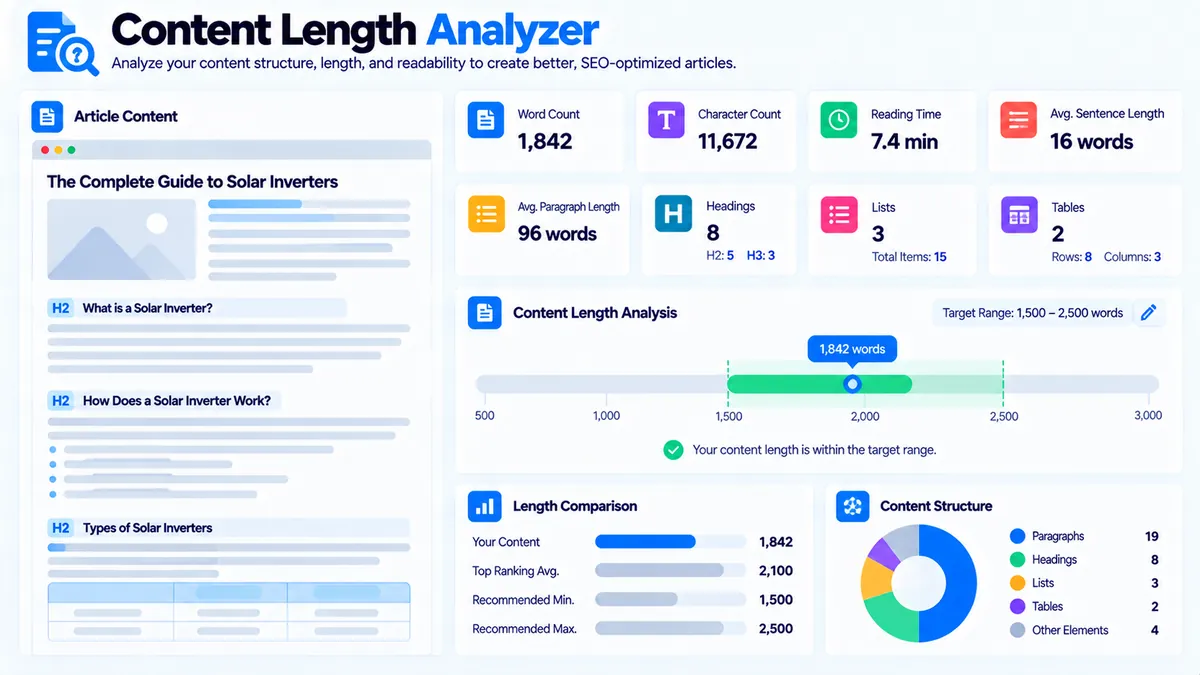
Content Length Analyzer helps you evaluate whether an existing piece of content fits your intended length and structure. It calculates word count, character count, estimated reading time, sentence and paragraph statistics, heading and list structure, table usage, primary-topic mentions, long sentences, and long paragraphs. You can compare the content with a target word count or selected length range, choose an analysis focus, and receive practical findings without sending the content to an AI API.
Content Length Analyzer
Measure word count, sentence and paragraph length, structure, and target-length fit across content you provide.
Content Length Report
Deterministic analysis of the content and length settings you supplied.
View JSON report
Content length is an editorial measurement, not a ranking requirement. The analyzer does not compare your word count with competitors or live search results.
How to Use the Content Length Analyzer in Simple Steps
- Enter the page details. Add the optional Page Title and Primary Topic, then enter your Target Word Count if you have a specific length goal.
- Choose a target length range. Select the range that best represents the intended size of the content: 500–1,000, 1,000–2,000, 2,000–3,500, or 3,500–5,000 words.
- Paste the content into Content to Analyze. You can provide the article or draft you want to review. If you want structural checks, keeping headings, paragraphs, lists, and tables in the supplied content gives the analyzer more information to inspect.
- Choose the analysis focus and options, then analyze. Select Balanced, Readability, or Depth & Coverage focus and optionally enable structure checks. Review the generated score, length status, content statistics, structural findings, and recommendations.
What the Content Length Analyzer Checks
The analyzer goes beyond a basic word counter. It combines content-length statistics with structural and readability-oriented signals.
The report can include:
- Word count
- Character count
- Estimated reading time
- Sentence count
- Average words per sentence
- Average words per paragraph
- Long sentence detection
- Long paragraph detection
- Heading detection
- List-item count
- Table count
- Primary-topic mention
- Length-fit status
- Content assessment score
- Findings and recommendations
These measurements are intended to help you decide whether content is appropriately sized and structured for its purpose.
Word Count and Target Length
The most direct measurement is the number of words in the supplied content.
You can also provide a Target Word Count when you have a specific editorial requirement.
For example:
- Current content: 1,650 words
- Target: 2,500 words
- Difference: 850 words
The difference is a planning signal, not an instruction to add 850 words of filler.
The analyzer also provides broader target ranges:
- 500–1,000 words
- 1,000–2,000 words
- 2,000–3,500 words
- 3,500–5,000 words
Choose the range that reflects the intended content type and depth.
There is no universal word count that guarantees better search performance. A page should be long enough to satisfy its purpose without adding unnecessary repetition.
Character Count
Character count provides another basic measurement of the supplied content.
This can be useful when you are working with editorial systems or content specifications that use character limits or when you want to compare the overall textual size of different drafts.
Character count should be treated as a descriptive metric rather than an SEO quality score.
Estimated Reading Time
The analyzer provides an estimated reading time based on the amount of text supplied.
Reading time is useful when planning user experience, especially for long guides and educational content.
It is an estimate rather than an exact measurement because actual reading speed varies between readers and content types.
Readers may also spend more time on pages containing tables, lists, technical terminology, examples, or complex explanations.
Sentence Count and Average Sentence Length
The analyzer counts sentences and calculates average words per sentence.
Average sentence length can help identify whether a draft may be difficult to scan.
For example, a page with many very long sentences may benefit from:
- Breaking complex sentences into shorter units
- Moving supporting details into separate sentences
- Using lists where several related items need to be presented
- Placing the main answer before supporting explanation
The tool also detects long sentences so you can review them individually rather than rewriting the entire article unnecessarily.
Paragraph Analysis
The analyzer calculates paragraph-related statistics and identifies long paragraphs.
Long paragraphs are not automatically bad. A detailed explanation can legitimately require several sentences.
However, large uninterrupted text blocks can make a page harder to scan, especially on mobile devices.
When a paragraph is flagged, review whether it can be improved by:
- Splitting separate ideas into separate paragraphs
- Adding a useful subheading
- Converting a sequence of items into a list
- Moving secondary detail into a later section
The goal is better information structure, not simply shorter paragraphs.
Heading Detection
When the supplied content contains recognizable headings, the analyzer can inspect the heading structure.
Headings help readers understand the hierarchy of a page and make long content easier to navigate.
A practical structure might look like:
- H2: What Technical SEO Covers
- H3: Crawlability
- H3: Indexability
- H3: Internal Linking
- H2: How to Run a Technical SEO Audit
- H3: Crawl the Website
- H3: Review Indexability
- H3: Check Redirects
The Content Length Analyzer is not a replacement for a dedicated page-structure audit. For broader heading and supporting-topic analysis, Pillar Page Analyzer can be used on a completed pillar page.
Lists and Tables
The analyzer counts list items and tables when the supplied content contains recognizable list or table structures.
Lists can make groups of related items easier to scan.
Tables are useful when readers need to compare multiple attributes.
Neither element should be added simply to increase the content’s structural count. Use them when they make information easier to understand.
For example, a technical SEO article could use a table to compare:
| Issue | What to Check | Typical Action |
|---|---|---|
| Crawlability | Access and crawl paths | Review blocked resources |
| Indexability | Indexing directives | Check relevant directives |
| Canonicals | Canonical targets | Review incorrect or conflicting URLs |
Primary Topic Mention
The optional Primary Topic field allows the analyzer to check whether the supplied content contains mentions of the topic.
For example:
Primary Topic: technical SEO audit
The analyzer can identify whether that topic appears in the supplied content.
This is a basic topic-presence signal. It is not keyword-density analysis, search-volume analysis, or a measure of ranking relevance.
For more detailed keyword-to-content coverage, use Content-to-Keyword Mapper.
Choosing the Analysis Focus
The Content Length Analyzer provides three analysis approaches.
Balanced
Balanced is designed for a general review of content length, readability, and structure.
Use it when you want an overall assessment rather than focusing primarily on one dimension.
Readability
Readability focus gives more attention to sentence and paragraph characteristics.
It is useful when the content feels dense, difficult to scan, or unnecessarily complex.
Depth & Coverage
Depth & Coverage focus is useful when you are reviewing a longer resource and want to consider whether its size and structural coverage are appropriate for the intended topic.
This does not mean longer content is automatically better. The supplied topic and page purpose still determine how much information is appropriate.
Structure Checks
The optional structure checks let the analyzer consider elements such as headings, lists, and tables when assessing the supplied content.
Keeping the original HTML structure in the input can therefore provide a more useful structural analysis than pasting only flattened text.
For example, if your source article contains:
<h2>Technical SEO Audit</h2>
<p>...</p>
<ul><li>...</li><li>...</li></ul>
the structural elements provide more context than the same content without its markup.
Understanding the Content Assessment Score
The tool provides a content assessment score based on the supplied length and structural signals.
Treat the score as an internal planning metric.
It is not:
- A Google ranking score
- A domain-authority score
- A search-quality score from Google
- A guaranteed ranking predictor
- A universal content-quality rating
A lower score can simply indicate that the content does not fit the selected target or that the supplied structure contains issues worth reviewing.
Always inspect the individual findings instead of relying on the score alone.
How to Interpret Length-Fit Status
The length-fit result should be interpreted alongside the target you selected.
Content below the target
If the content is shorter than your selected target range or target word count, review whether important information is missing.
Check:
- Missing subtopics
- Unanswered questions
- Missing examples
- Missing explanations
- Incomplete steps
Do not add words merely to reach a number.
Content within the target
Content within the selected range can still require editing.
Review sentence length, paragraph structure, headings, lists, tables, and topic coverage rather than assuming that length alone means the page is finished.
Content above the target
Longer content is not automatically a problem.
First determine whether the additional length provides useful information. If the content repeats ideas, contains unnecessary introductions, or mixes several unrelated topics, restructuring may be more useful than simply accepting the larger word count.
Long Sentences and Long Paragraphs
The analyzer highlights long sentences and paragraphs so you can focus editing attention where it matters.
For example, a sentence containing several separate ideas may be easier to understand when divided into two or three sentences.
Similarly, a paragraph containing a definition, example, exception, and recommendation may work better as multiple paragraphs under a clear subheading.
These are editing opportunities, not automatic errors.
Content Length Analyzer and Content Update Planner
Content Update Planner focuses on planning a refresh of an existing page using freshness, keywords, missing topics, questions, word count, and update goals.
Content Length Analyzer focuses on the actual length and structure of supplied content.
A practical workflow is:
- Use Content Update Planner to decide what needs updating.
- Paste the existing or revised article into Content Length Analyzer.
- Compare the current word count with the intended target.
- Review long sentences and paragraphs.
- Check heading, list, and table structure.
- Make only the changes that improve the page.
- Re-run the analysis after editing.
This makes the tools complementary rather than interchangeable.
Content Length Analyzer and Content Outline Generator
Content Outline Generator helps plan the structure of a new article before writing.
Content Length Analyzer works on the content after or during drafting.
For a new article, you can:
- Build the outline.
- Draft the article.
- Analyze the finished draft.
- Compare its length with the intended range.
- Review structural signals.
- Adjust sections that are too short, too long, or difficult to scan.
This helps prevent word-count targets from becoming the only planning method.
Content Length Analyzer and Featured Snippet Opportunities
Featured Snippet Opportunity Finder identifies paragraph, list, table, definition, and step-style structures that may be suitable for Featured Snippet-style answers.
Content Length Analyzer serves a different purpose.
Use the length analyzer to identify overly long sentences or paragraphs that could make direct answers harder to scan. Then use the Featured Snippet Opportunity Finder to review whether particular answer blocks have useful snippet-friendly structure.
Neither tool confirms live Google Featured Snippet ownership.
Browser-Side Processing and Privacy
The Content Length Analyzer processes the supplied content in the browser.
It does not require:
- An AI API
- An API key
- Google Search Console
- Live Google search results
- Competitor crawling
- Search-volume data
- Ranking databases
The content analysis is deterministic and based on the text and settings you provide.
Because the tool does not independently research the page or search engine results, its conclusions depend on the supplied content and selected target settings.
What the Tool Does Not Measure
Content Length Analyzer does not directly measure:
- Search rankings
- Search volume
- Keyword difficulty
- Organic traffic
- Backlinks
- Competitor content length
- Google’s preferred word count
- Google’s ranking algorithms
- Search-result positions
- Actual user engagement
It is a content measurement and planning tool, not a live SEO performance monitor.
Practical Example
Suppose you have a guide called:
Technical SEO Audit Guide
You set:
- Primary Topic:
technical SEO audit - Target Word Count:
2,500 - Target Range:
2,000–3,500 - Focus:
Balanced
You paste the current article.
The report might show the actual word count, character count, reading time, sentence statistics, paragraph statistics, heading count, list-item count, table count, topic mention, and length-fit status.
If several paragraphs are flagged as long, review them individually.
If the article is below the target, check whether important technical areas are missing before adding more text.
If the article is already within the target range, focus on clarity and structure instead of increasing the word count automatically.
A Practical Content-Length Workflow
Use the analyzer as part of an editing process rather than as a standalone word counter.
For a new article
- Define the primary topic.
- Build the structure with Content Outline Generator.
- Draft the article.
- Run it through Content Length Analyzer.
- Review length, sentences, paragraphs, headings, lists, and tables.
- Improve sections that need more explanation or better structure.
For an existing article
- Review the page with Content Update Planner.
- Identify missing or outdated areas.
- Update the content.
- Analyze the revised version with Content Length Analyzer.
- Review the final structure and length.
- Use Content-to-Keyword Mapper when you also need a dedicated keyword-coverage check.
For a major content resource
Use Pillar Page Analyzer after the length review when you need to evaluate the broader page structure, supporting topics, headings, and internal-link signals.
Developer Snippets (Automate This Tool Offline)
The Content Length Analyzer does not expose an external API. You can reproduce basic local content measurements with standard Python, PowerShell, or Node.js.
Python
import re
import math

content = """
Search engine optimization helps websites become easier to discover.
A technical SEO audit reviews crawlability, indexability, redirects,
canonical URLs, internal links, and other technical elements.
"""

words = re.findall(r"\b[\w'-]+\b", content)
sentences = re.findall(r"[^.!?]+[.!?]+", content)
paragraphs = [p.strip() for p in re.split(r"\n\s*\n", content) if p.strip()]

word_count = len(words)
sentence_count = len(sentences)
paragraph_count = len(paragraphs)

average_sentence_length = (
    word_count / sentence_count if sentence_count else 0
)

average_paragraph_length = (
    word_count / paragraph_count if paragraph_count else 0
)

reading_time = word_count / 200

print("Words:", word_count)
print("Characters:", len(content))
print("Sentences:", sentence_count)
print("Paragraphs:", paragraph_count)
print("Average sentence length:", round(average_sentence_length, 1))
print("Average paragraph length:", round(average_paragraph_length, 1))
print("Estimated reading time:", round(reading_time, 1), "minutes")
PowerShell
$content = @"
Search engine optimization helps websites become easier to discover.
A technical SEO audit reviews crawlability, indexability, redirects,
canonical URLs, internal links, and other technical elements.
"@

$words = ($content -split '\s+' | Where-Object { $_ }).Count
$sentences = [regex]::Matches($content, '[^.!?]+[.!?]+').Count
$paragraphs = ($content -split '\r?\n\s*\r?\n' | Where-Object {
    $_.Trim()
}).Count

$averageSentenceLength = if ($sentences) {
    $words / $sentences
} else {
    0
}

$averageParagraphLength = if ($paragraphs) {
    $words / $paragraphs
} else {
    0
}

$readingTime = $words / 200

Write-Output "Words: $words"
Write-Output "Characters: $($content.Length)"
Write-Output "Sentences: $sentences"
Write-Output "Paragraphs: $paragraphs"
Write-Output "Average sentence length: $([math]::Round($averageSentenceLength, 1))"
Write-Output "Average paragraph length: $([math]::Round($averageParagraphLength, 1))"
Write-Output "Estimated reading time: $([math]::Round($readingTime, 1)) minutes"
Node.js
const content = `
Search engine optimization helps websites become easier to discover.
A technical SEO audit reviews crawlability, indexability, redirects,
canonical URLs, internal links, and other technical elements.
`;

const words = content.match(/\b[\w'-]+\b/g) || [];
const sentences = content.match(/[^.!?]+[.!?]+/g) || [];
const paragraphs = content
  .split(/\r?\n\s*\r?\n/)
  .map(item => item.trim())
  .filter(Boolean);

const wordCount = words.length;
const sentenceCount = sentences.length;
const paragraphCount = paragraphs.length;

const averageSentenceLength =
  sentenceCount ? wordCount / sentenceCount : 0;

const averageParagraphLength =
  paragraphCount ? wordCount / paragraphCount : 0;

const readingTime = wordCount / 200;

console.log("Words:", wordCount);
console.log("Characters:", content.length);
console.log("Sentences:", sentenceCount);
console.log("Paragraphs:", paragraphCount);
console.log("Average sentence length:", averageSentenceLength.toFixed(1));
console.log("Average paragraph length:", averageParagraphLength.toFixed(1));
console.log("Estimated reading time:", readingTime.toFixed(1), "minutes");
These snippets reproduce basic measurements only. They do not reproduce the complete PKCapra scoring, structure detection, UI, or report-generation logic.
Excel Power Query Workflow
Excel Power Query can be useful when you manage multiple content drafts in a spreadsheet.
A practical content-review table can contain:
| Page | Current Words | Target Words | Primary Topic | Reading Time | Review Status |
|---|---|---|---|---|---|
| Technical SEO Audit Guide | 1,850 | 2,500 | technical SEO audit | 9.3 min | Review |
| Internal Linking Guide | 1,700 | 2,000 | internal linking | 8.5 min | Review |
| XML Sitemap Guide | 1,100 | 1,500 | XML sitemaps | 5.5 min | Expand |
You can use Power Query to:
- Remove duplicate page rows.
- Standardize page titles.
- Convert word-count fields to numbers.
- Calculate the difference between current and target words.
- Flag pages outside your preferred target range.
- Sort pages by the size of the word-count gap.
- Create an editorial review queue.
For individual-page structural analysis, paste the content into Content Length Analyzer after the spreadsheet review.
Improving Content Without Chasing Word Count
A useful content-length workflow asks whether every section earns its place.
If a page is short, consider whether it needs:
- A missing explanation
- A practical example
- A useful process
- An important question
- A relevant comparison
- Supporting evidence
- A necessary subtopic
If a page is long, look for:
- Repeated explanations
- Unnecessary introductions
- Long paragraphs containing multiple ideas
- Repeated examples
- Sections that belong on another page
- Details that do not support the primary purpose
This approach produces a more useful page than simply trying to hit a predetermined number.
Frequently Asked Questions
What is a Content Length Analyzer?
A Content Length Analyzer measures the length and structure of supplied content, including words, characters, reading time, sentences, paragraphs, headings, lists, tables, and selected content-quality signals.
Is Content Length Analyzer just a word counter?
No. It includes word counting but also evaluates sentence and paragraph length, structural elements, target length fit, primary-topic mentions, and other content signals.
Does a longer article automatically get better SEO results?
No. The tool does not treat a higher word count as an automatic SEO advantage. Content should be long enough to satisfy its purpose and no longer than necessary.
What target word-count ranges are available?
The tool provides 500–1,000, 1,000–2,000, 2,000–3,500, and 3,500–5,000 word ranges, along with an optional specific Target Word Count.
What does estimated reading time mean?
Estimated reading time is a calculated approximation based on the amount of text. Actual reading time varies by reader, subject complexity, formatting, and reading speed.
Does the analyzer check long sentences?
Yes. The tool calculates average sentence length and identifies long sentences for review.
Does it check long paragraphs?
Yes. The analyzer calculates paragraph statistics and can flag long paragraphs for review.
Can it analyze headings, lists, and tables?
Yes. When recognizable structure is supplied, the analyzer can count headings, list items, and tables and use structural information in its analysis.
Can I enter a Primary Topic?
Yes. The optional Primary Topic field lets the tool check for topic mentions in the supplied content.
Does Primary Topic mention mean keyword density?
No. It is a basic topic-presence signal and should not be interpreted as keyword-density or ranking analysis.
Does the tool use an AI API?
No. The analysis is performed with deterministic browser-side processing and does not require an AI API or API key.
Does it check Google rankings?
No. The tool does not fetch rankings, search results, search volume, or competitor data.
Can I export the analysis?
Yes. The tool provides Copy Report, Copy JSON, Download JSON, and direct Download PDF options.
Does the PDF open a print window?
No. The current tool generates the PDF directly in the browser for download rather than opening a browser print workflow.