
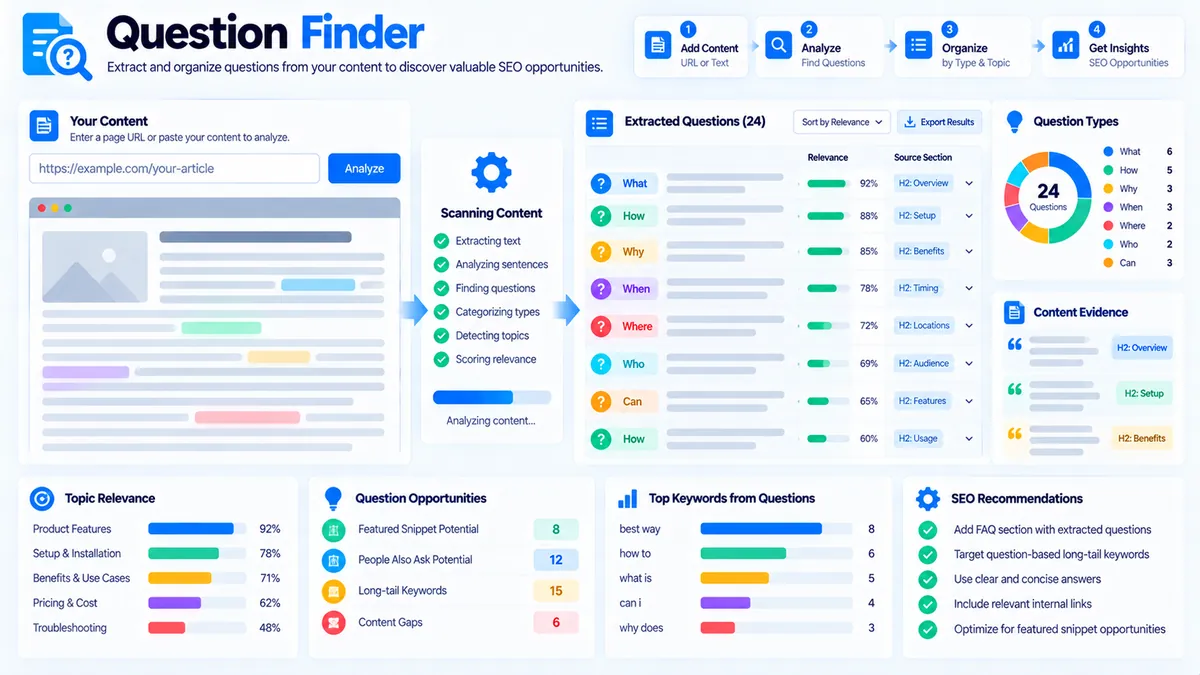
Question Finder helps you extract and organize questions from existing content. Paste your article, draft, documentation, or other text into the tool, optionally add a primary topic, choose the question type and result limit, and analyze the content to identify actual questions and question-like sentences.
The tool runs its analysis directly in your browser using deterministic text-processing rules. It does not require an AI API, Google connection, search-volume database, or external keyword service.
Question Finder
Extract real question candidates from the content you supply and organize them by question type and relevance signals.
Question Finder Report
Extracted from the content and topic you supplied.
View JSON report
How to Use the Question Finder in Simple Steps
- Paste your article, draft, or other text into the content field.
- Enter a primary topic if you want a topic-relevance signal.
- Select the question type you want to find and choose the maximum number of questions to return.
- Click the analysis button and review the extracted questions, question types, content evidence, and relevance signals.
You can then copy the report, copy the JSON data, download the JSON report, or download the PDF report.
What Question Finder Checks
Question Finder analyzes the text you provide and looks for questions that are already present or expressed as question-like sentences.
The results can include:
- Extracted questions
- Question-like sentences
- Question type
- Content evidence
- Topic relevance signals when a primary topic is provided
- Question-type breakdown
- Results limited by your selected maximum
The tool is designed for extracting questions from existing material. It does not claim that an extracted question has search demand or that it should automatically become an FAQ.
Question Types
Question Finder can organize detected questions into common question patterns.
What Questions
These questions generally ask for a definition, explanation, object, concept, or specific piece of information.
Examples include:
- What is a canonical URL?
- What does a redirect do?
- What is keyword clustering?
How Questions
These questions generally ask about a process, method, or implementation.
Examples include:
- How do I check a redirect?
- How can I organize related keywords?
- How does a sitemap work?
Why Questions
These questions generally ask for a reason, cause, or explanation.
Examples include:
- Why is a page not indexed?
- Why does a redirect chain matter?
- Why should related topics be grouped?
When Questions
These questions generally ask about timing, conditions, or situations.
Examples include:
- When should I update an article?
- When should a redirect be used?
Where Questions
These questions generally ask about a location, source, setting, or destination.
Examples include:
- Where can I find the sitemap?
- Where should the canonical URL be specified?
Who Questions
These questions generally ask about a person, role, organization, or responsible party.
Examples include:
- Who should review the page?
- Who manages the website configuration?
Can, Should, and Does Questions
These questions generally express capability, recommendation, or yes/no checks.
Examples include:
- Can a page have multiple redirects?
- Should this keyword be included?
- Does the page contain the required heading?
The exact classification depends on the question wording detected in the supplied content.
Question Finder vs. FAQ Finder
Question Finder and FAQ Finder serve different purposes.
Question Finder focuses on finding questions that already exist in the supplied material or are expressed as question-like sentences.
FAQ Finder focuses on identifying FAQ opportunities from content patterns and topic signals.
If you already have an article and want to extract its existing questions, Question Finder is the more direct workflow.
If you want to identify potential FAQ topics that could be developed from the content, use FAQ Finder.
The two tools can also be used together: first extract existing questions, then review broader FAQ opportunities separately.
Using Question Finder for SEO Content Work
Question extraction can help during content review because questions often reveal the information readers may need clarified.
For example, an SEO article might contain questions about redirects, title tags, meta descriptions, keyword usage, or internal links. Extracting those questions gives you a practical list to review before publishing or updating the page.
You can then compare the questions with the actual content and decide whether each question is already answered clearly.
For broader keyword-to-content analysis, the Content-to-Keyword Mapper can be used alongside the question workflow to check how target keywords are represented in the page.
When related keywords need to be organized into topic groups, Keyword Clustering provides a separate clustering workflow.
Using a Primary Topic
The Primary Topic field is optional.
When you provide a topic, Question Finder can include a relevance signal that helps you review whether detected questions are related to the subject you are analyzing.
For example, if the primary topic is “technical SEO,” questions about crawling, indexing, redirects, canonical URLs, and XML sitemaps may be more relevant to the review than unrelated questions in the same document.
The relevance signal should be treated as a content-analysis aid rather than a measurement of Google search relevance or search demand.
Choosing the Result Limit
Question Finder lets you control how many questions are returned.
A smaller limit is useful when you want a concise list of the most relevant detected questions.
A larger limit is useful when reviewing a long article, documentation set, or detailed draft containing many questions.
The result limit controls the size of the displayed question set. It does not represent search volume, ranking potential, or question popularity.
How to Interpret the Results
A detected question is evidence that the supplied content contains a question or question-like sentence.
That does not automatically mean the question needs a dedicated FAQ.
Review each question against the surrounding content:
- Is the question genuinely relevant to the page?
- Is it already answered clearly?
- Would making the answer easier to find improve the page?
- Does the question reveal a useful content gap?
- Is the question specific enough to be useful to the intended reader?
If a question is already answered well, you may simply keep it as part of the existing content.
If the question exposes missing information, it may indicate an opportunity to expand the relevant section.
For larger pillar content, you can also review the page with the Pillar Page Analyzer to examine supporting topics, headings, content alignment, and internal-link signals.
Question Finder Does Not Provide Search Demand
Question Finder is a content-extraction tool, not a live search-data tool.
It does not provide:
- Google search volume
- Keyword difficulty
- Google rankings
- People Also Ask results
- Live SERP questions
- Competitor question extraction
- Search-demand estimates
- Ranking predictions
A question found in an article is therefore not proof that users search for that exact wording.
If you need to analyze the likely intent behind a search phrase, use the Search Intent Analyzer as a separate workflow.
Privacy and Processing
Question Finder performs its analysis in the browser.
The supplied text is processed by the tool’s client-side analysis rather than being sent to an external AI service for question generation.
No API key is required for the Question Finder analysis.
This browser-side approach is suitable for reviewing drafts and text that you want to analyze without connecting the tool to an external search or AI provider.
Practical Content Workflow
A useful workflow for an existing article is:
- Paste the article into Question Finder.
- Extract the available questions.
- Review the question types and supporting evidence.
- Use the primary topic field when you want an additional relevance signal.
- Identify questions that are unclear, unanswered, or useful for readers.
- Improve the relevant article sections.
- Run FAQ Finder separately if you also want to identify broader FAQ opportunities.
For a content set rather than a single page, Content Gap Analyzer can help identify potentially missing topics across the material you are reviewing.
Developer Snippets (Automate This Tool Offline)
You can reproduce a basic question-extraction workflow offline with Python.
The following example reads a text file, identifies lines ending with a question mark or beginning with common question words, removes duplicates, and writes the results to CSV.
import csv
import re
from pathlib import Path

source = Path("article.txt")
output = Path("questions.csv")

text = source.read_text(encoding="utf-8")

pattern = re.compile(
    r"^(what|how|why|when|where|who|can|should|does|do|is|are|"
    r"could|would|will|may)\b",
    re.IGNORECASE
)

questions = []

for line in text.splitlines():
    line = re.sub(r"\s+", " ", line).strip()

    if not line:
        continue

    if line.endswith("?") or pattern.match(line):
        questions.append(line)

seen = set()
unique_questions = []

for question in questions:
    key = question.casefold()

    if key in seen:
        continue

    seen.add(key)
    unique_questions.append(question)

with output.open("w", newline="", encoding="utf-8") as handle:
    writer = csv.writer(handle)
    writer.writerow(["question"])

    for question in unique_questions:
        writer.writerow([question])

print(f"Saved {len(unique_questions)} questions to {output}")
This script provides a basic offline extraction workflow. It is not intended to reproduce every browser-side classification and reporting rule used by Question Finder.
PowerShell Alternative
You can also extract question-like lines from a plain-text file with PowerShell.
$inputFile = "article.txt"
$outputFile = "questions.csv"

$pattern = '^(what|how|why|when|where|who|can|should|does|do|is|are|could|would|will|may)\b'

$questions = Get-Content -Path $inputFile -Encoding UTF8 |
    ForEach-Object {
        $line = $_.Trim()

        if (
            $line.EndsWith('?') -or
            $line -match $pattern
        ) {
            [PSCustomObject]@{
                Question = $line
            }
        }
    } |
    Where-Object { $_.Question } |
    Sort-Object Question -Unique

$questions | Export-Csv -Path $outputFile -NoTypeInformation -Encoding UTF8

Write-Host "Saved $($questions.Count) questions to $outputFile"
Automate Question Extraction with Excel Power Query
Excel Power Query can be used when questions need to be extracted repeatedly from content stored in spreadsheets.
- Put your source content into an Excel table.
- Select the table and choose Data → From Table/Range.
- Split the content into rows or lines as appropriate for your source structure.
- Filter rows that contain
?or begin with common question words such asWhat,How,Why,When,Where, orCan. - Remove duplicate questions.
- Load the resulting question list back into Excel.
- Review the questions before using them in the final content.
Power Query is useful for repeatable internal content workflows because the transformation can be refreshed when the source data changes.
Question Finder is useful when you want the browser-based analysis, question classification, topic relevance signals, evidence, and downloadable reports in one workflow.
Building Useful Content from Extracted Questions
Extracting questions is only the first step.
A good content workflow reviews what each question means in context.
If the question is already answered, make sure the answer is easy to find and sufficiently clear.
If the question is only partially answered, expand the relevant section.
If the question is not answered at all, decide whether the page should address it or whether it belongs on a different page.
This prevents question extraction from turning into a collection of unrelated FAQ entries.
For a larger content architecture, the Topic Cluster Generator can help organize related subjects into supporting topic groups before deciding where individual questions belong.
Frequently Asked Questions
What is Question Finder?
Question Finder is a browser-based tool that extracts questions and question-like sentences from supplied content.
Does Question Finder use AI?
No. Question Finder uses deterministic text-processing rules and does not require an external AI API.
Can Question Finder extract questions from an article?
Yes. It can detect explicit questions and question-like sentences in supplied text.
Can I filter the questions by type?
Yes. The tool provides question-type filtering for common categories such as What, How, Why, When, Where, Who, and Can/Should/Does patterns.
Can I provide a primary topic?
Yes. A primary topic can be supplied to add a relevance signal to the analysis.
Does Question Finder show Google search volume?
No. Question Finder does not provide search volume or other live Google search metrics.
Is Question Finder the same as FAQ Finder?
No. Question Finder focuses on extracting questions from content, while FAQ Finder focuses on identifying broader FAQ opportunities.
Can I download the results?
Yes. Question Finder supports Copy Report, Copy JSON, Download JSON, and Download PDF.
Does Question Finder send my content to an AI service?
No. The analysis runs in the browser and does not require an external AI service.
Can an extracted question be treated as a keyword opportunity?
No. An extracted question confirms that the question appears in the supplied content, but it does not establish search demand or ranking potential.