
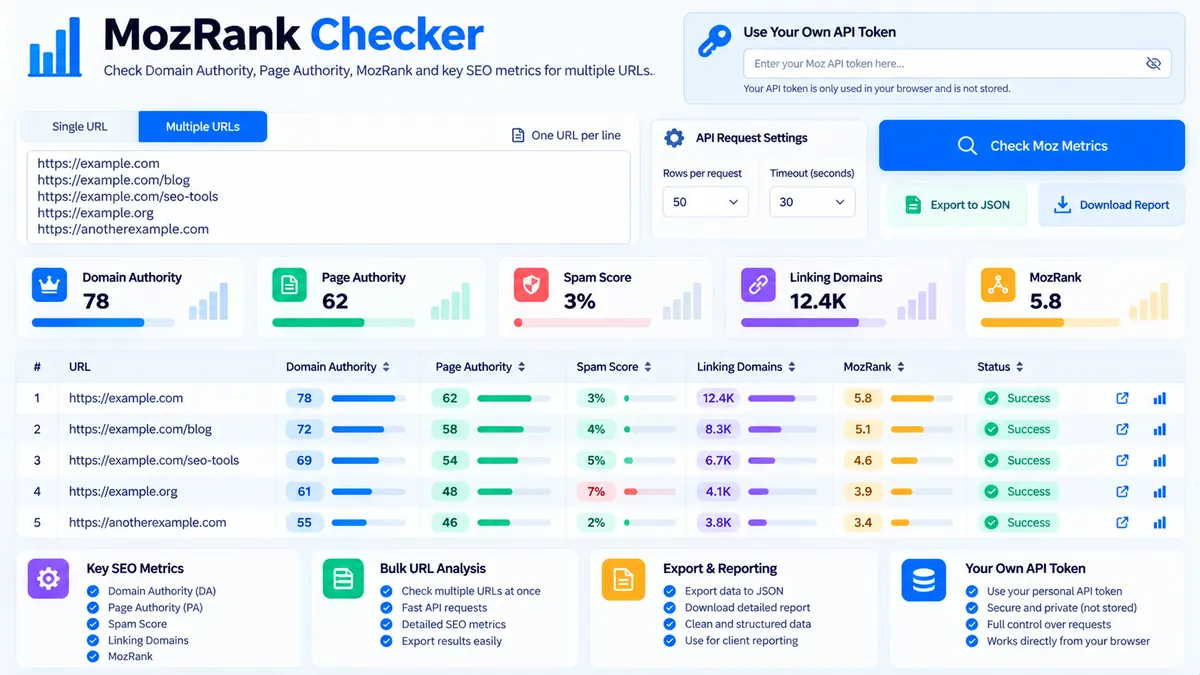
Blacklist-style API credentials are not required from PKCapra for the Moz metrics workflow. The MozRank Checker lets users provide their own Moz API token and submit URLs or domains for an on-demand metrics request. The token is used for the current lookup rather than being configured as a permanent PKCapra API credential, and the tool does not invent a MozRank value when the API does not return one.
MozRank & SEO Metrics Checker
Use your own Moz API token to request current URL metrics without storing your token in PKCapra.
Moz SEO Metrics Results
Metrics returned by the current Moz URL Metrics API.
| Target | MozRank | DA | PA | Spam Score | Linking Root Domains | Status |
|---|
View JSON report
How to Use the MozRank Checker in Simple Steps
- Enter your Moz API token in the Moz API Token field. The token is supplied by you for the lookup and is not configured as a site-wide PKCapra API key.
- Enter one or more URLs or domains in the URL input area. The current tool accepts up to 10 targets per lookup so you can check several pages or domains in one request.
- Click Check Moz Metrics. PKCapra sends the lookup request to the Moz metrics service through the tool’s on-demand server request and returns the metrics available for each submitted target.
- Review or export the results. The tool can show metrics such as Domain Authority, Page Authority, Spam Score, linking-domain information, and MozRank when that field is actually returned. You can then use Copy Report, Copy JSON, Download JSON, or Download PDF to preserve the results.
What the MozRank Checker Actually Checks
The MozRank Checker is a user-supplied-credential API tool rather than a locally calculated SEO scoring algorithm.
The tool does not attempt to recreate Moz’s link graph or mathematically estimate a proprietary Moz metric from a URL. It requests the available URL metrics from Moz and displays the values returned by the API.
Depending on the response available for the submitted target, the results can include:
- Domain Authority (DA)
- Page Authority (PA)
- Spam Score
- Linking root-domain information
- Other returned URL-level metrics supported by the configured Moz endpoint
- MozRank when a MozRank value is actually returned by the API
The distinction is important because a calculated number that merely resembles MozRank would not be a genuine MozRank value.
MozRank Is Not Estimated by PKCapra
MozRank is treated as an API-provided metric in this tool.
If the API response contains a usable MozRank value, the tool displays it. If the current API response does not contain a MozRank value, the tool does not substitute an estimated score, a third-party score, or a PKCapra-generated number.
This prevents the interface from presenting an internally calculated value as if it were an official Moz metric.
Bring Your Own Moz API Token
The current version uses a Bring Your Own Token model.
That means:
- PKCapra does not require you to configure a global Moz API key.
- Each user can provide their own Moz API token.
- The lookup is initiated only when the user clicks Check Moz Metrics.
- The token is not configured as a permanent WordPress plugin setting.
- The tool does not require a background API process.
- The workflow supports users who already have access to the required Moz API service.
The request still uses the PKCapra server because the browser cannot be assumed to communicate directly with every external API endpoint. This is an on-demand request rather than a continuous background process.
What Happens to the API Token
The token is supplied as part of the individual lookup workflow.
PKCapra does not require the site owner to enter a permanent Moz credential under WordPress Settings for this tool. This removes the need for the site administrator to purchase, maintain, rotate, or expose a shared Moz account for every visitor.
Users should treat their own API token as a credential and should not paste it into public content, screenshots, shared reports, or code repositories.
Why the Tool Uses an On-Demand Server Request
A browser-based API request is not always possible simply because an API has an HTTPS endpoint. Cross-origin browser restrictions can prevent a website from directly calling an external service.
The current architecture therefore uses WordPress as a lightweight request bridge:
- The visitor supplies the URL and their own token.
- The browser sends the lookup request to the PKCapra WordPress endpoint.
- WordPress validates the request and contacts the configured Moz endpoint.
- The returned metrics are sent back to the browser.
- The visitor can inspect, copy, or download the results.
The tool does not run scheduled Moz checks, continuously poll the API, or perform background crawling.
Understanding Domain Authority and Page Authority
Domain Authority and Page Authority are different URL metrics.
Domain Authority (DA) is a domain-level metric associated with the authority of a website’s domain within Moz’s metric system.
Page Authority (PA) is a page-level metric associated with the individual URL being evaluated.
A domain can therefore have different page-level values across different URLs.
For example, checking:
and:
does not necessarily produce identical page-level metrics because the URLs represent different pages.
Use the URL-level result when you are evaluating a specific page and the domain-level result when your analysis concerns the wider domain.
Understanding Spam Score
Spam Score is a separate Moz metric from authority measurements.
A Spam Score result should not be interpreted as a universal declaration that a website is spam. It is a metric supplied by the underlying provider and should be interpreted in the context of the provider’s methodology and the other signals available for the website.
Do not combine Spam Score with DA or PA into a single PKCapra score. The tool reports the returned metrics separately so the user can interpret each metric according to its intended purpose.
Why Results Can Differ Between URLs
SEO metrics can vary between individual URLs.
Different pages can have different:
- Incoming link profiles
- Linking root domains
- Page-level authority signals
- Indexed link data
- Historical link relationships
- Provider-specific metric values
For this reason, checking a homepage does not automatically provide the same information as checking a specific article, landing page, category page, or product URL.
Checking Multiple URLs
The current interface supports up to 10 URLs or domains in one lookup.
This is useful for workflows such as:
- Comparing several important website pages
- Reviewing a group of landing pages
- Checking a set of competitor URLs
- Auditing selected content pages
- Reviewing a small backlink or outreach target list
The results remain associated with their individual URLs so that one page’s metrics are not confused with another page’s metrics.
Interpreting Missing Metrics
A missing metric does not automatically mean that the URL has a zero score.
An API response can omit a metric for several reasons, including the availability of that field for the requested endpoint, the target being unavailable to the provider, or changes in the provider’s supported metric set.
The correct interpretation is therefore metric not returned, not automatically zero.
The tool follows this principle for MozRank in particular. It does not manufacture a value when the API does not return one.
Developer Snippets (Automate This Tool Offline)
The downloaded JSON report can be processed locally without making another API request. This is useful when you want to create a custom CSV report, filter results, or combine several previously downloaded Moz reports.
The following Python script reads a PKCapra Moz metrics JSON export and creates a clean CSV file.
import csv
import json
import sys
from pathlib import Path

input_file = Path("mozrank-results.json")
output_file = Path("mozrank-results.csv")

if not input_file.exists():
    raise FileNotFoundError(f"Input file not found: {input_file}")

with input_file.open("r", encoding="utf-8") as file:
    data = json.load(file)

if isinstance(data, dict):
    records = data.get("results", data.get("data", []))
elif isinstance(data, list):
    records = data
else:
    raise ValueError("Unsupported JSON structure.")

if not isinstance(records, list):
    raise ValueError("The JSON results section must contain a list.")

rows = []

for item in records:
    if not isinstance(item, dict):
        continue

    rows.append({
        "URL": item.get("url", ""),
        "Domain Authority": item.get("domain_authority", item.get("da", "")),
        "Page Authority": item.get("page_authority", item.get("pa", "")),
        "Spam Score": item.get("spam_score", ""),
        "MozRank": item.get("mozrank", ""),
        "Status": item.get("status", "")
    })

fieldnames = [
    "URL",
    "Domain Authority",
    "Page Authority",
    "Spam Score",
    "MozRank",
    "Status"
]

with output_file.open("w", newline="", encoding="utf-8") as file:
    writer = csv.DictWriter(file, fieldnames=fieldnames)
    writer.writeheader()
    writer.writerows(rows)

print(f"Created: {output_file}")
This workflow is intentionally offline after the JSON report has been downloaded. It does not require a Moz token because it is processing an existing result file rather than requesting new metrics.
Native Software Workaround: Excel Power Query
Excel Power Query can turn a downloaded Moz JSON report into a reusable analysis table without requiring another API call.
- Download the JSON report from the MozRank Checker.
- Open Microsoft Excel.
- Select Data → Get Data → From File → From JSON.
- Select the downloaded JSON file.
- Power Query will open the JSON structure.
- Expand the results collection when necessary.
- Select the URL, authority, Spam Score, MozRank, and status fields.
- Use Transform → Data Type to assign appropriate numeric types to metric columns.
- Select Home → Close & Load to place the results into an Excel worksheet.
- Save the workbook as your local reporting file.
For repeated analysis, replace the JSON file with a new export and use Data → Refresh All.
This workflow keeps API access separate from spreadsheet analysis. Excel works with the saved output rather than requiring the Moz API token itself.
Related PKCapra SEO Workflows
Authority metrics are most useful when combined with other page-level checks.
Use the Title Tag Analyzer to inspect title-tag length, structure, and optimization signals for an individual page.
Use the Meta Description Analyzer when reviewing the page’s search-result description alongside its authority metrics.
Use the Open Graph Analyzer when the same URL also needs social-sharing metadata checks.
Use the Page Speed Analyzer when performance is part of the wider page audit.
For the broader collection of webmaster utilities, see SEO & Website Tools.
Frequently Asked Questions
What is a MozRank Checker?
A MozRank Checker retrieves MozRank when the Moz API returns that metric for the requested URL. PKCapra does not calculate or estimate MozRank independently.
Do I need my own Moz API token?
Yes. The current PKCapra workflow uses a Bring Your Own Token model, so the visitor supplies their own Moz API token for the lookup.
Does PKCapra provide a Moz API key?
No. PKCapra does not provide or require a shared site-wide Moz API credential for this tool.
Is my Moz API token stored in WordPress?
No. The tool is designed around an on-demand user-supplied token rather than a permanent PKCapra WordPress API-key setting.
Does the tool run Moz checks automatically in the background?
No. A Moz request is made when the user runs a lookup; the tool does not continuously poll Moz or schedule background checks.
Can I check more than one URL?
Yes. The current interface supports up to 10 URLs or domains in one lookup.
Does the tool always return MozRank?
No. MozRank is displayed only when the API response actually contains a usable MozRank value. The tool does not estimate missing MozRank data.
What is the difference between DA and PA?
DA is a domain-level authority metric, while PA is a page-level authority metric. A website can therefore have different PA values for different URLs.
What does a missing metric mean?
A missing metric means that the requested response did not provide a usable value for that field. It should not automatically be interpreted as zero.
Can I download the Moz results?
Yes. The tool supports JSON and PDF downloads, and it also provides Copy Report and Copy JSON actions for preserving the results.