
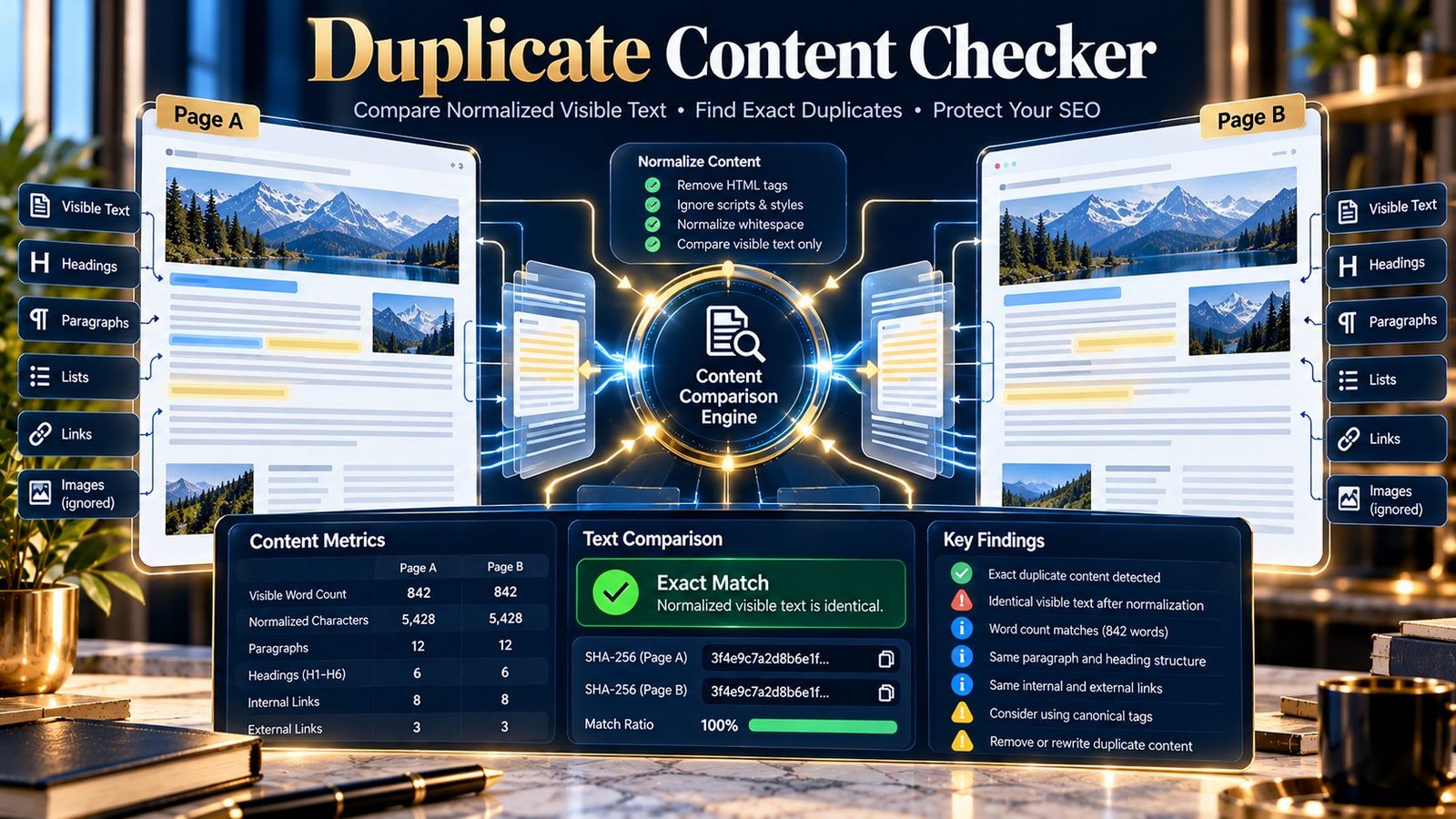
Duplicate Content Checker helps you determine whether two supplied content sources contain the same visible text after PKCapra’s normalization process. Compare two public webpage URLs, two pasted content sources, or a combination of URL and pasted content to identify exact duplicate content and review the evidence behind the comparison.
Duplicate Content Checker
Compare two webpages or two content inputs to determine whether their normalized visible content is an exact duplicate.
| Signal | Source A | Source B | Result |
|---|
The Duplicate Content Signal is a deterministic PKCapra diagnostic. An exact match means the normalized visible text matched; it does not determine search-engine treatment or represent a Google duplicate-content score.
Public URLs are fetched by the PKCapra analysis endpoint. Pasted content is sent to the same endpoint for comparison. Do not submit confidential or sensitive material.
What Is Duplicate Content?
Duplicate content is substantially the same content appearing in more than one location.
On a website, duplication can occur when similar or identical page content is available through multiple URLs, when pages are unintentionally copied, or when the same text is published across different resources.
Duplicate content is different from near-duplicate content.
The PKCapra Duplicate Content Checker is designed specifically for exact duplicate-content detection after normalization. It does not attempt to determine whether two pages are merely similar in meaning.
What Does the Duplicate Content Checker Do?
The tool compares two content sources and reports whether their normalized visible text is an exact match.
You can compare:
- Public URL A with public URL B
- Pasted content A with pasted content B
- Public URL A with pasted content B
- Pasted content A with public URL B
The report includes:
- Duplicate-content status
- Normalized SHA-256 comparison
- Visible word count for each source
- Normalized character length for each source
- Source details
- Duplicate-content checks
- Priority findings
- JSON export
- PDF download
The analysis is deterministic. It does not use an AI model or an external semantic similarity service.
Why Duplicate Content Matters
Duplicate content can make a website harder to maintain and can create uncertainty about which URL should represent a particular piece of information.
Potential causes include:
- The same content being published at multiple URLs
- Accidental page duplication
- Copied page content
- Multiple versions of a resource
- Content migration problems
- Template or CMS duplication
- Different resources containing exactly the same visible text
Finding duplication is only the first step.
After identifying a duplicate, you need to determine whether the duplication is intentional and whether the URLs have a clear purpose.
Duplicate Content Does Not Automatically Mean a Penalty
Duplicate content should not automatically be treated as a search-engine penalty.
A website can legitimately contain repeated text.
For example, common elements such as navigation, branding, legal notices, product attributes, or standard template sections can appear across many pages.
The important question is whether the pages provide distinct value and whether the duplication creates a technical or editorial problem.
The Duplicate Content Checker therefore reports an exact-match finding rather than declaring that a page has received a search-engine penalty.
Exact Duplicate vs. Near-Duplicate Content
These are different checks.
Exact duplicate content
Two sources produce the same normalized visible text.
This is what the Duplicate Content Checker is designed to identify.
Near-duplicate content
Two sources are highly similar but contain differences such as:
- A changed paragraph
- Additional sentences
- Different wording
- Updated information
- Different headings
- Minor content changes
The current Duplicate Content Checker does not perform semantic similarity or near-duplicate analysis.
A separate near-duplicate workflow should be used when the question is whether two pages are substantially similar rather than exactly identical.
How the Duplicate Content Checker Works
1. Provide the first source
Source A can be either:
- A public webpage URL
- Pasted content
2. Provide the second source
Source B can independently be either:
- A public webpage URL
- Pasted content
This allows URL-to-URL, content-to-content, and mixed comparisons.
3. Run the comparison
For public URLs, PKCapra retrieves the webpage content through the analysis endpoint.
For pasted content, the supplied content is sent to the same endpoint for comparison.
The analyzer extracts the visible text and applies its normalization process before comparison.
4. Review the duplicate result
The tool compares the normalized content and reports whether the two sources match exactly.
It also provides source-level measurements so you can understand what was compared.
Understanding Normalization
Webpage source code can contain differences that do not represent differences in the actual visible text.
For example, two HTML documents can use different markup while displaying the same written content.
The Duplicate Content Checker therefore compares normalized visible text rather than simply comparing raw HTML source.
The resulting normalized content is represented through a SHA-256 comparison.
This allows the tool to determine whether the normalized content representations match.
Understanding the SHA-256 Comparison
SHA-256 is used as a deterministic fingerprint of the normalized content.
When the normalized representations match, the corresponding fingerprints match.
When they differ, the fingerprints differ.
The fingerprint is evidence of the comparison performed by the tool. It does not provide semantic analysis or explain which individual sentence differs.
The tool therefore combines the fingerprint comparison with word-count, character-length, source, and finding information.
Understanding Visible Word Count
The report shows the visible word count for each source.
This provides useful context when investigating a duplicate result.
For example:
| Source | Visible Words | Normalized Characters | Result |
|---|---|---|---|
| Source A | 850 | 5,420 | Exact match |
| Source B | 850 | 5,420 | Exact match |
Matching measurements support the duplicate finding, while the normalized fingerprint provides the deterministic comparison.
Different word counts or character lengths indicate that the normalized content is not identical.
Understanding Normalized Character Length
The tool also reports the normalized character length of each source.
This can help distinguish between:
- Identical normalized content
- Content with additional text
- Content with removed text
- Other differences in the normalized representation
Character length should be interpreted together with the duplicate status and fingerprint comparison.
URL-to-URL Comparison
URL-to-URL comparison is useful when investigating possible duplication between live pages.
For example:
https://example.com/page-a/https://example.com/page-b/
If both URLs expose the same normalized visible text, the tool can identify them as an exact duplicate pair.
After finding a duplicate, investigate why both URLs exist.
Possible explanations include:
- Intentional alternate versions
- Migration remnants
- CMS duplication
- Incorrect URL structures
- Accidentally copied pages
- Different URLs serving the same resource
Pasted Content Comparison
You do not need two publicly accessible pages to use the tool.
Pasted-content comparison can be useful for:
- Draft review
- Content migration
- Editorial QA
- Comparing two document versions
- Checking copied text
- Reviewing content before publication
This also allows you to compare content that is not yet publicly available.
Mixed URL and Content Comparison
You can compare a public webpage against pasted content.
For example, you may have:
- Source A: existing published page
- Source B: proposed replacement content
The comparison can show whether the proposed content is exactly the same as the existing visible content after normalization.
This can be useful during content updates and migration workflows.
What an Exact Duplicate Result Means
An exact duplicate result means that the normalized visible-text representations of the two supplied sources match according to the tool’s comparison method.
This is a precise statement about the analyzed content.
It does not automatically tell you:
- Which URL should remain
- Whether one page should be redirected
- Whether a canonical tag should be changed
- Whether the duplication is intentional
- Whether search engines will treat the pages identically
Those decisions require investigation of the site’s architecture and purpose.
What a Non-Duplicate Result Means
A non-duplicate result means the normalized visible-text representations differ.
It does not mean the pages are completely unrelated.
Two pages can have:
- Very similar wording
- Many shared sections
- Similar structure
- The same topic
- Minor textual differences
and still fail an exact duplicate comparison.
This is why exact duplicate detection should not be confused with semantic similarity.
Common Causes of Duplicate Content
Accidental page copies
A page may have been duplicated in the CMS and published under another URL.
Content migration
Old and new URLs may temporarily expose the same content during a migration.
Multiple URL versions
Different URL structures may expose the same page content.
CMS duplication
A CMS or plugin can sometimes create multiple pages containing the same material.
Regional or language implementations
Different versions may intentionally share substantial content while serving different audiences.
These cases require contextual review rather than automatic removal.
What to Do After Finding Duplicate Content
Finding an exact duplicate should trigger an investigation.
Determine whether the duplication is intentional
Ask why both sources exist.
If both pages serve different legitimate purposes, the duplication may be intentional.
Identify the preferred resource
If two URLs should represent one resource, determine which URL should be the primary version.
Review canonicalization
Where appropriate, inspect canonical signals and determine whether they correctly represent the preferred URL.
The Canonical URL Checker can help inspect canonical signals on individual pages.
Review URL structure
If duplicate content is caused by multiple URL forms, investigate the URL architecture and canonicalization relationship.
PKCapra’s URL Canonicalization Checker can help compare URL variants and canonicalization signals.
Review redirects
If an old URL should no longer serve an independent version of the content, investigate whether a suitable redirect is appropriate.
The Redirect Checker can help inspect redirect behavior.
Recheck after changes
After changing the relevant URLs or content, run the comparison again to verify the resulting content relationship.
Duplicate Content and Canonical URLs
Duplicate content and canonicalization are related but not identical.
A duplicate-content comparison answers:
Are these two normalized visible-text sources exactly the same?
Canonicalization answers a different question:
Which URL should be treated as the preferred representation of a resource?
A duplicate finding does not automatically determine the correct canonical URL.
Use the duplicate result as evidence for investigation, then inspect the actual URL and canonical setup.
Duplicate Content and Redirects
Redirects can be relevant when multiple URLs should no longer operate as independent pages.
For example, after a site migration, an old URL and a new URL may temporarily expose the same content.
The correct technical solution depends on the site’s migration and URL strategy.
The Duplicate Content Checker identifies the content relationship; it does not automatically decide which redirect should be implemented.
Duplicate Content and Internal Linking
Internal links can reinforce which URLs are intended to serve particular resources.
If multiple duplicate URLs are accessible internally, review the site’s linking structure and determine whether links consistently point to the intended version.
The Internal Links & Crawl Path Analyzer can provide additional information about internal linking and crawl paths.
Duplicate Content and Page-Level SEO
Exact duplication is only one aspect of page-level analysis.
After identifying duplicate content, you may also want to inspect:
- Title tags
- Meta descriptions
- Canonical signals
- HTTP status
- Indexability
- Internal links
- Page structure
For example, the Title Tag Analyzer can be used when comparing title elements across pages, while the Meta Description Analyzer can help investigate description differences.
Practical Duplicate Content Audit Workflow
Use this workflow when investigating possible duplicate pages:
- Identify two pages or content sources that may be duplicates.
- Run the Duplicate Content Checker.
- Review the duplicate status.
- Compare visible word counts and normalized character lengths.
- Review the source information and findings.
- Determine why the two sources exist.
- Check canonical signals where relevant.
- Check redirects where relevant.
- Review internal links pointing to the affected URLs.
- Decide whether the duplication is intentional or needs correction.
- Make the appropriate content or technical change.
- Run the comparison again after the change.
The goal is not to eliminate every repeated piece of text. The goal is to ensure that duplicated resources have a clear purpose and technical relationship.
Practical Example
Suppose a website has:
- Source A:
/services/company-formation/ - Source B:
/business/company-formation/
The two pages appear to contain the same visible text.
Run the Duplicate Content Checker using both public URLs.
If the normalized visible text matches, the tool can report an exact duplicate.
You can then investigate:
- Why both URLs exist
- Which URL should represent the resource
- Whether one URL should redirect
- Whether canonical signals are appropriate
- Whether internal links consistently use the preferred URL
The tool identifies the duplication; the site’s architecture determines the appropriate corrective action.
Duplicate Content During Website Migration
Duplicate content can appear temporarily during migrations.
For example:
- A new URL is created.
- The old URL remains accessible.
- Both URLs expose the same content.
- Migration redirects have not yet been completed.
The Duplicate Content Checker can verify that the content is actually identical.
You can then separately inspect redirect behavior and canonical signals.
This separation is useful because content duplication and URL migration are different technical questions.
Duplicate Content in Content Publishing
Editorial teams can also use exact comparison before publication.
For example, compare:
- An existing article
- A rewritten article
- A syndicated draft
- A migrated version
- A proposed replacement
If the normalized visible text is identical, the result confirms an exact match.
If the content differs, the tool does not determine whether the differences are substantial enough to constitute a near duplicate.
What the Tool Does Not Do
The Duplicate Content Checker deliberately focuses on exact normalized visible-text comparison.
It does not perform:
- Semantic similarity analysis
- AI-based meaning comparison
- Near-duplicate scoring
- Full-site crawling
- Automatic canonical recommendations
- Automatic redirect recommendations
- Search-engine index comparison
- Google Search Console analysis
- Search-ranking prediction
- Automatic content rewriting
This keeps the result focused on a clearly defined comparison.
Limitations
The current Duplicate Content Checker:
- Compares the two supplied sources only.
- Does not crawl an entire website.
- Does not perform semantic similarity analysis.
- Does not detect every form of near-duplicate content.
- Does not determine whether duplication is intentional.
- Does not decide which URL should be canonical.
- Does not automatically recommend redirects.
- Does not determine how Google will index or rank the pages.
- Does not reproduce Google’s internal duplicate-content systems.
- Depends on the visible content successfully being available for analysis.
- Treats the comparison as an exact normalized-text diagnostic.
For URL analysis, public sources must be accessible to the PKCapra analysis endpoint.
For pasted content, the supplied material is compared through the same analysis endpoint.
Privacy and Processing
When you provide public webpage URLs, PKCapra retrieves those pages through the analysis endpoint for comparison.
When you paste content, the supplied content is sent to the same endpoint for analysis.
Do not submit confidential, private, or sensitive material unless you understand the processing involved.
The tool does not require an AI API, paid content database, or external semantic similarity service.
PDF output is generated from the displayed comparison results.
Frequently Asked Questions
What does the Duplicate Content Checker check?
It compares two supplied sources and determines whether their normalized visible text is an exact match.
Can I compare two URLs?
Yes. You can provide a public URL as Source A and another public URL as Source B.
Can I compare two pieces of pasted content?
Yes. Both sources can be pasted directly into the tool.
Can I compare a URL with pasted content?
Yes. One source can be a public URL and the other can be pasted content.
Does the tool detect near-duplicate content?
No. The current tool is designed for exact duplicate detection after normalization.
Near-duplicate and semantic similarity analysis is a separate problem.
Does the tool compare raw HTML?
No. The comparison is based on normalized visible text rather than simply comparing raw HTML source.
What is the SHA-256 value used for?
PKCapra uses SHA-256 as a deterministic fingerprint of the normalized content representation so that matching normalized content produces matching fingerprints.
Does an exact duplicate result mean I will receive an SEO penalty?
No. The tool reports an exact content match. It does not determine whether a search engine will apply a penalty or other ranking action.
Should every duplicate page be deleted?
No.
First determine why the duplicate exists and whether both URLs have a legitimate purpose.
Should I use canonical tags when duplicate content is found?
Canonicalization can be relevant, but an exact duplicate result alone does not determine the correct canonical setup.
Inspect the site’s URL and technical architecture before making changes.
Should I redirect a duplicate URL?
A redirect may be appropriate in some situations, such as certain migrations or obsolete URLs, but the correct action depends on why the duplicate URL exists.
Does different HTML markup mean the pages are different?
Not necessarily.
Two pages can use different HTML structures while exposing the same normalized visible text. The tool is designed to compare the visible content rather than raw markup.
Why did two similar pages return as non-duplicates?
The tool checks for an exact normalized-text match.
Even relatively similar pages can contain enough textual differences to produce different normalized representations.
Does the tool crawl my whole website?
No. It compares the two sources you supply.
Does the tool use AI?
No. The current comparison is deterministic and does not require an AI API.
What other PKCapra tools can I use after finding duplicate content?
For related technical investigation, use the Canonical URL Checker, URL Canonicalization Checker, Redirect Checker, and Internal Links & Crawl Path Analyzer.