
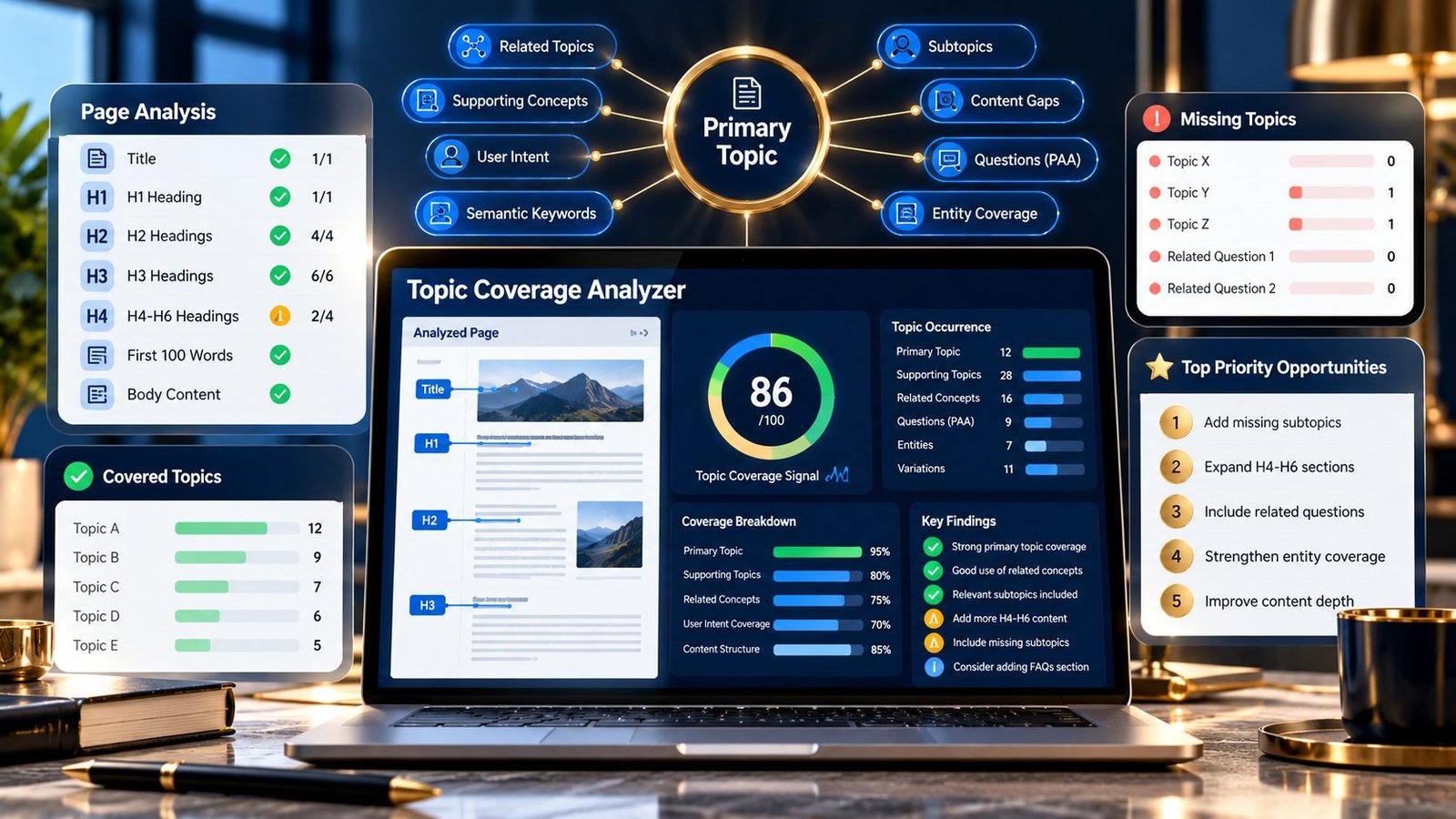
Topic Coverage Analyzer helps you check whether a webpage covers the primary topic and supporting subtopics you specify. Enter a public webpage or paste content, provide a primary topic and related topics, and PKCapra analyzes where those topics appear across the title, headings, opening content, and body text.
Topic Coverage Analyzer
Check whether important topics and subtopics are represented across the title, headings, introduction and visible page content.
| Topic | Coverage | Occurrences | Locations |
|---|
Coverage is based on deterministic exact-term and normalized phrase matching. It is a diagnostic aid, not a measure of Google topical authority or ranking potential.
Public URLs are fetched by the PKCapra analysis endpoint. Pasted content is sent to the same endpoint for analysis. Do not submit confidential or sensitive material.
What Is Topic Coverage Analysis?
Topic coverage analysis is a way to review whether important concepts that you expect a page to discuss are actually represented in its content.
A page can mention its main subject without adequately covering the questions, concepts, processes, or supporting topics that make the subject useful to a reader.
For example, a page about technical SEO might reasonably discuss topics such as:
- Crawling
- Indexability
- Canonical URLs
- Redirects
- XML sitemaps
- Robots.txt
- HTTP status codes
- Internal links
The appropriate topics depend on the purpose of the page. Topic Coverage Analyzer lets you define the primary topic and supporting topics you want to investigate, then checks their presence across the analyzed content.
The tool is a content coverage diagnostic, not a measurement of Google’s internal understanding of a page.
What Does the Topic Coverage Analyzer Check?
The current PKCapra tool analyzes supplied topics against these webpage areas:
- Page title
- H1 through H6 headings
- First 100 words
- Body content
For each supplied topic, the analyzer reports whether it is covered and how often it appears in the analyzed content.
The report can also show:
- Covered topics
- Topics with limited or missing coverage
- Topic occurrence counts
- Topic-specific coverage signals
- Structural coverage information
- Priority findings
- Overall Topic Coverage Signal
- Diagnostic grade
What Inputs Does the Tool Use?
The analyzer accepts the information needed to define the coverage review.
Webpage URL
You can provide a public webpage URL for the tool to analyze.
The tool retrieves the webpage content and evaluates the available HTML.
Pasted HTML or content
You can also provide content directly instead of relying on a public webpage.
This is useful when you are reviewing draft content before publishing it.
Primary topic
Enter the main subject the page is intended to cover.
For example:
technical SEO audit
The primary topic provides the central reference for the analysis.
Related topics or subtopics
Enter supporting topics that you expect the page to address.
For example:
crawling, indexability, canonical URLs, redirects, XML sitemap, robots.txt
These supplied topics become the coverage checklist for the analysis.
Why Topic Coverage Matters
A useful page normally needs to do more than repeat its main keyword.
Readers often need supporting information to understand a subject, complete a task, compare options, or solve a problem.
Topic coverage analysis can help reveal situations such as:
- The primary topic is present but important supporting topics are missing.
- A supplied subtopic appears only once.
- A topic appears in the body but is not reflected in the page structure.
- The introduction does not establish an important part of the subject.
- The page discusses a different scope from the one originally intended.
This makes topic coverage particularly useful during content planning, editorial review, content updates, and on-page SEO audits.
How the Topic Coverage Analyzer Works
1. Enter the page or content
Provide either a public webpage URL or the content you want to analyze.
For a URL-based analysis, PKCapra retrieves the public HTML for the specified page.
2. Define the primary topic
Enter the central topic of the page.
Keep it specific enough to describe what the page is actually about.
For example:
XML sitemap analyzer
is more useful as a primary topic than a very broad term such as:
SEO
when reviewing a page dedicated specifically to XML sitemap analysis.
3. Add supporting topics
Enter the related topics or subtopics that should be investigated.
For example:
XML sitemap, URLs, crawling, indexing, sitemap errors, sitemap index
These are not automatically treated as mandatory ranking factors. They are the topics you have chosen to investigate.
4. Run the analysis
PKCapra examines the supplied content and checks the primary and related topics against the available title, headings, opening content, and body text.
5. Review the coverage report
The report identifies which supplied topics are covered and highlights areas that may deserve further review.
The purpose is to help you make an editorial decision, not to automatically insert missing keywords.
Understanding Topic Coverage
A topic can be considered covered when the analyzer detects it in the analyzed content.
However, presence alone does not prove that the topic has been explained adequately.
For example, a page might mention canonical URL once without actually explaining:
- What a canonical URL is
- Why it is used
- Common canonical problems
- How to investigate a canonical issue
The analyzer can identify the presence of the topic, but a human review is still required to determine whether the page provides sufficient explanation.
Topic Occurrence Counts
Occurrence counts show how often a supplied topic appears in the analyzed content.
For example:
| Topic | Occurrences | Coverage |
|---|---|---|
| crawling | 8 | Covered |
| indexing | 6 | Covered |
| canonical URLs | 3 | Covered |
| redirects | 0 | Missing |
This gives you a starting point for deciding where to investigate the content further.
A higher occurrence count does not automatically mean better coverage.
Repeating a topic unnecessarily can make content less natural and does not substitute for useful explanation.
Title and Heading Coverage
Topic Coverage Analyzer checks the page title and H1-H6 headings as part of its structural coverage analysis.
This can help identify whether important topics are represented in the page’s visible structure.
For example, suppose your supplied topics are:
- Technical SEO audit
- Crawling
- Indexability
- Canonical URLs
- Redirects
If crawling and indexability appear in headings while redirects appears only deep in the body, the report gives you a useful structural clue.
It does not mean that every topic must have its own heading.
A heading should exist because it helps organize information for readers, not simply because a keyword is available.
For more detailed heading analysis, use the SEO Heading Analyzer.
First 100 Words Coverage
The analyzer also checks the first 100 words of the visible content.
This provides a useful diagnostic view of whether the page introduces important supplied topics near the beginning.
For example, if the primary topic is technical SEO audit but the opening spends several paragraphs discussing unrelated general SEO concepts, the coverage report may prompt you to review the introduction.
This does not mean every supporting topic needs to appear in the opening.
The opening should primarily help readers understand what the page is about and what they can expect to learn.
Body Coverage
The body-content analysis provides the broader coverage view.
A topic that does not appear in the title or headings may still be properly covered in the main content.
Likewise, a topic appearing in a heading may still receive very little explanation.
Use the body results together with the structural results rather than judging a topic from one location alone.
Primary Topic vs. Related Topics
The primary topic and related topics serve different purposes.
Primary topic
The primary topic represents the central subject of the page.
It should accurately describe what the page is fundamentally about.
Related topics
Related topics represent supporting concepts that you want to investigate.
They might include:
- Subtopics
- Processes
- Problems
- Features
- Supporting entities
- User questions
- Important terminology
The tool does not decide that your supplied topic list is universally correct. Your topic list is part of the analysis input.
Topic Coverage Signal
PKCapra provides an overall Topic Coverage Signal on a 0–100 diagnostic scale.
The signal summarizes the implemented topic-coverage checks across the supplied topics and the analyzed page structure.
The report can also provide topic-specific coverage signals so you can investigate individual topics rather than relying only on the overall result.
The score should be treated as a diagnostic indicator.
It is not:
- A Google ranking score
- A Google topical-authority score
- A measure of Google’s understanding of the page
- A search-volume score
- A keyword difficulty score
- A guarantee of rankings
- A substitute for editorial review
How to Interpret a Low Coverage Result
A low coverage signal does not automatically mean the page is poor.
First ask whether the supplied topics actually belong on the page.
For example, a focused article answering one narrow question may intentionally omit several broader topics.
If the topics are genuinely relevant, investigate:
- Is the topic actually explained?
- Is the topic mentioned only in passing?
- Should it have its own section?
- Is it better handled by an existing section?
- Does the topic belong on another page instead?
- Would adding it improve the answer for the intended reader?
This approach helps prevent unnecessary keyword expansion.
How to Investigate Missing Topics
Confirm that the topic belongs on the page
Not every related concept belongs on every page.
A missing topic can be a deliberate editorial choice.
Check the searcher’s actual question
Ask whether the topic helps answer the user’s underlying question.
If it does not, adding it purely because a tool reports a gap may make the page less focused.
Review existing sections
A topic may already be adequately covered under different terminology.
For example, a page may explain search engine crawling without repeatedly using the shorter term crawl.
The analyzer works from the supplied topic inputs and implemented matching logic, so human interpretation remains important.
Add useful explanation where appropriate
If an important topic is genuinely missing, add information that helps the reader understand or act on that topic.
Do not add isolated keyword sentences simply to increase the coverage signal.
Topic Coverage vs. Keyword Density
Topic coverage and keyword density measure different things.
Topic coverage asks:
Are the topics I identified represented in the content?
Keyword density asks:
How frequently does a specific keyword or phrase occur?
A page can have strong keyword density for one phrase while still failing to address important supporting concepts.
For frequency analysis, use the Keyword Density Checker.
Topic Coverage vs. Semantic Keyword Analysis
Semantic analysis and topic coverage are related but different.
The Semantic Keyword Analyzer examines terminology and recurring phrase patterns found in content.
Topic Coverage Analyzer starts with topics you explicitly provide and checks whether those topics are represented across the analyzed page.
A useful workflow can therefore be:
- Analyze the vocabulary already present.
- Define the topics that matter to the page.
- Check coverage of those topics.
- Review the actual explanations.
- Improve the content where useful.
Topic Coverage vs. Keyword Placement
Keyword placement asks whether a target phrase appears in specific page locations.
The Keyword Placement Checker examines locations such as the title, URL, H1, headings, opening content, body, image alt text, and anchor text.
Topic coverage has a different purpose: it checks the presence of your supplied topics across the title, headings, opening content, and body.
Topic Coverage vs. Keyword Prominence
Keyword prominence focuses on how early a target phrase appears.
The Keyword Prominence Checker measures first-occurrence positions for a target phrase.
Topic coverage is broader because it can evaluate multiple supplied topics instead of focusing on the position of one phrase.
Practical Example
Suppose you have a page targeting:
technical SEO audit
You define these supporting topics:
- crawling
- indexability
- canonical URLs
- redirects
- XML sitemap
- robots.txt
The analyzer might identify:
| Topic | Result |
|---|---|
| technical SEO audit | Covered |
| crawling | Covered |
| indexability | Covered |
| canonical URLs | Covered |
| redirects | Missing |
| XML sitemap | Covered |
| robots.txt | Covered |
The missing redirects result is not an instruction to insert the word repeatedly.
Instead, ask whether redirects are genuinely important to the page.
If the page promises a comprehensive technical SEO audit and redirects are an important part of that explanation, you may decide to add a useful section covering redirect types, chains, loops, or investigation methods.
If the page is specifically about crawling and indexability and redirects are outside its intended scope, leaving the topic out may be appropriate.
A Practical Content Coverage Workflow
Use the tool as part of a broader content review:
- Define the primary user question.
- Identify the page’s main topic.
- List genuinely relevant supporting topics.
- Analyze the existing page.
- Review covered and missing topics.
- Check where important topics appear in the structure.
- Investigate whether missing topics are actually relevant.
- Add useful explanations only where they improve the page.
- Review keyword frequency with the Keyword Density Checker.
- Review broader terminology with the Semantic Keyword Analyzer.
- Review page-level signals with the On-Page SEO Checker.
- Reassess the final content from the reader’s perspective.
Avoid Turning Topic Coverage Into Keyword Stuffing
Topic coverage should never become a reason to repeat terms unnaturally.
Google’s Search Central spam policies describe keyword stuffing as adding keywords or numbers to a page to manipulate Search, including repeating words or phrases so frequently that the result sounds unnatural. :contentReference[oaicite:0]{index=0}
A coverage gap should therefore trigger a content question:
Would explaining this topic make the page more useful?
It should not automatically trigger:
How can I insert this keyword more times?
A page can have many topic mentions and still provide little value if the concepts are not explained meaningfully.
What a Good Topic List Looks Like
A useful topic list is specific to the page’s purpose.
For a page about an XML sitemap analyzer, a reasonable diagnostic list might include:
- XML sitemap
- URLs
- sitemap errors
- crawling
- indexing
- sitemap index
- last modification
- HTTP status
For a narrow page about one sitemap error, the list might be much smaller.
The quality of the analysis depends partly on the quality and relevance of the topics supplied.
Common Topic Coverage Problems
The primary topic is missing
If the primary topic is not detected, first verify that the page actually focuses on that subject.
Check for:
- Different wording
- A different page purpose
- An incorrect topic input
- Content that is not present in the supplied HTML
Supporting topics are missing
Review whether the topics genuinely belong on the page.
If they do, determine whether they require a new explanation, a better heading structure, or simply clearer wording.
Too many topics were supplied
A very large topic list can make the report harder to interpret.
Keep the list focused on concepts that genuinely matter to the page.
A topic is present but poorly explained
Presence is not the same as coverage quality.
A single mention may satisfy a basic detection check while still leaving the reader without a useful explanation.
This is why Topic Coverage Analyzer should be used alongside editorial review.
The score is high but the page still feels incomplete
A high diagnostic signal does not prove that the page answers the user’s question.
Review the actual content, examples, evidence, practical guidance and limitations.
Topic Coverage Is Not Topical Authority
Topical authority is a much broader concept than whether a list of supplied terms appears on one page.
This tool does not evaluate:
- An entire website’s topical breadth
- Author expertise
- External references
- Backlinks
- Search visibility
- Search Console performance
- Competitor coverage
- Google’s internal topic representations
It focuses on the content supplied to the analyzer and the topics you define.
Limitations
The current Topic Coverage Analyzer is intentionally a focused content diagnostic.
It does not:
- Automatically determine the perfect topic list for a page.
- Query Google’s internal topic or ranking systems.
- Predict rankings.
- Measure search volume.
- Determine keyword difficulty.
- Prove topical authority.
- Guarantee that a page is comprehensive.
- Understand every synonym or semantic relationship.
- Replace editorial review.
- Crawl an entire website.
- Decide whether a missing topic should actually be added.
- Guarantee that a detected topic has been explained adequately.
The tool checks the topics supplied by the user against the implemented content-analysis areas. A topic can therefore be technically detected while still requiring deeper human review.
The Topic Coverage Signal is a PKCapra diagnostic heuristic and should not be interpreted as a Google score.
Privacy and Processing
For URL-based analysis, PKCapra retrieves the specified public webpage and processes its HTML for the topic-coverage analysis.
For pasted content or HTML, the supplied content is processed to generate the report.
The tool does not require an AI API, paid keyword database, or external SEO API.
The current analysis is focused on the submitted webpage or content and does not perform a full-site crawl.
Do not submit private or confidential material unless you understand the implications of processing that content through the service.
Frequently Asked Questions
What is a Topic Coverage Analyzer?
A Topic Coverage Analyzer checks whether selected primary and supporting topics are represented within the content of a webpage.
What does PKCapra Topic Coverage Analyzer check?
It checks supplied topics across the page title, H1-H6 headings, first 100 words, and body content, then reports coverage, occurrences, structural information, findings, and diagnostic signals.
Do I have to provide related topics?
The tool supports a primary topic and related topics or subtopics so you can define the coverage you want to investigate.
Does the tool automatically generate missing topics?
No. It analyzes the topics supplied to it. It does not claim to generate a definitive list of topics that every page should contain.
Does a high Topic Coverage Signal guarantee better rankings?
No. The signal is a PKCapra diagnostic heuristic and is not a Google ranking or topical-authority score.
Should every missing topic be added to the page?
No. First determine whether the topic genuinely belongs on the page and would help the intended reader.
Is topic coverage the same as keyword density?
No. Topic coverage checks whether selected topics are represented. Keyword density measures the frequency of a particular keyword or phrase.
Is topic coverage the same as semantic SEO?
No. Semantic analysis looks at terminology and phrase patterns in content, while Topic Coverage Analyzer evaluates topics that you explicitly supply.
Can the tool analyze a whole website?
No. The current tool is designed for the submitted webpage or content and does not perform a full-site crawl.
What should I do when an important topic is missing?
Confirm that the topic belongs on the page, then decide whether adding a useful explanation, section, example, or workflow would improve the answer. Do not add repetitive keyword text solely to increase the score.
Which PKCapra tools work well with Topic Coverage Analyzer?
You can combine it with the Semantic Keyword Analyzer, Keyword Placement Checker, Keyword Prominence Checker, Keyword Density Checker, SEO Heading Analyzer, and On-Page SEO Checker to investigate different aspects of the same page.
🚀 Take Your Content Optimization Further
Achieving 100% topical depth with our Topic Coverage Analyzer is just the first step. To completely dominate search results and AI search engines, you need a streamlined workflow. Use our interconnected, advanced SEO tools to turn your discovered content gaps into high-ranking assets:
- Content Gap Analysis Tool: Found out what your page is missing? Run a comprehensive Content Gap Analysis to benchmark your entire domain against top competitors and uncover hidden traffic opportunities.
- Keyword Clustering Tool: Don’t write separate articles for every keyword. Use our Keyword Clustering Tool to group semantic variations into logical topics, saving you time and preventing keyword cannibalization.
- Content Optimization Opportunity Finder: Keep your existing content fresh. Use the Content Optimization Opportunity Finder to scan your published URLs and instantly detect underperforming sections that need a quick boost.
Pro Tip: For the best results, analyze your topic coverage first, cluster your expanding keyword list, and then perform a full gap analysis to build a bulletproof content roadmap.