
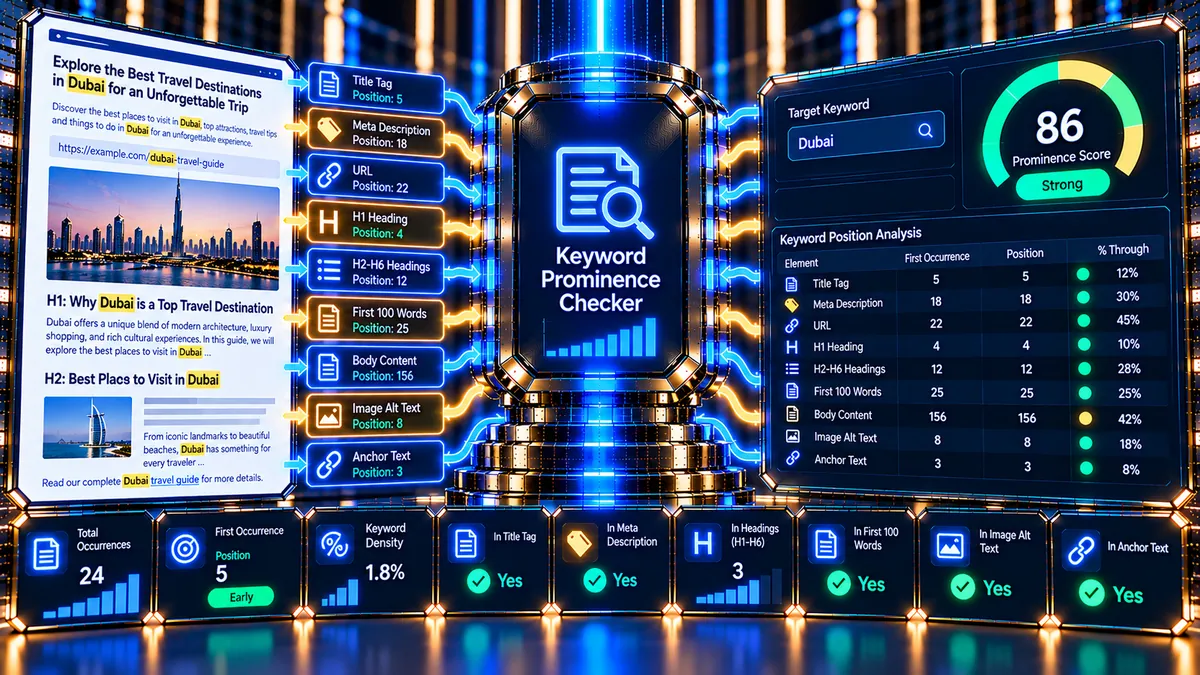
Keyword Prominence Checker helps you understand how early a target keyword or phrase appears within important parts of a webpage. Enter a public webpage URL and a target phrase to see its first exact occurrence across elements such as the title, meta description, URL, H1, headings, opening content, body text, image alt text and anchor text.
Keyword Prominence Checker
Measure how early a target keyword or phrase appears within important webpage elements, including the title, H1, opening content, headings and body text.
The score is a PKCapra diagnostic heuristic. Earlier placement can be useful for relevance clarity, but there is no universal “ideal” keyword position and higher prominence does not guarantee better rankings.
What Is Keyword Prominence?
Keyword prominence describes where a keyword or phrase appears within a piece of content. In practical SEO analysis, the question is not simply whether a phrase exists on a page, but whether the page establishes its topic clearly and early enough for a reader to understand what the page is about.
PKCapra’s Keyword Prominence Checker measures the first exact occurrence of your target phrase within several available webpage elements. It reports the position in words and the percentage of the analyzed element reached before the first occurrence.
This makes the tool useful for reviewing whether an important topic is introduced clearly in prominent areas of a page.
Keyword prominence should not be confused with keyword density. Density measures how frequently a term appears relative to the amount of content. Prominence focuses on where the first occurrence appears.
What Does the Keyword Prominence Checker Analyze?
The checker fetches one public HTML webpage and examines the following elements when they are available:
- Title — checks whether the target phrase appears and where its first occurrence appears.
- Meta description — measures the first occurrence within the page’s meta description.
- URL — checks the decoded webpage URL for the exact phrase.
- H1 — measures the first occurrence within the H1 content.
- Headings — checks H1 through H6 heading text collectively.
- First 100 words — examines the opening portion of the visible page content.
- Body text — measures the first occurrence across the visible page text.
- Image alt text — checks available image alternative text.
- Anchor text — checks available link text.
The tool also reports the total number of exact phrase occurrences detected across these analyzed elements.
Why Does Keyword Prominence Matter?
A page should establish its subject clearly for people reading it. When the main topic is introduced early and naturally, visitors can understand the purpose of the page without having to search through a large amount of unrelated text.
Prominence analysis can therefore help identify situations such as:
- The target topic is not introduced in the opening content.
- A keyword appears only after a long introduction.
- The phrase exists in the body but not in important page elements.
- The title or H1 introduces the topic less directly than intended.
- A page relies heavily on later mentions rather than establishing its subject early.
Prominence is only one diagnostic dimension. A phrase appearing earlier does not automatically make a page better or guarantee improved search visibility.
How the Keyword Prominence Checker Works
The tool performs a source-level analysis of one public webpage.
1. Enter the webpage URL
Enter the HTTP or HTTPS URL of the page you want to inspect.
For example:
The tool analyzes one webpage at a time and does not crawl the entire website.
2. Enter the target keyword or phrase
Enter the exact keyword or phrase you want to investigate.
The checker supports a target phrase of up to 12 words.
For example:
technical SEO audit
3. Run the analysis
PKCapra fetches the public HTML and extracts available webpage elements.
The checker uses exact phrase matching after normalizing whitespace and letter case. It also uses word-boundary-aware matching so that a phrase is not simply treated as a substring inside an unrelated longer word.
4. Review first-occurrence positions
For each available element, the tool determines whether the phrase was found and, when found, where its first occurrence appears.
For example, a result might show:
- Title: Word 2 / 8
- H1: Word 1 / 6
- First 100 words: Word 18 / 100
- Body: Word 42 / 850
This gives you a practical view of how early the topic is introduced.
Understanding the Prominence Results
The results include several useful measurements.
First occurrence
The first occurrence tells you where the exact phrase first appears within an analyzed element.
For example:
Word 12 / 120
means the first exact phrase occurrence begins at approximately word 12 of an element containing 120 analyzed words.
Relative position
The tool also reports the percentage through the element at which the first occurrence appears.
A smaller percentage means the phrase appears earlier in that element.
This is useful when comparing elements of very different lengths.
Occurrence count
The occurrence count shows how many exact phrase matches were detected in the analyzed elements.
A high occurrence count should not automatically be treated as a positive result. Repeating a keyword unnecessarily can make content less natural. Google’s Search Central documentation specifically describes excessive, unnatural repetition of keywords as keyword stuffing. :contentReference[oaicite:0]{index=0}
Body word count
The tool reports the number of analyzed words in the visible body text. This provides context for the first body occurrence.
How the Prominence Signal Score Works
PKCapra calculates a diagnostic Prominence Signal from the first-occurrence positions detected across the available elements.
The current implementation gives greater diagnostic weight to some elements:
| Element | Diagnostic Weight |
|---|---|
| Title | 20 |
| Meta description | 8 |
| URL | 5 |
| H1 | 20 |
| Headings | 10 |
| First 100 words | 20 |
| Body text | 10 |
| Image alt text | 4 |
| Anchor text | 3 |
The position of the first exact occurrence is converted into a prominence value for each element. Earlier occurrences receive a stronger diagnostic signal than later occurrences.
The resulting score is normalized to a 0–100 scale.
Score grades
The current tool uses these diagnostic ranges:
- 75–100: Strong Prominence Signal
- 50–74: Moderate Prominence Signal
- 25–49: Limited Prominence Signal
- 0–24: Low Prominence Signal
These are PKCapra diagnostic categories, not Google Search scores.
There is no universal keyword-position score that guarantees rankings. Use the result as a way to investigate page structure and topical clarity rather than as a ranking formula.
What a Strong Prominence Signal Means
A stronger signal generally means the exact target phrase is detected relatively early across several higher-weight elements.
For example, a page might naturally establish its topic through:
- A clear title
- A relevant H1
- An informative introduction
- Appropriate supporting headings
- Natural use of the phrase in the body
This does not mean every page should force the same keyword into every element.
What a Limited Prominence Signal Means
A lower signal can occur for several different reasons.
The phrase might:
- Be absent from the page.
- Appear only later in the body.
- Be missing from the title.
- Be absent from the H1.
- Not appear in the first 100 words.
- Appear only in less prominent elements.
- Use different wording from the exact target phrase.
A lower score is therefore an investigation signal rather than an instruction to add the keyword repeatedly.
Keyword Prominence vs. Keyword Density
These two measurements answer different questions.
Keyword prominence asks:
Where does the phrase appear first?
Keyword density asks:
How frequently does the phrase appear relative to the amount of content?
A page can have high keyword density but poor prominence if most mentions occur later in the content.
Likewise, a page can have strong prominence without repeatedly using the phrase throughout every paragraph.
For frequency-based analysis, you can use the Keyword Density Checker.
Keyword Prominence vs. Keyword Placement
Keyword placement and keyword prominence are closely related, but they are not identical.
Placement analysis can identify whether a phrase exists in specific page locations such as the title, URL, H1, headings, opening content, body, image alt text and anchor text.
Prominence goes one step further for each analyzed element by examining how early the first exact occurrence appears.
For a broader location-based analysis, use the Keyword Placement Checker.
Practical Example
Suppose you are optimizing a page about technical SEO audits and use:
technical SEO audit
as the target phrase.
Imagine the tool reports:
| Element | First Occurrence |
|---|---|
| Title | Word 2 |
| H1 | Word 1 |
| First 100 words | Word 14 |
| Body | Word 14 |
| Meta description | Word 5 |
| Headings | Word 20 |
This indicates that the phrase is introduced early in several important elements.
Now imagine the body result is:
Word 350 / 1,200
The phrase exists, but the first body occurrence comes considerably later. That can prompt you to review the introduction and ask whether the page explains its primary subject clearly enough before moving into supporting information.
The appropriate response is not automatically to insert the phrase several more times. First review the actual wording and user experience.
How to Investigate a Low Prominence Result
If the target phrase appears late or is missing, use this workflow:
Review the page topic
Ask whether the page genuinely focuses on the target phrase.
If the phrase describes a concept that is only a minor part of the page, a low prominence result may be perfectly reasonable.
Review the title
Check whether the title communicates the main topic clearly and naturally.
If the target phrase is relevant but appears unnecessarily late, consider whether the wording can be made clearer without making the title awkward.
Review the H1
The H1 should accurately describe the main subject of the page.
If the phrase is relevant to the page but missing from the H1, determine whether using it naturally would make the heading clearer.
For heading structure and hierarchy, use the SEO Heading Analyzer.
Review the introduction
Look at the first 100 words.
Ask whether a visitor can understand the page’s main purpose quickly, even without knowing the target keyword.
If the introduction spends too much time on general background before explaining the main subject, restructuring it may improve clarity.
Review the body
If the phrase first appears hundreds of words into the content, determine whether the opening sections should be reorganized.
Do not add repetitive keyword mentions simply to move the phrase upward.
Review related terminology
Exact-match prominence is not the same as topical completeness. A page can discuss a subject naturally using related concepts, terminology and entities without repeating one exact phrase everywhere.
For broader on-page analysis, use the On-Page SEO Checker.
Common Keyword Prominence Problems
The keyword is completely absent
If the tool cannot find the exact phrase, first verify:
- The keyword spelling.
- Word order.
- Singular and plural forms.
- Hyphenation.
- The actual topic of the page.
- Whether the content is present in the server-delivered HTML.
The tool performs exact phrase matching, so a close variation may not count as an exact match.
The keyword appears only in the body
This can happen when the page discusses the subject extensively but does not use the exact phrase in prominent elements.
Review whether the exact phrase is actually the best description of the page before changing the title or headings.
The keyword appears very late
A late first occurrence can be useful as a diagnostic clue. Review the introduction and page structure to determine whether the main subject should be established earlier.
The keyword appears everywhere
More mentions are not automatically better.
If the phrase already appears naturally in several prominent areas, avoid adding unnecessary repetitions simply to increase the diagnostic score. Excessive or unnatural keyword repetition can fall under Google’s keyword-stuffing guidance. :contentReference[oaicite:1]{index=1}
Prominence Does Not Replace Content Quality
Keyword prominence should be considered alongside the actual usefulness and relevance of the page.
Google’s current Search Central guidance emphasizes following Search Essentials and spam policies rather than relying on isolated optimization techniques. :contentReference[oaicite:2]{index=2}
A useful page still needs to answer the visitor’s question, provide appropriate information, maintain readable structure and deliver a good overall experience.
Google also notes that page experience involves multiple aspects rather than one isolated score or signal. :contentReference[oaicite:3]{index=3}
Use keyword prominence as one diagnostic layer within a broader SEO workflow.
A Practical On-Page SEO Workflow
For a new or updated page, you can use this sequence:
- Define the page’s primary topic and intended user question.
- Write a clear title and H1 that accurately describe the page.
- Introduce the main subject naturally near the beginning of the content.
- Organize supporting information with useful headings.
- Review the page with the Keyword Prominence Checker.
- Investigate unusually late or missing phrase occurrences.
- Check keyword frequency separately with the Keyword Density Checker.
- Review broader page-level signals with the On-Page SEO Checker.
- Review heading hierarchy with the SEO Heading Analyzer.
- Make changes for clarity and usefulness rather than simply maximizing a diagnostic score.
Limitations
The Keyword Prominence Checker is intentionally a focused source-level diagnostic.
It does not:
- Crawl an entire website.
- Predict Google rankings.
- Reproduce Google’s internal ranking systems.
- Determine whether a keyword is the correct target for a query.
- Evaluate the quality or usefulness of the entire page.
- Determine search intent automatically.
- Judge whether a phrase sounds natural to every reader.
- Execute the page’s JavaScript to discover content rendered after the initial HTML response.
- Download and analyze every image as a binary asset.
- Treat synonyms or semantically related phrases as exact matches.
- Guarantee how a search engine will interpret or rank the page.
The score is calculated by PKCapra using the implemented prominence heuristic and should be interpreted as a diagnostic aid.
The final URL may depend on the redirect information exposed by the server and WordPress HTTP response. The tool analyzes the HTML response it receives and does not claim to reproduce a browser’s complete rendering environment.
Privacy and Processing
The tool accepts a public webpage URL and a target keyword or phrase. PKCapra fetches the specified public webpage server-side to obtain its HTML for analysis.
The analysis is limited to one webpage and does not perform a full-site crawl.
For PDF reporting, the generated results are processed in the browser using the client-side PDF rendering libraries loaded by the tool. The PDF is generated from the displayed analysis results rather than requiring a paid SEO API.
Because the checker requests the target webpage, the target site’s server may receive a request from the PKCapra server infrastructure.
Do not submit private, authenticated or confidential URLs unless you understand the implications of making that page available to the analysis request.
Frequently Asked Questions
What is keyword prominence in SEO?
Keyword prominence refers to how early a keyword or phrase appears within relevant content or page elements. It is different from keyword density, which focuses on frequency.
What does the Keyword Prominence Checker measure?
It measures the first exact occurrence of a target phrase within the title, meta description, URL, H1, H1–H6 headings, first 100 words, body text, image alt text and anchor text when those elements are available.
Does a higher prominence score guarantee better rankings?
No. The PKCapra score is a diagnostic heuristic. It is not a Google ranking score and does not guarantee search visibility or rankings.
Should my keyword appear at the beginning of every element?
No. The purpose of the tool is diagnosis, not forced repetition. A phrase should be used where it naturally and accurately describes the page or element.
Is keyword prominence the same as keyword density?
No. Prominence measures where the first occurrence appears. Density measures how frequently a phrase occurs relative to the amount of content.
Why does PKCapra use exact phrase matching?
Exact matching makes the diagnostic result predictable. It lets the tool identify the first occurrence of the specific phrase entered by the user rather than silently treating every related term as an equivalent match.
Can the tool analyze an entire website?
No. The current tool analyzes one public webpage at a time and does not crawl the site.
What should I do if the keyword is missing?
First confirm that the phrase accurately represents the page’s main topic. Then review the title, H1, introduction and body structure. If the phrase is appropriate, consider whether it can be introduced naturally rather than adding repetitive mentions.
Can I use this tool together with other PKCapra SEO tools?
Yes. Prominence is one part of on-page analysis. You can combine it with the Keyword Placement Checker, Keyword Density Checker, SEO Heading Analyzer, and On-Page SEO Checker to investigate different aspects of the same page.