
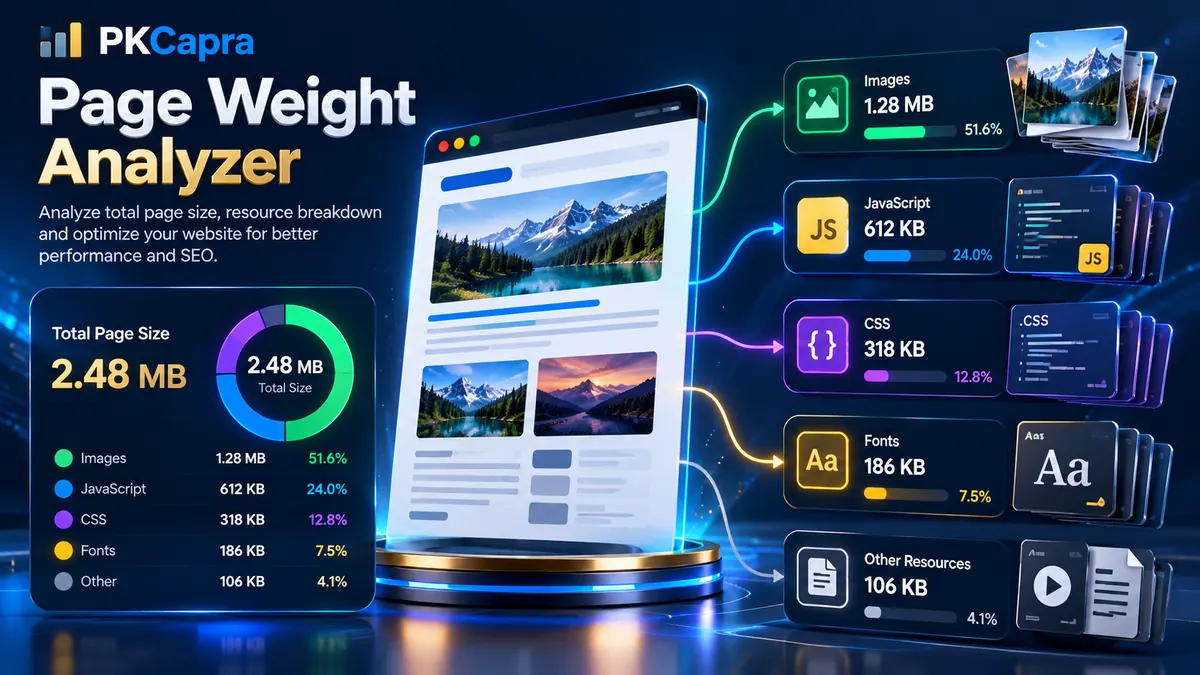
Page Weight Analyzer helps you understand how much data a webpage loads and which resources contribute most to its total payload. Enter a webpage URL to analyze the HTML document and discover images, JavaScript files, stylesheets, and other supported assets that contribute to page weight.
A lightweight page can generally be easier to load, especially on slower connections and resource-constrained devices. A page with large images, heavy scripts, oversized stylesheets, or many resources may require more data to download and process.
PKCapra’s Page Weight Analyzer gives you a resource-level view instead of showing only one total number. You can review the measured HTML, discovered resources, individual asset weights, request count, image payload, and combined JavaScript and CSS payload.
Page Weight Analyzer
Measure HTML, image, JavaScript, CSS, and font payloads to understand the total weight of a web page.
Page Resource Weight Matrix
Review the measured HTML document and discovered images, scripts, stylesheets, and fonts.
| # | Resource URL Path | Asset Type | Weight | Status |
|---|
What Is Page Weight?
Page weight is the amount of data required to load a webpage and its associated resources. It can include the HTML document itself together with resources such as:
- Images
- JavaScript files
- CSS stylesheets
- Web fonts
- Other discoverable page resources
The total payload can vary considerably from one page to another. A simple text-based page may be relatively small, while a media-heavy page can contain several megabytes of images and supporting resources.
Page weight is therefore useful as a technical measurement when reviewing website performance, resource usage, and front-end efficiency.
What Does the Page Weight Analyzer Check?
PKCapra’s Page Weight Analyzer analyzes the submitted webpage and builds a resource weight matrix.
The analyzer can report:
- Total Page Weight
- Total Request Count
- Measured HTML size
- Image Weight
- Combined JavaScript and CSS payload
- Individual resource URLs
- Asset type
- Individual resource weight
- Resource status
- Measured and unavailable resources
The tool separates discovered resources by type so you can identify which part of a page is contributing most to its payload.
Total Page Weight
The Total Page Weight metric represents the measured HTML document plus the asset sizes that could be measured successfully.
For example, if a webpage contains:
- 100 KB of HTML
- 500 KB of images
- 200 KB of JavaScript
- 100 KB of CSS
the combined measured page weight would be approximately 900 KB.
The exact result depends on the resources discovered and whether their byte sizes can be measured successfully.
Total Request Count
Total Request Count represents the measured HTML document together with the discovered resources included in the analysis.
A page can have a relatively small total payload but still contain many individual resources. Conversely, a page can have fewer requests while loading several large files.
Request count should therefore be considered together with resource weight rather than treated as an independent performance score.
Image Weight
Images are frequently an important part of webpage payload.
The Image Weight metric combines the measured sizes of discovered image resources such as:
- PNG
- JPG
- JPEG
- WebP
- SVG
- GIF
A high image payload can indicate that visual assets deserve closer examination.
Large images may result from:
- Uploading images at unnecessarily large dimensions
- Using high-quality source files without appropriate optimization
- Serving desktop-sized images to smaller devices
- Using multiple large decorative images
- Retaining unused or oversized media assets
The Page Weight Analyzer helps you identify the actual image URLs contributing to the measured payload.
For additional image-focused SEO analysis, you can also use the Image Alt Text Checker.
JavaScript and CSS Weight
JavaScript and CSS contribute to the code payload of a webpage.
The Page Weight Analyzer groups measured JavaScript and stylesheet resources into the combined code payload shown in the Code Optimization Ratio metric.
This helps you identify pages where front-end code represents a significant portion of the measured resources.
Large code payloads can come from:
- Large JavaScript bundles
- Multiple JavaScript files
- Large CSS files
- Plugin-generated assets
- Theme assets
- Third-party libraries
- Unused or duplicated functionality
The resource matrix lets you identify the individual files rather than relying only on the combined total.
Understanding the Resource Weight Matrix
The Page Resource Weight Matrix provides a resource-by-resource view of the page.
Each row can include:
- Resource number
- Resource URL path
- Asset type
- Weight
- Status
Resource URL
This is the URL of the discovered resource.
It allows you to identify the exact file contributing to the page payload.
Asset Type
The analyzer classifies supported resources according to their type, including:
- Script
- Style
- Image
- Font
This classification makes it easier to determine whether images or code are responsible for a larger portion of the measured payload.
Weight
Weight represents the measured byte size of the individual resource.
Resources that cannot expose a measurable byte size may be reported as unavailable rather than being assigned a misleading size.
Status
The status indicates whether the resource could be measured successfully.
A measured resource can contribute its byte size to the relevant totals.
A resource whose server does not expose a usable byte size may be shown separately without automatically being treated as a broken resource.
Why Some Resource Sizes May Be Unavailable
Not every web server exposes asset sizes in exactly the same way.
For example, a server, CDN, security layer, or third-party service may restrict HEAD requests or avoid exposing a usable Content-Length header.
For internal WordPress resources, PKCapra’s analyzer can resolve local WordPress asset paths and measure files directly from the server filesystem when the resource belongs to the local website.
For external resources, the analyzer uses HTTP-based measurement methods and fallback handling when supported by the remote server.
This distinction is important because an unavailable byte size does not necessarily mean that the resource itself is broken.
Page Weight vs Page Speed
Page weight and page speed are related, but they are not the same measurement.
Page weight describes the amount of data represented by the analyzed document and its measurable resources.
Page speed is influenced by many additional factors, including:
- Network conditions
- Server response time
- Browser processing
- JavaScript execution
- Rendering work
- Caching
- Compression
- Connection type
- Device capabilities
Therefore, reducing page weight can be useful without treating page weight as a complete substitute for performance testing.
For a broader performance-oriented analysis, use the Page Speed Analyzer.
How to Use the Page Weight Analyzer
Using the tool is straightforward.
Step 1: Enter the Website URL
Enter the complete URL of the webpage you want to analyze.
For example:
You can also analyze a specific page instead of only the homepage.
Step 2: Start the Analysis
Click Analyze Page Weight.
The analyzer retrieves the target document and identifies supported resources referenced by the page.
Step 3: Wait for Resource Processing
The tool processes discovered resources in small batches.
This approach helps prevent a large page from generating one oversized request-processing operation.
Step 4: Review the Dashboard
When processing is complete, review:
- Total Page Weight
- Total Request Count
- Image Weight
- Code Optimization Ratio
- Resource measurement coverage
Step 5: Inspect the Resource Matrix
Scroll down to the Page Resource Weight Matrix.
Look for unusually large images, scripts, stylesheets, or other resources.
Step 6: Optimize the Largest Contributors
Start with the resources that represent the largest measurable portions of the page.
Reducing several large resources can have a greater effect than spending time on files that contribute only a few kilobytes.
How to Reduce Page Weight
Once you identify large resources, several optimization approaches may be appropriate.
Optimize Images
Review large images first when image payload represents a significant part of the page.
Consider:
- Appropriate image dimensions
- Modern image formats
- Compression
- Responsive image delivery
- Removing unused images
- Avoiding unnecessarily large source files
Image optimization should preserve the visual quality required by the page while avoiding unnecessary bytes.
Review JavaScript
Large JavaScript files can increase the amount of code transferred to the browser.
Review:
- Plugin assets
- Theme scripts
- Third-party libraries
- Duplicate bundles
- Unused scripts
- Scripts loaded on pages where they are not required
Do not remove a JavaScript resource solely because it is large. Confirm what functionality depends on it before making changes.
Review CSS
Large stylesheets can also contribute to page weight.
Look for:
- Multiple stylesheet files
- Large framework bundles
- Unused CSS
- Duplicate declarations
- Page-specific styles loaded globally
CSS optimization should be tested carefully because removing required styles can affect page presentation.
Review Fonts
Web fonts can contribute to the resource payload, particularly when several font families, weights, and styles are loaded.
Review whether every requested font variant is necessary.
Reducing unnecessary font variants can decrease the number and size of font resources.
Page Weight and Technical SEO
Page weight is part of the broader technical health of a website.
A technical SEO review can include many additional areas such as crawling, indexability, redirects, canonical signals, HTTP behavior, structured data, and page performance.
Use the Technical SEO Checker when you need a broader technical inspection.
You can also use the Full SEO Site Audit for a wider website-level review.
Page Weight and Crawlability
Resource-heavy pages can also be considered alongside website crawlability and architecture.
A website should make important content accessible through a logical structure and usable internal paths.
The Crawlability Checker focuses on crawl-related signals and provides a different perspective from page-weight measurement.
Page Weight Analyzer should therefore be used as one component of a broader technical review rather than as a replacement for crawlability analysis.
Common Causes of Heavy Pages
A page can become unnecessarily large for many reasons.
Common causes include:
- Uncompressed images
- Oversized image dimensions
- Large JavaScript bundles
- Large CSS frameworks
- Too many third-party resources
- Multiple font families
- Multiple font weights
- Plugin-generated assets
- Theme assets loaded globally
- Legacy resources
- Duplicate libraries
- Large media files
- Unused resources
The Resource Weight Matrix can help you move from a general page-weight measurement to the specific files that need investigation.
What Is a Good Page Weight?
There is no single page-weight number that is appropriate for every website.
The appropriate payload depends on the page purpose, content type, audience, media requirements, functionality, and delivery environment.
For example, a documentation page, ecommerce product page, news article, image gallery, and web application may have very different legitimate resource requirements.
Instead of treating one fixed threshold as a universal rule, compare:
- Total page weight
- Number of resources
- Largest individual resources
- Image payload
- JavaScript payload
- CSS payload
- Performance measurements
- User experience
The Page Weight Analyzer provides the underlying resource data so you can make that assessment with more context.
Page Weight Analysis for WordPress Websites
WordPress websites can load resources from several locations.
Common sources include:
- Active themes
- Plugins
- WordPress core
- Media uploads
- Custom stylesheets
- Custom scripts
- Third-party services
This can make resource-level analysis particularly useful.
If a page contains a large number of assets, inspect the resource URLs to determine whether they originate from the theme, a plugin, your media library, or an external provider.
Do not assume that the largest resource is automatically unnecessary. Confirm its purpose before changing or removing it.
Common Page Weight Problems
A Large Image Dominates the Page
If one image represents a substantial portion of the measured payload, review its dimensions, format, compression, and delivery method.
Many Small Resources Increase Request Count
A page may contain many relatively small resources. Even when their combined byte size is moderate, the request count can reveal a fragmented resource structure worth reviewing.
JavaScript Represents a Large Payload
Inspect individual script resources and identify which plugin, theme component, library, or third-party service is responsible.
CSS Represents a Large Payload
Review whether large global stylesheets are being loaded on pages that do not require all of their rules.
Third-Party Resources Cannot Be Measured
External servers can restrict the headers or request methods needed for precise measurement. An unavailable resource size should not automatically be interpreted as a broken resource.
Page Weight Analyzer and Other PKCapra Tools
Page Weight Analyzer is designed to complement other PKCapra website analysis tools.
Use the Page Speed Analyzer for performance-oriented analysis.
Use the Technical SEO Checker for broader technical SEO signals.
Use the Full SEO Site Audit for a wider website-level audit.
Use the HTTP Status Checker when you need to inspect HTTP response status behavior separately.
Use the Image Alt Text Checker when reviewing image-related SEO implementation.
Frequently Asked Questions
What is a Page Weight Analyzer?
A Page Weight Analyzer measures the HTML document and discovered page resources to help identify how much data a webpage contains and which assets contribute to its payload.
What does page weight include?
Page weight can include the HTML document and measurable resources such as images, JavaScript, CSS, and fonts discovered from the analyzed page.
Does Page Weight Analyzer check images?
Yes. Supported image resources are discovered and their measurable byte sizes are aggregated into the Image Weight metric.
Does it measure JavaScript and CSS?
Yes. Supported JavaScript and stylesheet resources are classified and their measured sizes contribute to the combined code payload.
Why does a resource sometimes show unavailable?
Some servers and third-party services do not expose a usable byte size through their HTTP responses. In those cases, the analyzer can report the resource separately without treating the unavailable size as proof that the resource is broken.
Does a 0 B resource always mean the file is empty?
No. A 0 B or unavailable measurement can occur when the server does not expose a measurable byte size. It should not automatically be interpreted as an empty file.
Can I analyze a specific webpage instead of the homepage?
Yes. Enter the complete URL of the page you want to analyze.
Is page weight the same as page speed?
No. Page weight is a measurement of document and resource payload, while page speed also depends on server response, network conditions, browser processing, rendering, caching, compression, and other factors.
What should I optimize first?
Review the largest measurable contributors first. Depending on the page, these may be images, JavaScript, CSS, fonts, or third-party resources.
Is a heavier page always bad?
Not necessarily. Different pages have different content and functionality requirements. The useful approach is to understand the resource composition and determine whether the payload is justified by the page’s purpose and user experience.
Conclusion
PKCapra’s Page Weight Analyzer provides a practical resource-level view of webpage payload.
Instead of relying only on a single total number, you can inspect the HTML size, request count, image weight, combined JavaScript and CSS payload, and individual resource measurements.
Use the results to identify unusually large assets, investigate unnecessary resources, review image delivery, examine JavaScript and CSS payloads, and support broader technical website optimization.
For a complete technical review, combine Page Weight Analyzer with PKCapra’s other website analysis tools to understand performance, crawlability, HTTP behavior, indexing, and broader technical SEO signals.