
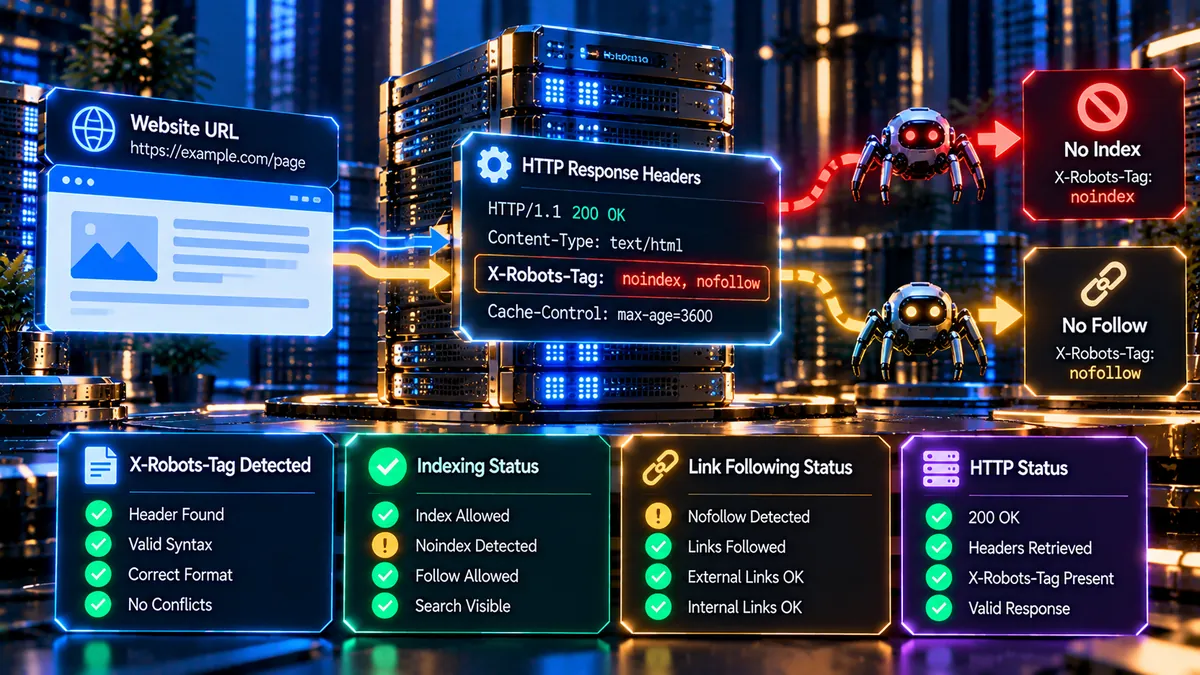
Check a URL’s HTTP response for X-Robots-Tag directives such as noindex, nofollow, noarchive, none, and all. PKCapra’s free X-Robots-Tag Checker reads the server response and helps you identify important crawler and indexation rules.
X-Robots-Tag Checker
Inspect the raw HTTP response headers of a public URL and identify X-Robots-Tag rules that affect indexing, link crawling, caching, and crawler behavior.
The result reflects the HTTP response received by the local WordPress server at scan time. Redirects are not automatically followed, so the inspected response and its X-Robots-Tag headers remain visible.
Only submit public URLs that you are authorized to analyze. The checker uses native WordPress networking with a robust local cURL path and requires no paid API, proxy, or VPS.
What Is an X-Robots-Tag Checker?
An X-Robots-Tag Checker analyzes the HTTP response headers returned by a URL and checks whether the server sends an X-Robots-Tag header with search-engine directives.
The X-Robots-Tag header can control how search engines handle a resource after they request it. It is especially useful for resources that do not use HTML meta tags, including:
- PDF files
- Images
- Videos
- Documents
- XML resources
- Other non-HTML files
- Dynamically generated resources
The PKCapra X-Robots-Tag Checker reads the HTTP response headers and identifies important directives such as noindex, nofollow, noarchive, none, and all.
This makes it easier to identify indexation and crawling signals that may not be visible in the HTML source.
Why Check the X-Robots-Tag Header?
A webpage can appear normal in its HTML while its HTTP response headers contain search-engine directives that change how crawlers handle the resource.
For example, a server may return:
X-Robots-Tag: noindex
This tells supporting search engines not to index the resource.
A different response might contain:
X-Robots-Tag: nofollow
This can affect whether crawlers follow links found in the resource.
These directives can therefore become important during:
- Technical SEO audits
- Website migrations
- Indexation troubleshooting
- PDF SEO audits
- Image SEO audits
- Large-scale crawling
- Server configuration changes
- Deployment reviews
- SEO quality assurance
For broader technical analysis, you can also use the Technical SEO Checker and Indexability Checker.
What Is X-Robots-Tag?
X-Robots-Tag is an HTTP response header used to provide robots-related instructions to search-engine crawlers.
Unlike robots meta tags, which are placed inside an HTML document, X-Robots-Tag is returned by the web server as part of the HTTP response.
A simplified response may look like this:
HTTP/2 200
Content-Type: application/pdf
X-Robots-Tag: noindex
The important information is contained in the response header rather than the visible page content.
This makes X-Robots-Tag particularly useful when controlling resources that do not contain an HTML head section.
X-Robots-Tag Directives
The PKCapra X-Robots-Tag Checker identifies several important directives.
noindex
noindex tells supporting search engines not to index the resource.
For example:
X-Robots-Tag: noindex
If a PDF, image, document, or other resource should not appear in search results, noindex can be used as an indexing directive.
However, the crawler generally needs to be able to access the resource and receive the header in order to see the directive.
nofollow
nofollow tells supporting crawlers not to follow links associated with the resource.
For example:
X-Robots-Tag: nofollow
A nofollow directive is different from noindex.
A resource can be allowed to appear in search results while its links are subject to a nofollow instruction.
noarchive
noarchive is a robots directive related to search-engine caching or archived representations.
For example:
X-Robots-Tag: noarchive
It can be useful when a resource should not have an archived version presented by supporting search systems.
none
none represents a combination of restrictive instructions equivalent to:
noindex, nofollow
For example:
X-Robots-Tag: none
The PKCapra checker treats none as an indexation and link-following restriction.
all
all represents unrestricted behavior for supported robots directives.
For example:
X-Robots-Tag: all
When an explicit all directive is present without a restrictive directive, the resource does not contain an X-Robots-Tag restriction through that directive.
How the PKCapra X-Robots-Tag Checker Works
The checker examines the HTTP response from the URL you provide.
It focuses on response headers rather than relying only on the visible HTML page.
The analysis identifies whether an X-Robots-Tag header is present and then examines the directives returned by the server.
The checker presents the result in a simple dashboard so you can quickly understand the important search-engine signals.
X-Robots-Tag Header Status
The first result shows whether an X-Robots-Tag header was detected.
Header Found
If the server returns an X-Robots-Tag header, the checker displays the detected header and its directives.
This allows you to investigate whether the resource contains indexing or link-crawling restrictions.
Header Not Present
If no X-Robots-Tag header is detected, the checker reports that the header is not present in the analyzed HTTP response.
The absence of X-Robots-Tag does not automatically mean that the URL is indexable. Other signals, such as robots meta tags, canonicalization, HTTP status codes, or robots.txt rules, may still affect the overall SEO situation.
For broader analysis, the Canonical URL Checker can help examine canonical signals.
Indexation Rule
The checker separately evaluates whether the detected X-Robots-Tag directives contain an indexation restriction.
Indexation Allowed
When no noindex or none restriction is detected, the X-Robots-Tag header does not indicate an indexation block through those directives.
Indexation Blocked
If noindex or none is detected, the checker identifies the response as containing an indexation restriction.
This distinction is useful because a page can have an otherwise successful HTTP response while still carrying an instruction that prevents indexing.
Link Crawl Rule
The checker also evaluates link-following behavior.
Follow Allowed
When nofollow or none is not detected, the X-Robots-Tag response does not contain those specific link-following restrictions.
Nofollow Detected
When nofollow or none is detected, the checker identifies a link-following restriction.
This is reported separately from indexation because nofollow and noindex address different crawling and indexing behaviors.
Checker Verdicts
The PKCapra X-Robots-Tag Checker uses clear result states to make important findings easier to understand.
SAFE / CLEAN
A clean result means the analyzed X-Robots-Tag response does not contain a restrictive noindex or nofollow directive, or contains an explicit unrestricted all directive.
This does not represent a complete SEO security or indexability audit. It only describes the X-Robots-Tag signals detected in the response.
INDEXATION BLOCKED
This result appears when noindex or none is detected.
The resource therefore contains an X-Robots-Tag instruction that restricts indexation.
LINK EQUITY BLOCKED
This result is used when nofollow is detected while an indexation restriction is not detected.
The resource may therefore be indexable while its links are subject to a nofollow instruction.
Raw HTTP Response Headers
The checker provides access to the raw HTTP response headers returned by the server.
This is useful when troubleshooting technical SEO issues because the header output shows what the server actually returned.
You can inspect information such as:
- HTTP status
- Content type
- Server response headers
- X-Robots-Tag
- Cache-related headers
- Redirect information
- Other HTTP response metadata
Raw headers can be particularly useful when a browser-rendered page does not explain why a search engine is receiving a particular directive.
For broader HTTP analysis, the HTTP Header Security Analyzer can be used to inspect security-related response headers.
X-Robots-Tag for PDFs
PDF files are a common use case for X-Robots-Tag.
A PDF does not normally provide the same HTML meta mechanism available to an HTML page.
A server can instead return an HTTP header such as:
X-Robots-Tag: noindex
This can be useful when a PDF should remain accessible to users but should not be indexed in search results.
For example, websites may need to manage:
- Old brochures
- Internal documents
- Downloadable forms
- Archived reports
- Duplicate documents
- Temporary PDFs
- Sensitive public-facing documents
X-Robots-Tag for Images
X-Robots-Tag can also be used with resources such as images.
This can be useful when a site needs to control how particular non-HTML resources are handled by search engines.
Image indexation should be considered separately from normal webpage indexation because the image itself can be a searchable resource.
For HTML image-related SEO, you can also use the Image Alt Text Checker.
X-Robots-Tag for Other Non-HTML Resources
The header can be relevant to many resource types.
Examples include:
- PDF files
- Image files
- Video resources
- Downloadable documents
- XML resources
- Data files
- Dynamically generated files
This makes X-Robots-Tag an important part of technical SEO for websites with large numbers of non-HTML assets.
X-Robots-Tag vs Robots Meta Tags
X-Robots-Tag and robots meta tags can communicate similar types of crawler instructions, but they are delivered differently.
A robots meta tag exists inside an HTML document.
X-Robots-Tag is returned through the HTTP response headers.
This difference matters because non-HTML resources cannot always use an HTML meta tag.
For example:
HTML page: Robots meta tags can be used.
PDF file: X-Robots-Tag can provide the HTTP-level directive.
Both mechanisms can therefore play an important role in technical SEO.
X-Robots-Tag vs Robots.txt
X-Robots-Tag and robots.txt should not be treated as interchangeable systems.
Robots.txt primarily controls whether crawlers are permitted to request particular URLs.
X-Robots-Tag is delivered in the HTTP response and can communicate indexing and other robots directives.
This distinction is important when troubleshooting indexation.
If a crawler cannot access a resource because it is blocked by robots.txt, it may not be able to retrieve an X-Robots-Tag response from that resource.
For robots.txt testing and analysis, use the Robots.txt Analyzer.
Multiple X-Robots-Tag Directives
A server can return multiple X-Robots-Tag directives.
Directives can also be combined depending on the server configuration and crawler syntax being used.
For example:
X-Robots-Tag: noindex
and:
X-Robots-Tag: nofollow
can communicate separate restrictions.
The checker evaluates the response headers to identify relevant directives rather than relying only on one visible line.
When troubleshooting complex responses, always review the complete raw HTTP header output.
User-Agent Specific X-Robots-Tag Rules
X-Robots-Tag can also be configured for specific crawlers or user-agent contexts.
This can create situations where different crawlers may receive different instructions.
For example, a server configuration could apply a robots directive to a particular crawler while returning different behavior elsewhere.
This is one reason raw response-header testing can be useful during technical SEO investigations.
X-Robots-Tag and Website Migrations
Website migrations can introduce unexpected HTTP header changes.
During a migration, teams may change:
- Web servers
- CDN configuration
- Reverse proxies
- Application frameworks
- Caching layers
- Redirect rules
- Security middleware
- File delivery systems
A migration can therefore accidentally introduce an X-Robots-Tag restriction.
For example, a staging environment may intentionally use noindex, but that directive can become problematic if the configuration is transferred to production.
A header check before and after migration can help identify these differences.
You can also use the Redirect Checker when reviewing redirect behavior during a migration.
X-Robots-Tag and Technical SEO Audits
X-Robots-Tag should be considered as part of a wider technical SEO review.
A complete audit may also examine:
- HTTP status codes
- Canonical URLs
- Robots.txt
- Robots meta tags
- XML sitemaps
- Redirects
- Indexability
- Crawlability
- Internal links
- Page performance
- Structured data
The Full SEO Site Audit can provide a broader website-level review, while the X-Robots-Tag Checker focuses specifically on HTTP robots directives.
X-Robots-Tag and Canonical URLs
X-Robots-Tag does not replace canonicalization.
A canonical URL communicates which URL should generally be treated as the preferred version among duplicate or similar URLs.
An X-Robots-Tag directive addresses crawler and indexing behavior at the HTTP response level.
These signals should therefore be reviewed together when investigating indexation problems.
The Canonical URL Checker can help investigate canonical relationships.
X-Robots-Tag and XML Sitemaps
XML sitemaps help search engines discover URLs that a website considers important.
X-Robots-Tag directives can affect whether individual resources are indexed.
A sitemap should therefore not be considered proof that a URL can or should appear in search results.
For sitemap analysis, use the XML Sitemap Analyzer.
Common X-Robots-Tag Problems
Several configuration problems can create unexpected results.
Accidental noindex
A production resource may inherit a noindex directive from a staging or development configuration.
Unexpected nofollow
A server or application rule may add nofollow to resources where link following was not intended to be restricted.
Incorrect server configuration
Web-server rules, middleware, plugins, CDNs, or application code may inject unexpected response headers.
Conflicting directives
Multiple robots directives can create a more restrictive effective result than expected.
Robots.txt confusion
Teams sometimes use robots.txt when their actual objective is controlling indexation.
Non-HTML resource oversight
PDFs and other downloadable resources may be forgotten during an SEO audit because they do not behave like normal HTML pages.
How to Use the PKCapra X-Robots-Tag Checker
Using the checker is straightforward.
Step 1: Enter a URL
Provide the complete URL you want to analyze.
Step 2: Start the Check
Run the X-Robots-Tag check.
Step 3: Review the Header
Check whether an X-Robots-Tag header was detected.
Step 4: Review Indexation
Look for noindex or none.
Step 5: Review Link Crawling
Check whether nofollow or none is present.
Step 6: Inspect Raw Headers
Open the raw HTTP response section when you need deeper technical information.
Step 7: Investigate Related Signals
If the result identifies a problem, compare it with robots.txt, canonical, indexability, redirect, and other technical SEO signals.
Privacy and Processing
The checker is designed around HTTP response analysis rather than requiring a premium third-party SEO API.
The tool analyzes the URL response and extracts relevant HTTP header information for the result.
When testing private, authenticated, or sensitive URLs, make sure the URL can safely be requested by the checker and that its use complies with your organization’s security and data-handling policies.
Frequently Asked Questions
What is an X-Robots-Tag Checker?
An X-Robots-Tag Checker analyzes HTTP response headers and identifies X-Robots-Tag directives that can affect how search engines handle a resource.
What does X-Robots-Tag noindex mean?
noindex tells supporting search engines not to index the resource.
What does X-Robots-Tag nofollow mean?
nofollow instructs supporting crawlers not to follow links associated with the resource.
What does X-Robots-Tag none mean?
none represents the combination of noindex and nofollow.
What does X-Robots-Tag all mean?
all represents unrestricted behavior for supported robots directives.
Can X-Robots-Tag be used for PDFs?
Yes. X-Robots-Tag is particularly useful for non-HTML resources such as PDFs because they do not use normal HTML robots meta tags in the same way as webpages.
Can X-Robots-Tag control image indexation?
Yes. HTTP response headers can be used to provide robots directives for applicable non-HTML resources, including images.
Is X-Robots-Tag the same as robots.txt?
No. Robots.txt controls crawler access to URLs, while X-Robots-Tag is delivered through the HTTP response and can communicate indexing and other robots directives.
Does X-Robots-Tag replace a robots meta tag?
Not necessarily. They are different delivery mechanisms for robots directives. X-Robots-Tag is especially useful for non-HTML resources.
Can a URL have more than one X-Robots-Tag directive?
Yes. Multiple directives can be returned and should be reviewed together when troubleshooting the response.
Can X-Robots-Tag affect indexation even when the webpage loads normally?
Yes. A resource can return a successful HTTP response while also containing an X-Robots-Tag directive such as noindex.
Should I check X-Robots-Tag during a website migration?
Yes. Server, CDN, application, and deployment changes can unintentionally alter HTTP response headers.
What should I do if X-Robots-Tag says noindex?
First determine whether the noindex directive is intentional. If the resource should be eligible for indexing, investigate the server, application, CDN, or other configuration generating the header.
Does the absence of X-Robots-Tag guarantee that a URL can be indexed?
No. Other technical signals can affect indexation, including robots directives, HTTP status, canonicalization, access restrictions, and search-engine processing.
Can this checker replace a complete technical SEO audit?
No. It focuses specifically on X-Robots-Tag and HTTP response information. A broader review should examine other technical SEO signals as well.
Related PKCapra SEO Tools
For a broader technical SEO workflow, you can also use:
- Technical SEO Checker
- Indexability Checker
- Crawlability Checker
- Canonical URL Checker
- Redirect Checker
- Robots.txt Analyzer
- XML Sitemap Analyzer
- Full SEO Site Audit
Final Thoughts
X-Robots-Tag provides an important HTTP-level mechanism for controlling how search engines handle webpages and non-HTML resources.
A single response header can change whether a resource is indexed or whether its links are followed.
The PKCapra X-Robots-Tag Checker makes these directives easier to inspect by analyzing the HTTP response and presenting the important findings in a clear dashboard.
For technical SEO audits, migrations, PDF indexation checks, server configuration reviews, and troubleshooting unexpected search-engine behavior, checking the actual HTTP response can reveal information that is not visible from the page itself.