
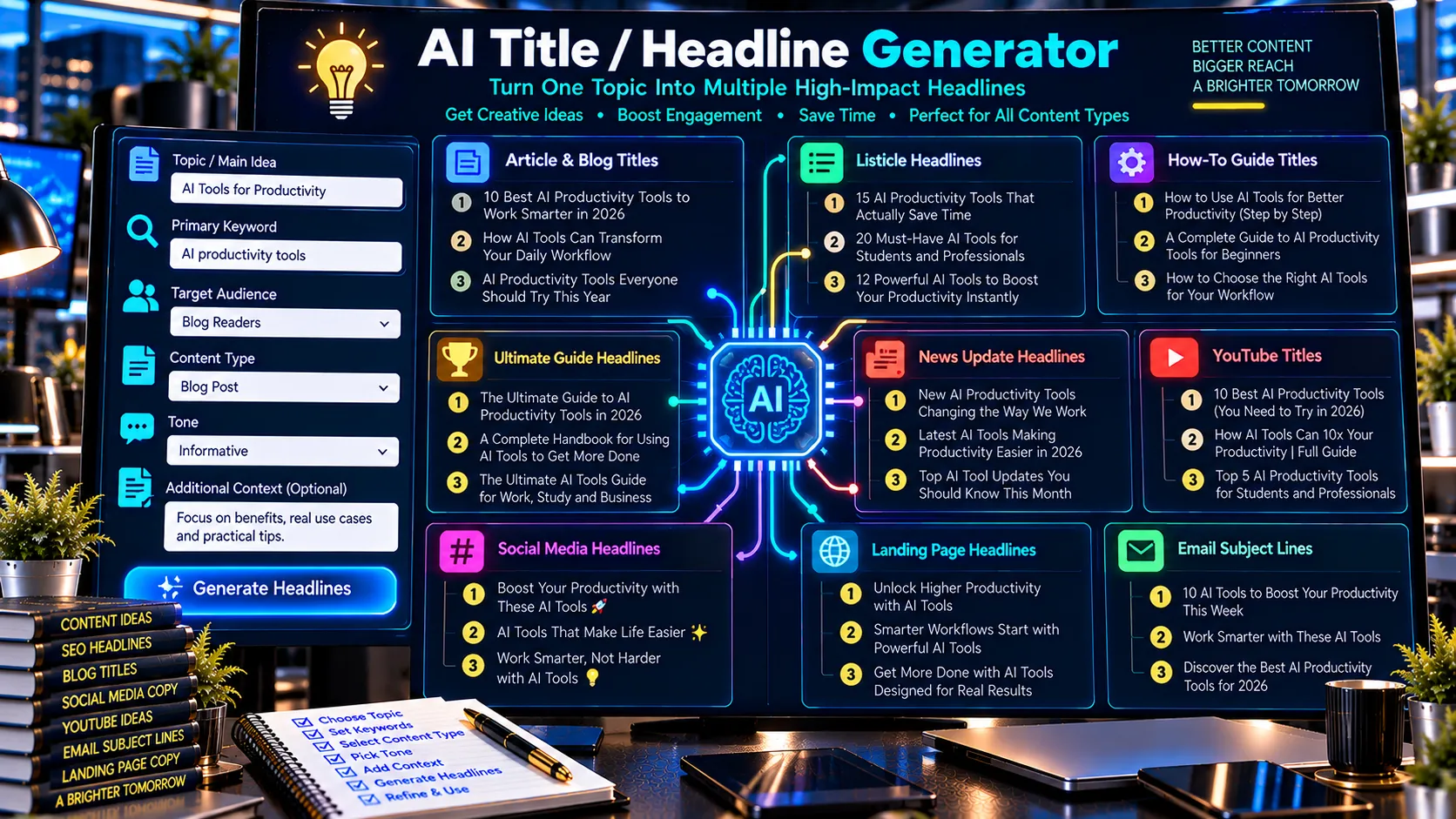
Create better titles and headlines from a topic, audience, keyword, content type, tone, and additional context. PKCapra’s AI Title / Headline Generator produces multiple headline ideas for articles, blog posts, listicles, how-to guides, ultimate guides, news updates, YouTube videos, social media posts, landing pages, email subjects, and products or tools.
AI Title / Headline Generator
Generate headline ideas from your topic, audience, format, tone, and keywords. This browser-based utility uses structured headline patterns and does not require an external AI API.
Structured headline-generation utility. Review titles for accuracy, clarity, audience fit, and platform limits before publishing.
What Does an AI Title & Headline Generator Do?
An AI title and headline generator helps you develop wording ideas for articles, blog posts, videos, campaigns and other content. By giving it a clear topic and relevant context, you can explore different ways to present the same subject, then edit the strongest suggestion to match your audience, content and publishing goals.
Why Your Title or Headline Matters
A title sets expectations before someone reads, watches or opens your content. It should communicate the subject clearly and give the right audience a useful reason to continue.
Make the Topic Clear
Readers should understand what the page, article or video covers without having to interpret vague wording.
Show the Relevant Benefit
Explain what the audience can learn, compare, solve or accomplish when that benefit is genuinely supported by the content.
Set Accurate Expectations
A strong headline attracts the appropriate audience without exaggerating results or promising information the content does not provide.
How to Use the Title & Headline Generator
Good suggestions begin with a useful brief. Give the generator enough information to understand the subject and the audience you want to reach.
Describe Your Content
Enter the main topic, the central idea or a short summary of the content you are preparing.
Add Useful Context
Include the intended audience, purpose, key takeaway and important details that should remain accurate in the title.
Review the Suggestions
Compare the generated wording. Look for options that are clear, relevant and different in their approach.
Edit Before Publishing
Refine your chosen title, check its facts and confirm that it accurately represents the final content.
Example: Give the Generator a Better Brief
A short topic can produce broad suggestions. A specific brief gives the generator more direction and helps you judge whether each title fits the content.
This topic leaves the audience, purpose and subject angle unclear.
The detailed brief identifies the audience, article purpose, key information and an important accuracy constraint.
Title, Headline, SEO Title or Subject Line?
These terms overlap, but the publishing context changes what a useful result looks like. The following distinctions can help you refine generated suggestions.
| Content type | Main purpose | What to prioritize |
|---|---|---|
| Article or blog title | Describe the subject and invite the intended reader. | Clarity, relevance, topic and natural keyword use. |
| SEO title tag | Represent a webpage in search-result title links and other contexts. | Distinct wording, page relevance and concise presentation. |
| YouTube or video title | Identify the video and communicate its central appeal. | Specificity, accurate expectations and a clear hook. |
| Social media headline | Introduce a post or shared piece of content. | Audience fit, readability and context for the platform. |
| Email subject line | Help recipients understand why an email is relevant. | Concise wording, honest relevance and easy scanning. |
For search-focused pages, you can also review your finished title with the Title Tag Analyzer. A generated headline is a writing draft; a title-tag review is a separate step.
How to Create a Useful SEO Title
Search optimization starts with accurately describing the page. A title generator can help with wording, but it cannot replace understanding the search intent or the content itself.
Use the Main Topic Naturally
Include the primary subject or target phrase when it fits the sentence. Avoid repeating keywords just to make a title appear optimized.
Make Each Page Distinct
Write a title that describes the specific page. Reusing the same generic title across multiple pages makes it harder to distinguish their purpose.
Keep the Promise Accurate
Numbers, comparisons, dates and claims should be supported by the content. Remove details that cannot be verified.
Think About Search Intent
A tutorial, product comparison and definition answer different needs. The title should match the type of answer the page provides.
Write for People First
A readable title is more useful than a string of search phrases. Use familiar wording and make the subject easy to recognize.
Check the Display Context
Search engines and publishing platforms may display titles differently or shorten them according to available space. Review the final title in its intended context.
Common Headline Mistakes to Avoid
Generated ideas are starting points. A quick editorial review helps remove wording that may confuse readers or misrepresent the content.
| Mistake | Why it can weaken a title | Better approach |
|---|---|---|
| Vague wording | Readers cannot tell what the page covers. | Name the subject or practical outcome. |
| Keyword stuffing | The title becomes repetitive and unnatural. | Use the topic phrase where it reads clearly. |
| Unsupported claims | The headline creates expectations the content cannot meet. | Verify every result, statistic and promise. |
| Excessive clickbait | Curiosity replaces useful information or trust. | Use an interesting angle while keeping the subject honest. |
| Near-duplicate options | Several suggestions offer little real choice. | Compare different angles, not just swapped adjectives. |
| Ignoring the audience | The wording may be too technical or too general. | Use language appropriate to the intended reader. |
How to Choose the Best Generated Headline
Do not select a title only because it sounds dramatic. Compare suggestions against the actual content and the reason someone would search for or open it.
- Check relevance: Does the title describe the main topic accurately?
- Check the audience: Would the intended reader understand the wording?
- Check the promise: Does the content deliver what the headline suggests?
- Check specificity: Can you replace broad language with a meaningful detail?
- Check keyword use: Is the main phrase included naturally where appropriate?
- Check length and layout: Does it suit the publishing format?
- Check originality: Does it sound distinct from your other page titles?
- Make the final edit: Use your own judgment and brand voice before publishing.
Related PKCapra Writing & SEO Tools
After developing a title, use these related tools to continue preparing and reviewing your content.
AI Meta Description Generator
Develop draft meta description wording that summarizes the page and supports a clear search-result message.
AI Keyword / Content Brief Generator
Organize a content topic and its supporting ideas into a more focused writing brief.
Content Outline Generator
Build a structured outline to help arrange the sections and supporting points of your article.
AI Title & Headline Generator FAQs
Answers to common questions about creating, reviewing and using generated title ideas.
What is an AI title and headline generator?
It is a writing utility that helps produce title or headline ideas from a topic or brief. The suggestions can be reviewed and edited for articles, videos, campaigns and other content.
How do I get more relevant headline suggestions?
Provide a specific topic, intended audience, content format and central takeaway. Include important facts or constraints that the title must preserve.
Can a title generator help with SEO?
It can help you explore clear wording and natural ways to include a topic phrase. It does not replace keyword research, search intent analysis or reviewing the actual page.
What is the difference between a headline and an SEO title?
A headline is the visible title used in content such as an article. An SEO title usually refers to the HTML title element intended to describe a webpage in search and browser contexts. They can be similar, but they do not have to be identical.
How long should an SEO title be?
There is no universal character limit that guarantees full display. Keep the wording concise and descriptive, and remember that search engines may shorten or rewrite title links.
Should I include my target keyword in the headline?
Include it when it accurately describes the content and fits naturally. Avoid forcing exact-match phrases into wording that would otherwise be clearer.
Can I publish a generated headline without editing it?
It is better to review and edit the suggestion first. Check names, numbers, claims, tone and whether the headline matches the finished content.
Does a catchy headline guarantee more clicks?
No. Performance depends on the audience, topic, placement, competition, content quality and many other factors. A headline generator cannot guarantee traffic, rankings or engagement.
Can I use the generator for social media and video titles?
Title ideas can be adapted for different publishing formats. Review the platform’s current display and character guidance, and make sure the final wording suits that audience.
Are generated title ideas always factually correct?
No. Generated wording may introduce unsupported details or assumptions. Verify every factual claim and remove anything that your content cannot substantiate.