
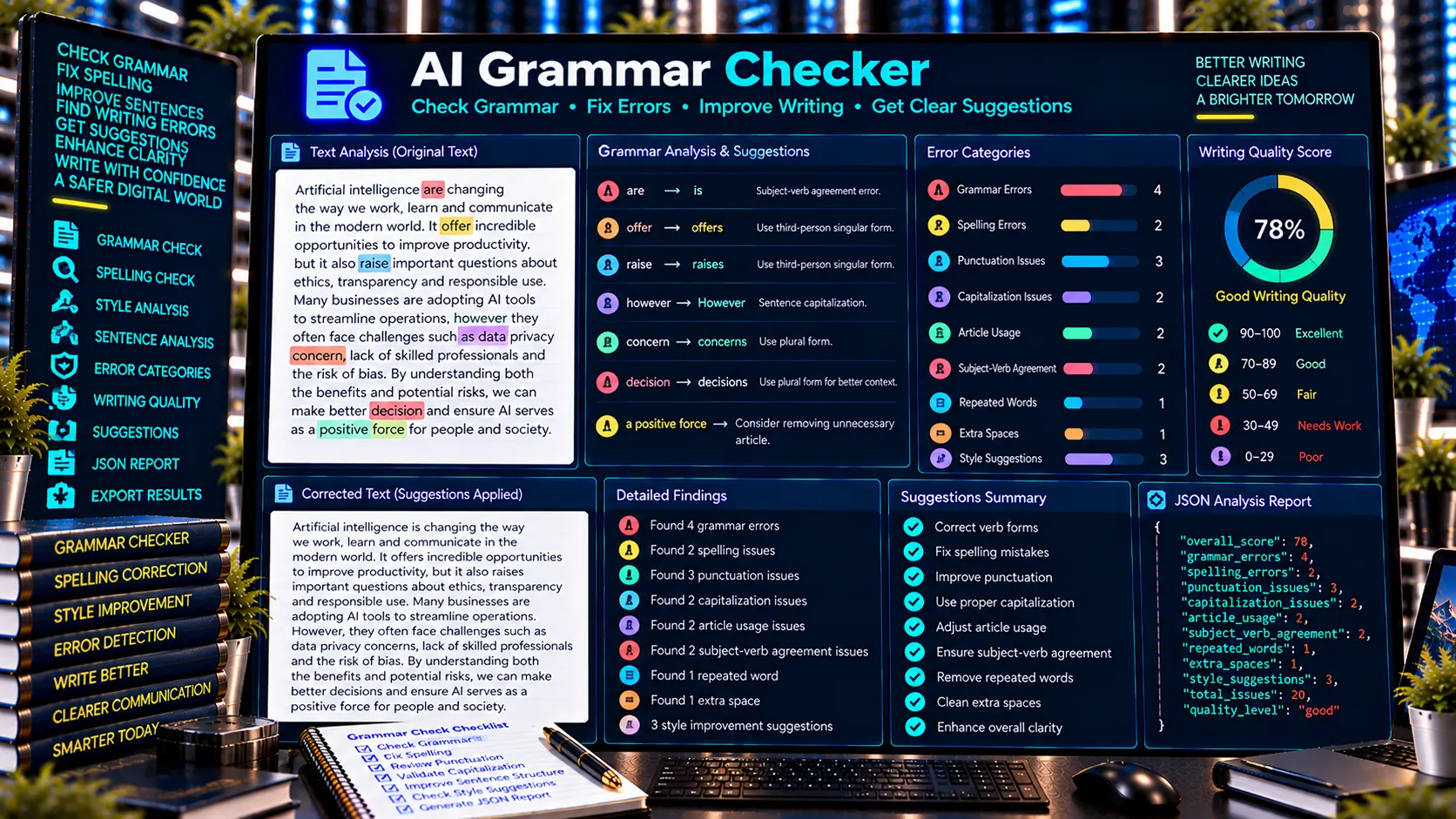
PKCapra’s AI Grammar Checker is a browser-based writing analysis tool that checks text for common grammar, spelling, punctuation, capitalization, repetition, and sentence-structure issues. It provides categorized findings, suggested corrections, and a writing-quality score without requiring an external AI API.
AI Grammar Checker
Check common grammar, spelling, punctuation, and style signals directly in your browser. No external AI API is required.
Deterministic browser-side checker using explicit rules and dictionaries; not a substitute for a human editor or full generative AI grammar system.
What Does an AI Grammar Checker Do?
An AI grammar checker reviews written text for possible grammar, spelling, punctuation, and sentence-structure problems. Depending on the checker, it may also suggest improvements to clarity, word choice, tone, and readability.
Use the PKCapra AI Grammar Checker to review a draft, identify areas that may need correction, and refine your writing before sharing or publishing it. Always review suggested changes to make sure they preserve your intended meaning and voice.
What Can a Grammar Check Help You Improve?
Grammar is only one part of effective writing. A careful review also considers whether the message is clear, appropriate for its audience, and easy to follow.
Grammar and Agreement
Review subject–verb agreement, verb forms, pronoun use, articles, and sentence construction.
Spelling and Word Choice
Spot possible spelling errors, confusing word choices, and words that may not fit the context.
Punctuation
Check commas, apostrophes, periods, and other punctuation that affects sentence meaning.
Sentence Clarity
Identify long, awkward, or difficult sentences that may benefit from a clearer structure.
Consistency
Look for inconsistent spelling, tense, capitalization, or style within the same piece of writing.
Readability
Review whether the wording is direct and understandable for the intended reader.
How to Check Grammar Online
Follow these practical steps when reviewing text with an online grammar checker.
Prepare Your Text
Write or paste the paragraph, email, article, assignment, or other text you want to review.
Run the Check
Use the controls available in the tool to submit your text for review.
Review Suggestions
Read each proposed correction in context. Check whether it fixes an actual error.
Make Appropriate Edits
Accept useful changes and retain wording that correctly expresses your intended message.
Read the Revised Draft
Review the complete text after editing to catch any changes that affect flow or meaning.
Proofread Before Use
Check names, numbers, quotations, specialist terms, and facts before publishing or sending.
Common Grammar Mistakes and Corrections
The examples below show frequent writing issues and how a corrected sentence can read.
| Issue | Incorrect Example | Corrected Example |
|---|---|---|
| Subject–verb agreement | She work every morning. | She works every morning. |
| Incorrect verb form | They have went home. | They have gone home. |
| Missing article | He bought new laptop. | He bought a new laptop. |
| Confused words | Your welcome. | You’re welcome. |
| Run-on sentence | I was late I missed the bus. | I was late, so I missed the bus. |
| Unclear wording | The report was done by us. | We completed the report. |
Remember: Not every suggested rewrite is a necessary grammar correction. A sentence can be grammatically correct while still sounding informal, unusual, or stylistically different from a tool’s preferred wording.
How to Get Better Results from a Grammar Checker
Good input and careful editing make grammar review more useful.
Use Complete Context
When possible, review full sentences or paragraphs rather than isolated words. Context can affect grammar and word choice.
Choose the Right English Variant
Keep British, American, Canadian, or other spelling conventions consistent with your audience and publication requirements.
Preserve Your Tone
A formal report, friendly email, academic paper, and social post may require different language choices.
Check Technical Terms
Specialist vocabulary, product names, abbreviations, and code-related terms may be unfamiliar to general writing systems.
Verify Meaning
Make sure a correction does not change the subject, intended emphasis, facts, or meaning of your sentence.
Proofread Separately
After using automated suggestions, read the final draft aloud or review it slowly for remaining issues.
Grammar Checker vs. Manual Proofreading
Automated checking and human proofreading serve different purposes. Using both can provide a more complete review.
| Review Method | Useful For | What to Keep in Mind |
|---|---|---|
| Online grammar checker | Finding possible grammar, spelling, punctuation, and wording issues. | Suggestions can be incorrect or miss context-specific errors. |
| Manual proofreading | Checking meaning, names, facts, tone, formatting, and final presentation. | Careful review takes time and may still overlook mistakes. |
| Combined review | Using automated suggestions as a first pass, followed by a human review. | Always make the final decision based on context and intended meaning. |
A grammar checker is a writing aid, not a substitute for editorial judgment. For important documents, professional, academic, legal, or technical writing, use the appropriate subject-matter review as well.
Practical Uses of an Online Grammar Checker
Grammar review can support many everyday writing tasks.
Students
Review essays, reports, study notes, and other drafts before submission. Follow your institution’s rules for writing assistance.
Professionals
Check business emails, proposals, meeting notes, and workplace documents for avoidable writing errors.
Content Writers
Proofread blog drafts, website copy, product descriptions, and editorial content before publication.
Website Owners
Review landing pages, help articles, FAQs, and other website text for clarity and consistency.
Non-Native English Writers
Use correction suggestions to identify recurring language patterns and learn from revised examples.
Everyday Communication
Check messages, applications, letters, and personal writing when accurate wording matters.
Explore More Text and Writing Tools
Use these related utilities for other writing and text-processing tasks.
AI Grammar Checker FAQs
Answers to common questions about online grammar checking and editing.
What is an AI grammar checker?
An AI grammar checker is a writing tool that uses language-processing techniques to identify possible errors and suggest improvements to text. Depending on the tool, it may review grammar, spelling, punctuation, sentence structure, and wording.
Can a grammar checker correct every mistake?
No automated checker can guarantee that every error will be found or corrected. Context, unusual phrasing, specialist terms, and factual mistakes may require manual review.
Does grammar checking improve readability?
It can help identify sentences that may be unclear or awkward. Readability also depends on organization, audience, vocabulary, and the way ideas are connected.
Should I accept every grammar suggestion?
No. Review each suggestion in context. Automated tools may recommend a stylistic change where your original sentence is already correct, or may misunderstand the intended meaning.
Can I use a grammar checker for emails and professional documents?
Yes, grammar checking can be useful for reviewing emails, reports, proposals, and other professional writing. Check the final text carefully, especially names, dates, figures, and sensitive details.
Is an online grammar checker a replacement for proofreading?
No. Automated checking can support proofreading, but a final human review is important for meaning, accuracy, tone, and context.
What should I do before checking confidential text?
Remove sensitive information where possible and review the site’s privacy policy and tool-specific data-handling information before submitting confidential, personal, or business-critical content.
Can grammar checking help me learn English?
It can be a useful learning aid when you review corrections, compare the original and revised sentences, and understand why a change may be appropriate. Do not rely on suggestions without learning the underlying rule or context.