
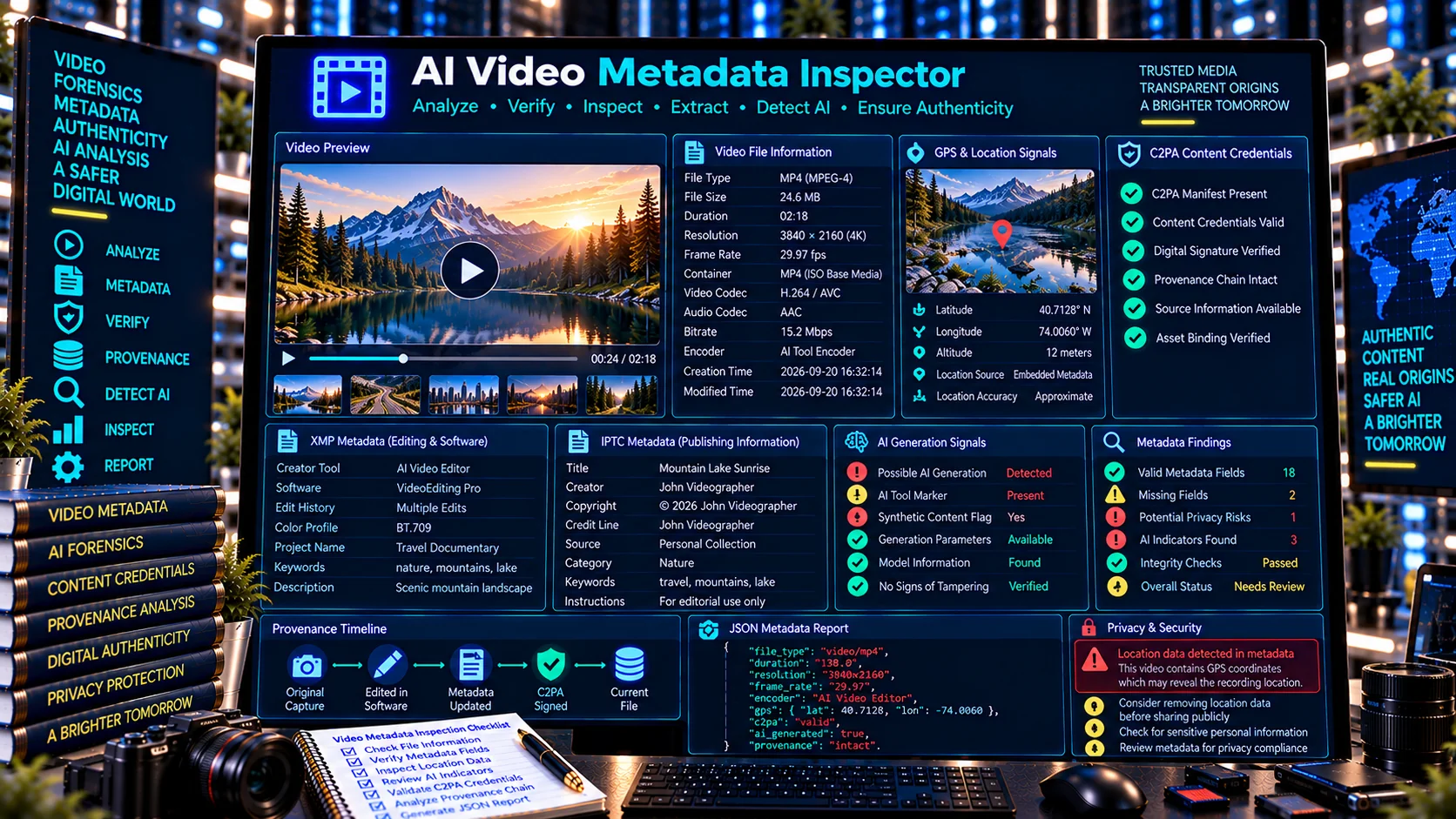
AI Video Metadata Inspector is a browser-based tool for examining video metadata and identifying available technical, software, location, provenance, and AI-related metadata signals. Analyze a video file for its basic media properties, metadata markers, C2PA Content Credentials signals, and other embedded information without relying on an external AI API.
Inspect a Video
Choose a video to inspect file properties, duration, dimensions, codec/container markers, metadata, and provenance-related signals.
Inspection Scope
Checks browser-readable video properties and detectable metadata markers. The video is processed locally in your browser and is not uploaded.
- File type and size
- Video dimensions and duration
- Container / codec / encoder signals
- Creation-time and location markers
- XMP / IPTC / QuickTime-style metadata signals
- C2PA / Content Credentials and AI-related markers
Metadata Findings
Detected Video Metadata Signals
Video Summary
JSON Report
What Does an AI Video Metadata Inspector Do?
An AI Video Metadata Inspector helps you examine descriptive and technical information associated with a video file. Depending on the file format and the metadata available, this information may include video dimensions, duration, encoding details, timestamps, audio streams, or embedded descriptive fields. Reviewing metadata can help you understand a file before using it in an AI workflow, media library, publishing process, or digital archive.
What Is Video Metadata?
Metadata is information that describes a media file. It is separate from the visible images and audible content, although some metadata can describe how that content was created or encoded.
Technical Metadata
Describes file and stream properties such as dimensions, frame rate, codec, bitrate, duration, and audio or video stream details when those fields are available.
Descriptive Metadata
May contain information such as a title, description, creator, comments, keywords, or other labels added by software or a person during the media workflow.
Time and Location Data
Some files or recording workflows may include creation timestamps, recording dates, or location-related fields. Their presence and interpretation depend on the format and source.
Why Inspect Video Metadata?
Metadata review can answer useful questions about a video without relying only on its filename or appearance.
Prepare Media for AI Workflows
Review available file properties before uploading a video to a system that processes, indexes, transcribes, or analyzes media. Metadata alone does not describe every detail of the video content.
Check Technical Compatibility
Use available dimensions, frame rate, codec, and stream information to help identify whether a file may need conversion or further compatibility testing.
Organize Media Libraries
Descriptive fields and timestamps can support cataloging, sorting, asset management, and review of video collections.
Review Information Before Sharing
Inspect metadata that may reveal details about the file’s creation or workflow. Consider whether any personal or confidential information should be removed before distribution.
Investigate File Differences
Compare metadata from different versions of a video to identify changes in encoding, dimensions, duration, or other reported properties.
Support Media Documentation
Record relevant technical details when preparing media for documentation, review, or archival workflows.
Common Video Metadata Fields Explained
Video formats and inspection methods expose different fields. The table below explains common properties you may encounter; it does not guarantee that every field appears for every file.
| Metadata Field | What It Describes | Why It Can Matter |
|---|---|---|
| Duration | The reported playback length of the media. | Useful for reviewing clips, timelines, and processing requirements. |
| Frame Dimensions | The encoded width and height of the video frames. | Helps identify resolution and display-size characteristics. |
| Frame Rate | The number of frames displayed or represented per second. | Relevant to motion characteristics and media compatibility. |
| Video Codec | The encoding method used for the video stream. | Can help determine whether a playback or processing system supports the file. |
| Bitrate | The reported data rate of a stream or file. | Provides context about encoding and file size, but is not a direct quality score. |
| Audio Streams | Information about audio tracks, codecs, or channels. | Useful when a workflow requires sound, narration, or multiple audio tracks. |
| Creation or Recording Time | A timestamp stored by the recording or editing process. | May help organize files, but can be missing or inaccurate. |
| Embedded Descriptive Fields | Optional titles, comments, creator labels, or related tags. | Can support file organization and provide context about the asset. |
Important: Metadata is not always complete, standardized, or trustworthy. A field may be absent, inherited from an editing application, or changed during conversion. Treat metadata as file information to review—not as automatic proof of who created a video or whether its content is authentic.
How to Inspect Video Metadata
Use the inspector above and follow the controls and supported file requirements shown on the tool interface.
Select a Video
Choose the video file you want to examine, using a format accepted by the tool.
Start Inspection
Use the available control to begin the metadata inspection process.
Review the Output
Read the metadata fields returned by the inspector and note any missing or unexpected information.
Use the Findings
Apply the information to your media organization, compatibility checks, documentation, or AI preparation workflow.
Video Metadata Inspection vs. Video Content Analysis
Metadata inspection and AI-based video understanding answer different questions. One examines file information; the other may analyze the visual or audio content itself.
| Task | Metadata Inspection | Content Analysis |
|---|---|---|
| File duration | May read the duration reported by the media file. | Usually not the primary purpose. |
| Resolution and codec | Examines technical stream properties when available. | May use these properties as input context. |
| Objects or scenes | Does not establish what appears in the frames. | May identify or describe visual content using supported analysis. |
| Speech or transcript | Metadata may indicate audio stream properties, not spoken words. | Speech recognition or audio analysis may produce a transcript. |
| Authenticity | Metadata can provide clues, but can be edited or removed. | Content analysis may provide additional signals, but is not definitive proof. |
If your goal is to understand the actual scenes, speech, or visual information in a video, metadata inspection should be treated as one part of the process rather than a replacement for content analysis.
Privacy and Accuracy Considerations
Metadata can contain information that is useful for organization but inappropriate to share publicly.
Check for Sensitive Fields
Review creator names, comments, timestamps, location-related fields, or other identifying information when present.
Do Not Rely on Metadata Alone
Metadata can be modified, copied, stripped, or generated by software. It should not be treated as conclusive evidence about a video’s origin.
Keep Original Files When Needed
If you are documenting or investigating a media asset, preserve the original file and record any transformations separately.
Privacy reminder: Before uploading confidential, personal, or sensitive video, review the site’s Privacy Policy and the specific tool’s processing information. Do not assume that every online utility processes files in the same way.
Common Video Metadata Mistakes
Assuming Every Video Has the Same Fields
Metadata varies by container, codec, recording device, editing software, and processing history.
Treating a Timestamp as Definitive
File dates and embedded recording times may reflect copying, editing, device settings, or timezone differences.
Confusing Metadata With Visual Content
A title or filename does not prove what a video contains. Content should be reviewed separately when accuracy matters.
Interpreting Bitrate as a Quality Guarantee
Bitrate is one encoding property. Perceived quality also depends on codec, resolution, source material, and compression.
Ignoring Metadata Before Publishing
Unnecessary descriptive or identifying fields may be worth removing before a video is distributed.
Assuming Missing Data Means a Problem
Some metadata fields are optional. Their absence does not automatically mean the video is damaged or invalid.
Related PKCapra AI Media Tools
Continue with other media and metadata utilities when your workflow requires a different type of inspection.
AI Video Metadata Inspector FAQs
Answers to common questions about video metadata and file inspection.
What is an AI Video Metadata Inspector?
It is a utility for examining information associated with a video file. Depending on the file and the inspector’s supported capabilities, this may include technical stream properties and embedded descriptive metadata.
Does video metadata show what is happening in a video?
Not necessarily. Metadata describes the file or its streams. Understanding scenes, objects, or spoken words generally requires separate video or audio content analysis.
What information can video metadata contain?
Common examples include duration, frame dimensions, frame rate, codec, bitrate, audio stream details, timestamps, and optional descriptive fields. The available information depends on the format and how the file was created.
Can metadata identify the original creator of a video?
Metadata may contain creator or software fields, but these values can be changed or removed. They should not be treated as definitive proof of authorship.
Can video metadata contain private information?
It can. Depending on the file and recording workflow, metadata may include names, comments, timestamps, or location-related information. Review the available fields before sharing a file publicly.
Does converting a video preserve its metadata?
Not always. Conversion and editing software may preserve, modify, or remove metadata. Check the resulting file if particular fields are important to your workflow.
Is missing metadata a sign that a video is corrupted?
No. Many metadata fields are optional, and some formats store information differently. Missing descriptive metadata alone does not establish file corruption.
Does metadata inspection prove that a video is authentic?
No. Metadata can provide useful context, but it can also be edited, copied, or stripped. Authenticity assessment requires additional evidence and should not rely on metadata alone.
Review Your Video File Information
Use the AI Video Metadata Inspector above to examine available file information, understand its technical properties, and prepare your media for a more informed workflow.
Explore More PKCapra AI Tools