
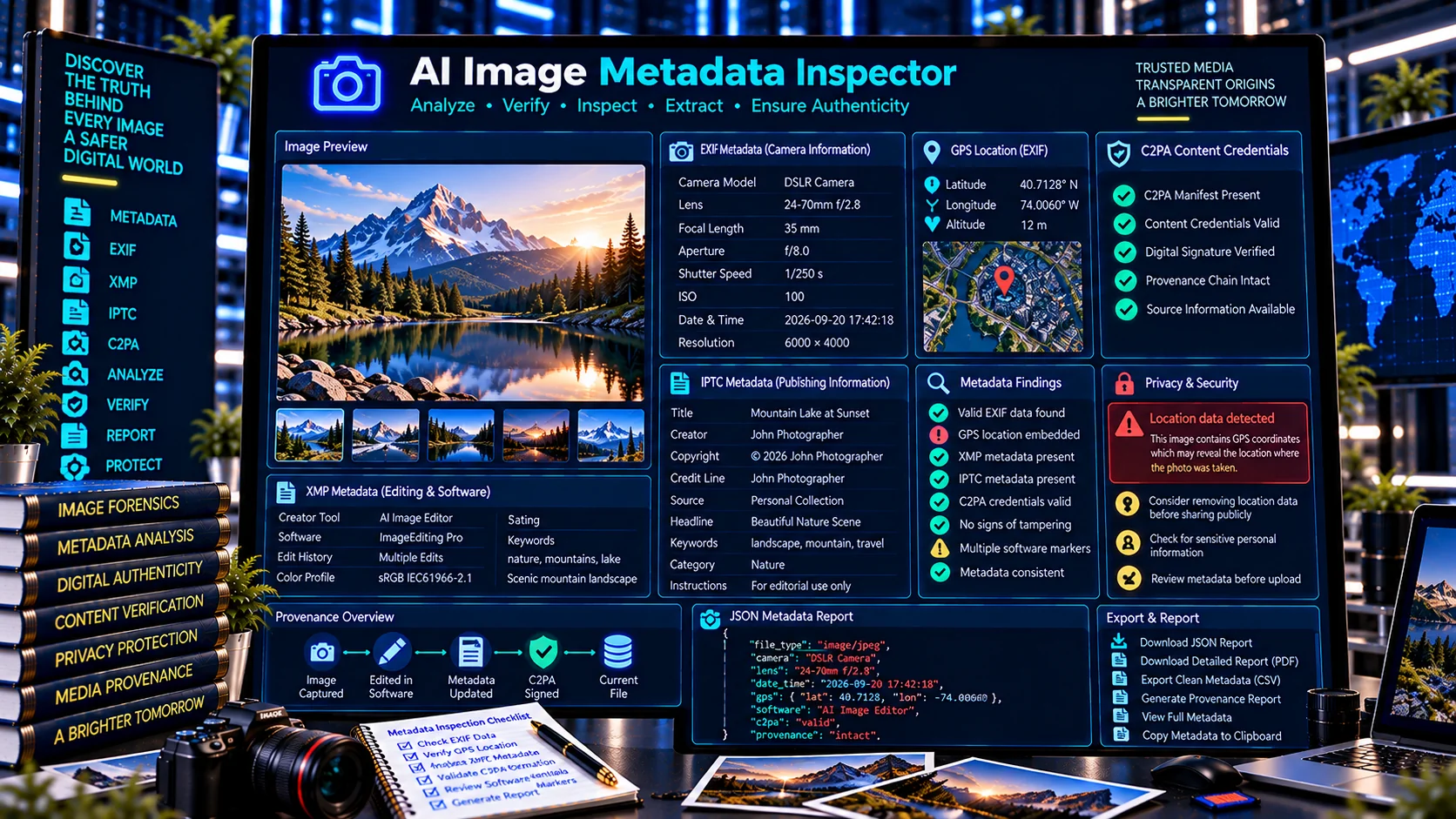
The AI Image Metadata Inspector is a browser-based tool for examining metadata and provenance-related signals contained in image files. It helps identify image properties, EXIF metadata, XMP and IPTC information, GPS/location fields, camera and software markers, C2PA or Content Credentials signals, and other detectable metadata.
The tool is designed for photographers, AI-content researchers, publishers, developers, digital-media teams, content reviewers, and anyone who needs to understand what metadata is associated with an image before publishing, sharing, or analyzing it.
Inspect an Image
Choose an image to inspect detectable file, EXIF, XMP, IPTC, GPS, and software metadata signals.
Inspection Scope
Checks browser-readable image properties and detectable metadata markers. It does not upload the image or rewrite its metadata.
- File type and size
- Pixel dimensions
- EXIF / XMP / IPTC signals
- GPS-related fields
- Software / creator markers
- AI-generation-related metadata signals
Metadata Findings
Detected Metadata Signals
Image Summary
JSON Report
What Is an AI Image Metadata Inspector?
An AI Image Metadata Inspector examines an image for detectable metadata and technical information.
Digital images can contain information beyond their visible pixels. Depending on the camera, editing application, export process, publishing workflow, and file format, an image may contain camera information, timestamps, software markers, location information, embedded descriptions, provenance-related information, or other metadata.
PKCapra’s AI Image Metadata Inspector brings these detectable signals together into a structured inspection workflow.
What Does the AI Image Metadata Inspector Check?
Image File Information
The inspector identifies basic information about the image file, such as its detectable file type, file size, dimensions, and other available technical properties.
This provides a starting point before examining embedded metadata.
EXIF Metadata
EXIF is commonly used to store information associated with photographs and image files.
Depending on the image and its source, EXIF information can include fields related to:
- Camera manufacturer
- Camera model
- Lens information
- Exposure settings
- ISO
- Focal length
- Date and time
- Orientation
- Software
- GPS information
The inspector reports detectable EXIF-related information when available.
GPS and Location Metadata
Some images can contain geographic coordinates or location-related metadata.
The inspector can identify detectable GPS/location fields.
This is particularly important before sharing images publicly because embedded location information can reveal where an image was captured.
A missing GPS field does not necessarily prove that an image has never contained location information; metadata may have been removed during editing, export, compression, or publishing.
XMP Metadata
XMP can store structured metadata associated with digital media.
Depending on the application and workflow, XMP may contain information about editing, descriptions, authorship-related fields, software, or other metadata.
The inspector identifies detectable XMP-related signals when available.
IPTC Metadata
IPTC metadata can be used in professional photography, publishing, journalism, and digital asset management workflows.
It may contain fields such as:
- Creator information
- Copyright
- Description
- Keywords
- Headline
- Location
- Credit
- Rights information
The inspector surfaces detectable IPTC-related metadata.
Camera Information
Images produced by cameras may contain manufacturer, model, lens, exposure, and other technical information.
The inspector can identify available camera-related metadata.
Software and Editing Markers
Image-processing software can sometimes leave detectable metadata or software markers in a file.
These markers can provide useful context about how an image was processed.
They should not be interpreted as a complete record of every application that has ever touched the image.
C2PA and Content Credentials Signals
Some images may contain C2PA-related provenance information or Content Credentials.
The inspector can identify detectable C2PA or Content Credentials signals alongside ordinary image metadata.
For dedicated provenance inspection, use the C2PA Content Credentials Inspector.
AI and Provenance-Related Markers
Some image workflows can leave metadata or provenance-related indicators associated with AI generation or AI-assisted editing.
The inspector reports detectable markers when they are present.
A metadata marker alone should not be treated as definitive proof that an image was generated by AI.
Why Inspect Image Metadata?
Image metadata can provide useful technical and contextual information that is not visible in the image itself.
Metadata inspection can help users:
- Understand an image file
- Review camera information
- Identify software markers
- Detect embedded GPS information
- Examine copyright fields
- Review creator information
- Investigate provenance signals
- Prepare images for publication
- Check privacy risks
- Document technical findings
Metadata inspection is therefore useful for both everyday image management and professional media workflows.
Image Metadata and Privacy
Image metadata can sometimes contain information that users do not intend to publish.
Location metadata is one of the most important examples.
A photograph taken with a location-enabled camera or smartphone may contain geographic information that could reveal where the image was captured.
Other potentially sensitive fields can include:
- Creator names
- Copyright information
- Device information
- Software information
- Dates
- Locations
- Descriptions
- Keywords
Reviewing metadata before publishing an image can help users identify information they may want to remove.
AI Image Metadata Inspector for Privacy Checks
Before uploading an image to a public website, social platform, marketplace, blog, or online publication, users can inspect the file for embedded metadata.
A practical workflow is:
Inspect → Identify Sensitive Fields → Remove if Appropriate → Export → Publish
Metadata inspection does not itself remove information. It helps users understand what information is present so they can decide what should be retained or removed.
AI Image Metadata Inspector vs C2PA Content Credentials Inspector
These tools address related but different layers of image information.
The AI Image Metadata Inspector focuses broadly on image metadata and technical properties, including EXIF, XMP, IPTC, GPS, camera information, software markers, and detectable provenance-related signals.
The C2PA Content Credentials Inspector focuses specifically on recognizable C2PA and Content Credentials structures.
A useful workflow can therefore be:
Image Metadata Inspection → C2PA Inspection → Provenance Validation
AI Image Metadata Inspector vs C2PA Metadata Validator
The AI Image Metadata Inspector is designed to examine a broad range of image metadata.
The C2PA Metadata Validator focuses specifically on the structural validation of detectable C2PA metadata.
Use the image metadata inspector when you want a broader view of an image’s embedded information.
Use the C2PA validator when the main objective is to validate C2PA-related provenance structures.
Image Metadata and AI-Generated Images
AI-generated images may contain different metadata patterns depending on the generation system, export process, editing software, and publishing workflow.
Some AI systems or downstream applications may preserve provenance-related information, while others may remove or transform metadata.
Therefore, metadata inspection should be treated as one evidence layer rather than an absolute AI detector.
The presence of a software marker, metadata field, or provenance signal does not independently establish how an image was created.
Likewise, the absence of an AI-related metadata marker does not prove that AI was not used.
Image Metadata and C2PA Provenance
C2PA is a provenance framework designed to associate structured provenance information with digital content.
C2PA information can contain concepts such as:
- Manifests
- Claims
- Assertions
- Actions
- Ingredients
- Claim-generator information
- Digital-source information
- Signature-related data
These structures are different from ordinary EXIF, IPTC, or XMP fields, although they can coexist within broader digital-media workflows.
For detailed C2PA metadata validation, use PKCapra’s C2PA Metadata Validator.
Common Image Metadata Findings
Camera Metadata Present
The image contains detectable camera-related information.
GPS Information Present
The image contains detectable geographic or location-related metadata.
This deserves particular attention before public sharing.
Software Information Present
A camera, editor, converter, or other application may be identified in available metadata.
Copyright Information Present
The file may contain copyright or rights-management information.
Creator Information Present
Creator-related metadata may be embedded in the file.
XMP Information Present
Detectable XMP structures or fields may be available.
IPTC Information Present
Professional publishing or photography metadata may be available.
C2PA Information Present
Detectable Content Credentials or C2PA-related information may be available.
Limited Metadata
Some images contain very little embedded metadata.
This can happen because the original workflow did not create metadata or because metadata was removed during export or processing.
Why Metadata Can Disappear
Metadata is not necessarily preserved throughout the life of an image.
It can be changed or removed by:
- Image editors
- Compression tools
- Screenshot workflows
- Social-media platforms
- Website optimization
- File conversion
- Export settings
- Privacy-cleaning tools
- Messaging applications
Consequently, metadata found in a file represents what is currently detectable, not necessarily everything that existed in the original image.
Image Metadata for Photographers
Photographers can use metadata inspection to review information embedded in their files.
Potential use cases include:
- Checking camera information
- Reviewing copyright metadata
- Confirming creator fields
- Examining GPS information
- Preparing images for clients
- Checking exported files
- Troubleshooting metadata workflows
It can also help photographers understand what information remains after editing and export.
Image Metadata for Journalists and Publishers
Newsrooms and publishers can use image metadata inspection during asset review.
Potential checks include:
- Creator information
- Copyright
- Camera information
- Location fields
- Software markers
- Provenance signals
- C2PA information
Metadata can provide useful context, but it should not automatically be treated as a complete verification of an image’s origin or factual context.
Image Metadata for AI Researchers
AI-content researchers can inspect images for detectable metadata and provenance-related signals when studying generated or edited media.
This can be useful for:
- Dataset research
- AI-media analysis
- Provenance research
- Content-authenticity studies
- Media QA
- Workflow documentation
The inspector is an information-extraction and inspection layer, not a standalone AI-image detector.
Image Metadata for Developers
Developers can use the tool when testing image-processing and metadata workflows.
For example:
Create → Edit → Export → Inspect → Compare
This can reveal which metadata fields survive a particular processing pipeline.
The results can be useful during development, debugging, and quality assurance.
Browser-Based Image Metadata Inspection
PKCapra’s AI Image Metadata Inspector is designed for browser-side processing.
The core inspection workflow does not require an external AI API or automatic image upload to a remote AI service.
This can be useful when reviewing images that should remain local during an initial metadata inspection.
Users should still follow their own privacy and security policies when handling sensitive images.
Image Metadata Inspection vs Image Authenticity
Metadata inspection and image authenticity analysis are different tasks.
Metadata can provide useful evidence about an image’s technical history or available provenance.
However, metadata can be:
- Removed
- Modified
- Rewritten
- Lost during conversion
- Incomplete
- Inherited from another workflow
Therefore, metadata should be interpreted as one source of information rather than absolute proof of authenticity.
What the AI Image Metadata Inspector Does Not Prove
An inspection result does not automatically prove that:
- An image is authentic
- An image is fake
- An image was generated by AI
- An image was created by a camera
- A creator identity is genuine
- GPS information is accurate
- Software metadata represents the complete editing history
- Metadata has never been modified
- Missing metadata means the file is original
- Present metadata proves the content is trustworthy
These limitations are important when using metadata in forensic, journalistic, research, or authenticity workflows.
Recommended Image Metadata Workflow
A practical image-review workflow can be:
- Inspect the image file.
- Review EXIF information.
- Check GPS/location fields.
- Review XMP and IPTC metadata.
- Examine camera and software markers.
- Check C2PA or Content Credentials signals.
- Document relevant findings.
- Remove sensitive metadata when appropriate.
- Perform deeper provenance or authenticity verification if required.
This provides a structured approach to understanding an image before it is published or analyzed further.
Frequently Asked Questions
What is an AI Image Metadata Inspector?
It is a tool for examining image files for detectable technical properties, EXIF, XMP, IPTC, GPS, camera information, software markers, C2PA signals, and other metadata.
Can it read EXIF metadata?
Yes. The tool can identify detectable EXIF-related information contained in the image.
Can it detect GPS metadata?
Yes. Detectable GPS and location-related fields can be identified.
Why should I check GPS metadata before sharing an image?
GPS metadata can potentially reveal where a photograph was captured. Reviewing it before public sharing can help identify unintended location disclosure.
Can it detect camera information?
Yes. Detectable camera manufacturer, model, and related fields can be reported when available.
Can it detect editing software?
It can identify detectable software-related metadata or markers. This does not necessarily provide a complete editing history.
Can it detect C2PA Content Credentials?
It can identify detectable C2PA or Content Credentials signals. For deeper C2PA inspection, use the dedicated C2PA Content Credentials Inspector.
Can it tell whether an image was created by AI?
No. Metadata can provide useful signals, but metadata inspection alone is not an authoritative AI-image detector.
Does missing metadata mean an image is original?
No. Metadata can be removed or lost through editing, conversion, screenshots, compression, and publishing workflows.
Does the tool remove metadata?
No. The inspector is designed to examine metadata. It does not automatically establish that metadata should be removed or that an image is safe to publish.
Does it upload my image to an AI service?
The core inspection workflow is designed for browser-side processing and does not require an external AI API.
Is the tool useful for photographers?
Yes. It can help photographers review camera, copyright, creator, location, and software-related metadata.
Build a Better Image Provenance and Privacy Workflow
Image metadata can provide valuable technical information, but it should be interpreted within the context of the complete media workflow.
A practical PKCapra workflow is:
Inspect Image Metadata → Check C2PA → Validate Provenance Metadata → Generate Provenance Report → Perform Deeper Verification
The AI Image Metadata Inspector provides the broad metadata inspection layer.
It helps users understand what information is embedded in an image before publishing, sharing, archiving, or performing deeper content-authenticity analysis.