
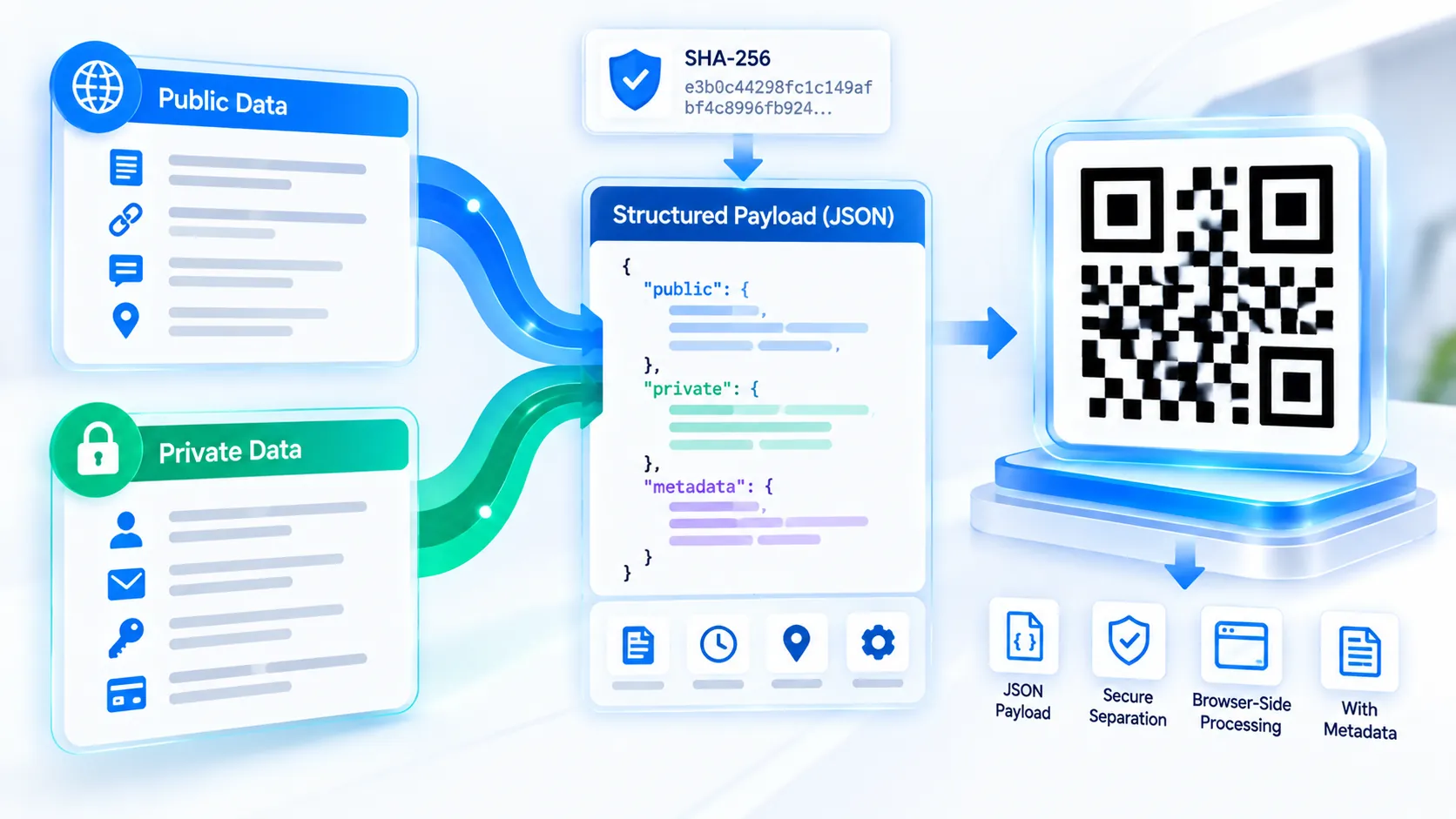
The SQRC Payload Generator prepares a structured public-and-private payload package for workflows that need to separate information intended for general access from information intended for restricted handling. Enter the public and private payloads, add an optional record ID and purpose, and the tool generates a browser-side JSON package with timestamps and SHA-256 fingerprints. The tool prepares payload data; it does not claim to generate a proprietary DENSO WAVE SQRC symbol or implement its private-data key mechanism.
SQRC Payload Generator
Prepare public and private information as a clean, machine-readable SQRC handoff package before using compatible SQRC generation software or readers.
Public Data
Private Data
Payload Settings
Live Payload Preview
LIVEWaiting for payload...
Export & Share
Payload Checks
How to Use the SQRC Payload Generator in Simple Steps
- Enter the information intended for the Public Payload field. This can contain data that your workflow is designed to expose generally.
- Enter the information intended for the Private Payload field. Keep restricted information separate from the public field rather than combining both into one string.
- Add an optional Record ID and Purpose to identify the payload package and describe its intended use. The JSON preview updates as you edit the fields.
- Copy the public payload, private payload, or complete JSON package, download the JSON file, or use Load Example to inspect a sample structure. Use Clear when you want to start a new package.
Technical Breakdown: What the SQRC Payload Generator Actually Produces
The SQRC Payload Generator creates a structured representation of public and private data rather than pretending to encode proprietary SQRC functionality that the browser module does not implement.
The generated package keeps the public and private values as separate fields. This separation is useful when an application needs to prepare data for a later SQRC-compatible encoding or another controlled data-processing workflow.
Optional metadata can include a record ID and purpose. The package also records generation-time metadata and creates SHA-256 fingerprints for the payload data. These hashes provide deterministic fingerprints of the corresponding content; they are not encryption and cannot be used to recover protected information.
The complete JSON preview is generated in the browser. Copy and download actions operate on the generated client-side data, avoiding a server-side payload-processing requirement for normal use.
The tool does not encrypt the private payload. A private field in a JSON structure is organizational separation, not cryptographic protection. If genuinely confidential information must be transmitted or stored securely, use an appropriate encryption and key-management system before placing that information into a production workflow.
The tool also does not generate a proprietary SQRC symbol or provide DENSO WAVE’s private-data decoding/key functionality. The purpose of this PKCapra utility is payload preparation and inspection.
For ordinary QR creation, use the QR Code Generator. For compact square symbols, the Micro QR Code Generator provides a different QR format. For rectangular Micro QR symbols, use the rMQR Code Generator.
Developer Snippets (Automate This Tool Offline)
The following examples show how to prepare a similar public/private payload structure offline. They do not create a proprietary SQRC symbol or implement DENSO WAVE’s private-data mechanism.
Python: Build a Public and Private Payload Package
import hashlib
import json
from datetime import datetime, timezone

public_payload = "https://example.com/item/123"
private_payload = "internal-reference-8472"

package = {
    "public_payload": public_payload,
    "private_payload": private_payload,
    "record_id": "ITEM-123",
    "purpose": "inventory-reference"
}

package["public_sha256"] = hashlib.sha256(
    public_payload.encode("utf-8")
).hexdigest()

package["private_sha256"] = hashlib.sha256(
    private_payload.encode("utf-8")
).hexdigest()

package["generated_at"] = datetime.now(timezone.utc).isoformat()

print(json.dumps(package, indent=2))
PowerShell: Generate a Payload Fingerprint
$payload = "https://example.com/item/123"

$bytes = [System.Text.Encoding]::UTF8.GetBytes($payload)
$hash = [System.Security.Cryptography.SHA256]::Create()
$digest = $hash.ComputeHash($bytes)

$hex = ($digest | ForEach-Object { $_.ToString("x2") }) -join ""

Write-Host "SHA-256:"
Write-Host $hex
Node.js: Create a Structured Payload Package
const crypto = require("crypto");

const publicPayload = "https://example.com/item/123";
const privatePayload = "internal-reference-8472";

const sha256 = (value) =>
  crypto.createHash("sha256").update(value, "utf8").digest("hex");

const packageData = {
  public_payload: publicPayload,
  private_payload: privatePayload,
  record_id: "ITEM-123",
  purpose: "inventory-reference",
  public_sha256: sha256(publicPayload),
  private_sha256: sha256(privatePayload),
  generated_at: new Date().toISOString()
};

console.log(JSON.stringify(packageData, null, 2));
These examples demonstrate payload structuring and hashing only. They should not be interpreted as implementations of the proprietary SQRC encoding, key-management, or private-data retrieval process.
Native Software Workaround: Prepare a Public/Private Payload Package
Native software can prepare the source information before it is passed to a QR or specialized 2D-code workflow.
In Microsoft Excel, place public information in one column and private information in a separate column. Add columns for record ID and purpose, then use formulas or a script to export the required fields as JSON.
In Microsoft Word, use separate labeled sections for public and private information when preparing a prototype document. Avoid treating visual separation as security; anyone with access to the document can still inspect both sections.
In Visual Studio Code, create a JSON file containing separate public_payload and private_payload properties. Use the editor’s JSON formatting command to keep the structure readable before passing it into another application.
In Adobe Illustrator or InDesign, treat the generated payload as source data rather than as artwork. Generate the actual supported code format separately, then place the resulting vector artwork into the final layout.
For confidential production workflows, perform encryption and access control outside this payload-preparation utility. A field named private_payload does not by itself provide confidentiality.
Frequently Asked Questions
What is an SQRC Payload Generator?
An SQRC Payload Generator is a data-preparation utility that separates public and private payload values into a structured package for workflows involving SQRC-style public/private data concepts.
Does this tool generate a real SQRC symbol?
The tool generates a structured payload package rather than a proprietary SQRC symbol. It does not claim to implement DENSO WAVE’s private-data encoding and key mechanism.
What is the difference between the public and private payload?
The public payload is the value intended for general-access handling in the workflow, while the private payload is kept as a separate field for restricted handling or later processing.
Does the private payload get encrypted?
The private payload is not encrypted by this tool. The private field provides data separation and organization, not cryptographic confidentiality.
What does the SHA-256 value represent?
A SHA-256 value is a cryptographic fingerprint of the corresponding payload content. Changing the input changes its fingerprint, but the hash does not reveal or encrypt the original value.
Can I copy the complete JSON package?
The complete JSON package can be copied directly from the tool for use in another application or development workflow.
Can I download the generated payload?
The generated JSON package can be downloaded locally as a JSON file.
Does the tool send my payload to PKCapra?
The tool performs its payload preparation in the browser, so the normal generation workflow does not require uploading the entered payload to PKCapra’s server.
Can I use this tool to protect confidential information?
Confidentiality requires encryption, access control, secure storage, and appropriate key management. A private JSON field alone is not a security mechanism.
What should I use for a normal QR Code?
The QR Code Generator is intended for standard QR Code creation. The SQRC Payload Generator is specifically for preparing separated public/private payload data.
What is the difference between SQRC and rMQR?
SQRC and rMQR address different requirements. SQRC relates to QR functionality involving public and private data concepts, while rMQR is a rectangular Micro QR format designed for rectangular symbol layouts. Use the rMQR Code Generator when the requirement is a rectangular Micro QR symbol.
Can I use the generated JSON in my own application?
The JSON package can be used as structured input for your own application, provided your application understands the package fields and implements any required encoding, encryption, authentication, or access-control mechanisms separately.